The Business Owner’s Quick Guide to Hosted PBX Phones in 2026
Hosted PBX phones are business phone systems where all the call-routing hardware and software live in the cloud — not in your office. Instead of buying and maintaining expensive on-site equipment, your provider manages everything remotely. You just need an internet connection.
Here’s what you need to know at a glance:
| Question | Quick Answer |
|---|---|
| What is it? | A cloud-based phone system that replaces on-site PBX hardware |
| How does it work? | Calls travel over the internet through your provider’s secure data centers |
| What devices can I use? | IP desk phones, softphones, mobile apps, or a browser |
| How much does it cost? | Typically $15–$35 per user per month, no upfront hardware costs |
| Can I keep my number? | Yes, through a process called number porting |
| What if my internet goes down? | Calls automatically reroute to mobile apps or backup lines |
Managing a business phone system used to mean a server closet, an IT specialist on speed dial, and a capital expense that hurt just to think about. In 2026, that model is largely obsolete.
Today, hosted PBX phones give businesses of every size access to enterprise-grade calling features — auto-attendants, call recording, voicemail-to-email, CRM integrations — without owning a single piece of telecom hardware. Providers like Centra IP Networks manage the infrastructure, the updates, and the uptime, while you focus on running your business.
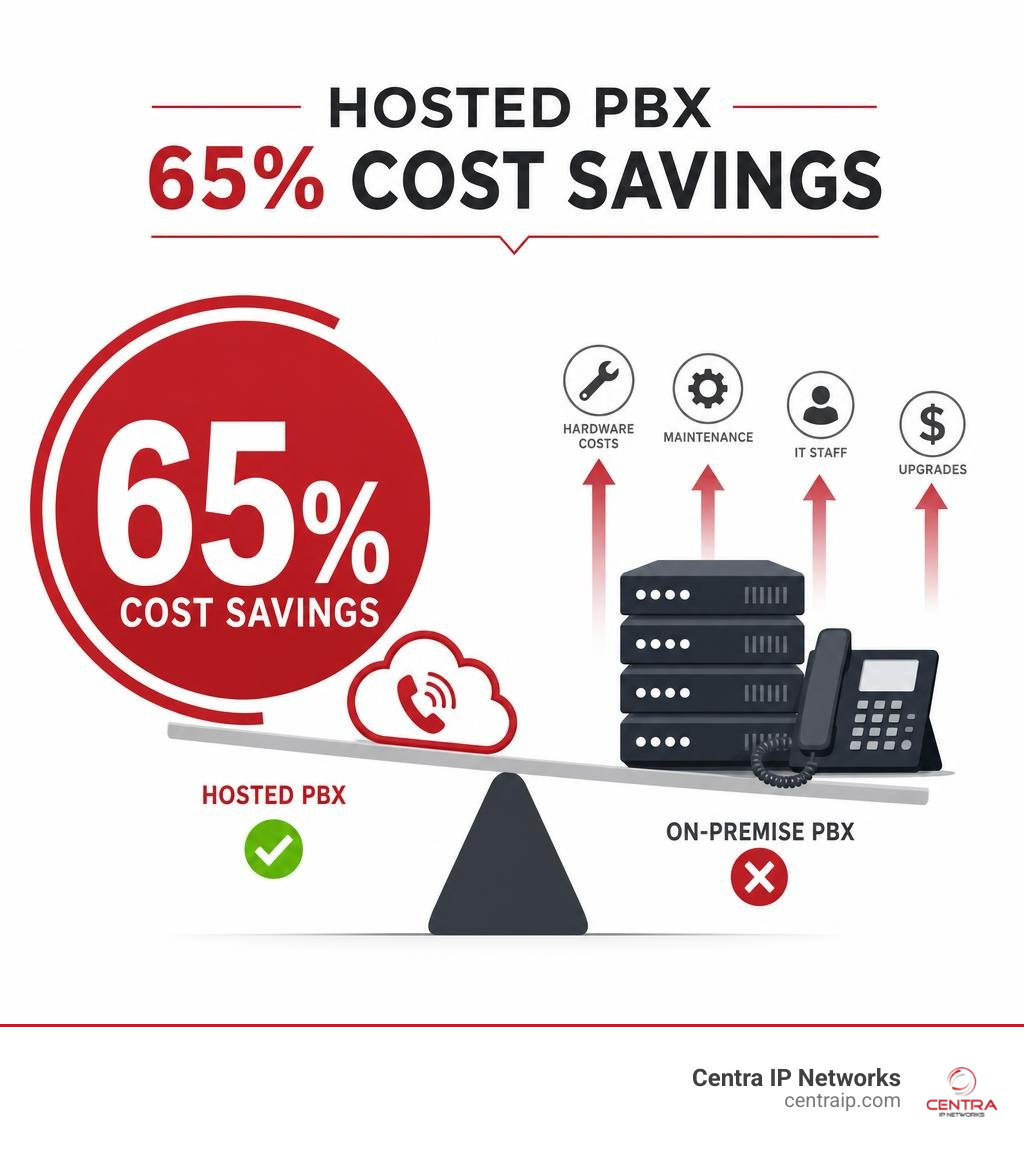
The shift is real and measurable. Businesses that move to hosted PBX report cutting phone expenses by up to 65%, and leading cloud PBX platforms now deliver 99.999% uptime backed by redundancy across multiple data centers.
I’m Patrick Brangan, and with over 20 years of experience helping SMBs in Dallas, Tampa, and Orlando navigate unified communications and hosted PBX phones, I’ve seen how the right cloud phone system transforms the way teams connect with customers. In the sections below, we’ll walk through exactly how hosted PBX works, what features matter most, and how to choose the right solution for your business.
Know your hosted pbx phones terms:
What Are Hosted PBX Phones and How Do They Differ From On-Premises Systems?
To understand hosted PBX phones, it helps to break down the acronym. PBX stands for Private Branch Exchange. Historically, this was a physical, proprietary switching box installed in a business’s utility closet. It connected all internal desk phones and routed calls out to the public switched telephone network (PSTN) using physical copper telephone lines.
A hosted PBX system takes that entire switching box, virtualizes it, and moves it to secure, off-site cloud data centers. Instead of routing physical phone lines to your office, your voice signals are digitized and transmitted over your broadband internet connection.
The most fundamental difference between the two setups is ownership and physical location:
- On-Premises PBX: You buy the physical servers, pay for installation, house the equipment in your office, and assume full responsibility for maintenance, software updates, and hardware replacement.
- Hosted PBX: Your service provider owns, houses, and maintains the server architecture. You simply connect your compatible devices to their cloud core via the internet.
Understanding these differences is crucial when evaluating your communication infrastructure. For a deeper dive into making this choice, check out our resource on On-Premise vs Cloud PBX: Your Ultimate Guide to Choosing.
Why Modern Businesses Are Switching to Hosted PBX Phones
The massive migration away from legacy telephone systems isn’t just a trend; it is a practical response to the demands of modern business operations in 2026.
First and foremost is the elimination of capital expenditure (CAPEX). With traditional systems, getting started required purchasing physical servers, licensing fees, and proprietary desk phones. Hosted PBX operates on a predictable subscription-based operating expenditure (OPEX) model, usually charging a flat monthly fee per user.
Secondly, cloud-hosted systems scale instantly. If you add five new employees to your team in Fort Worth or Sarasota, you do not need to call a technician to install physical expansion cards in your server room. You simply log into an online portal, add five licenses, and assign them to your new team members.
Furthermore, because the “brain” of your phone system lives in the cloud, your team is no longer tethered to a physical desk. Whether an employee is working from home in St. Petersburg or traveling to a client meeting in Orlando, they can access their exact business extension, make calls from the company number, and manage their settings from any device. For more context on this shift, see how to Ditch the Desk Phone: How Cloud Hosted PBX Systems Revolutionize Your Business Calls.
When comparing these models, many businesses find themselves weighing the long-term trade-offs. You can read more about these operational dynamics in our guide on Choosing Between On-Premise Phone Systems and Cloud.
Comparing Hosted PBX Phones to UCaaS and VoIP
In your research, you will likely encounter several related terms used interchangeably: VoIP, Hosted PBX, and UCaaS. While they are closely related, they represent different layers of communication technology:
- VoIP (Voice over Internet Protocol): This is the underlying transmission technology. It is the method of converting analog voice signals into digital data packets so they can travel over the internet. VoIP is the raw engine.
- Hosted PBX: This is the management and routing system built on top of VoIP. It provides the business features you expect, such as extension dialing, call queues, auto-attendants, and ring groups. It is the steering wheel, dashboard, and GPS of your telephone system.
- UCaaS (Unified Communications as a Service): This is a broader platform that integrates hosted PBX voice calling with other digital collaboration tools — including video conferencing, instant messaging, screen sharing, and SMS text messaging — into a single, unified software application.
For a comprehensive breakdown of how these technologies work together to support your operations, explore The Ultimate Guide to Hosted VoIP for Your Business.
On-Premises vs. Cloud PBX: A Direct Comparison
To help you visualize the core differences, let’s look at how these two main architectures compare across several critical business operational categories:
| Feature/Metric | On-Premises PBX | Hosted PBX (Cloud) |
|---|---|---|
| Upfront Cost | High (Server hardware, licensing, installation) | Low (Only IP phones or softphone devices) |
| Maintenance | Your IT team or hired contractors | Handled entirely by the cloud provider |
| Scalability | Limited by physical hardware capacity | Virtually unlimited; instant digital scaling |
| Disaster Recovery | Vulnerable to local power/internet outages | High redundancy; automatic failover to mobile |
| Updates & Upgrades | Manual, costly, and can cause downtime | Automatic, seamless, and included in plan |
| Mobility | Complex VPN setups required | Native mobile and desktop apps work anywhere |
While there are specific edge cases — such as massive enterprise offices with over 100 on-site users that might find long-term cost benefits in on-premises setups — the vast majority of growing businesses choose the cloud for its agility and resilience. To understand the nuances of both sides, you can review our detailed analysis: Cloud-Based vs Premise-Based Phone Systems: Which One Is Right for Your Business? as well as The Grounded Choice: A Deep Dive into On-Premise PBX Solutions.
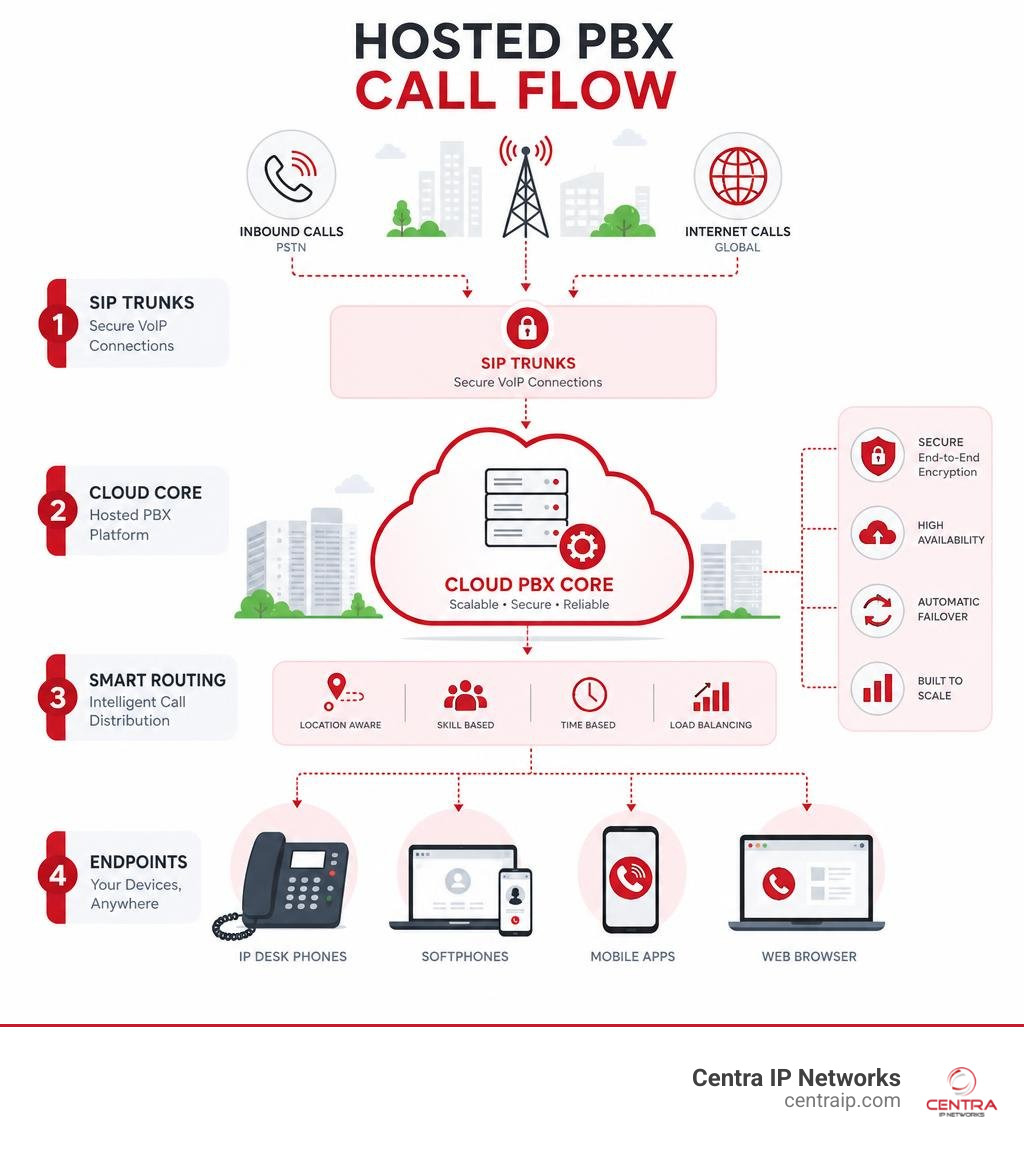
How Cloud-Hosted Telephony Works (Call Flow & Architecture)

At its core, a hosted PBX system operates on a simple premise: it replaces physical telephone wires with digital internet pathways. But what actually happens behind the scenes when you dial a number?
The backbone of this system is the Session Initiation Protocol (SIP). SIP is the globally recognized standard used to establish, manage, and terminate multimedia communication sessions over the internet. When you make a call, the system uses SIP trunking to establish a virtual pathway between your device and the cloud core.
To learn more about the foundational concepts of this setup, read our Introduction to Cloud-Based Phone Systems and explore our detailed look at Unlocking Seamless Communication: A Deep Dive into Cloud PBX Platforms.
The Step-by-Step Call Flow
To understand how a hosted PBX processes your calls, let’s trace the journey of a single voice transmission from start to finish:
- Initiation: You place a call using an IP desk phone, a softphone app on your computer, or a mobile app.
- Packetization: Your device instantly converts your analog voice waves into digital data packets using voice codecs.
- Transmission: These packets travel over your local area network (LAN) and out through your broadband internet connection.
- Cloud Routing: The packets arrive at your hosted PBX provider’s secure cloud data center. The provider’s virtual switchboard analyzes the dialed number and applies your custom routing rules (e.g., checking business hours, routing through an interactive voice response menu, or ringing a specific department queue).
- Session Connection: The cloud system routes the call over the internet (using SIP trunks) to the recipient’s phone carrier.
- Delivery: The recipient’s device receives the digital packets, decodes them back into analog sound, and their phone rings.
This entire process occurs in milliseconds — faster than you can say “hello.” You can find more information about this cloud infrastructure on our dedicated page for Cloud-Based Phone Systems.
Geographic Service Availability and Local Providers
When deploying hosted PBX phones, local support and carrier-grade connectivity are vital to ensuring call quality. Having a local partner who understands your regional infrastructure makes a massive difference in your deployment experience.
For businesses throughout our service areas, we recommend working with certified regional experts who can manage the transition seamlessly:
- For our clients in North Texas, utilizing established local networks is key; you can connect with certified regional experts via 3CX Resellers – Dallas – Cloud PBX – Phone System Providers .
- In Central Florida, businesses can secure localized deployment and support through Business Phone Systems Orlando FL | OBTS Solutions .
- Across the Tampa Bay region, we coordinate with trusted local providers to deliver reliable cloud services. You can explore regional options at Hosted PBX Phone System in Tampa, Florida and find local implementation support through Phone Systems & Service For Tampa Bay Businesses .
- If you are operating along the Florida Gulf Coast, specialized local setup services are available via Business Phone Systems St. Petersburg, FL | TSS USA and Business Phone System Installation Sarasota FL | TSS USA .
Working with a provider that has a local presence in your market ensures that your network is properly optimized for regional routing, minimizing latency and maximizing call clarity.
Key Benefits and Features of Hosted PBX Solutions
Beyond cost savings and scalability, hosted PBX phones introduce a suite of advanced features designed to streamline business workflows and keep teams connected.
One of the greatest advantages is built-in business continuity. Because the PBX server is hosted in a secure, redundant data center rather than your physical office, your phone system remains active even if your building loses power or internet. Calls can be automatically rerouted to mobile apps, laptop softphones, or external numbers, ensuring you never miss a critical customer inquiry.
Advanced Features: AI, Integrations, and Collaboration
Modern hosted PBX systems in 2026 go far beyond simple voice calls. They act as central hubs for your business data and workflows:
- AI-Powered Capabilities: Leading systems now offer real-time AI transcription, automated call summarization, and conversation intelligence to analyze customer sentiment during support calls.
- CRM Integrations: By connecting your phone system to CRMs like Salesforce, HubSpot, or Zoho, your team gets instant customer data pop-ups during incoming calls, and call logs are automatically saved to the customer’s profile.
- Auto-Attendants & Smart Routing: You can build multi-level interactive voice response (IVR) menus with custom time-of-day and holiday rules to guide callers to the right department without manual intervention.
- Unified Collaboration: Teams can transition a standard voice call into a video meeting or screen-sharing session with a single click.
Many organizations also choose to consolidate their communications by integrating their phone systems directly into their existing productivity suites. To see how this works in practice, read about our Microsoft Teams Hosted PBX Integration.
Implementation Challenges and How to Overcome Them
While the benefits of hosted PBX phones are clear, a successful migration requires addressing a few common implementation challenges:
- Internet Quality and Bandwidth: Because your voice calls share your internet connection with your daily data usage, insufficient bandwidth can lead to dropped calls or choppy audio.
- The Solution: Implement Quality of Service (QoS) settings on your office router. This prioritizes voice traffic over standard web browsing, ensuring clear calls even during high-bandwidth activities.
- Security Concerns: Transmitting voice data over the public internet requires robust security protocols to prevent eavesdropping or unauthorized access.
- The Solution: Choose a provider that utilizes end-to-end encryption (such as SRTP) and features integrated Session Border Controllers (SBCs) to secure your communication pathways.
- User Adoption: Moving to a new phone system can sometimes meet resistance from staff accustomed to traditional desk phones.
- The Solution: Select a platform with intuitive desktop and mobile applications, and partner with a provider that offers hands-on training and ongoing support during the transition.
Frequently Asked Questions About Cloud Telephony
What is the difference between hosted PBX and VoIP?
VoIP is the foundational technology that allows voice signals to travel over the internet. Hosted PBX is the cloud-based business management system that routes those VoIP calls, providing features like extensions, auto-attendants, and call queues.
How much do hosted PBX phones cost per month?
Most cloud PBX plans range from $15 to $35 per user per month. This subscription model eliminates upfront hardware costs and includes ongoing system maintenance and software updates.
What happens to my phone system if the internet goes down?
Because your phone system’s “brain” is hosted in the cloud, an office internet outage won’t take your system offline. Incoming calls will still hit your virtual PBX, which can automatically reroute them to mobile apps, laptop softphones, or backup analog lines.
Conclusion
Transitioning to hosted PBX phones allows your business to ditch outdated hardware, lower operational expenses, and empower a modern, flexible workforce. By moving your communications to the cloud, you gain enterprise-grade calling features, advanced AI capabilities, and seamless integrations without the headache of managing on-site servers.
At Centra IP Networks, we simplify your digital transformation by delivering comprehensive Managed IT and Cloud Communications services on a single platform. With a single bill, a single provider, and access to over 35 strategic partnerships, we design tailored, cost-effective communication solutions for businesses across Dallas, Fort Worth, Orlando, Tampa, St. Petersburg, Clearwater, and Sarasota.
Ready to upgrade your business communication with zero hardware hassle? Explore Centra IP Phone Systems today or contact our team of experts to design your custom cloud telephony solution.