What “Outsourced IT Support” Actually Means (And Why It Matters for Your Business)
Outsourced IT support is when a business hands off some or all of its technology management to a third-party provider — instead of hiring and maintaining an in-house IT team.
Here’s a quick snapshot of what that looks like in practice:
| Question | Quick Answer |
|---|---|
| What is it? | A third-party provider manages your IT — help desk, security, networks, cloud, and more |
| Who is it for? | Small to mid-sized businesses that want reliable IT without the overhead of a full internal team |
| How much does it cost? | Typically $100–$250 per user per month for fully managed services |
| Is it secure? | Yes, when the provider holds certifications like SOC 2 and follows compliance standards |
| What’s the alternative? | Hiring in-house staff or calling for help only when something breaks (break-fix) |
Technology is no longer just a back-office function. For most businesses today, IT is the business — it touches every sale, every customer conversation, and every internal process.
But managing IT in-house is expensive and complicated. A single competent IT professional can cost $70,000 to $120,000 per year in salary alone, before benefits, training, or turnover. And one person can rarely cover everything — help desk, cybersecurity, cloud management, compliance — all at once.
That’s the gap outsourced IT support fills.
The global IT outsourcing market is now valued at $617.69 billion and is projected to reach $806.53 billion by 2029. That growth isn’t driven by large enterprises alone — it’s being fueled by small and mid-sized businesses that are tired of juggling multiple vendors, unpredictable tech costs, and systems that only get attention when something goes wrong.
This guide cuts through the technical language and explains exactly how outsourced IT support works, what it costs, and how to choose the right partner — without needing a computer science degree to follow along.
I’m Patrick Brangan, founder of Centra IP Networks and a business technology specialist with 20+ years of experience helping SMBs with fewer than 200 users simplify their technology through outsourced IT support, unified communications, and managed security solutions. Throughout this guide, I’ll share what actually works for businesses like yours — based on real-world implementations, not theory.
Outsourced IT support terms to learn:
What is Outsourced IT Support and How Does It Work?
At its simplest, outsourced IT support is like hiring a professional property management company for your business’s digital real estate. Instead of trying to fix leaky pipes, repair the roof, and wire the security system yourself—or hiring a full-time handyman who might not know how to handle complex electrical issues—you partner with a team of specialists who keep everything running smoothly in the background.
When you outsource your IT, you gain access to a dedicated help desk, continuous network monitoring, and enterprise-grade cybersecurity tools. Instead of waiting for a system crash to disrupt your workday, a remote team of engineers actively monitors your servers, endpoints, and cloud applications. They apply software patches, update security protocols, and resolve background glitches before your employees even notice a problem.
To understand if this model is right for you, it is helpful to look at how it compares to other common approaches. For a deeper dive into this comparison, check out our guide on Managed IT vs. In-House IT: Which Is Best For Your Business?
In-House IT vs. Outsourced IT vs. Break-Fix
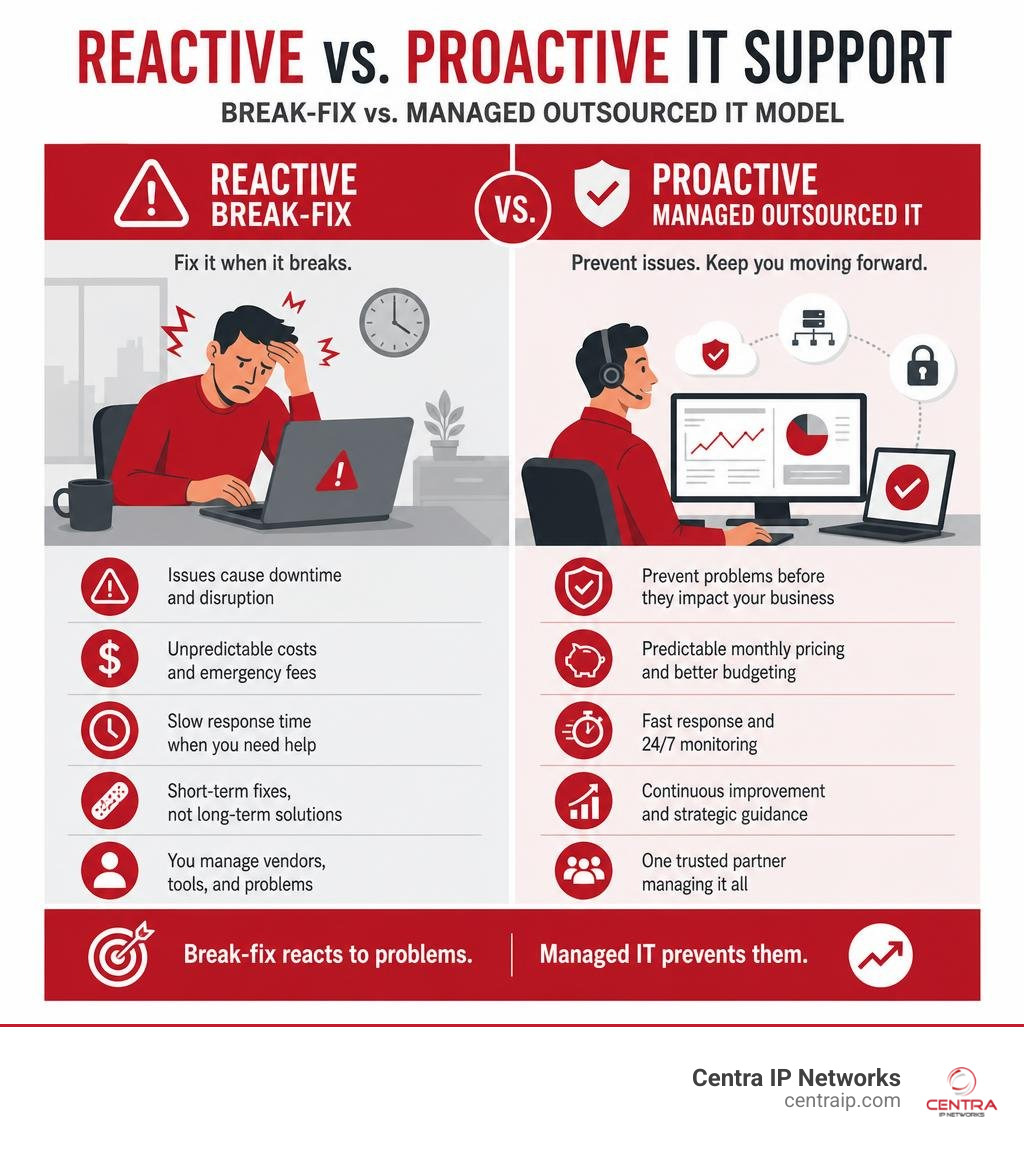
Many businesses grow by relying on a “break-fix” approach. Something breaks, they call a technician, pay an hourly rate, and wait for it to be fixed. While this seems economical on paper, it creates a fundamental conflict of interest: the technician only makes money when your business is suffering from downtime.
Conversely, an internal IT department provides immediate physical presence but comes with high overhead costs, recruitment struggles, and the risk of single-point-of-failure operations when your sole IT manager goes on vacation or gets sick.
Here is a direct comparison of the three approaches:
| Feature | In-House IT Staff | Outsourced IT Support | Break-Fix Model |
|---|---|---|---|
| Primary Approach | Hybrid (varies by skill) | Proactive (preventative care) | Reactive (fix after failure) |
| Cost Structure | High fixed salaries & benefits | Predictable flat monthly fee | Unpredictable hourly rates |
| Downtime Risk | Moderate (limited team size) | Extremely low (85% less downtime) | Very high (extended recovery) |
| Availability | Standard business hours | 24/7/365 coverage | On-demand (subject to wait times) |
| Expertise Range | Limited to hired staff skills | Broad team of certified experts | Varies wildly by technician |
By shifting from a reactive break-fix model to a proactive outsourced model, businesses experience up to 85% less unplanned downtime. This is because outsourced providers are incentivized to keep your systems running perfectly—the fewer problems you have, the more efficient their operations are.
Five Key Services an IT Company Should Provide
If you are considering outsourcing, you shouldn’t settle for a basic help desk that only resets passwords. A mature IT partner should act as a strategic asset.
We have outlined these capabilities in detail in our article on Five Key Services an IT Company Should Be Able to Provide, but here is a quick summary of the essentials:
- Network Management: Constant monitoring and optimization of your internet connections, routers, firewalls, and switches to ensure fast, stable connectivity.
- Cloud Computing & Migration: Setting up, securing, and managing environments like Microsoft 365 or Google Workspace so your remote and hybrid teams can collaborate safely.
- Data Backup & Disaster Recovery: Creating automated, encrypted backups of your business data and establishing a clear plan to restore operations within minutes if a disaster or cyberattack strikes.
- Cybersecurity & Threat Mitigation: Implementing advanced endpoint protection, multi-factor authentication (MFA), and email filtering to keep hackers out of your network.
- Strategic IT Consulting (vCIO): Providing forward-looking technology roadmaps and budgeting advice to ensure your tech investments align with your long-term business goals.
The Core Models of Outsourced IT Support
Every business has different technical needs, internal capabilities, and budgets. Because of this, outsourced IT support is not a one-size-fits-all service. Providers structure their relationships around three primary service models.
To help you navigate these options, you can read our comprehensive breakdown, Outsource the Headache: A Guide to Managed IT Support. Below, we explore the two most popular proactive models.
Fully Managed Outsourced IT Support
In a fully managed model, the provider serves as your complete, outsourced IT department. They take full responsibility for your technology infrastructure, from daily user support to high-level cybersecurity governance.
- How it works: You pay a predictable, flat monthly fee (typically based on the number of users or devices in your organization).
- What is included: 24/7/365 remote help desk support, proactive system monitoring, patch management, security administration, backup verification, and strategic consulting.
- Best for: Small to mid-sized businesses (10 to 200 employees) that do not have an internal IT team and want to offload the entire management burden.
This model provides peace of mind because it covers everything under one umbrella. If you want to explore how we structure these comprehensive solutions, visit our dedicated Managed IT Services page.
Co-Managed Outsourced IT Support
What if you already have an internal IT manager, but they are completely overwhelmed by daily support tickets? That is where co-managed IT comes in. It is a collaborative, hybrid model where an external provider partners with your existing staff.
- How it works: We share the workload. Your internal IT person might handle on-site hardware issues and strategic projects, while we handle the routine, repetitive tasks.
- What is included: Access to enterprise-grade remote monitoring tools, automated patch management, 24/7 help desk escalation, or specialized cybersecurity monitoring.
- Best for: Growing companies with a small in-house IT team that is facing burnout or lacks specialized skills in areas like cloud migrations or compliance.
Co-managed IT does not replace your staff—it empowers them. It gives your internal team the advanced tools and extra hands they need to focus on high-value business projects instead of resetting passwords all day. Learn more about how to design this partnership on our Managed IT Consulting Services page.
Weighing the Benefits, Costs, and Risks of Outsourcing

Before handing over the keys to your technology network, it is natural to weigh the financial impact, operational benefits, and potential risks. Making an informed decision means looking at both sides of the coin. For a complete overview of the pros and cons, read our article on the Benefits of Managed IT Services.
The Financial Benefits of Outsourcing IT
The most immediate impact of outsourcing is financial predictability. Instead of facing sudden, expensive repair bills when a server fails, you transition your technology costs from a volatile capital expense (CapEx) to a stable operational expense (OpEx).
Outsourcing your IT support typically reduces overall technology costs by 30% to 50% compared to maintaining an equivalent in-house team. Consider the math for a 40-employee business:
- In-House Cost: Hiring just one experienced network engineer and one help desk technician will easily cost over $150,000 annually in salaries, benefits, taxes, and ongoing training.
- Outsourced Cost: Fully managed IT services typically cost between $100 and $250 per user per month. For that same 40-employee company, that translates to roughly $4,000 to $8,000 per month ($48,000 to $96,000 per year) for round-the-clock access to an entire team of certified specialists.
Whether you are seeking outsourced IT support in Tampa or looking for local expertise across our other service areas, the cost savings remain highly consistent.
To explore localized options and understand regional benefits, check out our resources on:
- Tampa Managed IT Services
- Managed IT Service Providers Tampa
- Benefits of Managed IT Services Tampa
- Managed IT Services Dallas
- Managed IT Services Orlando
- Managed IT Services in Orlando Are Critical
Potential Risks and How to Mitigate Them
While the benefits are significant, outsourcing is not without potential challenges. Here are the primary risks businesses face and how a professional provider mitigates them:
- Risk of Data Security & Privacy Concerns: Entrusting your proprietary data to an external entity can feel risky.
- Mitigation: Verify that your provider holds independent security certifications (such as SOC 2 Type II) and utilizes multi-factor authentication, end-to-end encryption, and rigorous access controls.
- Fear of Vendor Lock-In: Businesses worry that a provider will make it impossible to leave by withholding administrative credentials or documentation.
- Mitigation: Ensure your contract clearly states that you own all licenses, data, and credentials, and look for providers that offer transparent offboarding protocols.
- Communication and Response Barriers: Some cheap, offshore outsourcing models suffer from language barriers, time-zone delays, and slow ticket resolution.
- Mitigation: Partner with a provider that guarantees 100% U.S.-based support engineers and includes strict response-time guarantees in their Service Level Agreement (SLA).
Industry-Specific Benefits: Healthcare, Finance, and Legal
Some industries face strict regulatory hurdles that make general IT support insufficient. For these sectors, specialized outsourced IT is a necessity for survival.
- Healthcare (HIPAA Compliance): Healthcare providers must protect patient data under strict HIPAA laws. With HIPAA violations carrying penalties of up to $2.13 million per violation category per year, medical practices cannot afford security configuration mistakes. Outsourced IT providers implement secure electronic health record (EHR) integrations, device encryption, and audit-ready compliance reporting. Learn more on our Managed IT Services for Healthcare page.
- Finance & Accounting (GLBA & PCI-DSS): Financial firms handle highly sensitive tax, banking, and credit card data. Specialized providers establish zero-trust network access, secure document sharing portals, and multi-layered cyber defense systems. Explore these solutions on our Managed IT Services for Accounting Firms page.
- Legal (Client Confidentiality): Law firms are high-value targets for hackers seeking sensitive litigation data. Outsourced IT ensures robust email encryption, secure remote access for attorneys working from court, and automated backup systems to prevent data loss.
How to Choose a Partner and Transition Smoothly

Selecting an IT partner is one of the most critical operational decisions you will make. The right partner acts as an extension of your team, while the wrong one can lead to frustration, unresolved issues, and security vulnerabilities.
To guide your search, you can read our detailed guide on Choosing Your Tech Partner: The Premier Managed IT Services in Dallas.
Evaluating Providers and SLA Essentials
When comparing providers, look beyond the price tag. You want to evaluate their technical depth, industry experience, and their Service Level Agreement (SLA)—the contract that dictates how quickly they must respond when things go wrong.
A strong, professional SLA should clearly outline:
- Response Time Guarantees: Look for tiered response times based on severity (e.g., a 15-minute response for critical “system down” issues, 2 hours for high-priority issues, and next-business-day for routine requests).
- Uptime Commitments: The provider should guarantee at least 99.9% network availability.
- Exclusions and Fees: Ensure there are no hidden fees for after-hours emergency support or on-site visits.
For businesses operating in our key metropolitan regions, we recommend partnering with a provider who understands your local market and can offer rapid on-site assistance when remote troubleshooting isn’t enough. Having local technicians available in areas like Dallas-Fort Worth, Orlando, and the Tampa Bay region (including St. Petersburg, Clearwater, and Sarasota) ensures that physical hardware issues, network outages, or hands-on setups are resolved without delay.
The Onboarding and Transition Timeline
A common fear is that switching IT providers will cause massive operational disruption. In reality, a professional transition is a highly structured, phased process that takes about 6 to 8 weeks and requires almost no downtime for your staff.
Here is what the transition roadmap looks like:
- Discovery & Assessment (Weeks 1-2): The new provider scans your network, cataloging all hardware, software, user accounts, and security vulnerabilities.
- Documentation & Planning (Weeks 3-4): Engineers map your entire infrastructure, document vendor relationships (like your internet provider), and create a secure password vault.
- Tool Deployment & Security Setup (Weeks 5-6): Remote monitoring software, endpoint protection, and backup agents are quietly installed in the background without interrupting daily work.
- Parallel Operations & Training (Weeks 7-8): The new provider works alongside your old setup to test backup restoration and verify network stability. Your staff receives clear instructions on how to contact the new help desk.
- Go-Live & Hand-off: The old provider’s access is securely revoked, and your new IT partner takes full operational control.
Future Trends: AI and Cybersecurity in 2026
The technology landscape moves fast, and the outsourced IT support models of today are highly advanced compared to those of just a few years ago. As we navigate 2026, several major trends are shaping how businesses stay secure and productive:
- AI-Powered Help Desks: Modern providers are utilizing AI resolution engines to handle routine issues like password resets and software installations instantly, allowing human engineers to focus on resolving complex technical issues faster.
- Zero-Trust Architecture: With remote work firmly established, the old “perimeter firewall” security model is dead. Providers are implementing zero-trust frameworks, meaning every user and device must be continuously verified before accessing company data.
- Proactive Threat Hunting: Cybersecurity has evolved from reactive antivirus scans to active, AI-driven threat hunting. Modern security tools analyze network behavior in real time to isolate and neutralize cyber threats before they can spread.
Frequently Asked Questions About Outsourced IT Support
Is outsourced IT support secure for sensitive business data?
Yes, provided you partner with a security-first provider. Reputable providers secure your data using end-to-end encryption, multi-factor authentication (MFA), and role-based access controls. They also undergo annual third-party audits to maintain certifications like SOC 2 Type II, ensuring their internal security practices meet the highest standards.
How much does outsourced IT support typically cost per month?
For fully managed services, most businesses pay between $100 and $250 per user per month. For a business with 30 employees, this equates to a predictable monthly budget of $3,000 to $7,500. Co-managed services or basic monitoring plans can be lower, typically ranging from $50 to $150 per user per month depending on the level of internal IT support you already have.
What is the difference between fully managed and co-managed IT?
Fully managed IT is a complete outsourcing solution where the provider acts as your entire IT department, handling everything from basic help desk tickets to executive-level strategic planning. Co-managed IT is a partnership model where the provider supports your existing in-house IT staff by sharing the workload, providing advanced management tools, and offering specialized expertise.
Conclusion
Managing your business’s technology shouldn’t feel like a second full-time job. Technology should be a silent engine that drives your growth, protects your data, and keeps your team productive—not a source of daily frustration and unpredictable expenses.
At Centra IP Networks, we do things differently. We offer comprehensive Managed IT and Cloud Communications services—including business phone systems, high-speed Internet connectivity, and tailored cloud solutions—all delivered on a single platform with a single bill and a single point of contact. By leveraging over 35 strategic industry partnerships, we design custom, cost-effective technology solutions tailored specifically to your business’s unique needs.
Whether you are operating in Dallas, Fort Worth, Orlando, Tampa, St. Petersburg, Clearwater, or Sarasota, we are here to simplify your technology operations so you can focus on running your business.
Ready to take the headache out of your business technology?
Explore Centra IP Cloud Services today, or get in touch with our team of specialists to design a secure, scalable, and predictable IT strategy for your organization.