Why VoIP Phone Service Is Replacing Traditional Phone Systems
VoIP phone service is a technology that lets you make and receive calls over the internet — instead of through traditional copper telephone lines.
Here’s what you need to know at a glance:
| Question | Quick Answer |
|---|---|
| What is it? | Phone calls transmitted over the internet as digital data packets |
| What does it cost? | Typically $10–$35/user/month for business plans |
| What do you need? | A broadband connection + IP phone, softphone app, or ATA adapter |
| Can I keep my number? | Yes, via free number porting |
| Does it support 911? | Yes, through Enhanced 911 (E911) |
| Is it reliable? | Top providers offer 99.999% uptime SLAs |
If you’re a business currently juggling multiple phone lines, outdated PBX hardware, and rising telecom bills, you’re not alone. The good news: there’s a simpler, more affordable way to handle all of it.
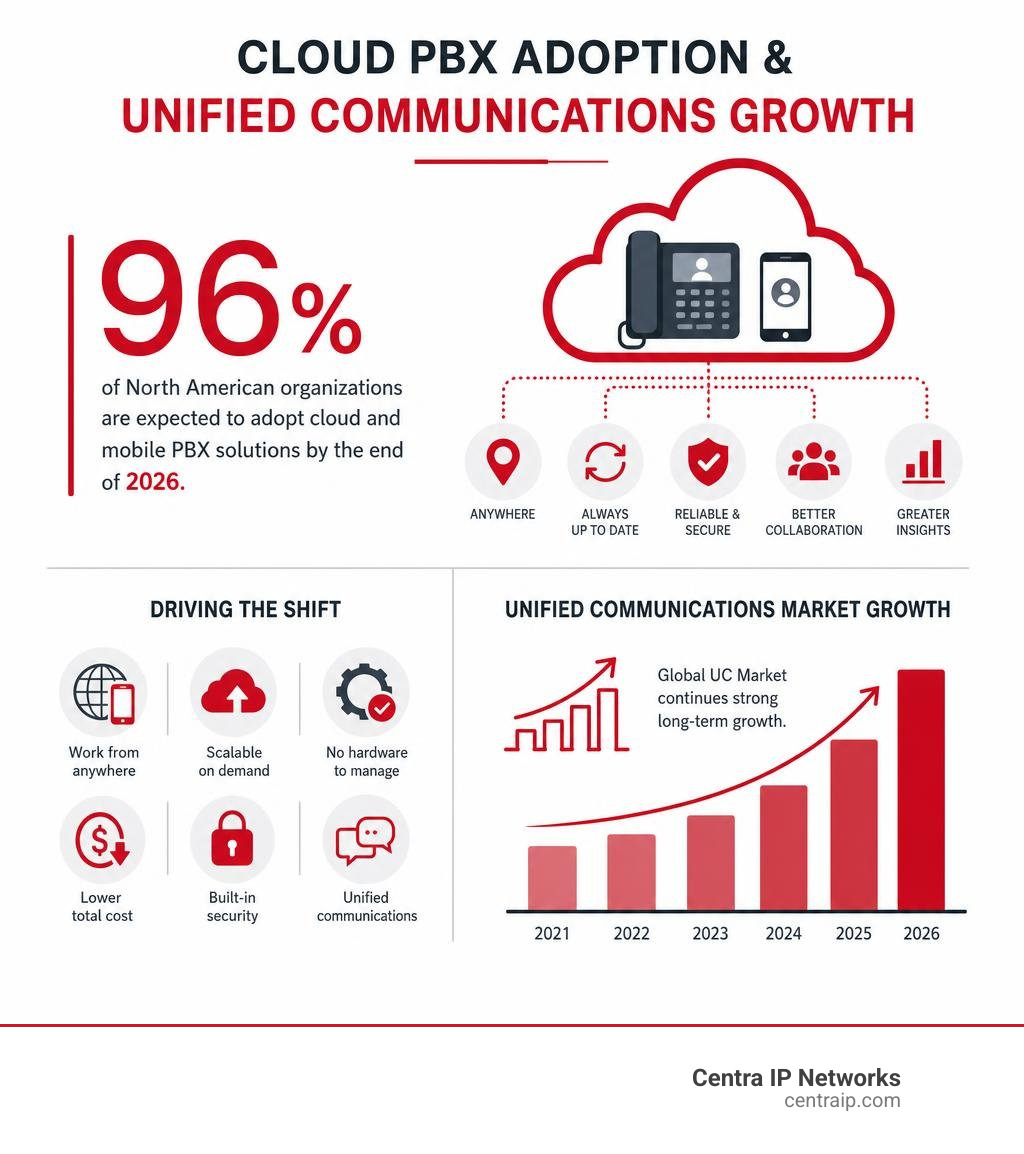
VoIP has moved from a niche tech option to the dominant standard for business communications. In fact, 96% of North American organizations are expected to adopt cloud or mobile PBX solutions by the end of 2026. The shift isn’t just about cutting costs — it’s about getting a smarter, more flexible system that grows with your business.
I’m Patrick Brangan, and over my 20+ years in business technology sales, I’ve helped hundreds of SMBs across Dallas, Tampa, and Orlando cut costs and simplify their communications by switching to VoIP phone service. In this guide, I’ll walk you through everything you need to make a confident decision.
What is VoIP and How Does It Work?
VoIP stands for Voice over Internet Protocol. In plain English, it means your phone calls travel over an internet connection instead of the old public switched telephone network, also called the PSTN.
With a traditional landline, your voice moves across copper wiring as an analog electrical signal. With VoIP, your voice is converted into digital data, sent across the internet, and reassembled as audio on the other end.
That may sound technical, but the experience is familiar: you dial a number, the other person answers, and you talk. The difference is what happens behind the scenes.
A VoIP call can be made from:
- An IP desk phone
- A computer softphone app
- A mobile app
- A traditional phone connected through an ATA adapter
- A conference phone
- A browser-based calling platform
In many business setups, VoIP is part of a larger cloud phone system that also includes messaging, video meetings, voicemail, call routing, and analytics. That is why we often describe modern VoIP as more than phone service. It is a unified communications platform.

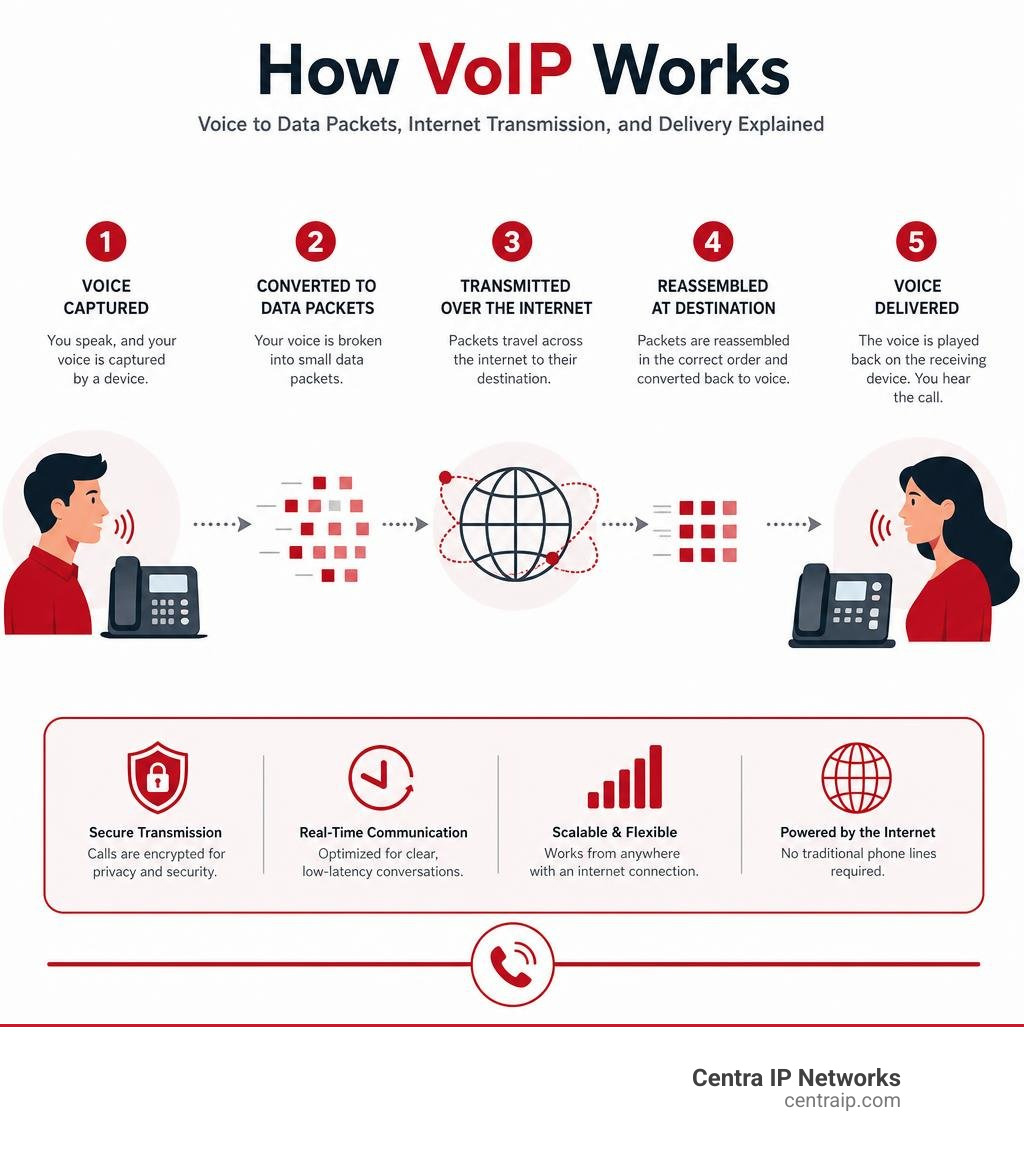
How VoIP Transmits Voice Data
Here is the simple version of what happens during a VoIP call:
- You speak into a phone, headset, or microphone.
- Your device captures your voice as an analog sound wave.
- A codec compresses and converts that sound into digital packets.
- Those packets travel through your router and internet connection.
- Your VoIP provider routes the packets to the recipient.
- The receiving device reassembles the packets into clear audio.
The key word is “packets.” VoIP breaks your conversation into tiny pieces of data, sends them over the network, and puts them back together almost instantly.
This is similar to how email, web pages, and video streams move across the internet. The big difference is that voice is real-time. A web page can load a second late and nobody panics. A phone call with a one-second delay feels like you are talking to someone on the moon.
That is why business VoIP depends on good bandwidth, low latency, and proper network configuration. Fiber internet is often ideal because it offers high capacity and low delay, but cable, fixed wireless, and other broadband connections can also work well when properly designed.
VoIP vs. Traditional Landlines: Key Differences
Traditional landlines still work, but they were built for a different era. VoIP was built for modern business: mobile teams, cloud apps, video meetings, remote work, and customers who expect fast answers.
If you want a deeper business comparison, read our guide on VoIP vs landline for business.
| Category | VoIP Phone Service | Traditional Landline |
|---|---|---|
| Network | Internet protocol and cloud infrastructure | Copper lines and PSTN |
| Call signal | Digital data packets | Analog electrical signal |
| Equipment | IP phones, apps, ATA adapters, cloud PBX | Handsets, copper wiring, on-site PBX |
| Scalability | Add users, numbers, and features through software | Often requires physical line installation |
| Mobility | Works from office, home, mobile, or browser | Usually tied to a fixed location |
| Features | Auto attendant, voicemail-to-email, SMS, video, analytics | Basic calling, voicemail, caller ID, add-ons |
| Cost model | Usually per user per month or usage-based | Line-based billing, maintenance, add-on fees |
| Outage planning | Can use failover, mobile apps, call forwarding | Depends heavily on physical line availability |
| Best fit | Growing businesses and flexible teams | Basic fixed-location calling |
Technical Differences in Data Transmission
The biggest technical difference is how the call travels.
Landlines rely on copper wiring. Copper transmits electrical signals and has physical limitations. It works, but it is not built for modern data-heavy communication.
VoIP uses IP networks, often running over fiber or other broadband infrastructure. Fiber transmits data using light, which allows much higher capacity than old copper systems. That extra capacity makes it easier to support HD voice, video conferencing, call recording, and simultaneous users.
Landlines are also geographically rigid. A landline number is typically tied to a physical service area. VoIP numbers are more flexible. Many providers allow businesses to use local, toll-free, or virtual numbers across multiple locations, which is especially useful for companies serving Dallas, Fort Worth, Orlando, Tampa, St Petersburg, Clearwater, and Sarasota from one platform.
Key Benefits of a Modern VoIP Phone Service
The main reason businesses switch to VoIP is not because it sounds futuristic. It is because it solves everyday headaches.
VoIP helps businesses reduce costs, support hybrid work, improve customer experience, and consolidate communication tools. Instead of maintaining separate systems for calls, voicemail, conferencing, texting, and call routing, everything can live under one cloud-based platform.

Common benefits include:
- Lower monthly phone costs
- Easier setup and administration
- Better support for remote and mobile employees
- Advanced call handling features
- Simple scaling as the business grows
- Centralized billing and management
- Integration with business apps
- Better disaster recovery options
- Professional customer experience
At Centra IP Networks, we focus on simplifying the whole communication stack: phone systems, internet connectivity, cloud communications, and managed IT. That matters because VoIP quality depends on more than the phone platform. It also depends on the network underneath it.
Advantages of Business VoIP Phone Service
Business VoIP offers advantages that residential VoIP usually does not need.
For businesses, the phone system is tied directly to revenue, customer service, operations, and reputation. If calls are missed, routed incorrectly, or dropped, it can cost real money.
Business VoIP can include:
- Auto attendants to greet and route callers
- Call queues for sales, support, billing, or dispatch
- Ring groups for departments
- Call recording for training and compliance needs
- Voicemail-to-email and voicemail transcription
- Business SMS and MMS
- Video meetings and team chat
- CRM and help desk integrations
- Analytics and call reporting
- Mobile and desktop apps
- Hot desking for shared workspaces
- Multi-location support
- Disaster recovery call forwarding
Cloud and mobile PBX adoption is accelerating quickly, with 96% of North American organizations expected to adopt these solutions by the end of 2026. That shift is not surprising. Businesses want phone systems that work anywhere, update automatically, and do not require a closet full of aging hardware humming like a tiny data center sauna.
For more detail, see our ultimate guide to hosted VoIP.
Residential VoIP vs. Business VoIP
Residential VoIP and business VoIP use the same basic technology, but they serve different needs.
Residential VoIP is usually focused on home calling, low monthly cost, caller ID, voicemail, call blocking, and sometimes international calling. It may be a great fit for households that want a home phone without paying for traditional landline service. Examples of regional residential services include home phone options in Fort Worth, Orlando, and St. Petersburg.
Business VoIP goes further. It is designed for multiple employees, departments, business hours, call routing, reporting, compliance, uptime, and security. A business also needs better planning around internet circuits, failover, permissions, devices, emergency calling, and support.
In short:
- Residential VoIP is for home convenience.
- Business VoIP is for operational continuity, customer experience, and growth.
If your phone number is printed on your trucks, website, invoices, business cards, and Google Business Profile, treat it like a business-critical system.
Essential Features and Equipment of VoIP Systems
A VoIP system can be very simple or very advanced. A single user may only need a mobile app. A multi-location business may need desk phones, call queues, auto attendants, direct inward dialing numbers, call recording, and network failover.
Required Equipment for VoIP
At minimum, VoIP requires:
- A reliable broadband internet connection
- A VoIP provider or cloud PBX platform
- A calling device
- A router or firewall
- Proper network configuration
Common VoIP devices include:
- IP desk phones: Physical phones that connect to your network.
- Softphone apps: Software on a computer, tablet, or smartphone.
- ATA adapters: Devices that let some traditional analog phones work with VoIP.
- Headsets: Useful for receptionists, sales teams, and support agents.
- Conference phones: Designed for meeting rooms.
- PoE network switches: Power IP phones through Ethernet cables.
- Backup power: Keeps routers, switches, and phones running during short outages.
If you are still asking, “What exactly counts as a VoIP phone?” we explain that here: What Is a VoIP Phone?
Some companies can reuse existing SIP-compatible phones. Others are better served by replacing old devices to improve security, audio quality, and supportability. We usually recommend evaluating the full environment before buying hardware. Phones are easy to order. Designing the system correctly is where the magic happens.
Advanced Features of Modern VoIP
Modern VoIP includes features that used to require expensive PBX hardware or add-on services.
Typical features include:
- Auto attendant
- Extension dialing
- Call forwarding
- Simultaneous ring
- Find me/follow me routing
- Call queues
- Ring groups
- Voicemail-to-email
- Voicemail transcription
- Call recording
- Caller ID
- Custom greetings
- Business SMS
- Video conferencing
- Team messaging
- Fax-to-email or cloud fax
- Call analytics
- Admin portal
- Mobile app
- Desktop app
- E911 address management
AI is also becoming more important. In customer service, 85% of leaders are set to pilot conversational Gen AI in 2025. For VoIP and cloud communications, that can mean AI call summaries, live transcription, sentiment analysis, automated follow-up tasks, smarter routing, and virtual agents.
The key is to choose features your team will actually use. A phone system with 80 features is not helpful if nobody knows where the transfer button is.
How to Choose and Set Up Your VoIP System
A good VoIP rollout starts before anyone plugs in a phone. The best results come from matching your phone system, internet connection, network hardware, security needs, and user workflows.
Selecting the Best VoIP Phone Service Provider
Choosing the right VoIP provider is about more than the lowest monthly price.
Look at:
- Uptime and reliability commitments
- Call quality and network redundancy
- E911 support
- Number porting process
- Security features such as encryption and access controls
- Admin portal usability
- Mobile and desktop app quality
- Supported desk phones
- CRM and business app integrations
- Call recording and retention options
- Support availability
- Contract terms
- Local implementation help
- Internet and network expertise
Some leading platforms advertise 99.999% uptime, which equals only a few minutes of potential downtime per year under ideal SLA conditions. That level of reliability is valuable, but it still depends on your local network and internet connection.
That is where Centra IP Networks is different. We are not just looking at the phone app. We help businesses align phone systems, internet connectivity, managed IT, and cloud solutions on one platform, with one provider and one bill. Through 35+ partnerships, we can tailor a solution instead of forcing every business into the same box.
For provider comparisons, start with our guide to the Best VoIP Providers.
You can also review regional service options across Texas and Florida, including business phone systems in Dallas-Fort Worth, VoIP implementation services in Tampa, and business phone system installation in Sarasota. When comparing options, focus on fit, support, reliability, and total cost of ownership.
Setting Up and Installing Your VoIP System
A small VoIP setup can be almost plug-and-play. A larger business deployment should follow a more structured process.
A typical business VoIP installation includes:
- Review current phone bills, numbers, users, and call flows.
- Assess internet bandwidth, firewall, switches, Wi-Fi, and cabling.
- Choose phones, apps, extensions, and licensing.
- Design auto attendants, call queues, business hours, and voicemail rules.
- Configure E911 addresses.
- Start number porting from the current carrier.
- Provision phones and apps.
- Test inbound calls, outbound calls, transfers, voicemail, and failover.
- Train users and administrators.
- Monitor call quality after go-live.
Most cloud VoIP phones are provisioned remotely. Once configured, an IP phone can often be shipped to a user, plugged into Ethernet, and activated automatically. Softphone apps are even simpler: install, sign in, and start calling.
For business phone system planning, read VoIP Phone Systems for Business.
VoIP Costs and Pricing Models
VoIP pricing varies by provider, feature set, contract, and call usage. Common pricing models include:
- Per-user monthly pricing
- Metered calling plans
- Unlimited domestic calling plans
- Usage-based pricing
- SIP trunk pricing
- Add-on pricing for advanced features
- Hardware purchase or rental
- Implementation fees
- Month-to-month or annual contracts
Many business VoIP plans fall around $10 to $35 per user per month, though advanced contact center, compliance, international calling, or AI features can increase the cost.
When comparing pricing, do not only look at the seat price. Ask about:
- Taxes and regulatory fees
- Number porting fees
- Hardware costs
- Installation charges
- SMS fees and limits
- International rates
- Call recording storage
- Support costs
- Contract cancellation terms
VoIP often saves money because it reduces physical lines, PBX maintenance, long-distance charges, and separate communication tools. But the bigger win is often operational: fewer missed calls, faster routing, better visibility, and easier management.
We cover this in more detail here: Saving Money with a Business VoIP Phone Service.
Frequently Asked Questions about VoIP
Here are the questions we hear most often from businesses considering a switch.
Can I keep my existing phone number when switching to VoIP?
Yes, in most cases you can keep your existing phone number through number porting.
Number porting transfers your number from your current carrier to your new VoIP provider. You usually need to provide:
- The current phone bill
- The account number
- The authorized contact name
- The service address
- A signed letter of authorization
Porting often takes several business days, but timing varies by carrier and number type. During the transition, your current service should usually remain active until the port completes. Do not cancel your old phone service too early. That is the telecom version of cutting the bridge while you are still standing on it.
How does VoIP handle emergency 911 calls?
VoIP uses Enhanced 911, or E911, for emergency calling. With E911, your registered physical address is sent to emergency responders when you call 911.
This is important because VoIP numbers can be used from many locations. If an employee takes a desk phone home or uses a softphone from another office, the registered address must be accurate.
The FCC requires interconnected VoIP providers to meet 911 obligations. You can review the FCC’s overview of VoIP and 911 service requirements for more background. Still, every business should have a clear process for keeping E911 locations updated, especially for remote workers and multi-location teams.
Best practices include:
- Register every user or device location
- Update addresses when employees move
- Train staff on VoIP 911 limitations
- Use provider tools for location management
- Keep backup calling options available
How reliable is VoIP service during power or internet outages?
VoIP depends on power and internet access. If your internet connection, router, switch, or phone loses power, your VoIP service may stop working at that location.
The good news is that business VoIP can be designed with redundancy.
Reliability options include:
- Battery backup for modem, router, switches, and phones
- Secondary internet connection
- LTE or 5G failover
- Automatic call forwarding during outages
- Mobile and desktop apps
- Cloud voicemail
- Multi-location routing
- Provider redundancy and uptime SLAs
If your office loses internet, calls can often be rerouted automatically to mobile phones, another office, or an answering service. Because the PBX is hosted in the cloud, the phone system itself may remain online even when one location is not.
For mission-critical businesses, we recommend planning VoIP and internet together. A great cloud phone system on a weak internet connection is like putting racing tires on a shopping cart.
Conclusion
VoIP phone service has become the modern standard because it is flexible, scalable, cost-effective, and built for how people actually work in 2026.
It replaces aging copper lines and bulky PBX hardware with cloud-based calling, messaging, video, routing, voicemail, analytics, and mobility. For homes, it can reduce the cost of basic phone service. For businesses, it can transform the way teams communicate with customers and each other.
The best VoIP setup is not just about picking a provider. It is about designing the right combination of phone system, internet connection, network hardware, security, support, and failover.
That is where we can help.
At Centra IP Networks, we bring managed IT, cloud communications, internet connectivity, and phone systems together under one platform, one provider, and one bill. Whether you are in Dallas, Fort Worth, Orlando, Tampa, St Petersburg, Clearwater, or Sarasota, we can help you move from outdated phone service to a modern communications system that is easier to manage and ready to grow.
Ready to modernize your phones? Upgrade to a modern phone system with Centra IP Networks.