What Is Contact Center Recording (And Why It Matters)?
Contact center recording is the process of capturing audio — and often screen activity — from interactions between agents and customers, so those conversations can be stored, reviewed, and acted on.
Here’s a quick breakdown of what it covers:
- What it captures: Voice calls, screen activity, chat, and email interactions
- Why centers use it: Quality management, compliance, agent coaching, and dispute resolution
- Who manages it: Supervisors, QA teams, and compliance officers
- Key regulations: PCI-DSS, HIPAA, GDPR, and state consent laws
- Modern upgrade: AI now analyzes 100% of calls, vs. the 1–2% reviewed by traditional QA teams
If you run a contact center — or are evaluating solutions — understanding recording isn’t optional. It’s the foundation for everything from customer satisfaction to legal protection.
Most businesses think of call recording as a simple “press record” feature. But in 2026, it’s a full platform that captures voice, video, screen activity, and metadata, then feeds that data into coaching tools, compliance workflows, and AI analytics.
The stakes are real. Companies that actively use call recordings see a 10% boost in customer satisfaction. And without the right setup, a single mishandled interaction — or missing compliance record — can become a serious liability.
I’m Patrick Brangan, and with over 20 years in business technology and unified communications, I’ve helped SMBs across Dallas, Tampa, and Orlando design contact center recording systems that are simple to manage and built for compliance. Let’s walk through everything you need to know to get it right.
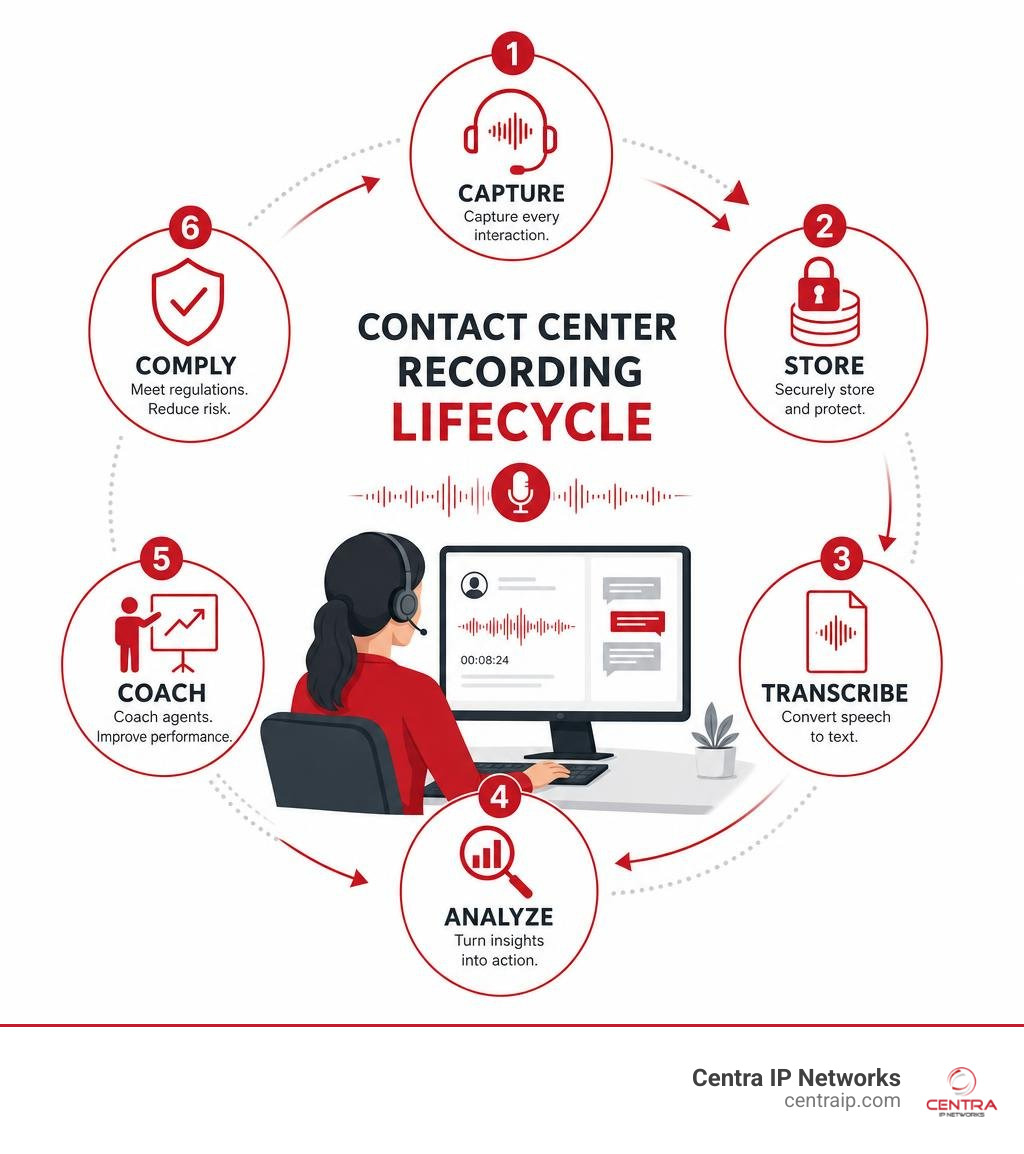
Simple contact center recording glossary:
Understanding the Basics of Interaction Capture
At its core, interaction capture is about more than just grabbing an audio file. Modern systems capture the entire picture of a customer’s journey, combining voice streams, agent desktop screens, and digital channels (like chat and email) into a single, unified view. By storing these interactions securely in the cloud, supervisors can reconstruct exactly what happened during any customer touchpoint.
How Contact Center Recording Works
The technical side of contact center recording relies heavily on Voice over IP (VoIP) technology. When an agent takes a call, the voice data travels as digital packets across the network. Recording software captures these packets in real time—often using a method called packet sniffing or via direct integration with the session border controller (SBC)—and converts them into standard, high-quality audio formats.
Once captured, these recordings are securely routed directly to cloud-based storage. Storing recordings in the cloud ensures they are safe, easily searchable, and accessible from anywhere, whether your team is working in an office in downtown Fort Worth or remotely in Sarasota. To understand why this shift to cloud storage is so critical for business continuity and flexibility, check out our guide on Cloud-Based Call Recording: Why It’s Essential for Modern Businesses.
Automatic vs. On-Demand vs. Ad Hoc Recording
Depending on your industry, operational goals, and compliance needs, you will want to choose how and when calls are recorded. Modern platforms generally support three distinct recording triggers:
- Automatic Recording: This is the standard for most compliant contact centers. The system records 100% of inbound and outbound interactions from the moment the call connects to the moment it disconnects. It eliminates human error, ensuring you never miss a critical conversation.
- On-Demand Recording: This gives agents or systems the ability to trigger a recording based on specific rules. For example, a recording might automatically start only when a call is transferred to a specialized billing queue.
- Ad Hoc Recording: This gives agents manual control. An agent can manually click “Record” in their workspace mid-call—for instance, when a customer begins detailing a formal dispute.
While manual agent control is useful, it also introduces risk if an agent forgets to hit record. Managing these settings correctly is critical, especially when balancing customer expectations and legal guidelines. For a deeper dive into the nuances of recording without explicit live interruptions, read The Ultimate Guide to Call Recording Without Announcement.
Key Features of Modern Contact Center Recording Solutions
To get the most out of your recorded interactions, you need a solution that goes far beyond simple audio storage.

Modern platforms provide automated transcription, real-time monitoring, and advanced metadata tagging, turning raw audio files into searchable, structured data. This functionality is what drives that impressive 10% boost in customer satisfaction.
To understand how voice and screen recording differ—and how they work together—take a look at this comparison:
| Feature | Voice Recording | Screen Recording |
|---|---|---|
| Primary Focus | Captures audio, tone, and spoken words. | Captures agent desktop activity, system navigation, and keystrokes. |
| Main Benefit | Evaluates communication skills and verbal compliance. | Identifies tool bottlenecks, training gaps, and process adherence. |
| Compliance Role | Documents verbal agreements and consent. | Audits data entry and ensures sensitive payment screens are hidden. |
| Coaching Value | Excellent for improving empathy, scripts, and soft skills. | Excellent for reducing average handle time (AHT) and system errors. |
Essential Capabilities for Quality Management
Quality Assurance (QA) is the heartbeat of any successful contact center. Without robust recording tools, managers are left guessing how their agents are performing. Modern software allows supervisors to build custom evaluation forms and digital performance scorecards directly within the playback portal.
During coaching sessions, supervisors can play back specific call segments, attach scorecards, and leave timestamped feedback. This structured approach helps agents understand exactly where they excel and where they need to improve. If you are looking to build a world-class QA process, check out our insights on The Best Call Recording Software for Call Center Success.
How Screen Recording Completes the Picture
Audio only tells half the story. An agent might sound perfectly calm and polite on the phone, but if they are struggling to navigate a slow CRM or switching between five different tabs to find an answer, their average handle time will skyrocket.
Screen recording captures the agent’s screen activity in perfect sync with the audio. This omnichannel visibility allows QA teams to spot workflow bottlenecks, see if agents are following standard operating procedures, and verify that they are using their tools efficiently. For an in-depth look at how top-tier platforms handle this synchronization, check out Call Recording Solutions for Contact Centers | Verint.
Navigating Compliance and Regulatory Requirements
Compliance is often the primary reason contact centers invest in enterprise-grade recording solutions. Failing to secure customer data or record interactions properly can result in massive legal penalties and a devastating loss of customer trust.

Consent Laws and Notification Best Practices
Before you record a single second of audio, you must navigate a complex web of state and federal consent laws.
In the United States, consent laws generally fall into two categories:
- One-Party Consent: Only one party involved in the conversation needs to consent to the recording (applicable in Texas, covering our Dallas and Fort Worth clients).
- Two-Party (All-Party) Consent: Every single person on the call must agree to be recorded. This is the law in Florida, directly affecting our clients in Orlando, Tampa, St. Petersburg, Clearwater, and Sarasota.
Because Florida is an all-party consent state, contact centers operating here must play an automated notification (e.g., “This call may be monitored or recorded for quality purposes”) before the agent and customer begin speaking. For a fun, practical look at how to handle these announcements without making your business sound cold or suspicious, see How to Record Landline Calls Without Sounding Like a Spy. For more technical compliance standards, read the industry overview at Contact Center Call Recording: What you need to know – NiCE.
Securing Sensitive Payment Data
If your contact center accepts credit cards or processes healthcare information, you must adhere strictly to PCI-DSS (Payment Card Industry Data Security Standard) and HIPAA regulations.
Under PCI-DSS, it is strictly illegal to record CVV/CVC credit card security codes, even in encrypted formats. Modern recording systems solve this by using automatic redaction. When an agent navigates to a payment screen, the system uses API triggers or computer vision to automatically pause the audio and screen recording, resuming it once the payment is processed. In transit and at rest, all stored recordings must be fully encrypted, with strict role-based access controls ensuring only authorized personnel can listen to them.
How AI and Analytics Transform Recorded Interactions
The biggest shift in contact center recording in 2026 is the integration of Artificial Intelligence. AI turns passive audio archives into active, searchable business intelligence.
By leveraging machine learning, platforms can now automatically score calls, track customer sentiment, and spot trends before they turn into major issues. To see how these tools fit into your broader data strategy, explore these Stop Guessing and Start Growing with These Call Center Analytics Tools.
Moving from 1% QA to 100% Coverage
Historically, QA teams have suffered from a massive blind spot. Because manual review is incredibly time-consuming, traditional QA teams typically review only 1–2% of calls. This means 98% of your customer interactions go completely unmonitored.
AI-powered recording solutions change the game entirely. By automatically transcribing every call, AI can analyze and score 100% of customer interactions against your custom QA rubrics. It automatically highlights calls with high customer frustration, identifies compliance violations, and flags agents who may need immediate coaching. Learn more about automated, high-coverage QA platforms at AI Call Recording Software – Interaction Recording and Management | NiCE.
Extracting Voice of the Customer Insights
Every day, your customers are telling your agents exactly what they love and hate about your products, services, and competitors. AI mines these recordings to extract actionable “Voice of the Customer” (VoC) insights.
By running keyword and intent detection across thousands of hours of recorded audio, the software can spot emerging product complaints, map out common friction points in the customer journey, and even generate automated post-call summaries. This reduces the time agents spend on manual data entry and ensures your management team gets accurate, real-time feedback from the front lines.
Selecting and Implementing the Right Platform in 2026
Choosing the right contact center recording software requires balancing your current budget with your long-term growth plans.
Choosing the Right Contact Center Recording Software
When evaluating vendors, look beyond the initial sticker price. You need to calculate the Total Cost of Ownership (TCO), which includes storage fees, implementation costs, and licensing.
Ensure the platform integrates natively with your CRM (like Salesforce or HubSpot) so recordings are linked directly to customer profiles. Additionally, look for a provider that offers strong Service Level Agreements (SLAs) for uptime—especially if your business relies on continuous recording for compliance. If you are operating on a tight budget, we have compiled some great tips on How to Record Phone Calls on a Budget.
Top Software Providers to Consider in 2026
In 2026, the market features several enterprise-grade providers that excel at capturing and securing interaction data:
- NICE CXone: Renowned for its robust, unified AI platform and comprehensive compliance tools.
- Verint / Calabrio: Excellent options for organizations looking to transition from basic call logging to comprehensive workforce engagement and analytics.
- Uniphore: A leader in delivering uncompressed, AI-ready data and real-time guidance tools. Explore their enterprise solutions at Enterprise Recording Software | Communication Recording Agent.
- Eleveo: A highly flexible option tailored for mid-market and enterprise contact centers requiring strict compliance management.
Frequently Asked Questions about Contact Center Recording
Is contact center recording legal without consent?
In almost all cases, no. While federal law and some states (like Texas) allow one-party consent, many states (including Florida) require all parties to consent to being recorded. To remain compliant, the safest and best practice is to always play an automated recording announcement to every caller.
How long are business call recordings typically stored?
Storage duration depends entirely on your industry and local regulations. While some general businesses keep recordings for 30 to 60 days for QA purposes, highly regulated industries (like finance or healthcare) may be legally required to retain recordings for seven years or more. Modern cloud platforms allow you to set custom lifecycle and deletion policies to automate this process.
What is the difference between call recording and screen recording?
Call recording captures the audio portion of the conversation between the customer and the agent. Screen recording captures a video of the agent’s computer screen during that same call. When combined and played back in sync, they give supervisors complete context of the interaction.
Conclusion
Implementing a reliable, compliant, and AI-ready contact center recording system doesn’t have to be overwhelming. At Centra IP Networks, we specialize in taking the complexity out of cloud communications and managed IT.
We serve businesses across Dallas, Fort Worth, Orlando, Tampa, St. Petersburg, Clearwater, and Sarasota, providing a unified platform that delivers your phone systems, internet connectivity, and cloud solutions on a single bill from a single provider. Through our 35+ industry partnerships, we design custom, cost-effective contact center solutions tailored exactly to your business needs.
Ready to upgrade your customer experience and secure your compliance? Explore our Contact Center solutions today, and let’s build a platform your team and customers can trust.