Why the Right Call Recording Software for Call Centers Matters in 2026
Call recording software for call centers is one of the most practical tools a business can invest in — whether you’re running a five-person support team or a large contact center handling thousands of calls a day.
Here’s a quick look at the top options to help you evaluate fast:
| Software | Best For | Key Strength |
|---|---|---|
| Dialpad | AI-powered teams | Real-time transcription & coaching |
| Nextiva | Omnichannel operations | Unified voice, chat, and email capture |
| NiCE | Enterprise compliance | Multi-channel recording at scale |
| Uniphore | AI-readiness | Uncompressed audio for AI analytics |
| Calabrio | Workforce engagement | AES-256 security + quality management |
Call centers today are under more pressure than ever. Call complexity has spiked by as much as 50% in the last three years, yet 70% of contact centers still manually review only seven or fewer calls per agent per month. That’s a massive blind spot — and it’s costing businesses in quality, compliance, and customer experience.
Meanwhile, 88% of consumers say customer experience is just as important as the product itself. The stakes are high.
The right call recording solution helps you close that gap — capturing every interaction, surfacing coaching opportunities, and keeping your team compliant with regulations like GDPR, HIPAA, and PCI DSS.
I’m Patrick Brangan, and with over 20 years in business technology and unified communications, I’ve helped SMBs evaluate and implement call recording software for call center environments across a range of industries. In this guide, I’ll walk you through the best options available in 2026 so you can make a confident, informed decision.
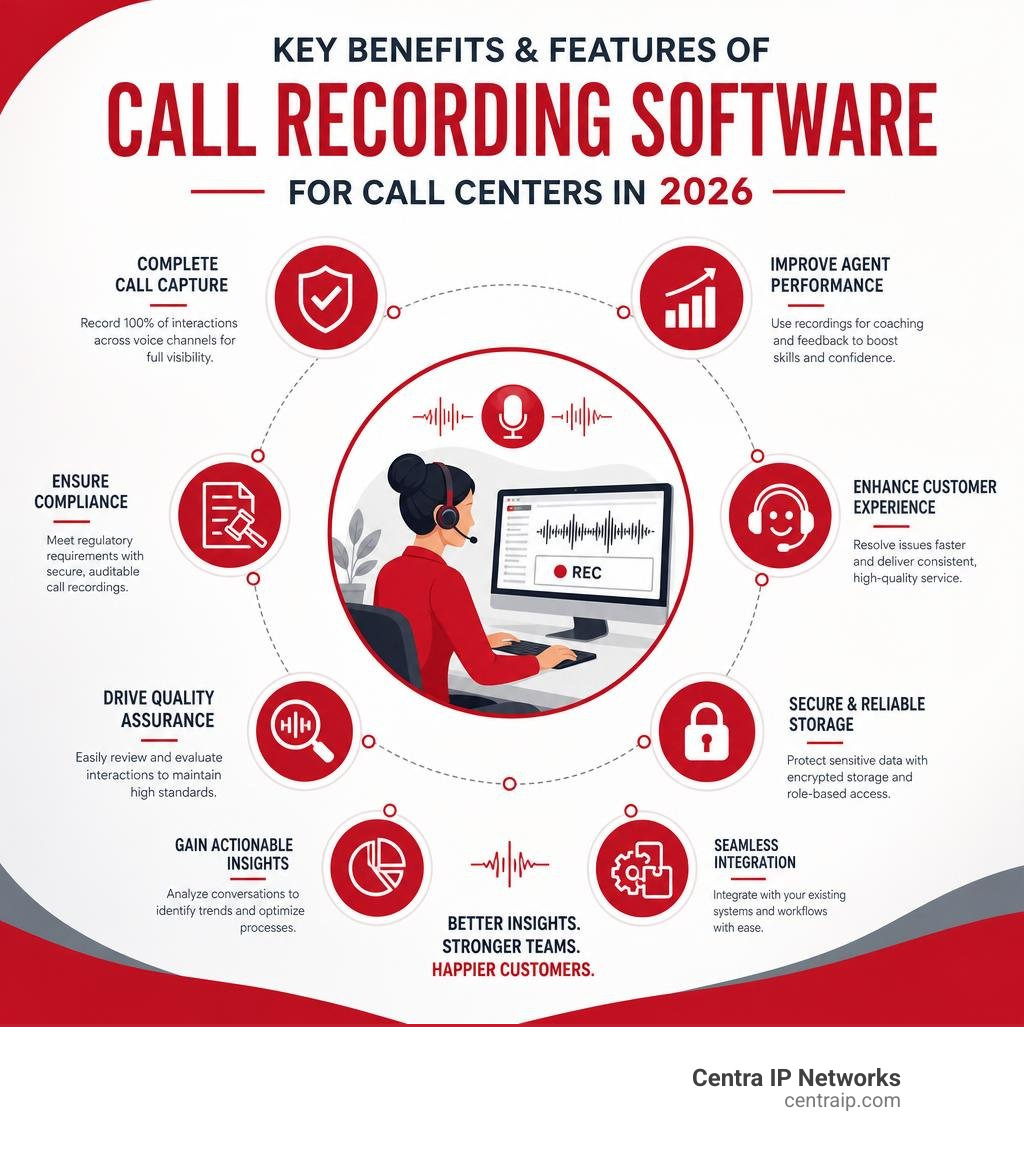
Key call recording software for call center vocabulary:
What is Call Recording Software and How Does It Work?
At its core, call center recording software captures the audio of inbound and outbound phone conversations over a telecommunications network. In modern environments, however, it does much more than just save audio files. It captures the entire interaction ecosystem, including screen activity, text chats, emails, and social media touchpoints.

Most modern call centers use Voice over IP (VoIP) systems to route calls. When a call is initiated or received, the call recording software intercepts the media stream. This is often done using a protocol called SIPREC (Session Initiation Protocol Recording) or through direct integration with the cloud private branch exchange (PBX).
The software records the conversation, converts it into an optimized digital format (like MP3 or WAV), and indexes it with metadata (such as agent name, timestamp, customer ID, and call duration). This ensures that calls are easily searchable later.
Depending on your architecture, these files are saved either on-premises or in secure cloud storage. For modern teams, migrating to a cloud-hosted environment is the gold standard because it offers seamless scalability, lower maintenance overhead, and easy remote access. To understand why this shift is so critical, read our deep dive on Cloud-Based Call Recording: Why It’s Essential for Modern Businesses.
Why Your Business Needs Call Recording Software for Call Center Teams
Without a reliable recording system, your contact center is operating in the dark. You cannot easily verify what was promised to a customer, nor can you effectively evaluate if your agents are representing your brand properly.
By implementing high-quality recording software, you achieve:
- Absolute Accountability: When customer disputes arise, having an indisputable audio record resolves misunderstandings in minutes rather than days.
- Data-Driven Performance Evaluation: Instead of guessing which agents need help, supervisors can listen to actual customer interactions to pinpoint exact skill gaps.
- Boosted Customer Satisfaction: Research shows that companies utilizing call recordings experience a 10% boost in customer satisfaction. It allows you to identify friction points in the customer journey and fix them.
If you want to take your customer service from average to outstanding, check out our practical guide on How to Master the Contact Center Customer Experience Without Breaking a Sweat.
Key Features of Call Recording Software for Call Center Compliance
Operating a call center in 2026 requires strict adherence to privacy and financial regulations. If your business takes credit card payments or handles medical records, compliance isn’t optional—it’s a multi-million dollar legal boundary.
Excellent recording systems protect your business through several key compliance features:
- Automated Pause-and-Resume: To comply with PCI DSS (Payment Card Industry Data Security Standard), software must not record sensitive card details. Advanced tools automatically pause recording when an agent opens a payment screen and resume it once the transaction is complete.
- Granular Access Controls: Role-based permissions ensure that only authorized personnel can search, play back, or download sensitive recordings.
- Encryption at Rest and in Transit: Top-tier platforms encrypt call files using AES-256 standards, preventing data breaches.
- Automated Retention Policies: Meet strict GDPR and HIPAA requirements by setting automated lifecycles that delete or archive files after a specified period.
For teams looking for robust, enterprise-grade compliance and quality management, Calabrio Call Recording stands out as a highly reliable platform built to handle complex security requirements.
Choosing the Right Call Recording Software for Call Center Operations
Selecting the right deployment model is the first major decision you will face. While on-premise systems historically offered maximum control over data, cloud-native platforms have become the dominant choice for modern businesses due to their agility and lower total cost of ownership.
Here is how the two deployment models stack up:
| Feature | Cloud-Based Recording | On-Premise Recording |
|---|---|---|
| Upfront Cost | Very low (subscription-based) | High (hardware & licensing) |
| Scalability | Instant (add users with a click) | Limited by physical server capacity |
| Maintenance | Handled entirely by the provider | Requires dedicated in-house IT |
| Integrations | Seamless via open APIs | Often complex and custom-coded |
| Remote Support | Native support for work-from-home | Requires complex VPN setups |
For businesses looking to build a modern, flexible workforce, a cloud-based setup is almost always the right path. Learn more about how these modern systems operate in our guide on What Is a Cloud-Based Call Center: Features and Benefits.
How AI and Conversation Intelligence Enhance Call Recording
The days of supervisors manually listening to random call samples are over. With AI and conversation intelligence, 100% of your calls can be automatically transcribed, analyzed, and graded.
AI enhances traditional call recording in several groundbreaking ways:
- Real-Time Transcription: Converts spoken conversations into searchable text instantly.
- Sentiment Analysis: Automatically flags calls where customer frustration spikes, allowing supervisors to intervene before a customer churns.
- Automated Post-Call Summaries: Saves agents valuable time by automatically writing concise summaries of the call and pushing them directly into your CRM.
- Keyword and Trend Tracking: Instantly alerts you if customers start mentioning a competitor’s name or reporting a specific product bug.
To leverage these advanced analytics and stop playing guessing games with your business metrics, explore our list of Stop Guessing and Start Growing with These Call Center Analytics Tools.
The Best Call Recording Software Options in 2026

Choosing the best software requires balancing your budget, existing tech stack, and compliance needs. To help you navigate the landscape, we have highlighted the top platforms reviewed in the 10 Best Call Center Recording Software Reviewed in 2026 and analyzed their unique strengths.
Dialpad
Dialpad is a leader in AI-driven communications. Built from the ground up with proprietary AI (Dialpad Ai), it is designed for teams that want to turn raw audio into actionable coaching insights instantly.
Key capabilities include:
- Real-Time Assist Cards: If a customer asks a difficult question or mentions a competitor, Dialpad automatically triggers helpful notes on the agent’s screen to guide the conversation.
- Actionable Post-Call Summaries: Instantly generates bulleted summaries, action items, and sentiment scores.
- Seamless CRM Integrations: Pushes recordings and transcripts directly to Salesforce, HubSpot, and Zendesk.
Dialpad combines telephony with cutting-edge AI to deliver robust call center recording capabilities.
Nextiva
Nextiva is a powerhouse for mid-market and enterprise businesses looking for a unified, highly reliable communication platform. It blends robust VoIP service with advanced omnichannel contact center features.
Key capabilities include:
- Omnichannel Capture: Record and monitor voice, chat, email, and SMS in a single, unified interface.
- Workforce Optimization (WFO): Built-in tools for scheduling, agent evaluation, and performance tracking.
- High-Quality Cloud Storage: Secure, scalable storage options with flexible retention rules tailored to your industry.
Nextiva’s call center recording features are designed to elevate customer support teams and streamline operations.
NiCE
For massive, global enterprises that require bulletproof compliance and multi-platform recording, NiCE (NICE CXone) is an industry benchmark. They power over 15 billion interactions a year.
Key capabilities include:
- Unified Recording Foundation: Centralizes voice, screen, and digital channel recording across multiple third-party ACDs and UCaaS systems.
- Enterprise-Grade Compliance: Automated policies enforce strict retention, deletion, and redaction rules to meet global compliance standards.
- Historical Ingestion: Allows businesses to import legacy recordings into a single, searchable AI-ready platform.
NiCE Interaction Recording provides robust enterprise capabilities for complex organizations.
Uniphore
Uniphore focuses heavily on delivering high-fidelity, AI-ready data. They believe that standard compressed audio files limit the accuracy of modern AI engines, so they do things differently.
Key capabilities include:
- Uncompressed Stereo Recording: Captures high-quality, dual-channel audio (separating agent and customer) for superior transcription and sentiment accuracy.
- Bring Your Own Storage (BYOS): Complete control over where your data lives, avoiding vendor lock-in and high storage fees.
- Real-Time Guidance: Delivers live coaching to agents during calls to improve first-contact resolution.
The Uniphore Communication Recording Agent prepares your voice data for the AI era with high-fidelity capture.
Frequently Asked Questions about Call Center Recording
Is call center recording legal in 2026?
Yes, but the legal requirements depend entirely on your geography and jurisdiction.
In the United States, consent laws vary by state:
- One-Party Consent: In states like Texas (which covers our clients in Dallas and Fort Worth), only one party in the conversation needs to consent to the recording. This means a business can legally record a call as long as the agent is aware.
- Two-Party (All-Party) Consent: In states like Florida (covering our clients in Orlando, Tampa, St. Petersburg, Clearwater, and Sarasota), all parties on the call must consent to being recorded. This is why you must use clear, automated pre-call announcements such as, “This call may be monitored or recorded for quality and training purposes.”
If you do business internationally, you must also comply with the European Union’s GDPR, which requires explicit consent, a defined purpose for recording, and the customer’s “right to be forgotten” (meaning you must be able to delete their recordings upon request).
How can call recordings improve agent training and quality assurance?
Instead of relying on theoretical training modules, call recordings allow you to use real-life examples. You can create “coaching playlists” of excellent calls to show new hires exactly what success sounds like, or highlight challenging calls to teach objection handling.
With modern software, supervisors can also use screen capture alongside audio to see if an agent is navigating systems efficiently, or if slow software is causing long hold times.
To see real-world examples of how businesses transformed their support teams using interaction data, read From Hold Music to High Praise: Contact Center Success Stories You Need to Read.
How do I record phone calls on a budget?
You don’t need a massive enterprise budget to start recording calls. If you are a growing business, you can implement highly cost-effective solutions by choosing a cloud-based phone provider that includes basic recording features in their standard packages.
To keep costs low:
- Choose a system with flexible cloud storage options.
- Download older files to local storage if your provider charges high fees for long-term cloud archiving.
- Only record specific extensions or departments rather than your entire organization.
For a step-by-step breakdown of affordable options, check out our guide on How to Record Phone Calls on a Budget.
Conclusion
Choosing the right call recording software for call center success isn’t just about archiving audio files—it’s about unlocking valuable insights, protecting your business from legal risks, and empowering your agents to deliver outstanding service.
At Centra IP Networks, we specialize in simplifying your business communications. We deliver comprehensive Managed IT and Cloud Communications services across Texas (Dallas and Fort Worth) and Florida (Orlando, Tampa, St. Petersburg, Clearwater, and Sarasota).
Our unique advantage is simple: we provide your phone systems, internet connectivity, cloud solutions, and call recording tools on one single platform with a single bill and a single point of contact. By leveraging over 35 strategic partnerships, we tailor cost-effective, high-performance solutions designed specifically for your business goals.
Ready to upgrade your contact center and drive real business growth? Let us help you find the perfect setup. Explore our Centra IP Contact Center Solutions and contact our team of experts today!