Why Choosing the Right Electronic Fax Solutions Can Save Your Business Time and Money
Electronic fax solutions – also called internet fax, digital fax, or cloud fax solutions – are cloud-based services that let you send and receive faxes over the internet with no fax machine, no dedicated phone line, and no paper required.
Here is a quick summary of what you need to know:
| Question | Quick Answer |
|---|---|
| What is an electronic fax solution? | A cloud service that replaces traditional fax machines using email, web, or mobile apps |
| Do I need special hardware? | No – any internet-connected device works |
| Is it secure? | Yes – top providers use 256-bit AES and TLS 1.2 encryption |
| Is it HIPAA compliant? | Yes, on qualifying plans that include a signed BAA |
| How much does it cost? | Plans typically start around $19/month for individuals, with business and enterprise tiers available |
| Who are the top providers? | Fax.Plus, iFax, MyFax, Retarus, and enterprise carrier-grade platforms are leading options in 2026 |
Faxing is not dead. It is just different now.
Millions of businesses – especially in healthcare, legal, and finance – still depend on fax every single day. But the old way of doing it is expensive and slow. Physical machines break down. Dedicated phone lines cost money every month. And someone always runs out of toner at the worst possible moment.
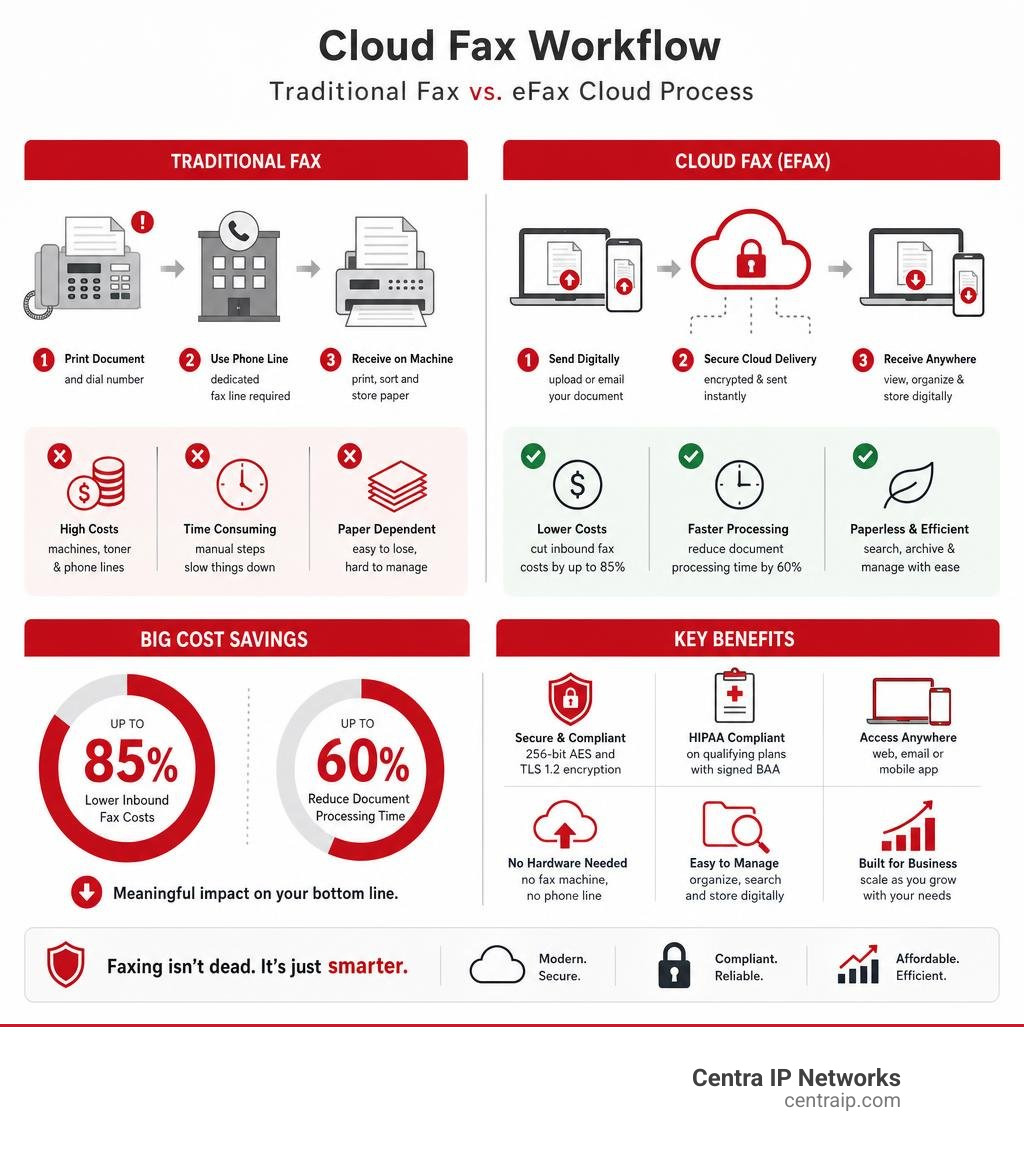
Cloud faxing solves all of that. According to industry data, companies that switch to cloud fax can cut inbound fax costs by up to 85% and reduce document processing time by 60%. That is a meaningful impact on any business’s bottom line.
But not every electronic fax solution is the same. Plans, security certifications, API access, and cancellation terms vary significantly across providers. Choosing the wrong one can lock you into a frustrating contract with limited support.
This guide breaks it all down so you can make a confident decision.
I’m Patrick Brangan, founder of Centra IP Networks – a full-service business technology firm with over 20 years of experience helping small and mid-sized businesses simplify their communications stack, including deploying electronic fax solutions as part of broader unified communications and managed IT strategies. In the sections below, I’ll walk you through everything from pricing and compliance to the features that actually matter for businesses like yours.
Discover more about electronic fax solutions:
What is Electronic Faxing and How Does It Differ From Traditional Faxing?
To understand how modern electronic fax solutions work, we have to look at the plumbing. Traditional faxing relies on the Public Switched Telephone Network (PSTN). It takes a digital document, converts it into analog audio signals, sends it over a copper telephone line, and then another machine converts those squeals and beeps back into a printed page.
It is slow, prone to transmission errors, and requires physical infrastructure that is increasingly expensive to maintain.
Electronic faxing bypasses the copper lines entirely. It utilizes Fax over IP (FoIP) technology to transmit document files securely over internet protocol networks. When you send an internet fax, the application converts your document, such as a PDF or Word file, into a secure data packet, routes it through cloud servers, and delivers it directly to the recipient’s endpoint – whether that is an email inbox, a mobile app, or even a legacy physical fax machine on the other end.
By moving your faxing infrastructure to the cloud, we eliminate the need for dedicated analog lines, physical paper, ink toner, and complex hardware maintenance. For a deep dive into the mechanics of this transition, check out our guide on What is Fax Over IP? Benefits and Best Practices for Businesses.
The Evolution of Modern Electronic Fax Solutions
Over the past three decades, digital faxing has evolved from a basic convenience into a highly sophisticated, enterprise-grade communication channel. Originally, internet faxing was just a way for remote workers to send an occasional document without buying a dedicated machine. Today, enterprise cloud faxing is a critical component of secure data exchange.
Modern businesses in Dallas, Fort Worth, Orlando, Tampa, St. Petersburg, Clearwater, and Sarasota no longer look at faxing as an isolated task; they treat it as an integrated data workflow. For teams that still receive purchase orders, patient records, signed contracts, or financial documents by fax, cloud migration creates a faster and more secure process without disrupting the recipients who still rely on fax numbers.
Key Differences: Analog vs. Cloud Faxing
If you are still holding onto a traditional fax machine in your office, you are paying a premium for a slower, less secure workflow. Let us look at how the two models stack up:
| Feature | Traditional Analog Faxing | Modern Cloud Faxing |
|---|---|---|
| Hardware Required | Physical fax machine, paper, toner, and spare parts | Any internet-connected device (PC, tablet, smartphone) |
| Connectivity | Dedicated analog phone line (PSTN) | Secure Internet Protocol (VoIP/FoIP) |
| Document Format | Physical paper copies | Digital files (PDF, TIFF, DOC, PNG) |
| Simultaneous Faxes | One fax at a time per phone line (busy signals) | Unlimited concurrent inbound and outbound transmissions |
| Security Risk | Documents left sitting on open tray; no encryption | End-to-end encryption, secure user portals, MFA |
| Maintenance & IT Costs | High (telephony line rental, hardware repairs) | Low, predictable monthly subscription pricing |
By shifting from legacy analog systems to cloud-based routing, businesses can eliminate busy signals, reduce business paper usage by approximately 50%, and experience up to a 30% boost in overall employee productivity.
Key Features and Business Benefits of Electronic Fax Solutions
Modern electronic fax solutions do more than just send static pages. They are built to streamline how your team handles sensitive business records, legal agreements, and patient files. Transitioning to a digital workflow can lead to a 60% reduction in document processing times, freeing up your administrative staff to focus on high-priority tasks rather than standing over a scanner.
To see how different digital platforms compare across the board, take a look at our analysis of Digital Fax Service for Business: A Complete Comparison.
Core Features of Enterprise Electronic Fax Solutions
When evaluating enterprise-grade platforms, several core features are essential for maintaining seamless business operations:
- Multi-DID Support: This allows us to assign dedicated, individual fax numbers (Direct Inward Dialing) to different employees, departments, or regional offices – such as specific local numbers for your teams in Tampa or Dallas – ensuring that sensitive documents go straight to the intended recipient.
- Secure Online Portals and Dashboards: Users can access, organize, and search their entire fax history via a centralized, user-friendly interface.
- Mobile App Integration: Mobile apps allow remote workers to snap photos of physical documents and send them securely as high-quality faxes on the go.
- Flexible Storage Integration: Leading platforms support direct integration with third-party cloud storage systems like Microsoft SharePoint, Google Drive, and Dropbox, making document archiving automatic.
For a closer look at these business-centric features, enterprise cloud faxing plans offer various tiers of protection, including HIPAA-compliant options that secure sensitive data.
Advanced AI and Interoperability Workflows
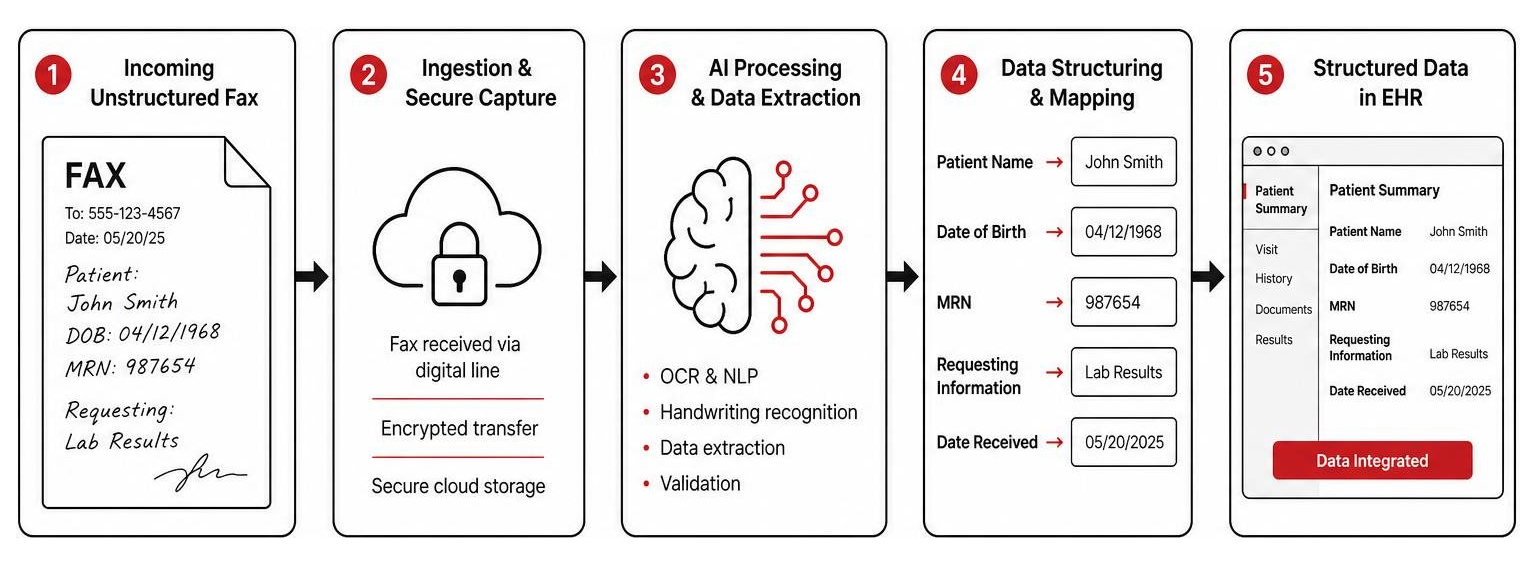
The most significant shift in modern cloud faxing is the integration of Artificial Intelligence (AI) and Natural Language Processing (NLP). In highly regulated fields, receiving a fax is only the first step; someone still has to read it, extract the key information, and manually type it into another software system.
With advanced tools, this manual data entry is eliminated. AI-powered engines automatically scan incoming unstructured documents, including handwritten notes or low-resolution scans, extract the relevant data, and convert it into structured, actionable formats like HL7 or FHIR. This allows healthcare systems and corporate enterprises to route critical data directly into their primary databases without human error.
Learn more about these advanced interface options through enterprise healthcare interoperability platforms and interface engines designed to connect disparate systems.
Security, Compliance, and Enterprise Integrations
For businesses operating in legal, financial, and healthcare sectors, security is not a nice-to-have feature – it is a strict regulatory requirement. Traditional faxing machines pose significant compliance risks: anyone walking past a physical machine can glance at a highly confidential document sitting in the paper tray.
Cloud faxing mitigates this risk by securing data at every stage of its journey. If you want to compare the security baselines of various options, check out our list of Top Secure Online Fax Services to Save Your Small Business.
HIPAA Compliance and the Business Associate Agreement (BAA)
Under the Health Insurance Portability and Accountability Act (HIPAA), healthcare providers and their partners must protect Protected Health Information (PHI).
There is a critical distinction to make here: HIPAA-ready encryption is not the same as true HIPAA compliance.
While many basic plans secure your data in transit using TLS 1.2 and at rest using 256-bit AES encryption, they do not automatically make you compliant. To meet federal standards, your provider must sign a Business Associate Agreement (BAA). A BAA is a legal contract that establishes the provider’s liability for safeguarding PHI. The U.S. Department of Health and Human Services explains these obligations in its guidance on business associates and HIPAA compliance.
If your team handles health records in Florida or Texas, you must ensure you are on a plan that officially supports a signed BAA, such as secure enterprise cloud fax plans.
EHR, ERP, and API Integrations for Developers
Enterprise environments require communication tools that talk to existing line-of-business applications. Rather than forcing employees to jump between email, web portals, and their primary software, secure electronic fax solutions offer robust REST and SOAP APIs.
These developer tools allow us to build faxing capabilities directly into:
- Electronic Health Record (EHR) Systems: Allowing doctors to send patient charts directly from Epic, Cerner, or Athenahealth.
- Enterprise Resource Planning (ERP) Platforms: Automating the transmission of purchase orders and invoices from systems like SAP or Oracle.
- Document Management Systems (DMS): Automatically filing incoming transmissions into secure, indexed digital archives.
For businesses looking to build these custom integrations, developer documentation and enterprise capabilities are widely available from leading cloud fax platforms.
Evaluating Electronic Fax Plans, Pricing, and Top Alternatives
Choosing the right subscription plan requires balancing your monthly transmission volume with your compliance and integration needs. If you want to review a broad spectrum of what is currently on the market, our resource on The Ultimate List of Cloud-Based Fax Solutions is an excellent starting point.
Understanding the 60-Second Billing Rule and Overage Costs
When comparing pricing, it is crucial to read the fine print regarding how pages are counted. Some major cloud fax providers enforce what is known as the 60-Second Billing Rule.
Under this rule, any single fax page that takes longer than 60 seconds to transmit is billed as multiple pages against your monthly allowance. If you are sending graphic-heavy documents, high-resolution PDFs, or transmitting to a slow legacy fax machine on the receiving end, a 5-page document could easily register as 10 or 15 pages.
Once you exceed your monthly page limit, overage fees apply – typically ranging from $0.07 to $0.10 per page. If your business regularly sends high-volume or highly detailed documents, these overage costs can quickly inflate your monthly bill.
Top Cloud Fax Alternatives in 2026
Several modern cloud fax providers offer competitive pricing, clean interfaces, and transparent billing models. Here is how common options compare in July 2026:
- Fax.Plus: Widely considered a strong overall option. It features a modern, user-friendly interface, excellent mobile apps, and transparent pricing. It is SOC 2 Type II certified and offers easy BAA signing on its business plans.
- iFax: A cost-effective option for healthcare teams and small clinics that need a low-cost BAA without committing to massive enterprise contracts.
- MyFax: MyFax offers simpler, budget-friendly plans for light users, making it suitable for home offices or small businesses with occasional faxing needs.
For an in-depth, unbiased evaluation of these and other competitors, check out our guide on Cloud Fax Providers That Actually Work.
The Cancellation Process and Common User Complaints
One of the most common complaints among cloud fax users centers on cancellation friction. Some services still require phone calls, live chat requests, or additional verification steps instead of allowing cancellation directly through a billing dashboard.
If you decide to close your account, keep these critical points in mind:
- Backup Your Data First: The moment your account is canceled, your access to the secure portal may be revoked, and stored documents may be deleted according to the provider’s retention policy.
- Check for Account Blocks: Outstanding balances, multiple active numbers, or annual billing terms can disable self-serve cancellation options online.
- Review Subscription Channels: If you subscribe through the Apple App Store or Google Play Store, you may need to manage or cancel the subscription directly through your device’s subscription settings.
- Confirm in Writing: If you must cancel via phone or live chat, always request written cancellation confirmation for your records.
Frequently Asked Questions About Electronic Faxing
Are electronic fax solutions fully HIPAA compliant?
Yes, but only on specific plans. While many providers use high-level encryption, such as 256-bit AES and TLS 1.2, to secure data in transit and at rest, standard personal and basic business plans may not meet HIPAA requirements because they do not include a signed Business Associate Agreement (BAA). To achieve full compliance, you must subscribe to a plan that supports a signed BAA and follows the provider’s HIPAA-ready workflow.
Can I port my existing fax number to a cloud fax provider?
Yes, in most cases you can port your existing local or toll-free numbers. However, you must carefully review the terms of service. Some providers claim ownership over any new numbers they assign to you, which can make porting your number out to another carrier difficult if you ever decide to change services. Always clarify number ownership before distributing a new digital fax number to your clients.
How does the 60-second billing rule affect my monthly costs?
The 60-second billing rule states that any page taking longer than one minute to transmit counts as multiple pages. For example, if a detailed 3-page contract takes 3 minutes and 15 seconds to send, it will be billed as 4 pages against your monthly allowance. This can lead to unexpected overage charges if you regularly transmit high-resolution images or long documents.
Conclusion
Transitioning to modern electronic fax solutions is one of the easiest ways to eliminate unnecessary hardware costs, secure your sensitive business communications, and boost your team’s daily productivity. But as we have explored, the right choice depends heavily on your volume, your integration needs, and your industry’s specific compliance regulations.
At Centra IP Networks, we specialize in taking the complexity out of business technology. We help businesses throughout Dallas, Fort Worth, Orlando, Tampa, St. Petersburg, Clearwater, and Sarasota integrate secure cloud communications directly into their daily operations.
By consolidating your phone systems, internet connectivity, managed IT, and secure digital faxing onto a single, unified platform, we help you eliminate billing headaches and ensure your communication stack works seamlessly together.
Ready to modernize your document workflows? Let us help you find the perfect fit. Visit our Centra IP Faxing Solutions page to get started today.