
Why Surveillance Integration with IT Is the Smartest Security Move Your Business Can Make
Surveillance integration with IT means connecting your physical security cameras — and related systems like access control and alarms — directly into your business’s IT network and software infrastructure so they all work together as one system.
Here’s what that looks like in practice:
| What Gets Connected | What You Gain |
|---|---|
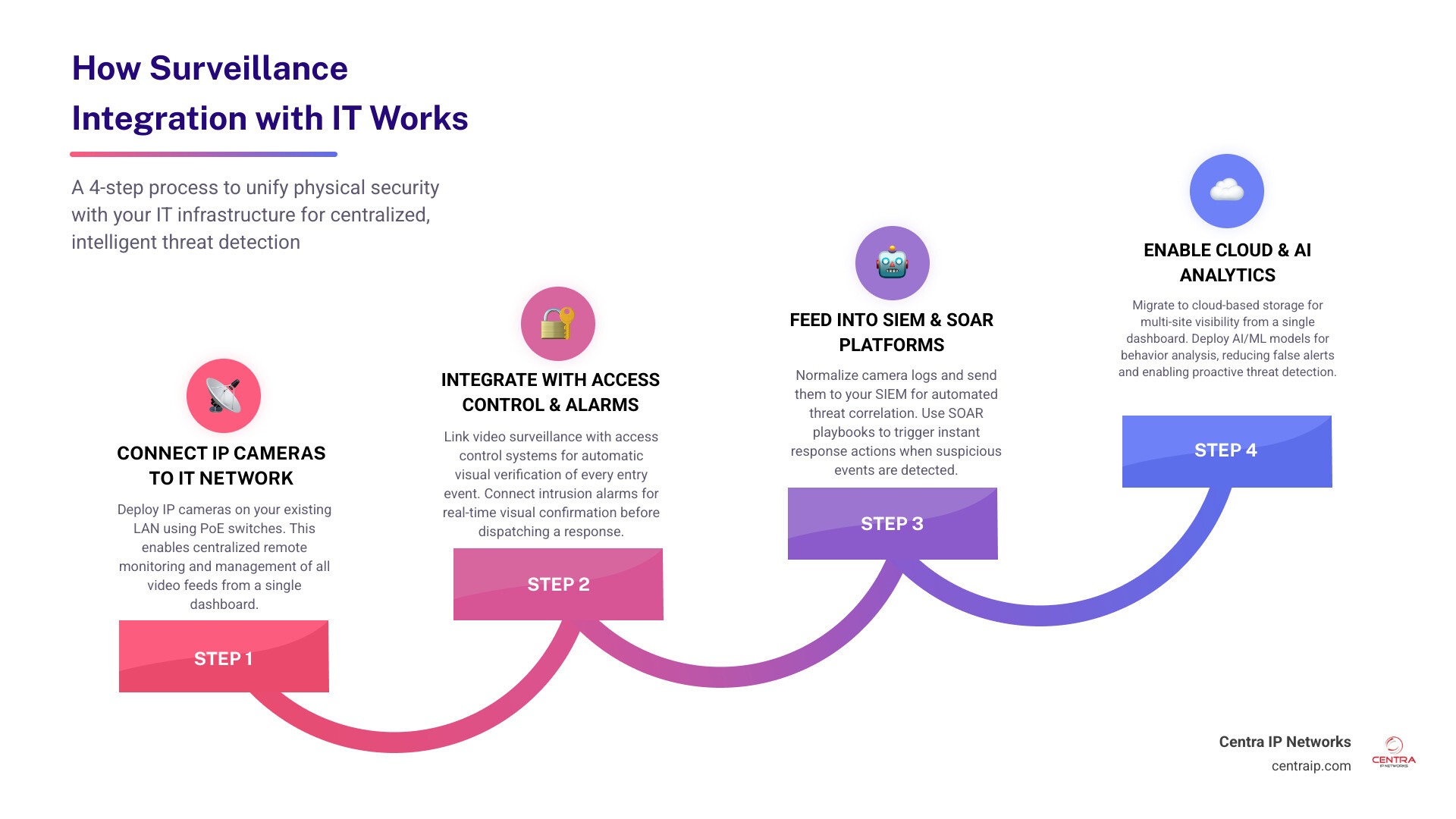
| IP cameras + IT network | Centralized remote monitoring and management |
| Video surveillance + access control | Automatic visual verification of every entry event |
| Cameras + intrusion/alarm systems | Real-time visual confirmation before dispatching a response |
| Surveillance + SIEM/SOAR platforms | Automated threat detection and incident response |
| All systems + cloud | Multi-site visibility from a single dashboard |
The result? Your security stops being a collection of separate tools that don’t talk to each other — and starts acting like a single, intelligent system.
Most businesses today run their cameras on one platform, their access control on another, and their IT security tools somewhere else entirely. The problem is that security events don’t happen in neat silos. A breach might show up as a failed login in your access control log, an anomaly in your network traffic, and a blurry figure on a camera feed — all at the same time, across three separate screens nobody is watching simultaneously.
That gap is exactly where incidents go uninvestigated.
The global integrated security services market reflects how urgently businesses are closing this gap — growing from $15.8 billion in 2021 to a projected $55.5 billion by 2031. The shift is clear: integrated, IT-connected surveillance isn’t a premium upgrade anymore. It’s the baseline for serious security.
I’m Patrick Brangan, and with over 20 years of experience helping SMBs across Dallas, Tampa, and Orlando consolidate their communications, managed IT, and security cameras into one streamlined solution, surveillance integration with IT is something I work with every day. This guide walks you through exactly how to make it work for your business.
Glossary for surveillance integration with IT:
- enterprise video surveillance systems
- office video surveillance systems
- surveillance systems for business
The Strategic Value of Surveillance Integration with IT
When we talk about bringing physical security into the IT fold, we aren’t just talking about plugging an ethernet cable into a camera. We are talking about a complete shift in how your business handles security, operations, and risk. Historically, physical security was the domain of low-voltage contractors, while digital security belonged to the IT department. By bridging this divide, you unlock massive operational efficiency, superior situational awareness, and long-term cost savings.
Think about the standard post-incident investigation. A laptop goes missing from an office in Fort Worth. Without integration, your IT team flags the missing asset, your HR team looks up who was in the building, and your facility manager spends three hours scrubbing through raw camera footage, trying to match a vague timestamp on an access control log to a specific camera angle.
When you implement business video surveillance that is fully integrated with your IT network, that three-hour headache shrinks to three clicks. The access control log is automatically linked to the corresponding video clip, giving you instant visual verification.
| Feature | Legacy Standalone Systems | Integrated IT Surveillance |
|---|---|---|
| Data Storage | Isolated on physical NVRs/DVRs | Unified Cloud/Hybrid Data Lakes |
| Event Correlation | Manual, time-consuming matching | Automated, instant cross-system mapping |
| Alerting | Passive alarms or basic motion alerts | AI-driven, context-aware smart alerts |
| Management | Separate consoles for every vendor | Single pane of glass dashboard |
| Response Time | Hours to days (reactive) | 5 to 30 seconds (proactive/automated) |
Unifying Video Surveillance and Access Control
Door activity is the most frequent security event in any commercial facility. Yet, running access control and cameras separately creates massive investigative gaps. If an employee badges into a restricted server room in Tampa, the access log simply says “Authorized Entry: John Doe.” But was it actually John, or did he loan his badge to a contractor? Or worse, did someone swipe his badge off his desk?
By unifying your cameras with your access control, credential events are automatically correlated with live video. When a badge is swiped, the system triggers the nearest IP camera to capture a high-definition snapshot of the person at the door.
This integration is also the only reliable way to achieve automated tailgating detection. When a door opens, physical sensors register a single credential event. However, integrated AI video analytics can analyze the physical gap behind the first person to detect if a second individual slipped through without badging in. The system immediately flags the anomaly, sends an alert, and bookmarks the exact video frame for review. To explore how to design these setups, check out our commercial video surveillance system guide.
Coordinating Intrusion Detection and Alarm Systems
A standard intrusion detection system (IDS) is a blunt instrument. A motion sensor trips after hours in a Sarasota warehouse, and a loud siren sounds. The monitoring station calls the police, who arrive 30 minutes later to find a stray cat or a fallen cardboard box. False alarms waste local emergency resources and can result in hefty fines for your business.
Coordinating your video feeds with your alarm systems enables instant real-time response and automated alarm verification. When an intrusion sensor is triggered, the integrated system automatically pans and zooms the nearest camera to the exact zone of the breach.
Furthermore, integrating platforms like Status Solutions SARA (Situational Awareness and Response Assistance) allows you to turn raw alarms into highly targeted, automated alerts. Instead of a generic alarm bell, your team receives a detailed push notification: “Zone 4 Motion Alarm: Visual verification shows unauthorized individual at loading dock door.” This level of detail keeps your team safe and ensures emergency responders are dispatched only when there is a verified threat. Discover more about how these layers protect your bottom line in our article on the benefits of security cameras for businesses.
How to Achieve Seamless IT Network Integration
To make your physical cameras and your corporate IT network best friends, you need a solid foundation. If you simply plug dozens of high-definition IP cameras into your standard office network, you will quickly run into bandwidth bottlenecks, dropped packets, and sluggish business applications.
Modern video surveillance relies on high-resolution streams (often 4K or high-megapixel sensors) that demand significant network throughput. To manage this, your network architecture must be carefully designed. We highly recommend utilizing managed Power over Ethernet (PoE) switches to power your cameras directly through the network cabling, simplifying installation and allowing for remote power-cycling of individual cameras.
To prevent camera traffic from overwhelming your business operations, we implement strict bandwidth management strategies, such as setting up Quality of Service (QoS) rules and routing surveillance traffic through dedicated Virtual Local Area Networks (VLANs). For a deeper dive into structuring your office network for high-bandwidth devices, read our guide on data networking.
Step 1: Ensuring Compatibility and Interoperability
The biggest obstacle to a successful integration is compatibility. If you buy proprietary, closed-loop hardware, you will find yourself locked into a single vendor’s ecosystem, unable to connect your cameras to your access control or IT dashboards.
To ensure your systems can talk to each other, follow these three rules of interoperability:
- ONVIF Compliance: Ensure every IP camera and Video Management System (VMS) you purchase is ONVIF (Open Network Video Interface Forum) compliant. This industry standard ensures that devices from different manufacturers can discover, stream, and control each other seamlessly.
- RTSP Support: Real-Time Streaming Protocol (RTSP) is the universal language for video streaming. It allows your AI engines, local monitors, and third-party software to pull live feeds directly from your cameras without lag.
- REST APIs: Modern access control systems and VMS platforms should support open REST APIs. This allows software developers to write custom scripts that link events—such as triggering a camera to start recording at a higher frame rate when a specific network switch registers an offline alert.
To plan your hardware layout with these standards in mind, explore our ultimate guide to business surveillance systems.
Best Practices for Surveillance Integration with IT Security Systems
Every IP camera is a mini-computer connected to your network. If left unsecured, they represent an attractive entry point for cybercriminals. To secure your integrated physical security systems, you must treat them with the exact same rigor as your servers and workstations.
First and foremost, implement strict network segmentation. Your camera network should be completely isolated from your corporate data network. If a hacker physically tampers with an outdoor camera and plugs a laptop into the ethernet cable, network segmentation ensures they cannot access your financial records or customer databases.
Second, secure the perimeter. Every connection between your remote sites (like a branch in Clearwater and a headquarters in Dallas) must go through a secure firewall. For remote access, never open raw camera ports to the internet; instead, require users to connect via a secure Virtual Private Network (VPN) or use a secure cloud-gateway.
- To understand why these boundaries are non-negotiable, check out our guide on why do we need a firewall.
- To learn how to protect remote connections, read about understanding VPNs and how they impact your business.
Integrating with SIEM and SOAR Platforms
For businesses with mature IT security operations, the ultimate goal of surveillance integration with IT is to feed physical security events directly into your digital security monitoring tools, such as SIEM (Security Information and Event Management) and SOAR (Security Orchestration, Automation, and Response) platforms.
This is achieved through log normalization. By converting physical events (like door forced open, camera offline, or motion detected) into a standardized format like the Elastic Common Schema (ECS), your SIEM can correlate physical events with network events.
Imagine this scenario:
- 01:00:00 — An employee’s credentials are used to badge into the server room in Fort Worth.
- 01:00:02 — That same employee’s user account attempts to log into a database from an IP address in Europe (an impossible-travel anomaly).
- 01:00:05 — The SIEM correlates these events, queries the integrated camera feed at the Fort Worth server room door, and flags that the person who badged in does not match the employee’s photo.
- 01:00:12 — The SOAR platform executes an automated playbook: it disables the user account, locks down the server room door, and sends a high-priority alert to the security team with the video clip attached.
This level of automation can reduce your Mean Time to Respond (MTTR) from hours to as low as 8 to 14 seconds for common attack scenarios. To see how these advanced systems operate, you can learn more about intSignal SIEM and explore the open-source Cyberfortress Intelligent SOC Ecosystem to see how modern security teams orchestrate active responses.
Leveraging AI and Cloud Solutions for Modern Surveillance
Traditional video surveillance systems are passive. They record petabytes of footage that sit on local hard drives until something bad happens, at which point someone has to sit down and manually search through hours of video. AI and cloud computing change everything, shifting your security posture from reactive to proactive.
By integrating Artificial Intelligence (AI) and Machine Learning (ML) directly into your surveillance infrastructure, your cameras stop merely “recording” and start “understanding” what they see. When combined with the flexibility of cloud-based remote monitoring, you gain complete operational visibility over all your locations—whether you are managing offices in Dallas, warehouses in Tampa, or clinics in Orlando—from a single screen. To learn more about the security benefits of this shift, discover how cloud-based video surveillance adds security.
Deploying AI and Machine Learning for Threat Detection
A challenge in physical security is alert fatigue. Standard motion-detection cameras trigger alerts for swaying trees, headlights, or passing animals. When a security team receives 500 alerts a day, they inevitably start ignoring them.
AI-driven log classification and video analytics solve this by focusing on behavior analysis rather than simple pixel changes. Machine learning algorithms can differentiate between a vehicle parking in a spot, an employee walking to the door, and a person loitering suspiciously near a restricted fence line. Implementing AI/ML-based classification can reduce false alerts by 25% to 30%, allowing your team to focus only on genuine threats.
Furthermore, you don’t need to replace your entire camera fleet to get these benefits. Modern integrations allow you to layer AI threat detection directly onto your existing Video Management System (VMS). For example, you can read about the Milestone Systems and IntelliSee integration to see how businesses upgrade their legacy, passive recording setups into active, real-time threat detection networks without replacing a single camera.
Transitioning to Cloud-Based Remote Monitoring
Historically, viewing camera feeds remotely was a clunky process that required configuring complex router rules and dealing with slow, stuttering video streams. Transitioning to cloud-based remote monitoring eliminates these hurdles.
By leveraging a hybrid or pure cloud-surveillance model, your video data is compressed and securely streamed to cloud storage. This offers several massive advantages:
- Instant Remote Access: View live and recorded footage from any authorized smartphone, tablet, or web browser, anywhere in the world.
- No Single Point of Failure: If an intruder breaks into your facility and steals or destroys the physical NVR (Network Video Recorder), your footage is already safe in the cloud.
- Zero-Maintenance Storage: No more worrying about hard drive failures, storage limits, or manual firmware updates on local recording boxes.
To ensure a smooth transition, check out our practical cloud video surveillance tips to implement it.
Compliance, Governance, and Long-Term Cost Benefits
For many industries, surveillance integration with IT is not just a smart operational move—it is a compliance requirement. Modern security frameworks like the NIST Cybersecurity Framework (NIST CSF) and ISO 27001 require organizations to maintain strict physical access control and continuous monitoring of critical assets (such as data centers, medical records storage, and financial offices).
By integrating your physical surveillance with your IT governance policies, you create a unified, audit-ready compliance engine. To learn how to align your physical and digital assets with these standards, read our guide to data security compliance.
Meeting Security Framework Standards
When an auditor asks how you secure your physical server rooms or medical records areas, a log of badge swipes is no longer enough. Under frameworks like ISO 27001, you must prove that you can actively detect, respond to, and document physical breaches.
An integrated system satisfies these requirements by creating automated, tamper-proof audit trails. Because your access control and cameras are linked to your centralized IT log management, every physical entry event is recorded alongside its corresponding video bookmark. If an unauthorized entry occurs, the system automatically packages the access log, the camera snapshot, and the subsequent alert into a single compliance-friendly report.
This level of detail dramatically simplifies forensic investigations and ensures your business is always prepared for an audit. To assess your current security posture, learn more about how safe your company’s data is.
Overcoming Common Challenges in Surveillance Integration with IT
While the benefits of integration are clear, the process is not without its challenges. Understanding these hurdles ahead of time allows you to design a system that avoids common pitfalls.
- Legacy Hardware: Many businesses have thousands of dollars invested in older analog or proprietary digital cameras. Ripping and replacing everything is often financially unfeasible. The Solution: Use IP encoders or open-platform VMS bridges to bring legacy cameras onto your modern IT network without replacing the hardware.
- Bandwidth Constraints: High-definition video streams can choke a corporate network. The Solution: Implement edge-storage (where cameras record locally and upload to the cloud only during off-peak hours or when an event is triggered) and utilize modern compression codecs like H.265.
- Cybersecurity Risks: Adding IoT devices to your network increases your attack surface. The Solution: Implement strict device hardening, disable unused ports, enforce strong password policies, and schedule regular firmware updates.
To build a comprehensive defense strategy that addresses both physical and digital vulnerabilities, explore the managed network security playbook.
Frequently Asked Questions about IT Surveillance Integration
How does integrating video surveillance with access control improve security?
Integrating these systems provides instant visual verification of every entry event, eliminating the risk of badge sharing or stolen credentials. It also enables advanced AI features like tailgating detection, where the system automatically alerts security if multiple people enter a door on a single badge swipe. Finally, it centralizes your data, allowing you to search access logs and instantly view corresponding video clips without switching platforms.
Can AI help reduce false alerts in integrated surveillance systems?
Yes. Traditional motion-detection cameras trigger alerts based on simple pixel changes, leading to high rates of false alarms from wind, shadows, or animals. AI-powered systems use machine learning and semantic analysis to understand behavior, focusing strictly on human and vehicle movement. This contextual analysis can reduce false alerts by 25% to 30%, preventing alert fatigue and ensuring your team responds to real threats.
What are the network requirements for integrating IP cameras with IT infrastructure?
To prevent network congestion, you must design a structured architecture that includes managed gigabit PoE switches to power and connect cameras, dedicated VLANs to isolate surveillance traffic from corporate data, and Quality of Service (QoS) rules to prioritize critical business applications. Additionally, utilizing modern video compression codecs (like H.265) and configuring edge-based recording can drastically reduce the continuous bandwidth load on your network.
Conclusion
At the end of the day, surveillance integration with IT is about taking the complexity out of business security. You shouldn’t have to manage five different vendors, log into three separate dashboards, or deal with multiple bills just to keep your business safe.
At Centra IP Networks, we believe in keeping things simple. We provide comprehensive Managed IT, Cloud Communications, and integrated cloud surveillance solutions on a single, unified platform with a single bill and a single point of contact. By leveraging our 35+ industry partnerships, we design custom, cost-effective security and network solutions tailored specifically to your business.
Whether you operate in Dallas, Fort Worth, Orlando, Tampa, St. Petersburg, Clearwater, or Sarasota, our team of local experts is here to help you build a secure, connected, and efficient infrastructure.
Ready to eliminate your security blind spots and make your cameras and network best friends? Upgrade your security with Centra IP Cloud Surveillance Services today.


