Why Analog Phone Systems for Small Business Still Matter in 2026
Analog phone systems for small business remain a practical, battle-tested choice — even as VoIP and cloud solutions dominate the headlines. Here’s a quick answer if you’re trying to decide:
What is an analog phone system for small business?
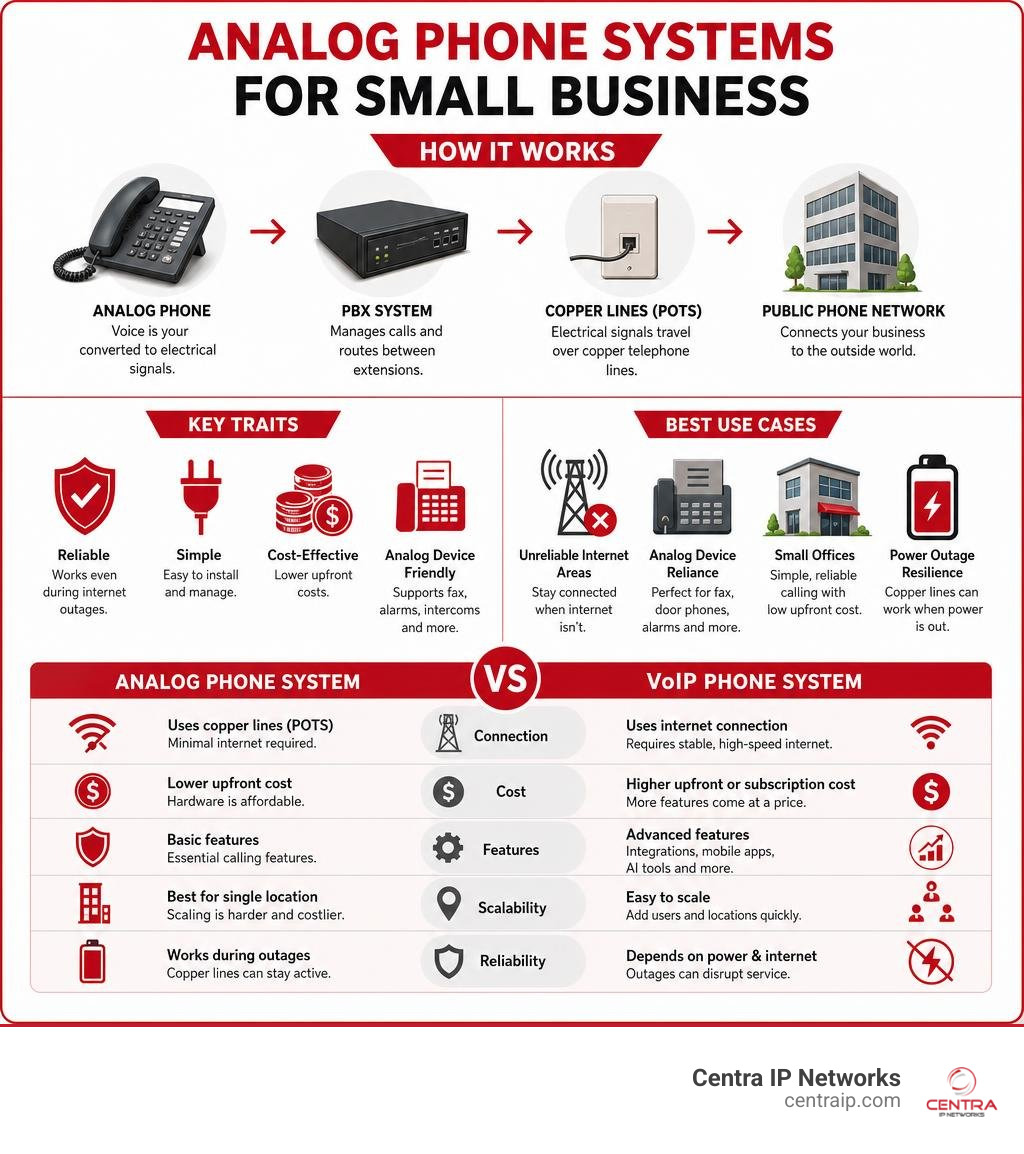
An analog phone system transmits voice calls as electrical signals over copper telephone lines (POTS — Plain Old Telephone Service). It connects to the public phone network through physical wiring, requiring minimal internet infrastructure to operate.
Best suited for:
- Businesses in areas with unreliable internet
- Industries that rely on analog devices (fax, door phones, intercoms)
- Small offices that want low upfront cost and simple, reliable calling
- Environments where power backup through copper lines is critical
Not ideal for:
- Businesses that need to scale quickly across multiple locations
- Teams that work remotely or need mobile app integration
- Companies looking for advanced features like AI transcription or CRM sync
The phone system market is crowded. There are over 2,000 telephone system products on Amazon alone, ranging from basic two-line corded phones to full cloud PBX platforms. That makes it genuinely hard to know what’s right for your business — especially when most guides push you straight toward VoIP without explaining where analog still wins.
This guide cuts through the noise. We’ll explain how analog systems work, compare them honestly to digital and VoIP alternatives, and help you figure out which setup actually fits your needs and budget.
I’m Patrick Brangan, and with over 20 years of experience helping SMBs across Dallas, Tampa, and Orlando select and install analog phone systems for small business and modern unified communications solutions, I’ve seen when analog is the right tool — and when it’s time to move on.
Similar topics to analog phone systems for small business:
Understanding Analog Phone Systems for Small Business: How They Work
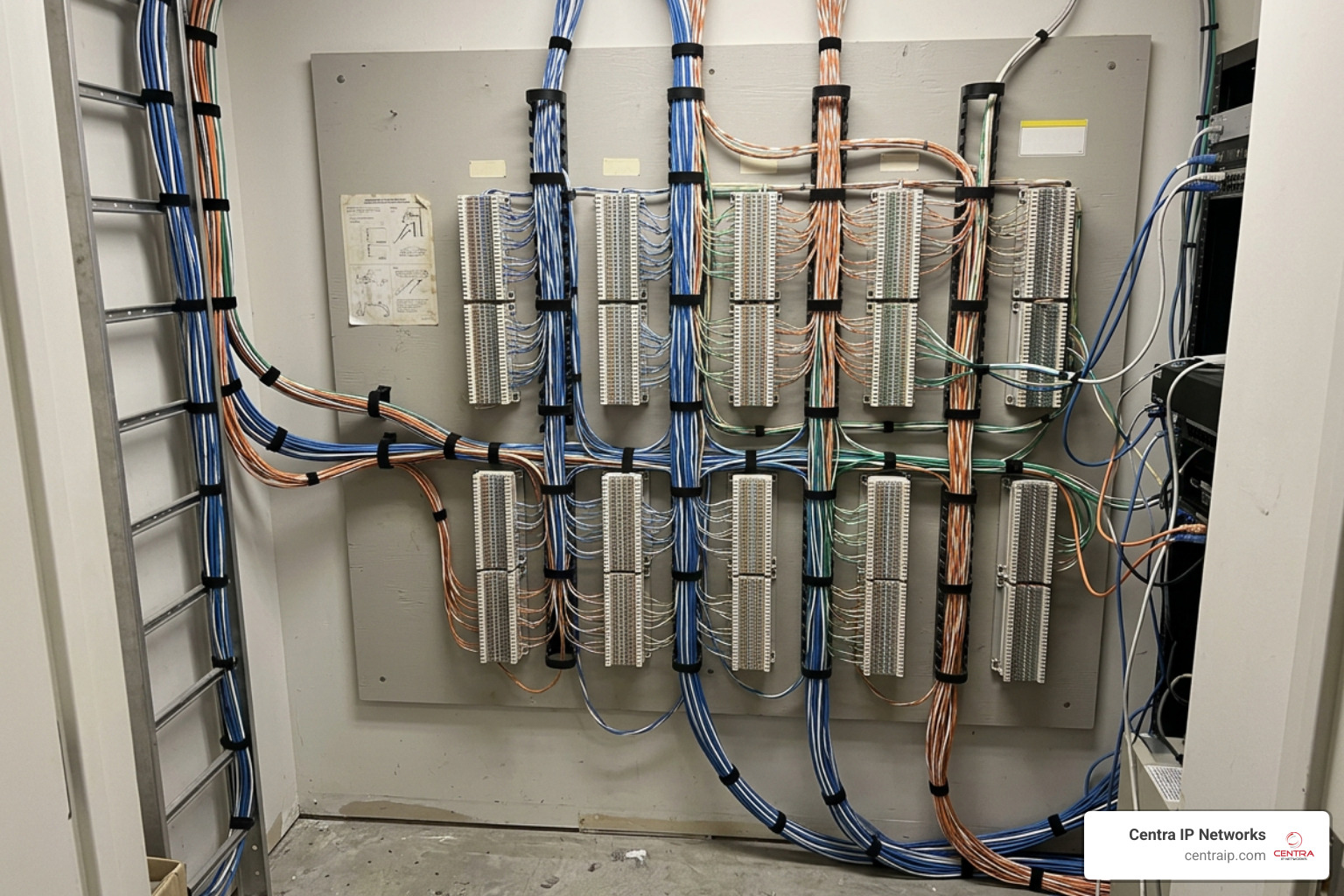
To understand whether an analog system is right for your physical storefront in Fort Worth or your office in Sarasota, we have to look under the hood. Unlike cloud-based platforms that turn your voice into digital data packets, traditional analog systems rely on physical infrastructure.
Analog setups operate on what the telecom world calls POTS (Plain Old Telephone Service), which connects to the PSTN (Public Switched Telephone Network). When you plug a standard telephone into an RJ-11 wall jack, you are tapping into a network of copper wires that runs all the way back to your local carrier’s central office.
If you are trying to make sense of your current office setup, check out our guide on The Different Types of Business Phone Systems to see how these legacy architectures fit into the broader telecom landscape.
How Traditional Landlines Route Calls
When you speak into an analog handset, the microphone converts your voice’s acoustic sound waves into continuous electrical signals. These electrical waves travel along copper wiring directly to a local exchange or physical switch.
From there, the local exchange routes the electrical signal to its destination. Because the signal travels as a continuous wave over dedicated physical lines, the call quality is incredibly consistent—you do not have to worry about the “jitter,” packet loss, or awkward delays that can sometimes plague internet-based calls when bandwidth is tight.
On-Premise PBX vs. Key Systems
For a small business, having a separate physical line for every single employee is both expensive and impractical. To solve this, businesses historically installed one of two physical systems on their property:
- Key Telephone Systems (KSU): These systems use a physical Key Service Unit (KSU) to act as a manual controller. A user manually selects which external phone line they want to use by pressing a physical button on their desk phone. Key systems are simple, highly durable, and perfect for small offices with fewer than 10 or 15 employees.
- Private Branch Exchange (PBX): A PBX is a more sophisticated, automated on-premise switchboard. Instead of manually selecting a line, the PBX automatically routes incoming and outgoing calls to the correct internal extensions.
To learn more about how physical hardware handles your office traffic, take a look at The Grounded Choice: A Deep Dive into On-Premise PBX Solutions.
Analog vs. VoIP: A Cost and Feature Comparison
Deciding between traditional copper lines and cloud-hosted VoIP is one of the most important decisions you will make for your office infrastructure. Here is a direct breakdown of how they compare across key categories:
| Feature/Cost Category | Traditional Analog Systems | Cloud VoIP Systems |
|---|---|---|
| Upfront Hardware Costs | Moderate to High (Requires physical PBX, wiring, and proprietary desk phones) | Low (Requires IP phones or simply uses existing computers/smartphones) |
| Monthly Subscription Fees | Fixed line rental per copper line (Often higher per line) | Per-user monthly licensing (Scalable and predictable) |
| Maintenance & IT Support | High (Requires on-site telecom technicians for physical changes) | Negligible (Managed remotely via a web browser or cloud provider) |
| Power Outage Resilience | High (Copper lines carry their own electrical current) | Low (System goes down without internet and local power backup) |
| Advanced Feature Set | Basic (Voicemail, transfer, hold, caller ID) | Advanced (Video meetings, CRM integration, AI voicemail-to-text) |
For a deeper dive into how on-premise hardware stacks up against modern cloud platforms, read our analysis on Choosing Between On-Premise Phone Systems and Cloud.

Key Features to Look For in Analog Phone Systems for Small Business
If you decide to stick with an analog setup, you do not have to settle for a bare-bones experience. Modern analog hardware has evolved to include several productivity features:
- Caller ID & Call Waiting: Essential for identifying clients before you pick up.
- Smart Call Blocking: Crucial for keeping spam and robocalls from tying up your physical lines.
- Auto-Attendant: A digital receptionist that plays a recorded greeting and routes callers to the right extension (e.g., “Press 1 for Sales”).
- Customizable Music on Hold: Allows you to play promotional announcements or pleasant music to keep callers engaged.
- Intercom and 3-Way Conferencing: Perfect for quick internal collaboration between desks.
To make sure you are not missing out on critical tools, review our checklist of What You Need in a Business Phone System.
The Financial Reality: Upfront vs. Ongoing Costs
From a budgeting perspective, analog and VoIP systems use entirely different financial models.
Analog systems are a heavy Capital Expenditure (CapEx). You buy the physical PBX unit, pay a technician to run physical copper wires through your walls, and purchase the proprietary desk sets. However, once the equipment is paid for, your ongoing costs are limited to local carrier line fees and occasional physical maintenance.
VoIP, on the other hand, is an Operational Expenditure (OpEx). Many cloud phone platforms are priced as monthly per-user plans, which can reduce the upfront hardware bill but continue indefinitely and scale up with every employee you hire.
If you are operating in Central Florida, you can explore localized pricing options and deployment strategies by working with a regional managed communications provider.
Equipment, Infrastructure, and Hybrid Integrations
Setting up a robust communication network requires a clear understanding of the physical components involved. If you are not ready to abandon your existing analog desk phones but want to take advantage of modern call rates, a hybrid setup is your best path forward.
For businesses looking to keep their physical hardware on-site, a hybrid system acts as a bridge. Learn more about how this infrastructure is managed on our Premise-Based Phone Systems page.
Essential Hardware for Setup
To get a traditional analog system up and running, you will need:
- Incoming Lines: Physical copper POTS lines delivered by your local telecom utility.
- A Central Controller: An on-premise KSU or PBX cabinet to manage line distribution.
- Desk Phones: Multi-line corded base stations (like the VTech CM18445) that can handle up to 4 lines.
- Cordless Handsets: DECT 6.0 cordless handsets to allow your team to move around the office without losing signal or experiencing interference.
- Answering Machines: Dedicated digital recording hardware if your central system does not have built-in voicemail.
Bridging the Gap: Integrating Analog with Modern VoIP and CRMs
You do not have to choose between 100% analog and 100% cloud. Hybrid IP-PBX systems allow you to combine the reliability of traditional local lines with the cost-efficiency of the internet.
To make this connection, hybrid systems use two types of physical interfaces:
- FXS Ports (Foreign Exchange Subscriber): These physical ports allow you to plug traditional analog telephones, fax machines, or door phones directly into a digital system.
- FXO Ports (Foreign Exchange Office): These ports connect your on-premise system to the outside analog telephone line (POTS) coming from your local utility company.
By using hybrid appliances like the Yeastar S412 or the Karel MS48IP, small businesses can route local calls over cheap internet connections (SIP trunking) while keeping their physical copper lines active as an automatic backup if the internet goes down.
This hybrid approach also allows you to integrate legacy systems with modern CRM software, ensuring your customer records update automatically when a call comes in. For professional installation services in North Texas, you can consult with local telecom experts to design a seamless setup.
Evaluating Scalability, Reliability, and Maintenance
Before committing to a physical system, you must think about what happens when your business grows or when the next major storm hits the Gulf Coast.
Choosing between on-premise hardware and cloud flexibility is a long-term commitment. For an exhaustive breakdown of how these choices impact your operations, read our On-Premise vs Cloud PBX: Your Ultimate Guide to Choosing.
Physical Wiring Limitations and Scalability
The biggest drawback of a traditional analog system is its physical rigidity. If you hire a new employee in your Tampa office and need to add a phone line, you cannot just click a button in an online dashboard.
You must physically purchase an expansion board for your PBX cabinet, verify you have an open physical port, and often pay a technician to run new copper lines through your ceiling and walls. If your physical cabinet runs out of port capacity, your only option is to replace the entire system.
Reliability and Power Outage Resilience
Where analog systems truly shine is physical reliability. Because copper telephone lines carry their own low-voltage electrical current directly from the carrier’s central office, traditional analog phones will still work during a local power outage.
If a summer storm knocks out the power grid in St. Petersburg, your internet will go down, taking any pure VoIP phones with it. An analog phone, however, will keep working, providing your business with a crucial lifeline for emergency calls and customer contact.
Top Analog and Hybrid Phone Systems on the Market
If you are ready to shop, the market has several excellent options depending on whether you want a simple standalone system or a hybrid setup that can grow with you.
To help narrow down your choices, check out our comprehensive Phone System Buyer’s Guide.
Best Standalone Analog Hardware for Small Offices
If you want to plug in and start calling without complex programming, these standalone systems are highly recommended:
- VTech CM18445 (4-Line System): A fantastic main console for small offices. It supports up to four external lines, features an auto-attendant, customizable hold music, and can wirelessly expand up to 10 DECT 6.0 cordless handsets.
- AT&T TL86103: A versatile 2-line system that features Bluetooth Connect-to-Cell. This allows you to pair your mobile phone to your desk set, letting you answer cell calls using your comfortable office handset.
- Panasonic KX-TG9582B: A reliable 2-line system that is expandable up to 6 cordless handsets, perfect for small retail storefronts or local workshops.
Best Hybrid PBX Systems for Growing Teams
If you want the reliability of analog lines combined with the modern features of VoIP, these hybrid systems are the gold standard:
- Yeastar S412: Engineered specifically for small businesses, this hybrid system supports up to 8 VoIP users, 8 concurrent calls, and features up to 12 physical FXS ports to connect your existing analog phones.
- NEC SL2100: A highly scalable “smart” key system. It supports traditional copper lines, mobile smartphone apps, and built-in toll fraud protection (InGuard) to prevent unauthorized remote access.
- Avaya IP Office: A highly powerful, converged solution that can scale from a dozen handsets to over 1,000 users, allowing you to seamlessly mix traditional digital phones and VoIP.
If you are located in southwest Florida, you can find local deployment support through experienced regional installation partners.
When to Choose Analog Phone Systems for Small Business vs. VoIP
To make your final decision simple, we have broken down the ideal scenarios for each technology:
Go with an Analog/Hybrid System if:
- You run a retail store or manufacturing plant where you only need a few reliable lines and simple paging/intercom features.
- You manage a long-term care or hospitality facility that requires hundreds of simple, inexpensive analog room phones.
- Your local internet connection is slow or prone to regular outages.
Go with a Cloud VoIP System if:
- Your team works remotely or travels frequently.
- You need deep integration with tools like Salesforce, Microsoft 365, or Google Workspace.
- You want to scale your team up and down without touching physical wires.
For a complete strategic roadmap, read through our Small Business Phone System Guide.
Frequently Asked Questions about Analog Business Phones
Can I use my existing analog phones with a VoIP service?
Yes! You do not have to throw away your reliable analog desk phones. By using an ATA (Analog Telephone Adapter), you can plug your traditional RJ-11 phone cords into the adapter, which converts your analog voice signals into digital data packets compatible with VoIP networks.
What is the difference between analog and digital phone systems?
While both use physical on-premise hardware, analog systems use standard copper wiring to transmit continuous electrical waves. Digital systems convert voice into binary code and run over proprietary bus structures, allowing for more advanced features like digital displays and programming without physical rewiring.
To explore these differences further, check out our comparison on Premise Based Phone System or Cloud System.
Are analog phone systems being phased out in 2026?
Yes, traditional copper POTS lines are undergoing a gradual decommissioning process across the United States. While the FCC has allowed carriers to phase out legacy copper infrastructure in favor of fiber and digital networks, physical analog systems will continue to operate for years to come through fiber-to-the-premise connections and hybrid VoIP adapters.
Conclusion
Finding the perfect balance between classic physical reliability and modern digital features does not have to be a headache. Whether you want to maintain a traditional copper system for emergency backup or transition your office to a modern, flexible cloud platform, the key is choosing a solution that fits your day-to-day workflow.
At Centra IP Networks, we make business communication simple. We offer comprehensive Managed IT and Cloud Communications services across Dallas, Fort Worth, Orlando, Tampa, St. Petersburg, Clearwater, and Sarasota.
Our unique strength is our single-platform approach: we combine your phone systems, high-speed internet connectivity, and cloud solutions into one platform with a single bill and a single point of contact. By leveraging our 35+ industry partnerships, we design tailored, cost-effective communication systems built specifically for your business.
Ready to find your perfect fit? Read our guide on Finding the Right Business Phone System for Your Business or take the next step and Explore Centra IP Phone Systems today to see how we can streamline your office communications.