Why Surveillance Systems Matter More Than Ever in 2026
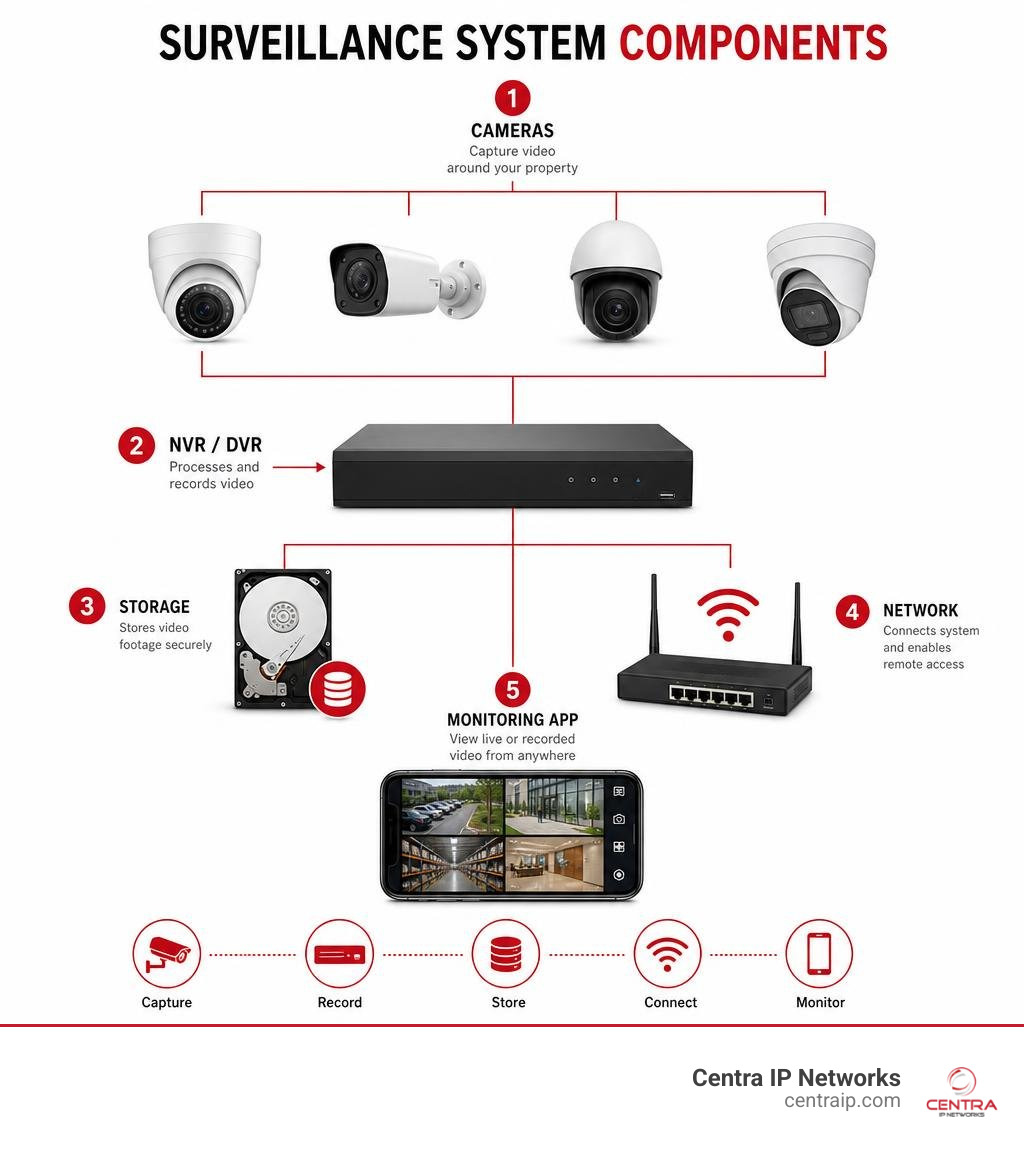
Surveillance systems are integrated security solutions that combine cameras, sensors, recorders, and software to monitor and protect a property — continuously, and often intelligently.
Here’s a quick breakdown of what you need to know:
| Type | Best For | Key Feature |
|---|---|---|
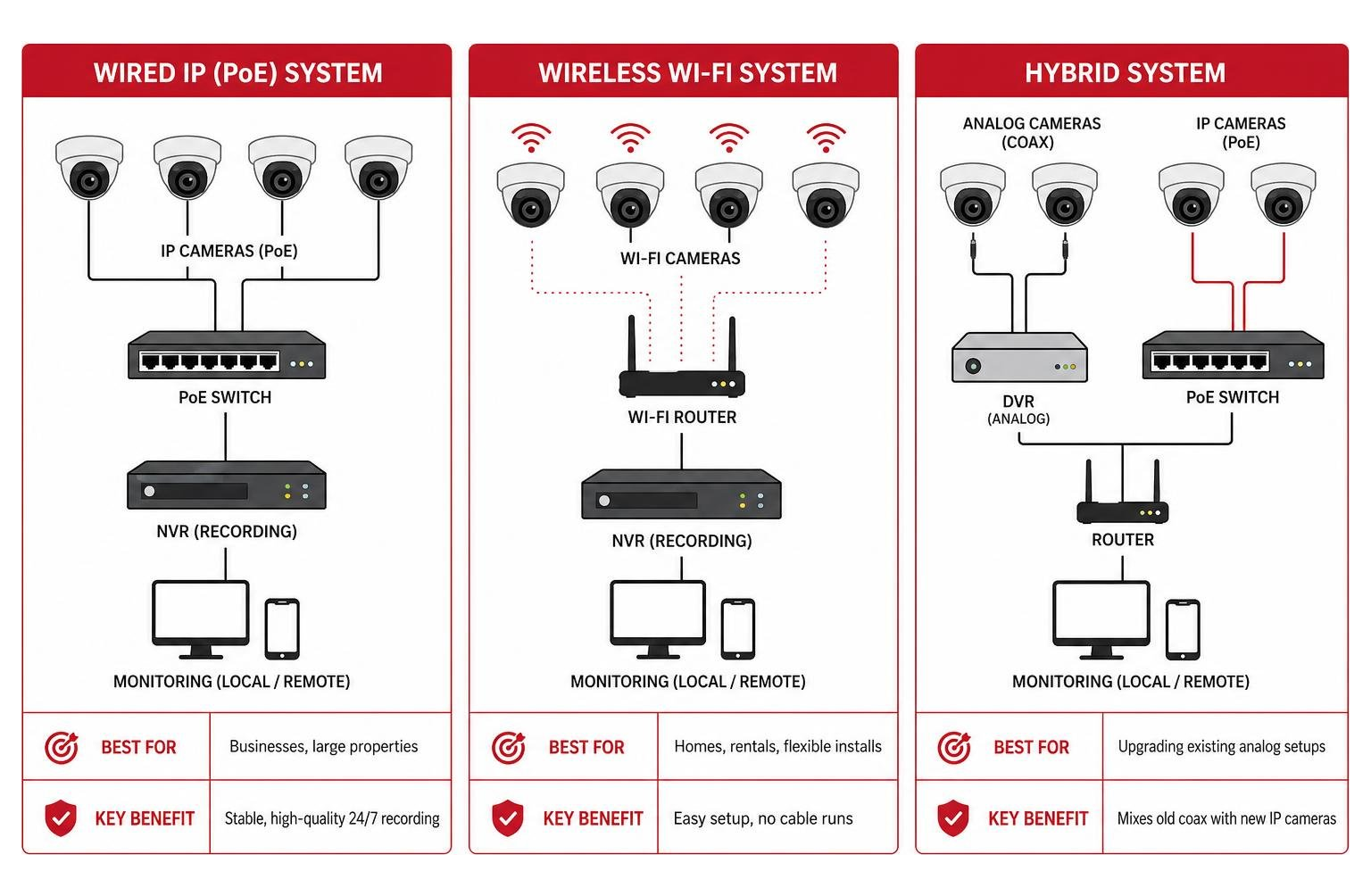
| Wired IP (PoE) | Businesses, large properties | Stable, high-quality 24/7 recording |
| Wireless Wi-Fi | Homes, rentals, flexible installs | Easy setup, no cable runs |
| Hybrid | Upgrading existing analog setups | Mixes old coax with new IP cameras |
| Cloud-managed | Multi-site businesses | Remote access, AI analytics |
| Analog/DVR | Budget installs, legacy systems | Low upfront cost |
The scale of modern surveillance is staggering. As of 2016, there were roughly 350 million surveillance cameras deployed worldwide — with 65% concentrated in Asia alone. Cities like New York have invested $350 million into systems like the Domain Awareness System, which runs 18,000 cameras across the city. And that was years ago. In 2026, the technology has only grown more powerful, more affordable, and more accessible to everyday businesses and homeowners.
But it’s not just governments and megacities anymore. Small and mid-sized businesses are now building smart, AI-powered surveillance systems for a fraction of what enterprise setups cost a decade ago. Features like facial recognition, color night vision, and real-time behavior detection — once reserved for law enforcement — are now available off the shelf.
The challenge isn’t access. It’s knowing what to choose, how to deploy it, and how to stay on the right side of privacy law.
I’m Patrick Brangan, and over the past 20+ years I’ve helped SMBs across Dallas, Tampa, and Orlando design and deploy surveillance systems that actually work — from a single-camera retail setup to a 10-day full-site installation covering cameras, access points, and networking for a nationwide preschool chain. This guide pulls from that hands-on experience to help you make the right call for your business.
Comparing the Main Types of Surveillance Systems: Wired, Wireless, and Hybrid
When building or upgrading your security infrastructure, the first decision you will face is how your cameras communicate and receive power. This choice sets the foundation for your system’s reliability, installation cost, and flexibility.
Wired IP Systems and PoE Technology
For businesses that cannot afford a single second of downtime, wired IP (Internet Protocol) systems are the gold standard. These systems utilize Power over Ethernet (PoE) technology, which transmits both high-definition video data and electrical power over a single Cat5e or Cat6 Ethernet cable.
With PoE, you do not need to run separate electrical wiring to each camera location. Instead, everything runs back to a centralized Network Video Recorder (NVR) or a PoE switch. This single-cable architecture delivers unmatched stability. While consumer Wi-Fi cameras can suffer from signal drops, local router congestion, or wireless interference, a wired PoE system remains online 24/7.
Modern commercial setups, such as the eufy PoE NVR Security System S4 Max | 16MP & PTZ – eufy US , show how powerful wired systems have become. These configurations support ultra-high-resolution streams (up to 16MP) and Pan-Tilt-Zoom (PTZ) cameras that require a constant, heavy stream of bandwidth that would easily choke a standard office Wi-Fi network.
Wireless Video Surveillance System Options
If running Ethernet cables through solid concrete walls or across a sprawling outdoor yard is out of the question, wireless systems offer a highly flexible alternative. However, in 2026, we must distinguish between standard consumer Wi-Fi and professional-grade wireless.
Standard Wi-Fi cameras (operating on 2.4 GHz or 5 GHz bands) are easy to install but are prone to range limitations and signal blockage. For larger commercial properties, farms, or detached warehouses, the industry has turned to Wi-Fi HaLow technology. Operating in the sub-1 GHz band (specifically around 900 MHz), Wi-Fi HaLow provides up to 2,200 feet of range in a clear line of sight. It penetrates physical obstacles like concrete walls and metal structures far better than traditional Wi-Fi.
For properties without a reliable internet connection, a professional Wireless Video Surveillance System can operate completely independently of your local router. By pairing wireless cameras directly with a dedicated wireless NVR, the system creates its own closed network. This ensures your cameras keep recording locally to hard drives even if your internet service provider goes down.
Hybrid Surveillance Systems and Fusion Recorders
What if you already have an older analog surveillance system but want to upgrade to modern IP cameras without ripping out miles of expensive coaxial cabling? This is where hybrid systems and fusion recorders save the day.
A hybrid recorder acts as an analog-to-IP bridge. It features physical BNC ports to accept traditional coaxial cables from legacy cameras alongside RJ45 Ethernet ports (or Wi-Fi connections) for newer IP cameras. This allows you to keep your existing, functional cameras on low-risk areas while strategically deploying advanced 4K IP cameras on high-priority zones like cash registers, entryways, or loading docks. Utilizing hybrid technology is one of the smartest ways to scale your system budget-friendly. To understand how these different form factors fit into your physical space, check out our guide on the 10 Different Types of Security Cameras for Business.
IP Cameras vs. Analog Cameras: Key Differences and Use Cases
The choice between IP and analog cameras is about more than just cables—it dictates the clarity of your footage, the smart features you can use, and how easily your system can expand.
| Feature | IP (Network) Cameras | Analog CCTV Cameras |
|---|---|---|
| Resolution | Up to 4K (8MP), 12MP, or even 16MP+ | Typically limited to 1080p or 4K over Coax (HD-TVI/CVI) |
| Cabling | Single Ethernet cable (PoE) | Coaxial cable + separate power cable |
| Intelligence | On-camera (Edge AI) analytics | Dependent on DVR processing power |
| Scalability | Highly scalable via network switches | Limited by physical ports on the back of the DVR |
| Bandwidth | Consumes local network bandwidth | Zero network impact (until viewed remotely) |
High-Definition IP Cameras and Network Video Recorders
IP cameras are essentially tiny computers with lenses. They capture video, compress it on-board, and transmit it as digital data over an IP network. This digital nature allows for incredible resolution options, often starting at 4K (8MP) and going up to 12MP or 16MP.
With this level of detail, digital zoom actually becomes useful. Instead of looking at a pixelated blur when zooming in on a suspicious face or license plate, 4K IP cameras let you crop in close while maintaining recognizable details. Because they run on standard network protocols, you can easily scale your system by adding PoE switches throughout your facility. This is particularly useful for growing companies; you can read more about setting up these systems in The Ultimate Guide to Office Video Surveillance Systems for Modern Workspaces.
Traditional Analog Cameras and Digital Video Recorders
Analog cameras capture a continuous video signal and send it over raw coaxial wiring to a central Digital Video Recorder (DVR), which digitizes and compresses the footage.
While analog systems lack the advanced on-camera intelligence of IP networks, they remain incredibly popular for budget-conscious operations and legacy buildings. They have virtually zero signal latency, do not consume any of your local office network bandwidth, and are highly reliable because they do not rely on network switches or IP configurations. If your goal is straightforward, continuous recording without the need for advanced AI searches, a modern HD-over-Coax analog system can still get the job done reliably.
Modern Features: AI Detection, Facial Recognition, and Color Night Vision
The days of squinting at grainy, black-and-white security footage while trying to guess if a shadow was a stray cat or a burglar are officially over. Modern surveillance systems have transitioned from passive recording devices into proactive security guards.
AI-Powered Threat Detection and Video Analytics
Traditional motion detection was notoriously unreliable. A blowing leaf, a spider crawling across the lens, or a sudden change in headlights would trigger a false alarm, leading many business owners to disable notifications entirely.
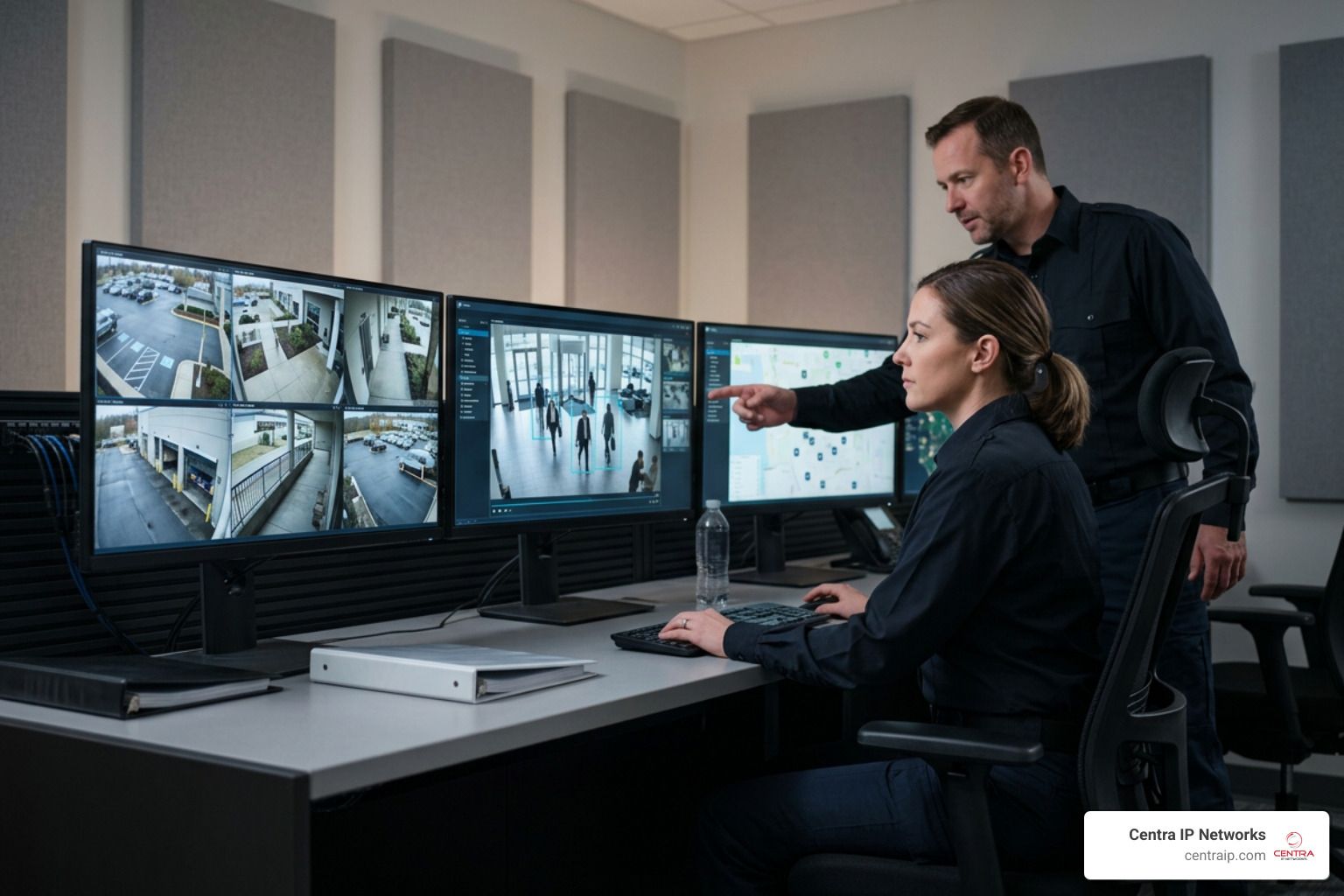
Modern systems use edge-based AI to classify objects in real time. They distinguish between humans, vehicles, animals, and environmental noise, reducing false alerts by 70% to 90%. Platforms like MASS AI – Magos Systems pair radar detection with AI video classification. This allows the system to automatically track targets with PTZ cameras and alert security personnel only when an actual human trespasses into a restricted area after hours.
Facial Recognition and Biometric Databases
Advanced surveillance setups can compare live video feeds against local database libraries. This is highly valuable for high-security environments, retail loss prevention, or access control.
On a larger scale, government agencies and enterprise organizations utilize biometric databases to keep track of security threats. For instance, the FBI has invested over $1 billion into biometric databases storing facial recognition data, iris scans, and fingerprints. In highly specialized environments, wide-area systems like the SkEye WAPS | Persistent Wide-Area Airborne Surveillance provide persistent, city-scale visual monitoring, tracking multiple targets simultaneously across massive geographic areas.
Color Night Vision and Smart Security Lighting
Standard infrared (IR) night vision turns night footage into a gray, ghostly image. Today’s starlight sensors can capture full-color video in near-total darkness by maximizing minimal ambient light from stars or streetlights.
When ambient light is completely absent, systems like the NeuTracis AI Video Search 4K 8MP PoE Security Camera System – ANNKE Store – ANNKE Official Website utilize “Smart Dual Light” technology. They remain in discreet infrared mode until they detect a human or vehicle. Once a target is identified, the camera activates a warm white spotlight, switching to crystal-clear color night vision while simultaneously warning the intruder that they are being watched.
Storage, Ecosystems, and Integration Options
Where does your video live, how do you access it, and how does it play with the rest of your technology? These are critical questions when designing a system that is easy to manage.
Local Storage vs. Cloud Video Surveillance
Choosing where to store your footage is a balancing act between security, bandwidth, and ongoing costs.
- Local Storage (NVR/DVR): Your cameras record directly to physical hard drives on-site. This option involves no monthly subscription fees, keeps your data entirely private, and does not consume your internet bandwidth. However, if a physical break-in occurs and the intruder steals or destroys the NVR, your evidence is gone.
- Cloud Video Surveillance: Footage is encrypted and sent directly to secure remote servers. This ensures your data is safe from physical theft or local hardware failure. It also makes remote viewing and multi-site management incredibly simple. The trade-off is that continuous 4K cloud streaming requires significant internet upload speeds, and you will pay ongoing monthly storage fees. For practical deployment advice, read our Cloud Video Surveillance Tips to Implement It.
- Hybrid Storage: This is the ideal professional setup. The system records 24/7 high-resolution footage locally to an NVR, while simultaneously backing up critical motion events or bookmarked clips to the cloud.
App Ecosystems and Smart Home Integration
For residential and light commercial use, integration with smart home platforms like Amazon Alexa and Google Assistant allows you to pull up camera feeds on smart displays using voice commands.
For larger business operations, you need a dedicated Video Management Software (VMS) platform. An open-platform VMS like XProtect® video management software | Milestone Systems allows you to manage thousands of cameras from different manufacturers under a single, unified interface. This eliminates brand lock-in, letting you choose the best camera hardware for each specific location while keeping your user experience consistent.
Integrating Surveillance Systems with Access Control
A truly smart security posture does not treat cameras as isolated islands. By integrating your cameras with access control systems, every badge swipe, forced door, or entry request is automatically linked to a corresponding video clip.
If an employee badges into a secure server room in Dallas, your system can immediately display the live video feed next to their profile picture to verify their identity. Integrating these technologies on a single converged network provides a holistic view of your operations, vastly improving incident response times. Discover more about how these integrations protect your bottom line in our article on the Benefits of Security Cameras for Businesses.
Practical Considerations: Costs, Installation, and Legal Compliance
Before purchasing hardware, you must plan your physical deployment, set a realistic budget, and ensure your system complies with local and state laws.
DIY vs. Professional Installation Services
While buying a pre-packaged DIY camera kit from a big-box store is tempting, professional installation is almost always the smarter choice for commercial properties.
Professional installers conduct a comprehensive security assessment to identify blind spots, calculate proper lens focal lengths, and ensure cameras are mounted out of reach of vandals. They handle the complex task of running structural cabling through fire-rated walls and configuring network switches to prevent camera traffic from slowing down your office computers.
If you are located in Dallas, Fort Worth, Orlando, Tampa, St. Petersburg, Clearwater, or Sarasota, working with local security experts ensures your physical installation is up to code. Trusted regional integrators can provide the hands-on support required for a seamless deployment, ensuring your cameras are positioned correctly and integrated with your existing network infrastructure.
Cost Breakdown of Modern Surveillance Systems
What should you expect to invest? According to market data analyzed by NerdWallet on How Much Does a Home Security System Cost in 2026? – NerdWallet , basic residential setups can range from a few hundred dollars for DIY gear to over $1,000 for professionally installed systems.
For commercial enterprises, the cost structure generally looks like this:
- Hardware: Cameras range from $150 to $800+ each, depending on resolution, PTZ capabilities, and AI features. NVRs with surveillance-grade hard drives cost between $300 and $2,000+.
- Installation: Professional labor typically runs $150 to $250 per camera drop, depending on the complexity of the cable runs.
- Ongoing Fees: Cloud storage plans or VMS software licensing can range from $5 to $15 per camera per month.
Privacy Regulations and Legal Considerations
You cannot simply point cameras wherever you want. In both Texas and Florida, individuals have a legally protected right to a “reasonable expectation of privacy.”
- Prohibited Areas: Cameras must never be installed in restrooms, locker rooms, changing areas, or employee break rooms where privacy is expected.
- Audio Recording: Wiretapping laws are strict. In Florida, recording audio without the consent of all parties is a felony. Therefore, many commercial surveillance systems have their microphones disabled by default to avoid legal liability.
- Public Notification: If you are monitoring a retail space or public entryway, posting visible signage stating that video surveillance is in progress is highly recommended—and often legally required—to deter crime and establish consent.
- Data Security: If your cameras capture public spaces or sensitive areas, you must ensure your video streams are encrypted (using AES-256 standards) to prevent unauthorized hacking and data leaks.
Frequently Asked Questions
Do wireless security cameras work without internet?
Yes. Professional wireless surveillance systems can record 24/7 directly to a local NVR without an internet connection. The NVR creates its own local Wi-Fi network to communicate with the cameras. You only need internet access if you want to view live feeds or receive push notifications on your smartphone when you are away from the property.
What is the difference between IP and analog cameras?
IP cameras are digital devices that process video on-board, offering higher resolutions (like 4K and 12MP), advanced AI features, and easy scalability over network cables. Analog cameras send a raw video signal over coaxial cables to a DVR for digitization. Analog is generally more budget-friendly and simpler to configure but lacks smart analytics and high-end image clarity.
How much does a professional security system cost?
A professional business system typically starts around $1,500 to $3,000 for a basic 4-camera PoE setup, including hardware, cabling, and professional installation. Larger commercial properties with 16 or more cameras, advanced AI analytics, and integrated access control can range from $10,000 to over $30,000.
Conclusion
Choosing the right surveillance systems does not have to be an overwhelming process. Whether you need a highly stable wired PoE network for a busy office in Fort Worth, a long-range wireless setup for a property in Sarasota, or a cloud-integrated system for multiple retail shops across Tampa and Orlando, the key is matching the technology to your specific operational goals.
At Centra IP Networks, we make security simple. We offer comprehensive Managed IT and Cloud Communications services on a single, unified platform. That means your surveillance, your business phone systems, your internet connectivity, and your cloud solutions all come from a single trusted provider, on a single bill. By leveraging our 35+ industry partnerships, we design tailored, cost-effective security solutions that fit your budget without sacrificing performance.
Ready to protect what matters most? Read The Ultimate Guide to Business Surveillance Systems to take the next step in securing your business today.