
Why an Omnichannel Cloud Contact Center Matters
An omnichannel cloud contact center brings calls, email, text, web chat, and social messages into one connected system. It lets customers move between channels without starting over, while agents see the conversation history and customer details in one place.
Customers now expect fast, consistent help wherever they reach out. The average consumer interacts with businesses across eight channels, and 85% expect interactions to feel consistent. When conversations live in separate tools, customers repeat themselves, agents lose time, and IT teams end up managing too many vendors.
For growing businesses, a cloud-based approach can simplify that work. Instead of maintaining on-site contact center hardware, teams can manage customer conversations, routing, reporting, and remote agents through a scalable hosted platform.
I am Patrick Brangan, and I have more than 20 years of experience helping small and midsize businesses simplify their communications and IT systems. My work with omnichannel cloud contact center and unified communications solutions focuses on giving teams reliable tools without adding vendor sprawl or unnecessary complexity.
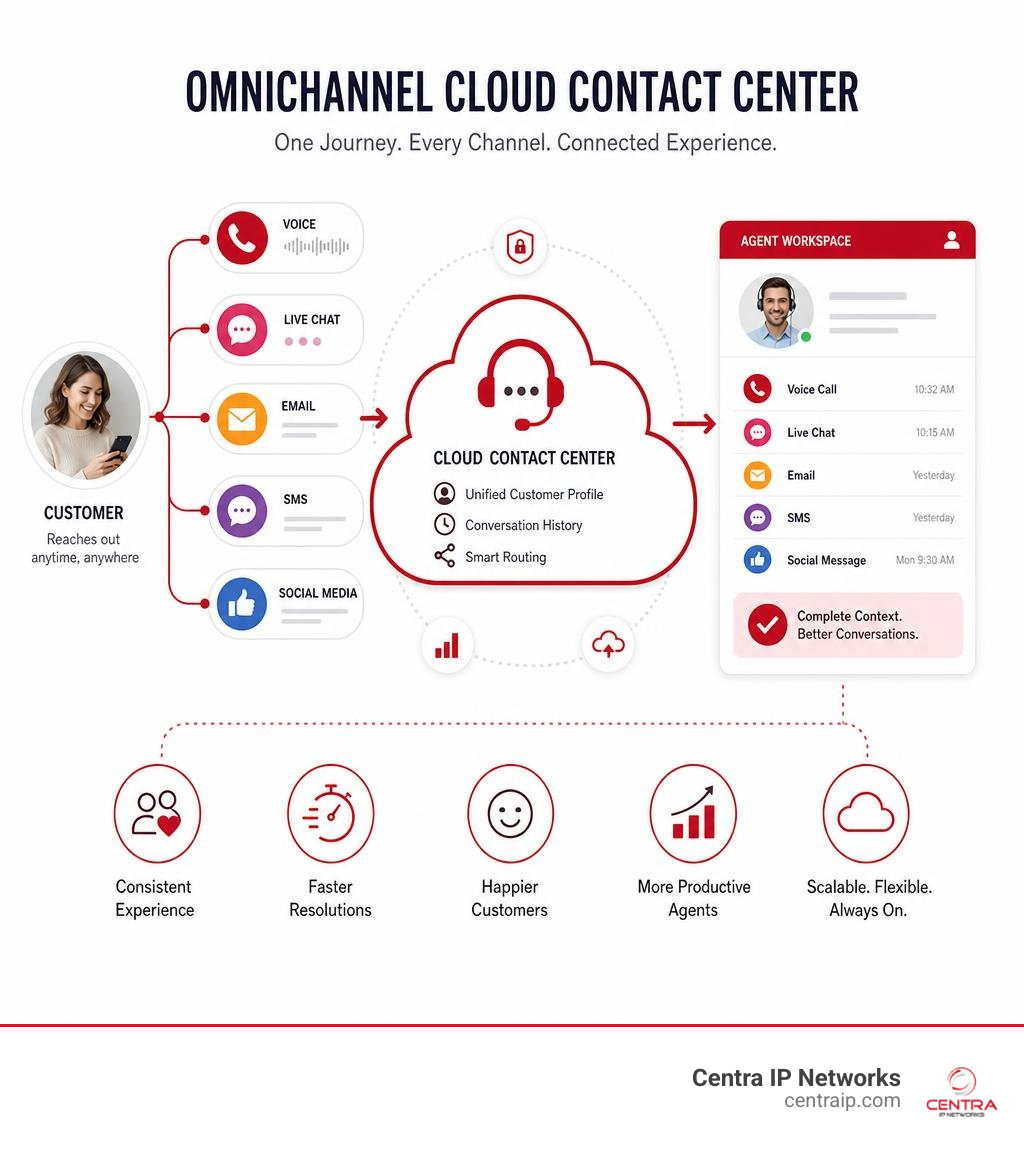
Omnichannel cloud contact center terms explained:
What Is an Omnichannel Cloud Contact Center?
An omnichannel cloud contact center is a hosted customer communication platform that unifies all voice and digital support channels into a single operational framework. Built in the cloud rather than housed in an on-premises server closet, it processes inbound and outbound interactions across voice calls, email, web chat, SMS, social media, and messaging applications.
What makes it truly “omnichannel” is how it manages data. In traditional setups, switching from web chat to a phone call wipes the slate clean, forcing the customer to re-explain their problem to a new agent. An omnichannel system preserves conversation history and context across touchpoints. When a customer initiates a query via web chat and later calls support, the incoming voice agent instantly views the prior chat transcript, account details, and active tickets on a single screen.
Because the infrastructure is hosted in secure, distributed cloud data centers, software maintenance, security updates, and capacity scaling are handled automatically by the platform provider. For detailed background on platform fundamentals, explore What is an Omnichannel Cloud Contact Center? – NiCE and read our In-Depth Guide to Contact Center Solutions.
Omnichannel vs. Multichannel: Understanding the Core Differences
It is common to confuse “multichannel” with “omnichannel,” but their underlying architectures are fundamentally different.
A multichannel contact center offers several communication touchpoints—such as phone, email, and live chat—but operates each channel in an isolated operational silo. The email team uses one software platform, the voice team uses a legacy PBX, and live chat operates through a separate website widget. Customer data remains fragmented, forcing support representatives to operate in the dark regarding parallel interactions taking place on other channels.
An omnichannel cloud contact center, by contrast, integrates all interaction channels into a unified engine. Customer details, prior transcripts, purchase records, and ongoing tickets flow freely regardless of touchpoint.
| Operational Feature | Multichannel Contact Center | Omnichannel Cloud Contact Center |
|---|---|---|
| Data Architecture | Siloed systems with disconnected customer records | Unified CRM and contact management engine |
| Context Retention | Lost when switching channels; customer must repeat details | Automatically preserved across all digital and voice handoffs |
| Agent Desktop Interface | Toggling between multiple application windows and tabs | Single-pane workspace aggregating interaction history |
| Routing Intelligence | Basic routing isolated by channel | Universal skills-based routing across voice and digital queues |
| Customer Effort | High; multiple follow-ups required across touchpoints | Low; continuous conversation across preferred channels |
Transitioning from Legacy Architecture to Cloud Native Solutions
For decades, organizations relied on traditional on-premises Private Branch Exchange (PBX) systems and physical hardware banks. Maintaining physical telephony hardware requires significant capital expenditure, dedicated server rooms, complex wiring, and ongoing IT labor for patching and upgrades. When operational capacity needs to expand during seasonal spikes, businesses are forced to purchase excess hardware licenses that sit idle during normal business hours.
Transitioning to cloud-native contact center software replaces physical infrastructure with web-based software platforms accessed securely over the internet. This migration eliminates physical hardware maintenance while introducing operational flexibility. Support agents can work securely from corporate offices in Dallas, Fort Worth, or Tampa, or operate remotely from home offices across St. Petersburg, Clearwater, and Sarasota without losing access to core tools.
To learn more about comparing hardware frameworks, review our guide on Cloud-Based vs. Premise-Based Phone Systems: Which One is Right for Your Business? and check out What Is a Cloud Native Contact Center? The Ultimate Guide to Modern Support.

Business Benefits of Modern Contact Center Unification
Unifying customer communications on an omnichannel cloud contact center directly influences bottom-line revenue, operational agility, and brand reputation. Businesses implementing omnichannel transformations report revenue increases between 5% and 15% along with improvements in cost-to-serve efficiencies of 3% to 7%.
Elevating Customer Retention and Satisfaction
Today’s consumers are channel-agnostic. Recent consumer data shows that shoppers used up to ten channels to interact with businesses in 2021, compared to five in 2016. Furthermore, 72% of consumers report remaining loyal to companies that provide fast, effortless service, and 86% state they spend more money with businesses that deliver high-quality experiences.
When customer service requires minimal effort, loyalty surges. In fact, research demonstrates that companies adopting a comprehensive omnichannel strategy achieve a 91% higher year-over-year customer retention rate compared to businesses sticking with fragmented support models. Preserving conversation context reduces resolution times, lowers Customer Effort Scores (CES), and yields higher Net Promoter Scores (NPS).
Maximizing Agent Productivity and Operational Efficiency
Agent burnout and high turnover have historically plagued customer service departments. Much of this frustration stems from “screen switching”—forcing agents to copy and paste customer details between half a dozen open windows while trying to manage a live conversation.
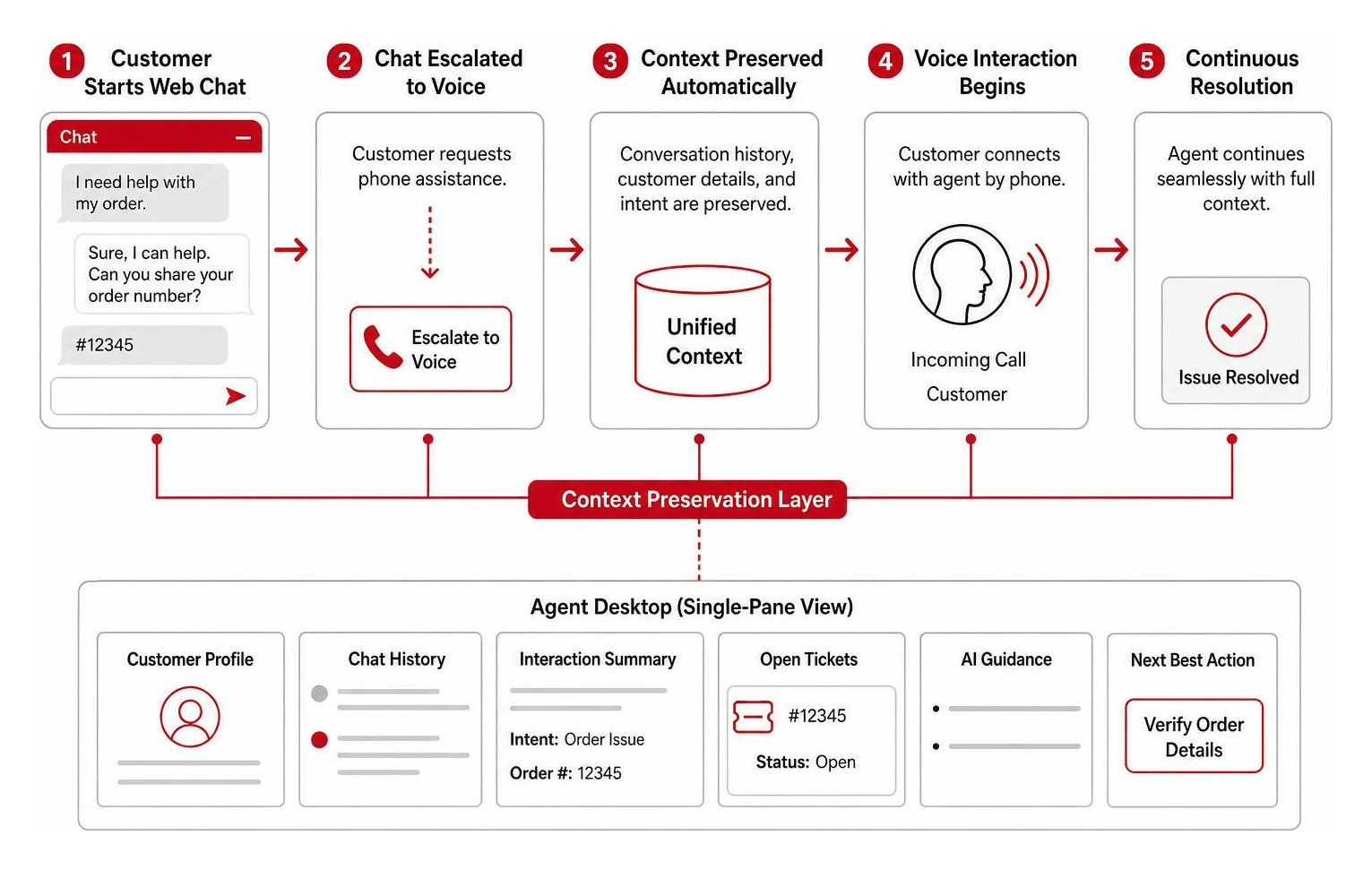
An omnichannel cloud contact center presents agents with a single-pane desktop. When an inquiry arrives, the platform pulls account records, previous interaction summaries, open support tickets, and AI coaching notes directly onto the screen.
Key efficiency gains include:
- Reduced Average Handle Time (AHT): Agents spend less time verifying caller identities and asking customers to repeat information.
- Improved First Contact Resolution (FCR): Multi-skilled agents can resolve queries across text, chat, or voice without transferring callers between departments.
- Optimized Staffing Schedules: Integrated Workforce Management (WFM) tools accurately forecast interaction traffic across all channels, balancing agent shifts to eliminate costly downtime.
To understand how cloud voice integration supports agent productivity, read Contact Center VoIP Solutions: Why Your Business Needs to Make the Call.

Essential Software Features and Technical Capabilities
Selecting the right omnichannel cloud contact center software requires evaluating core management, routing, and integration features.
Core Components of an Omnichannel Cloud Contact Center Platform
Modern cloud contact platforms combine several essential operational modules into one unified web administration console:
- Automatic Call Distributor (ACD): Dynamically routes incoming contacts across voice, chat, email, and social messaging to the most qualified available representative based on agent skill profiles, customer history, and current queue volumes.
- Workforce Management (WFM): Uses historical data to forecast contact spikes, build multi-skilled agent schedules, and monitor real-time schedule adherence across hybrid work environments.
- Interactive Voice Response (IVR) & Visual IVR: Guides callers through self-service menus using natural speech recognition or visual web interfaces, allowing customers to resolve simple balance inquiries or appointments independently.
- Universal Agent Desktop: Consolidates voice calls, live web chat, SMS, email, and social messaging into a single interface with built-in interaction records and call control buttons.
- Supervisor Dashboards & Live Coaching: Gives contact center managers real-time visibility into active queues, agent statuses, average wait times, and call sentiment, featuring whisper, listen, and barge-in capabilities for live coaching.
CRM Integrations and Unified Communications
A contact center cannot operate effectively as an isolated application island. Native integration with Customer Relationship Management (CRM) tools—such as Salesforce, HubSpot, Microsoft Dynamics, or Zendesk—allows data to flow back and forth automatically.
Through Computer Telephony Integration (CTI) screen pops, customer records open automatically the moment an inbound contact connects. Every call recording, chat transcript, and automated summary logs straight into the CRM timeline without requiring manual agent entry.
Combining Contact Center as a Service (CCaaS) with Unified Communications as a Service (UCaaS) further bridges internal collaboration gaps. Support agents can view presence statuses for internal subject matter experts across departments and initiate a quick internal chat or call transfer to resolve complex customer issues while the customer is on the line.
To explore how system integrations optimize workflows, read Cloud Phone System CRM Integration and learn What is UCaaS?.
AI-Powered Contact Center Optimization
Artificial intelligence has evolved from basic rule-based auto-responders into an intelligence engine that supports both self-service tools and live agent assistance. Industry surveys reveal that 67% of contact center leaders observe faster issue resolution times following AI deployment, while 60% report measurable improvements in overall customer satisfaction.
How AI Optimizes the Omnichannel Cloud Contact Center Workflow
Native AI within an omnichannel cloud contact center operates in the background during live customer interactions:
- Real-Time Speech-to-Text Transcription: Converts spoken voice interactions into text transcripts instantly, removing the need for manual note-taking during calls.
- Real-Time Sentiment Analysis: Evaluates caller word choices and voice tone to grade customer sentiment continuously, alerting supervisors automatically if an interaction turns negative.
- Automated Interaction Summarization: Generates concise call summaries and updates CRM ticket notes immediately following contact completion, drastically shortening post-call wrap-up work.
- Automated Quality Management (AQM): Scores 100% of customer interactions across voice and digital channels based on compliance and sentiment criteria, giving managers instant visibility into coaching needs across the entire team.
Intelligent Self-Service and Virtual Agents
Conversational AI platforms—such as Dialogflow CX and native voice bots—enable 24/7 self-service containment. Rather than forcing users through rigid, frustrating keypad trees, natural language processing allows customers to speak or type requests naturally.
When an issue requires human assistance, virtual agents execute a contextual handoff. The bot transfers the customer directly to an appropriately skilled live representative along with the complete transcript of the self-service attempt. The human agent steps into the conversation fully informed, ensuring a frictionless customer handoff.
Best Practices for Implementing an Omnichannel Strategy
Upgrading to an omnichannel cloud contact center requires strategic planning, thoughtful customer journey mapping, and comprehensive staff onboarding.
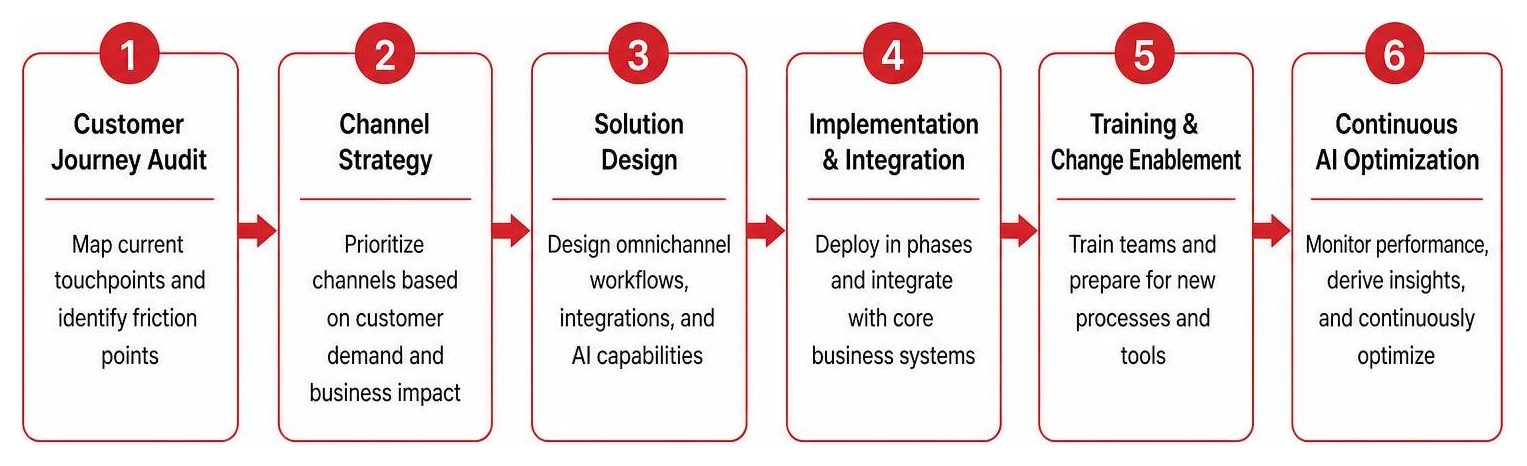
Customer Journey Mapping and Channel Prioritization
Avoid the temptation to launch ten new communication channels simultaneously without assessing real customer demand. Successful implementation follows a structured framework:
- Audit Customer Touchpoints: Map out how customers currently reach your business. Identify common friction points, such as high call drop-off rates or slow email response times.
- Prioritize Core Channels: Launch channels based on actual customer communication preferences. Most organizations start by unifying voice calls, web chat, and email before expanding into SMS and social messaging.
- Establish Clear SLAs: Define specific Service Level Agreements (SLAs) for every channel. For example, aim to answer 80% of voice calls within 20 seconds while maintaining a 15-minute response target for web chat and WhatsApp messages.
- Gather Representative Feedback: Involve frontline customer service agents during beta testing to gather direct input on desktop workspace layouts and workflow design.
Security, Compliance, and Managed IT Services
Handling sensitive customer communication across cloud networks requires robust security controls and regulatory oversight:
- Data Encryption: Ensure all voice streams and digital message payloads are encrypted using TLS and AES-256 standards both in transit and at rest.
- Regulatory Compliance: Verify that interaction recording and storage mechanisms adhere to strict industry compliance standards, including PCI-DSS for credit card payments and HIPAA for healthcare communications.
- Infrastructure Bandwidth & Managed IT Services: High-definition voice calls and video interaction require reliable internet connectivity, Quality of Service (QoS) bandwidth prioritizing, and enterprise firewalls.
Partnering with a managed IT provider simplifies deployment. At Centra IP Networks, we deliver managed IT, connectivity, and contact center solutions on a single unified platform with one point of contact and one simple monthly bill.
For additional compliance insights, review Cloud-Based Call Recording: Why It’s Essential for Modern Businesses and explore Streamline Your Business: The Benefits of Managed Communication Services.
Frequently Asked Questions About Cloud Contact Centers
How does channel switching work in an omnichannel contact center?
Channel switching allows a customer to transition between communication methods during a single interaction without losing context. For instance, if a customer initiates a web chat regarding an account inquiry but requires live verbal assistance, the agent can escalate the session to a voice call with a single click. The complete web chat transcript and account context pop up on the voice agent’s screen instantly, allowing the conversation to continue without requiring the customer to re-verify details or repeat their issue.
What is the difference between CCaaS and UCaaS?
CCaaS (Contact Center as a Service) focuses on external-facing customer support, featuring advanced tools like ACD call queues, skills-based routing, multi-channel queues, IVRs, and workforce engagement management. UCaaS (Unified Communications as a Service) focuses on internal team collaboration, providing employee video meetings, internal voice extensions, team messaging channels, and file sharing. Combining CCaaS and UCaaS onto a single cloud platform allows customer-facing agents to connect instantly with internal back-office staff. To learn more about unifying your tech stack, read Future-Proof with a Unified Communications Solution.
How does cloud contact center software lower total cost of ownership?
Cloud platforms replace heavy upfront capital expenditures for on-premises PBX hardware, server maintenance, and physical line cards with predictable, subscription-based operating expenses. Businesses save money by eliminating physical hardware upkeep, automated software upgrades, lower IT management overhead, and flexible per-agent licensing models that let organizations scale capacity up or down as call volumes change. Read our guide on Bringing It All Together: Mastering Unified Communications Management to learn more about TCO optimization.
Conclusion
Migrating to an omnichannel cloud contact center transforms customer service operations from disconnected cost centers into modern drivers of revenue and brand loyalty. By unifying voice, email, chat, SMS, and social messaging onto one platform, businesses empower their agents, reduce operational complexity, and give modern consumers the fast, context-aware service they expect.
Managing separate voice providers, internet vendors, and software licenses often leads to unnecessary friction and unpredictable costs. At Centra IP Networks, we eliminate vendor sprawl by delivering comprehensive Managed IT, Internet connectivity, and cloud contact center platforms on a single bill with one local support team. Whether your team operates in Dallas, Fort Worth, Orlando, Tampa, St. Petersburg, Clearwater, or Sarasota, our tailored solutions keep your business connected.
Ready to elevate your customer experience and streamline your communications technology? Learn more about our customizable Centra IP Networks Contact Center Solutions or contact our expert team today to schedule your personalized platform walkthrough.