Why So Many Tampa Businesses Are Rethinking How They Communicate
If you’re comparing communication platforms in Tampa, here’s a quick look at the top options:
| Platform Type | Best For | Key Benefit |
|---|---|---|
| Hosted VoIP | Small to mid-size businesses | Low cost, easy setup |
| UCaaS | Growing or distributed teams | Voice + video + chat in one platform |
| SIP Trunking | Businesses with existing PBX | Cuts line costs, keeps hardware |
| Hybrid VoIP | Mixed on-site and remote teams | Flexibility + control |
| Unified Messaging | Customer-facing businesses | All channels in one inbox |
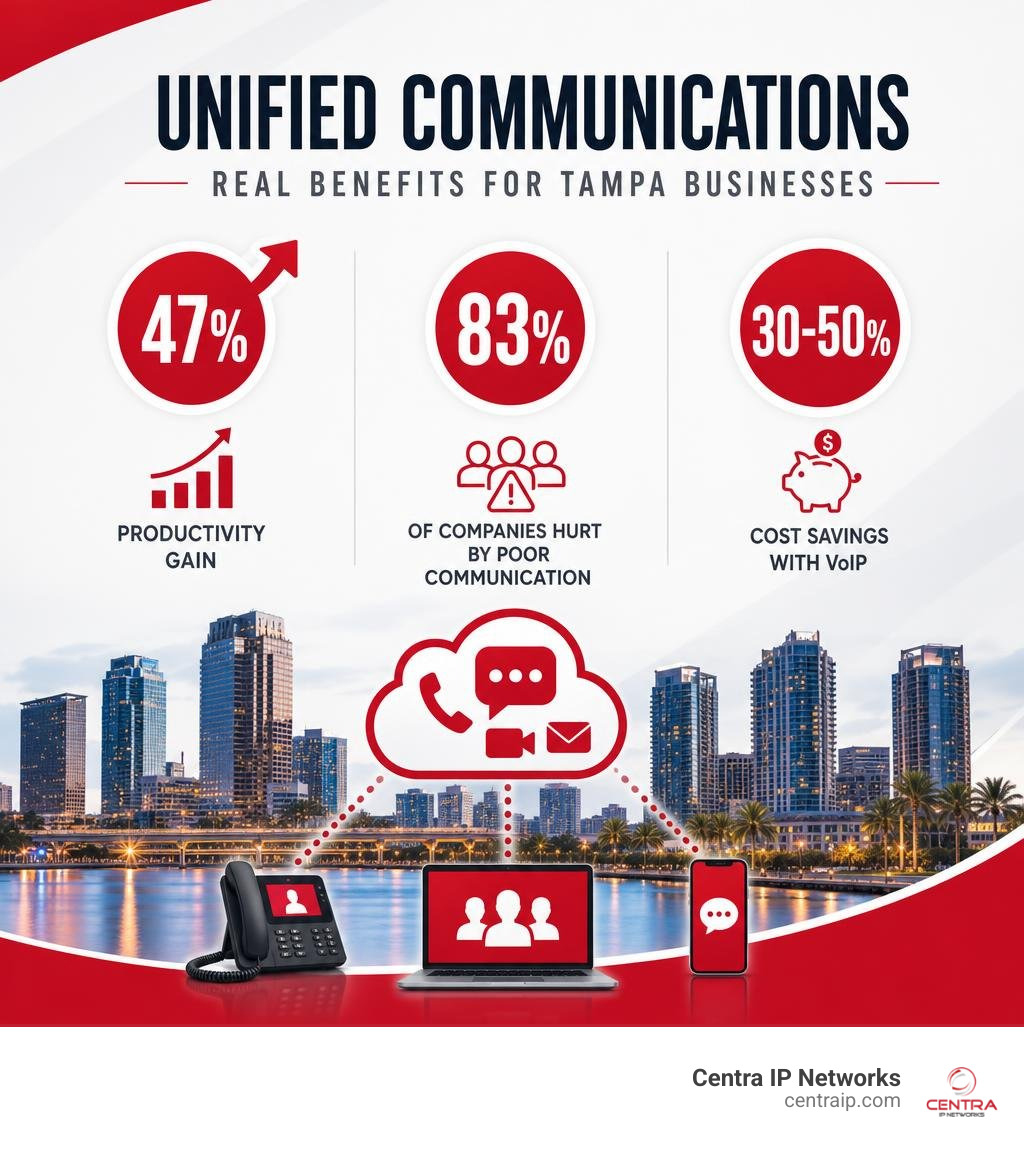
The numbers are hard to ignore. Research shows that 83% of companies have experienced missed deadlines, lost sales, and employee turnover — all because of communication breakdowns. And businesses that switch to a centralized platform report up to a 47% increase in productivity.
Yet many Tampa businesses are still juggling separate tools for calls, texts, video meetings, and customer messages. That’s a lot of noise for not enough signal.
Modern communication platforms solve this by pulling everything into one place — voice, video, messaging, and collaboration — so your team spends less time switching between apps and more time getting things done.
I’m Patrick Brangan, and over the past 20+ years I’ve helped hundreds of small and mid-size businesses across Tampa, Dallas, and Orlando simplify their communication platforms in Tampa and beyond — from cloud VoIP to full unified communications buildouts. In this guide, I’ll break down the top options so you can find the right fit for your business without the guesswork.
Why Upgrading to Modern Communication Platforms Tampa is Essential
A communication platform is the system your business uses to manage calls, voicemail, video meetings, team chat, SMS, customer messaging, and collaboration. In older offices, that usually meant a desk phone, a phone closet, a fax line that nobody wanted to touch, and a few disconnected apps.
In 2026, that is not enough.
Modern Communication Platforms Tampa businesses use are built around speed, mobility, and resilience. They help your team answer calls from the office, home, a mobile app, or another location without making customers feel like they are being passed around like a beach ball at a Lightning game.
For Tampa organizations, the upgrade matters for a few practical reasons:
- Remote and hybrid work are normal now.
- Customers expect fast responses through phone, text, chat, and email.
- Hurricane season makes business continuity a real operational issue.
- Traditional copper phone infrastructure is aging and being retired in many areas.
- Separate tools create confusion, duplicate work, and missed messages.
- Businesses need systems that scale without expensive hardware projects.
A modern business phone system is not just about making calls. It is about keeping your business reachable when your office is busy, your team is distributed, or your building loses power.
That is why many Tampa companies are moving from traditional phone systems to Hosted VoIP, UCaaS, SIP trunking, or hybrid deployments. Each option has a different fit, but the goal is the same: make communication simpler, faster, and more reliable.
If you want a deeper local overview, we also cover this in our guide to Tampa Business Phone Service.
Key Features to Look for in Communication Platforms Tampa Providers Offer
Not every communication platform is built the same. Some are basically old phone systems wearing a cloud costume. Others are true unified platforms that connect voice, video, messaging, mobility, analytics, and integrations.
When comparing providers, look for these features:
Auto attendants
A good auto attendant routes callers to the right person or department without making your receptionist play traffic cop all day.Voicemail-to-email
Voicemails should land in your inbox with audio files or transcriptions, so your team can respond faster.Mobile and desktop apps
Your employees should be able to call, message, and join meetings from laptops or smartphones while still using the business number.Video conferencing
Built-in video reduces the need for extra meeting tools and makes remote collaboration easier.Team messaging
Internal chat helps teams move faster than email, especially when used with channels for projects, locations, or departments.Call recording and reporting
Useful for training, quality assurance, compliance review, and understanding call volume patterns.CRM integration
Platforms that connect with tools like Salesforce, HubSpot, Zendesk, Microsoft 365, or Google Workspace help your team see customer context during conversations.SMS and customer messaging
For customer-facing businesses, texting can be faster and more effective than voicemail tag.99.999% uptime options
Top-tier VoIP and UCaaS systems may offer five-nines uptime, which equals less than about five minutes of downtime annually.Local implementation support
A Tampa provider should understand local connectivity, hurricane readiness, multi-location needs, and the realities of small and mid-size business budgets.
The best platform is the one your team will actually use. If it takes three manuals, two webinars, and a minor in telecommunications to transfer a call, keep shopping.
For more on cloud calling features, see our article on Tampa Cloud VoIP Phone Systems.
How AI is Transforming Communication Platforms Tampa Businesses Deploy
AI is quickly becoming one of the biggest differences between basic phone service and modern communication platforms.
No, your phone system will not start demanding vacation time. But it can help your team work faster.
AI features now appearing in VoIP and UCaaS platforms include:
- Meeting summaries
- Call transcriptions
- Voicemail transcription
- Sentiment analysis
- Smart call routing
- Chatbots for common customer questions
- Automatic follow-up reminders
- Intelligent search across chats, calls, and meetings
- Real-time translation for multilingual teams
Some users save nearly 100 minutes per week from AI-powered summaries alone. That is time employees can spend serving customers instead of re-listening to long calls or digging through meeting notes.
For Tampa businesses with sales, service, healthcare, legal, financial, hospitality, and field teams, AI can be especially useful. It can help route urgent calls, summarize customer issues, document conversations, and reduce repetitive administrative work.
The key is to use AI as an assistant, not a replacement for human service. Customers still want a real person when the issue matters. AI should remove friction, not create a robot maze.
AI also works best when supported by the right cloud infrastructure. Our Cloud Services Tampa page explains how cloud systems support communication, storage, mobility, and business continuity.
VoIP vs. UCaaS: Choosing the Right Technology for Your Organization
VoIP and UCaaS are related, but they are not identical.
VoIP stands for Voice over Internet Protocol. It moves phone calls over an internet connection instead of traditional copper phone lines. For a plain-English regulatory overview, the FCC maintains a guide to Voice over Internet Protocol (VoIP).
For many Tampa businesses, VoIP is the first step away from legacy landlines.
UCaaS stands for Unified Communications as a Service. It usually includes VoIP, but adds more tools in one cloud platform, such as:
- Voice calling
- Video meetings
- Team chat
- SMS
- File sharing
- Presence status
- Conferencing
- Mobile apps
- Contact center features
- Integrations with business software
Think of VoIP as replacing the phone system. Think of UCaaS as replacing the phone system plus several disconnected communication apps.
SIP trunking is another option. SIP trunks let businesses use internet-based calling with an existing PBX system. This can be a good fit if your current hardware still works and you want to reduce line costs without replacing everything at once.
As of June 2026, businesses should also pay attention to legacy copper retirement. Traditional landline infrastructure is being phased down in many markets as carriers invest in fiber and IP-based systems. That does not mean every landline disappears overnight, but it does mean relying on old phone infrastructure is becoming riskier and often more expensive.
Here is the simple way to choose:
- Choose Hosted VoIP if you mainly need reliable business calling with lower costs.
- Choose UCaaS if your team needs calling, video, chat, messaging, and remote collaboration.
- Choose SIP trunking if you want to keep an existing PBX but lower telecom costs.
- Choose hybrid VoIP if you need a mix of cloud flexibility and on-site control.
- Choose unified messaging if missed customer messages are your biggest pain.
For businesses comparing these paths, our Business Phone Systems Tampa page is a helpful next step.
Comparing Hosted, On-Premises, and Hybrid Deployments
The right deployment depends on your size, budget, compliance needs, network, and internal IT resources.
| Deployment Type | Best For | Advantages | Watchouts |
|---|---|---|---|
| Hosted VoIP | Small to mid-size businesses, remote teams, growing offices | Lower upfront cost, fast setup, easy scaling, provider-managed updates | Requires reliable internet and proper network configuration |
| On-Premises PBX | Organizations needing maximum local control or specialized legacy integrations | Direct hardware control, custom configuration, less dependence on cloud apps | Higher maintenance, hardware costs, limited remote flexibility |
| Hybrid VoIP | Businesses with existing PBX investments or mixed location needs | Keeps some existing equipment, adds cloud features, flexible migration path | More complex design and support requirements |
Hosted VoIP is usually the easiest path for small and mid-size Tampa businesses. It avoids major capital expense and lets users be added or removed quickly.
On-premises systems can still make sense in specific cases, especially where a company has unusual integration needs or a large existing investment. But they require maintenance, hardware lifecycle planning, and disaster recovery strategy.
Hybrid systems are popular when businesses want to modernize gradually. For example, a company may keep its PBX at headquarters while moving remote users or branch offices to cloud calling.
If you are unsure which model fits, start by reviewing your current lines, phone numbers, call paths, internet service, and remote work requirements. We help clients map that out as part of our Business Phone Service Tampa planning process.
Financial ROI: Cost Savings of Switching to Cloud Communications
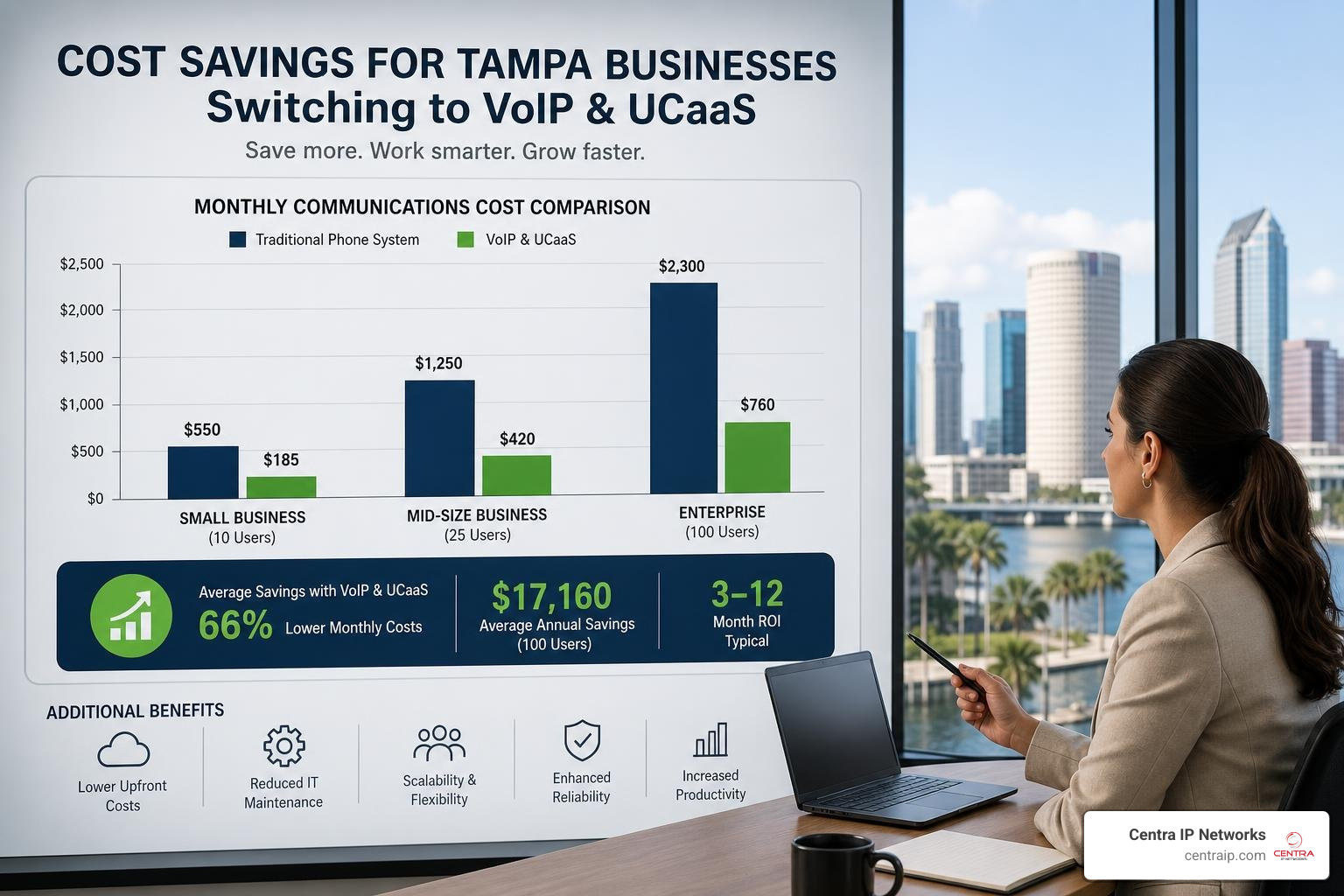
Cost is one of the biggest reasons Tampa companies switch to VoIP or UCaaS.
Research shows VoIP systems can help Tampa businesses save 30% to 50% compared with traditional landlines. For a 20-employee business, that often means around $300 to $800 in monthly savings, or $3,600 to $9,600 per year.
Savings usually come from:
- Lower monthly line costs
- Reduced long-distance charges
- Less on-premises hardware
- Fewer maintenance contracts
- Easier user changes
- Bundled features that would cost extra on legacy systems
- Reduced need for separate video, messaging, or conferencing tools
Cloud communications also improve ROI through productivity. If your staff spends less time hunting for messages, repeating information, or switching between tools, the savings go beyond the phone bill.
A few examples:
- Sales teams respond faster to leads.
- Service teams route calls more accurately.
- Managers get call reporting and performance visibility.
- Remote employees stay reachable on business numbers.
- Customers avoid the dreaded “let me transfer you” loop of doom.
Typical VoIP pricing can vary by provider and feature set. Basic plans may start around $20 to $30 per user per month, while more advanced professional or enterprise packages may run higher. Hardware phones, implementation, call recording, contact center tools, and integrations can affect final cost.
The right goal is not just the cheapest monthly price. It is the best total value.
Our Phone Systems Tampa page explains how cloud phone systems, traditional systems, and hybrid options compare.
Calculating the Total Cost of Ownership (TCO)
Before switching platforms, calculate the full cost, not just the advertised seat price.
Your TCO should include:
Monthly user licenses
This is the per-user or per-extension charge.Calling plans
Look at local, long-distance, toll-free, and international requirements.Internet bandwidth
VoIP depends on a stable internet connection. A common planning estimate is about 100 Kbps per concurrent call, though we often recommend building in extra headroom.Network upgrades
Some businesses need better switches, routers, firewalls, VLANs, or Wi-Fi.Quality of Service configuration
QoS prioritizes voice traffic so calls stay clear even when the network is busy.Phones and headsets
Some users need desk phones. Others may prefer softphones or mobile apps.Setup and migration
Setup fees can vary widely depending on users, call flows, integrations, and number porting.Training
Training helps employees use features like call transfer, conferencing, voicemail, mobile apps, and reporting.Redundancy
Backup internet, cellular failover, and UPS power can protect uptime.Support
The cheapest platform can become expensive if support is slow or fragmented.
The network is especially important. A good VoIP platform on a bad network is like putting racing tires on a shopping cart. Technically impressive, but nobody is happy with the ride.
That is why voice planning should include data networking. Learn more about the foundation behind strong cloud calling on our Data Networking Tampa page.
Security, Compliance, and Avoiding Common Implementation Mistakes

Modern communication platforms must be secure by design.
Tampa organizations in healthcare, finance, legal, retail, professional services, and hospitality often handle sensitive customer or employee information. If your phone system records calls, stores voicemails, sends SMS messages, or integrates with a CRM, security matters.
Important protections include:
- Encryption for calls, messages, and stored data
- Multi-factor authentication
- Strong password policies
- Role-based access controls
- Secure administrator portals
- Endpoint protection
- Firewall configuration
- Network segmentation
- Logging and monitoring
- Regular updates and patching
- Backup and disaster recovery planning
Compliance needs vary by industry. Healthcare organizations may need HIPAA-aligned workflows. Businesses taking payments should consider PCI DSS requirements. Companies handling personal information should understand applicable data breach notification obligations.
The platform matters, but so does the implementation. A secure system can be weakened by poor passwords, shared admin accounts, outdated routers, or untrained users.
That is why we like to approach communication platforms as part of a larger IT environment, not as an isolated phone project. Managed IT, cybersecurity, connectivity, and cloud communications all affect each other.
For more on the IT side, visit our guide to Tampa Managed IT Services.
Common Pitfalls in VoIP and UCaaS Deployment
Most VoIP problems are avoidable. The trouble usually starts when a business treats the phone system like a simple plug-and-play app.
Here are the mistakes we see most often:
Underestimating bandwidth
Every active call needs stable bandwidth. If your internet connection is already strained, adding VoIP will expose the weakness quickly.Skipping QoS
Without Quality of Service, voice traffic competes with file downloads, video streams, backups, and cloud apps. That can cause jitter, delay, and choppy calls.Ignoring the firewall
Firewalls need to be configured properly for VoIP traffic. Poor settings can cause dropped calls, one-way audio, or security gaps.No power backup
VoIP phones, switches, routers, and internet equipment need power. UPS systems can keep essential equipment running temporarily during outages.No internet failover
If your only internet connection goes down, your cloud phone system may lose office connectivity. Mobile apps, call forwarding, backup internet, or cellular failover can help.Weak number porting plan
Phone number migration should be scheduled carefully to avoid business disruption.Poor call flow design
Auto attendants, ring groups, voicemail boxes, and after-hours routing should match how your business actually works.Not training employees
If users do not know how to transfer, park, forward, or use the mobile app, adoption suffers.Overbuying features
More features are not always better. Buy what solves real problems.Choosing disconnected vendors
When internet, phones, cloud, and IT support come from different providers, troubleshooting can turn into a blame tennis match.
A managed approach helps prevent these issues. Our article on the Benefits of Managed IT Services Tampa explains why coordinated support is often more efficient than piecing everything together.
Frequently Asked Questions About Tampa Business Phones
Is VoIP cheaper than a traditional landline?
Yes, in most cases VoIP is cheaper than a traditional landline system.
Tampa businesses often save 30% to 50% on communication costs after switching. A 20-employee company may save roughly $300 to $800 per month, depending on its current phone bill, calling patterns, features, and hardware needs.
VoIP can reduce costs because it uses internet-based calling instead of separate copper phone lines. It also includes features that often cost extra with traditional systems, such as voicemail-to-email, call forwarding, mobile apps, auto attendants, and call reporting.
There is also a future-proofing reason to compare options now. Traditional copper phone infrastructure is aging, and carriers continue moving toward fiber and IP-based networks. Waiting too long can leave businesses paying more for older technology with fewer support options.
If you are comparing systems, our guide on choosing a small business phone system in Tampa is a good place to start.
Can we keep our existing phone numbers when switching?
Usually, yes.
Most businesses can keep their existing phone numbers through a process called number porting. The new provider submits a request to move your numbers from the old carrier to the new platform.
A good migration plan includes:
- Listing every phone number your business uses
- Identifying main numbers, fax numbers, toll-free numbers, and direct dials
- Reviewing current carrier bills
- Scheduling the port date
- Testing inbound and outbound calling
- Setting temporary forwarding if needed
- Training staff before the cutover
The goal is a seamless transition with little to no downtime. Number porting can take time, so it should be planned early in the project.
If your company has multiple locations or users in Tampa, Orlando, Dallas, Clearwater, St Petersburg, Sarasota, Fort Worth, or other service areas we support, we can help design a consistent phone experience across offices. You can also read more in our post on VoIP Phones for Tampa Orlando and Dallas Companies.
What happens to our cloud phone system during a hurricane or power outage?
This is one of the most important questions for Tampa businesses.
A cloud phone system can be much more resilient than an old on-site phone system, but only if it is designed correctly.
If your office loses power or internet, your cloud phone service can often continue through:
- Mobile apps on employee smartphones
- Automatic call forwarding
- Cloud voicemail
- Remote login from another location
- Backup internet
- Cellular failover
- UPS battery backup for routers, switches, and phones
- Hosted auto attendants and call queues
Because the core phone system is hosted in the cloud, calls are not necessarily tied to one physical office. That matters during storms, evacuations, building closures, and extended outages.
However, your local equipment still needs power and connectivity. A UPS may provide temporary backup for essential networking gear. For longer outages, some businesses add generators or cellular backup connections.
The best plan is to test your disaster recovery setup before hurricane season, not when the wind is already auditioning for a disaster movie. Run drills, confirm forwarding rules, make sure employees can use mobile apps, and document emergency call procedures.
Our article Enterprise Phone Systems Tampa Don’t Let Your Business Get Disconnected covers this topic in more detail.
Conclusion
The best communication platforms Tampa businesses can choose are not one-size-fits-all. Hosted VoIP, UCaaS, SIP trunking, hybrid VoIP, and unified messaging all solve different problems.
If you mostly need lower phone costs and easier management, Hosted VoIP may be the right move.
If your team needs voice, video, chat, SMS, and collaboration in one place, UCaaS is usually the stronger fit.
If you have an existing PBX and want to reduce line costs, SIP trunking may be a smart bridge.
If your organization needs flexibility across locations, cloud and on-site systems, a hybrid approach may make sense.
At Centra IP Networks, we help businesses simplify all of this. We provide Managed IT, Cloud Communications, phone systems, internet connectivity, and cloud solutions on one platform, with one provider and one bill. We also leverage 35+ partnerships so we can tailor solutions around your needs instead of forcing every business into the same box.
In other words, we help you put down the megaphone and build a communication system that actually works.
Ready to compare your options? Start with our Centra IP Internet Services page or contact us to plan a communication platform that fits your business, your budget, and your team.