

Why Choosing the Right Contact Center Solution Is More Complex Than It Looks
A contact center is the central hub where businesses manage every customer interaction — across phone, email, chat, SMS, and social media — from one unified platform.
Quick answer: What is a contact center?
| Feature | Contact Center | Traditional Call Center |
|---|---|---|
| Channels supported | Phone, email, chat, SMS, social | Phone only |
| Customer history | Unified across all channels | Limited to call logs |
| AI and automation | Built-in routing, chatbots, agents | Minimal |
| Deployment options | Cloud, on-premises, or hybrid | Usually on-premises |
| Best for | Modern omnichannel CX | High-volume voice-only support |
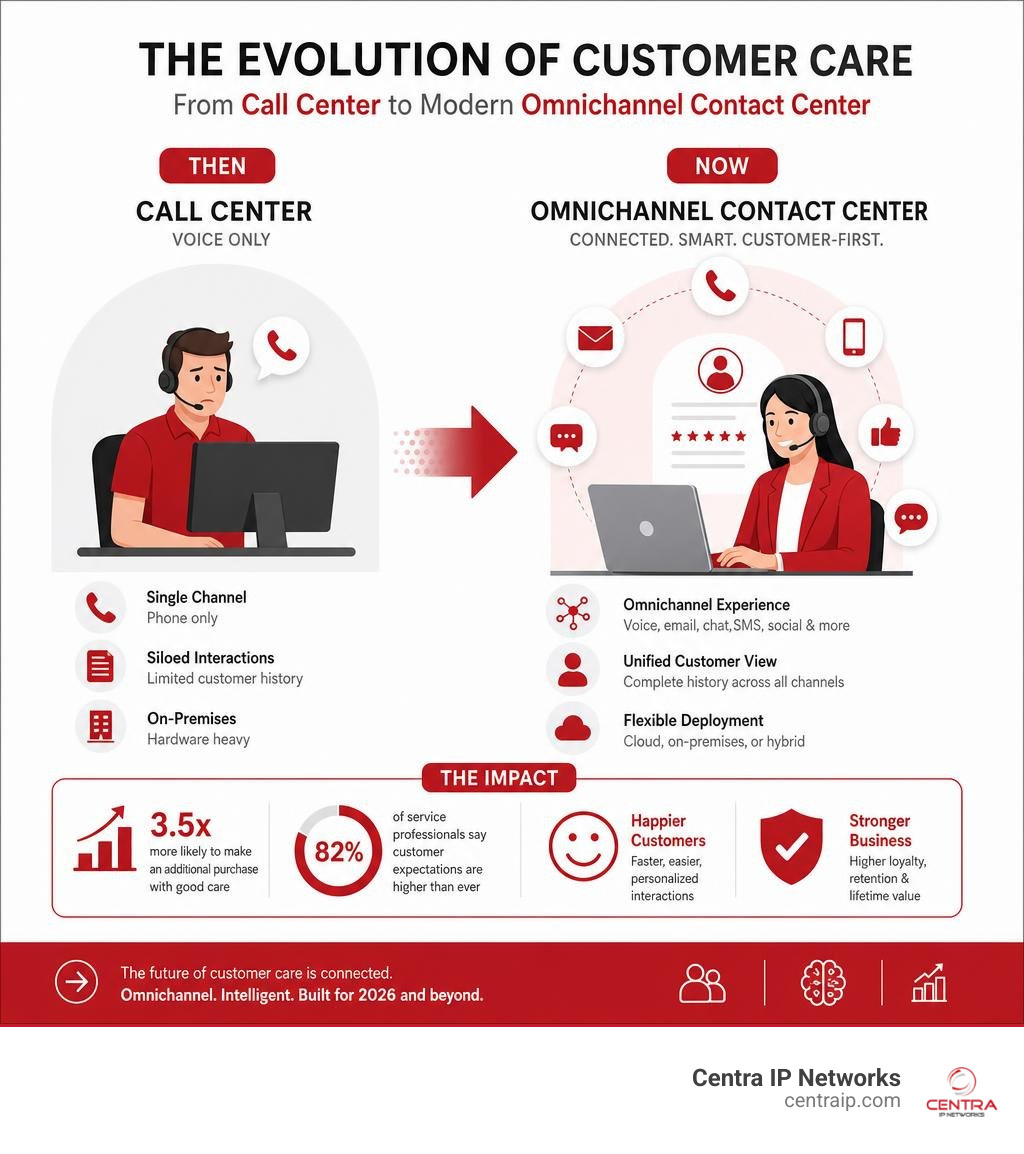
The stakes are high. Research shows that customers who receive good care are 3.5 times more likely to make an additional purchase than those who have a poor experience. At the same time, 82% of service professionals say customer expectations are higher than ever before.
Yet most businesses are still comparing solutions without a clear checklist. They end up picking a platform that handles calls well but falls apart when a customer switches to chat — or they overpay for features they don’t need.
This guide cuts through the noise. It gives you a practical, structured checklist to compare contact center solutions side by side, so you can make a confident decision without wasting time or budget.
I’m Patrick Brangan, founder of Centra IP Networks, and with over 20 years helping SMBs in Dallas, Tampa, and Orlando design and deploy contact center and unified communications systems, I’ve seen what separates the platforms that scale from the ones that stall. Let’s walk through exactly what to look for.
Defining the Modern Contact Center: How It Differs from a Call Center
To choose the right platform, we must first clear up a very common point of confusion: the difference between a call center and a contact center. While people often use these terms interchangeably, doing so in 2026 is a bit like calling a smartphone a “rotary dialer.”
A traditional call center is built for one thing: voice. It handles inbound and outbound telephone calls. If a customer wants to send an email, use live chat, or shoot over a quick text, they have to jump out of the system entirely.
A modern contact center, on the other hand, is built for the entire customer journey. It unifies all communication channels into a single, cohesive platform. To dive deeper into how these systems are structured, you can check out our In-Depth Guide to Contact Center Solutions.
By integrating these channels, your agents get a unified customer history. When a customer calls, the agent doesn’t just see a phone number; they see the chat from yesterday, the email from last week, and the SMS confirmation sent this morning. This context prevents the ultimate customer experience sin: making the customer repeat their story.
The Evolution of Customer Care and Omnichannel Engagement
Customer expectations have shifted dramatically. We live in an era of real-time, on-demand service. If a client in Fort Worth or Sarasota has an issue, they don’t want to wait on hold for forty minutes listening to elevator music. They want to open a chat, get a quick answer, and move on with their day.
As mentioned, 82% of service professionals report that customer expectations are higher than they used to be. Meeting these expectations requires more than just adding a few digital channels as an afterthought. It requires true omnichannel engagement.
In a multichannel setup, you might offer phone, email, and chat, but they operate in silos—managed by different agents using different software. In an omnichannel setup, the channels are completely integrated. This seamless transition is what builds long-term customer loyalty. When customers can connect with you on their terms, they stick around.
Key Differences in Technology and Customer Experience
The technological gap between voice-only call centers and omnichannel contact centers is massive. Traditional systems rely on basic hardware and simple routing. Modern platforms use sophisticated software engines that manage:
- Voice calls: High-definition audio with advanced queue management.
- Business SMS: Allowing customers to text your main business line.
- Web Chat & Messaging: Live chat on your website that can escalate to a voice call instantly.
- Social Media Integration: Tracking and responding to direct messages or public posts.
- Email Queuing: Routing support emails into the same inbox as chats and calls.
This technology ensures seamless transitions. If a customer starts a conversation with an automated chatbot and the issue gets too complex, they can be routed to a live agent. The agent receives the full transcript of the chat, so they can say, “I see you’re having trouble with your billing portal, let me fix that for you,” instead of, “How can I help you today?”
Types of Deployments: On-Premises vs. Cloud
When evaluating solutions, one of your first major decisions is where the software will live. Historically, businesses bought physical servers, stacked them in an IT closet, and ran physical telephone lines. Today, cloud-based deployments dominate the market, but it’s crucial to understand the trade-offs of both.

| Comparison Factor | On-Premises Contact Center | Cloud-Based (CCaaS) Platform |
|---|---|---|
| Upfront Cost | Very high (hardware, servers, licenses) | Low (monthly per-user subscription) |
| Setup Time | 6 to 12 weeks | 1 to 4 weeks |
| Maintenance & Upgrades | Managed by your internal IT team | Automated by the cloud provider |
| Scalability | Hard (requires buying more hardware) | Instant (add seats with a few clicks) |
| Remote Work Support | Complex (requires VPNs and hardware) | Native (agents only need an internet connection) |
| Disaster Recovery | Business-dependent (costly redundancy) | Built-in (geographic redundancy) |
Inbound, Outbound, and Blended Operations
Your choice of deployment will also depend on how your team operates. Are you primarily handling incoming support requests (inbound), running sales and notification campaigns (outbound), or doing both (blended)?
Inbound operations rely heavily on routing and self-service. Outbound operations require powerful dialing modes (like predictive or preview dialing) and automated campaign scheduling to reach prospects efficiently without wasting agent time.
If you run a blended operation, your agents need to switch between inbound and outbound tasks dynamically based on call volumes. Managing this complexity requires a platform that can handle high-density traffic. For businesses in major hubs like Texas and Florida, finding localized support is key. If you are looking to optimize your local communication setup, we help businesses implement robust Business Phone Systems Dallas and high-performing Business Phone Systems Tampa, as well as tailored Business Phone Systems Orlando solutions.
Whether you are coordinating an outbound campaign in the Dallas metroplex or handling inbound support across Clearwater and St. Petersburg, a cloud-native platform keeps your operations unified.
Cloud-Based Contact Center Solutions and CCaaS Benefits
Contact Center as a Service (CCaaS) has revolutionized how organizations interact with their clients. By moving your operations to the cloud, you gain access to enterprise-grade tools without the enterprise-grade price tag. To learn more about how this transition works, read our breakdown of What is Cloud-Based Call Center Features and Benefits.
Many businesses also choose to integrate their contact center with their unified communications. This strategy—combining CCaaS with UCaaS—ensures that your front-office agents can easily collaborate with back-office experts. You can read more about this in our guide on What is UCaaS.
Transitioning to modern Cloud-Based Phone Systems offers several distinct advantages:
- Scalability: If your business experiences seasonal spikes (common in Florida’s tourism or Texas’s retail sectors), you can scale your agent count up for a month and scale back down afterward.
- Remote Work: Your agents can work securely from home in St. Petersburg, Sarasota, or Fort Worth. They simply log in through a web browser.
- Reliability: Cloud platforms feature built-in geographic redundancy, meaning your communications stay online even during severe weather events. This level of reliability is essential for maintaining consistent Customer Care standards when local infrastructure is challenged.
Key Features and Technologies to Evaluate
When you begin comparing specific platforms, the feature lists can feel overwhelming. To prevent “shiny object syndrome,” we recommend focusing on features that directly impact your team’s daily productivity and the customer’s actual experience.

At a minimum, your checklist should include:
- CRM Integration: Seamless data exchange with Salesforce, HubSpot, or Zoho.
- Omnichannel Routing: One inbox for voice, email, SMS, and chat.
- Real-Time Analytics: Live dashboards for supervisors.
- Open APIs: The ability to connect custom business applications.
Intelligent Routing, IVR, and ACD Systems
The core engine of any contact center is how it handles incoming traffic. This is managed by three main technologies:
- Interactive Voice Response (IVR): A multi-level IVR acts as your digital receptionist. Modern IVR systems use conversational AI rather than rigid “press 1 for sales” menus, allowing callers to state their issue naturally.
- Automatic Call Distribution (ACD): Once the IVR gathers the customer’s intent, the ACD routes the interaction.
- Skills-Based Routing: Instead of just sending a call to the next available agent, skills-based routing sends the customer to the agent best qualified to handle their specific issue (e.g., routing a Spanish-speaking caller with a billing question to a bilingual billing specialist).
To make this work flawlessly, your telephony must talk to your customer database. Implementing a tight Cloud Phone System CRM Integration ensures that when a call is routed, a “screen pop” instantly displays the customer’s CRM profile to the agent. Combined with advanced Voice Features, this dramatically reduces greeting times and administrative friction.
AI, Automation, and Agentic CX in a Contact Center
Artificial Intelligence is no longer a futuristic concept; it is actively transforming how support is delivered. We are moving rapidly from basic automation to “Agentic CX”—where autonomous AI tools work alongside human representatives to resolve cases.
In organizations using AI, 81% of representatives say the technology frees them to work on more complex cases. Instead of spending time on routine tasks like resetting passwords or checking order statuses, agents can focus on high-value interactions.
AI-driven features to look for include:
- Conversational AI Agents: Handling routine inquiries 24/7 with genuine context and empathy.
- AI Copilots: Real-time coaching that suggests answers and knowledge-base articles to human agents during live calls.
- Automated Summarization: AI instantly drafts case notes and wrap-up summaries when a interaction ends, saving precious minutes of after-contact work.
Workforce Engagement Management and Compliance
Managing a team of agents is one of the most expensive and complex parts of running a business. Did you know that service reps spend only 46% of their work hours directly helping customers? The rest of their time is often consumed by administrative tasks, navigating clunky software, or waiting for calls.
Furthermore, it takes 4 to 6 months for a new agent to reach full productivity, costing 5% to 10% of your total agent spend. With agent attrition costing a typical 500-seat US center $2.9 million every year, keeping your team engaged and well-trained is financially critical.
This is where Workforce Engagement Management (WEM) and quality monitoring tools come in. To ensure your team is performing well while remaining compliant with industry regulations, you need robust recording systems.
We recommend reviewing The Complete Guide to Contact Center Recording and Compliance to understand your legal obligations. Choosing The Best Call Recording Software for Call Center Success allows you to capture interactions for training purposes, while moving to Cloud-Based Call Recording Why Its Essential for Modern Businesses ensures your records are stored securely and are easily searchable.
Whether you are managing secure Voice Recordings in a healthcare setting in Tampa or redacting credit card details for PCI compliance in a retail center in Fort Worth, your platform must support automated compliance controls.
Essential Metrics and KPIs for Measuring Performance
You cannot manage what you do not measure. A modern platform must provide deep, actionable insights into your team’s performance.

A solid analytics suite should track:
- Queue Performance: Live wait times and abandonment rates.
- Agent Activity: Occupancy rates and adherence to schedules.
- Customer Sentiment: AI-powered analysis of caller tone and vocabulary.
Operational Efficiency Metrics
To keep your operations running smoothly and cost-effectively, supervisors need access to real-time analytics. To get a clear picture of your operational health, we recommend using specialized Stop Guessing and Start Growing with These Call Center Analytics Tools.
The three most critical operational metrics to watch are:
- First Contact Resolution (FCR): The percentage of issues resolved during the very first interaction. High FCR is the single greatest driver of customer satisfaction.
- Average Handle Time (AHT): The total duration of an interaction, including talk time, hold time, and related administrative tasks.
- Call Abandonment Rate: The percentage of callers who hang up before reaching an agent. A high abandonment rate usually points to staffing shortages or poor routing logic.
Customer Experience and Loyalty KPIs
While efficiency metrics keep your budget in check, customer experience KPIs tell you if your business is actually growing. To master these metrics without overcomplicating your workflows, check out our guide on How to Master the Contact Center Customer Experience Without Breaking a Sweat.
Focus on these three key performance indicators:
- Customer Satisfaction (CSAT): Post-interaction surveys asking customers to rate their experience.
- Net Promoter Score (NPS): Measuring long-term brand loyalty by asking how likely customers are to recommend your business.
- Customer Effort Score (CES): Assessing how easy or difficult it was for the customer to resolve their issue.
The financial impact of a great experience is real: customers who receive excellent care are 3.5 times more likely to make an additional purchase.
Developing a Future-Proof Strategy
Implementing a new platform is a major project, which is why you want a solution that will serve your business for years to come. A future-proof strategy requires aligning your immediate business goals with a scalable technology roadmap.
Aligning Business Goals with Omnichannel Capabilities
As you map out your strategy, keep in mind that 65% of service leaders expect case volume to increase over this year. If your plan to handle that extra volume is simply “hire more people,” your margins are going to suffer.
Instead, you need to align your growth with smart omnichannel capabilities. To see how other organizations have successfully scaled their support operations, we’ve compiled several From Hold Music to High Praise Contact Center Success Stories You Need to Read.
By mapping out your customer journey, you can identify which routine inquiries can be handled by self-service, freeing your human agents to handle high-value, complex cases.
Future Trends: Self-Service, Video, and Advanced Analytics
As we look ahead, several major trends are shaping the future of customer care:
- Asynchronous Messaging: Customers increasingly prefer to message a business and respond at their convenience. Implementing professional Business Text Messaging allows you to support these natural, text-based conversations.
- Social Media Support: The use of social media as a support channel has increased by 25 percent since 2015. If your team isn’t monitoring these channels, you are missing critical customer touchpoints.
- Video Troubleshooting: Technical support teams are utilizing video conferencing to visually diagnose hardware or installation issues in real time, reducing the need for costly on-site visits.
- Advanced AI Analytics: Platforms are moving beyond basic keyword searches to analyze 100% of customer interactions for tone, sentiment, and compliance automatically.
Keeping up with these shifts is why industry events like the ICMI Contact Center Expo 2026: AI, Innovation & Solutions for Contact … are so valuable for learning how to leverage AI and modern automation tools effectively.
Frequently Asked Questions about Customer Service Solutions
What is the difference between a call center and a multi-channel hub?
A traditional call center focuses exclusively on telephone-based voice interactions. A multi-channel hub allows customers to reach out via different digital channels (like email, SMS, or web chat), but these channels usually operate in separate silos. A true modern contact center unifies all of these channels into a single interface, preserving customer context as they transition between phone, text, and chat.
How long does it take to implement a cloud-based platform?
While legacy on-premises systems typically take 3 to 12 months to deploy, a cloud-native platform can be set up in a matter of weeks. Standard configurations can often be deployed in 1 to 4 weeks, depending on the complexity of your routing rules, CRM integrations, and data migration needs.
What security and compliance standards should modern platforms meet?
Depending on your industry and location, your platform should meet stringent security certifications to protect customer data. Look for solutions that comply with SOC 2 Type II, PCI-DSS (for secure payment handling), and HIPAA (if you are managing healthcare data). Modern platforms should also feature end-to-end encryption, automated data redaction in recordings, and strict role-based access controls. For example, local organizations like the Customer Service Center in Tampa or the Sarasota County Government must adhere to strict public record and security standards, as do financial institutions like Clearwater Credit Union Help. If you need after-hours support, partnering with a professional answering service can keep your business connected while maintaining those same high compliance standards.
Conclusion: Making Your Decision with Confidence
Choosing a contact center solution is one of the most critical technology decisions your business will make. The right platform will empower your agents, lower your operational costs, and turn customer service into a powerful engine for business growth.
At Centra IP Networks, we believe that managing your communications shouldn’t be chaotic. We offer comprehensive Managed IT and Cloud Communications services across Dallas, Fort Worth, Orlando, Tampa, St. Petersburg, Clearwater, and Sarasota.
Our unique value is simple: we provide your phone systems, internet connectivity, and cloud solutions on one platform, with a single bill, from a single trusted provider. By leveraging our 35+ strategic industry partnerships, we design tailored, cost-effective solutions that fit your exact operational needs.
Ready to upgrade your customer experience? Explore our Contact Center solutions today, or reach out to our team of experts to schedule a custom demo.


