Find the Right Free Call Recorder for Android
A free call recorder for Android can work well, but the best choice depends on your phone, Android version, and whether you need regular calls, VoIP calls, or both. Start with the built-in Google Phone app if your device and region support it. For more control, consider free open-source options such as ShizuCallRecorder or CallVault. Apps like Cube ACR are easier to install, but advanced features may be behind a subscription and two-way audio can vary by device.
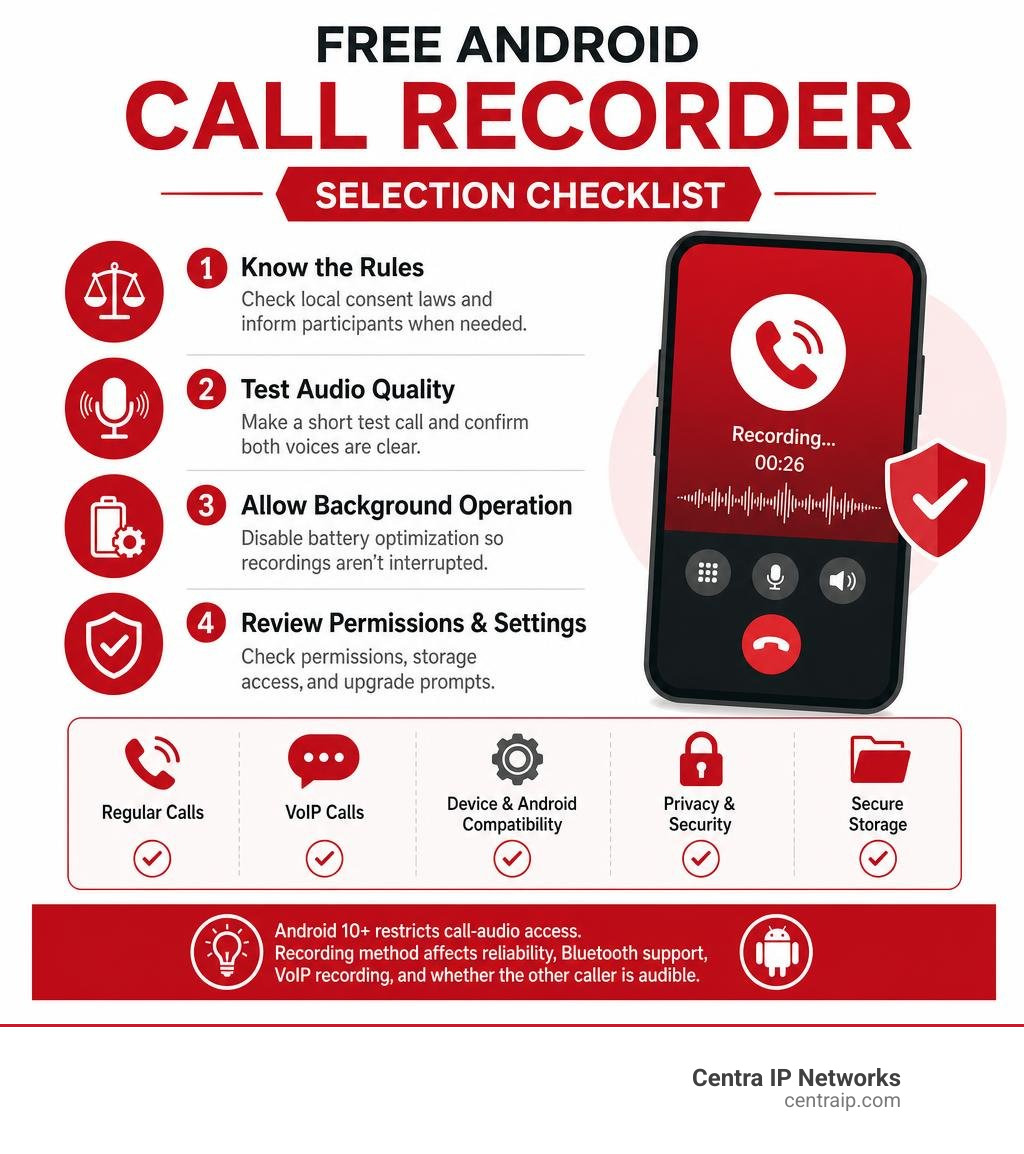
Before downloading anything:
- Check your local call-recording consent rules and tell participants when required.
- Make a short test call to confirm that both voices are clear.
- Turn off battery optimization for the recorder if recordings stop in the background.
- Review permissions, storage settings, and any premium upgrade prompts.
Android has made direct call-audio capture much harder since Android 10. That is why some apps use microphone pickup, Accessibility services, Shizuku, or ADB-based permissions. These methods can affect reliability, Bluetooth support, VoIP recording, and whether the other caller is audible.
I am Patrick Brangan, a business technology professional with more than 20 years of experience helping small and midsize organizations simplify communications, IT, and security tools. In this guide to a free call recorder for Android, I will help you weigh convenience, privacy, recording quality, and secure storage before you choose.
Quick look at free call recorder for android:
How to Choose the Best Free Call Recorder for Android in 2026
Finding a reliable recording solution on modern Android requires balancing OS permissions, hardware quirks, and audio routing. For budget-conscious users and business operators trying to discover how to record phone calls on a budget, the ideal tool must reliably capture both sides of the conversation without demanding complex paid service contracts.
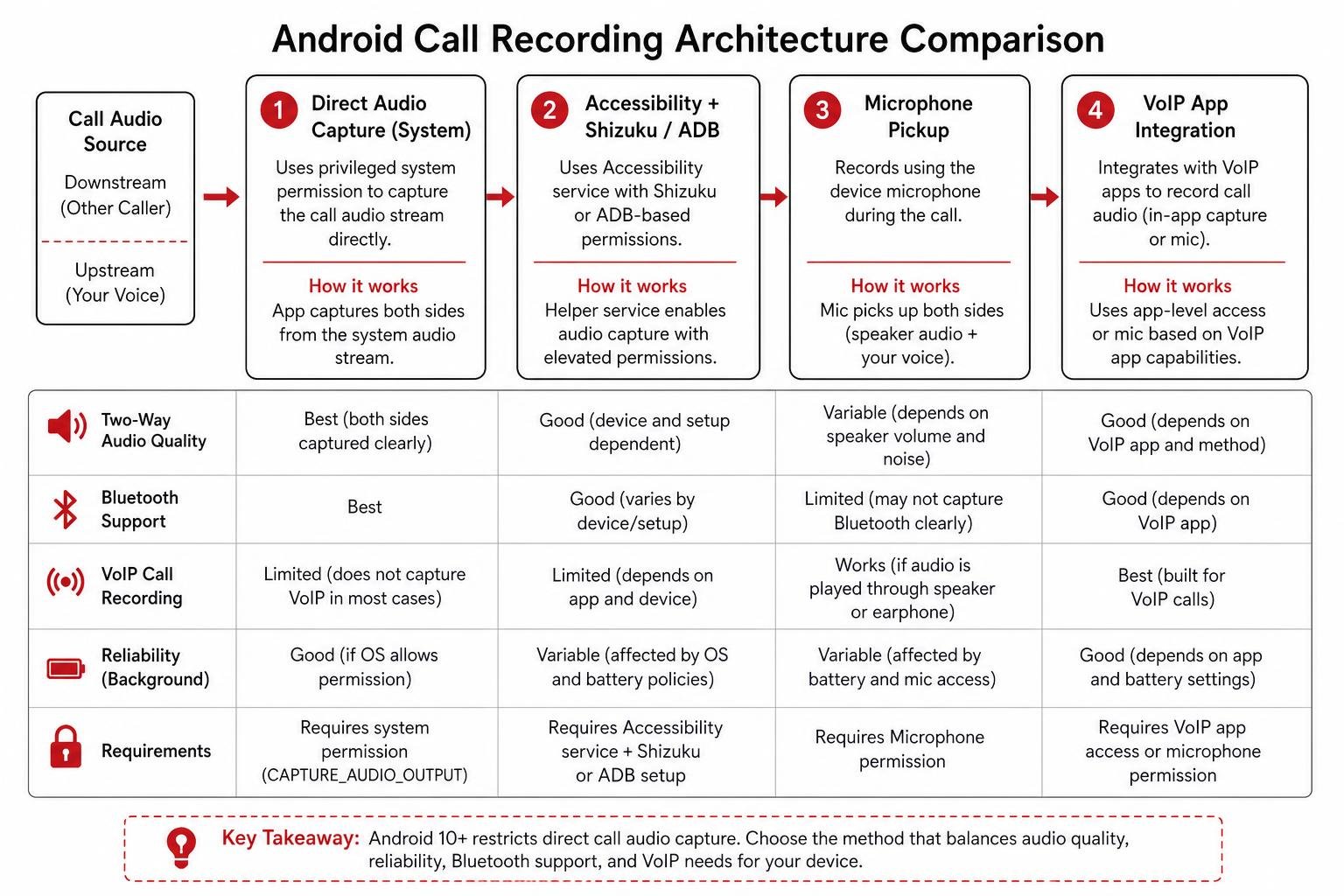
When evaluating solutions, consider these critical technical factors:
- Audio Stream Access: Direct capture of the downstream caller requires privileged permissions (
CAPTURE_AUDIO_OUTPUT). Without this, apps must rely on microphone audio bleed or elevated helper daemons. - Background Battery Management: Aggressive OEM battery optimizations (such as those in Samsung One UI or Xiaomi HyperOS) frequently kill background recording tasks midway through a conversation.
- Storage and Encryption: Audio logs must be stored securely using the Android Storage Access Framework (SAF) with on-device biometric or password protection.
- VoIP Platform Support: Capturing cellular calls is one challenge; intercepting data streams from WhatsApp, Telegram, or Google Meet requires distinct audio-policy routing.
| Application | Root Required? | Setup Mechanism | Primary Audio Codecs | VoIP App Support | Pricing Model |
|---|---|---|---|---|---|
| Cube ACR | No | Play Store / Helper App | AMR, MP3, AAC | Yes (WhatsApp, Meet, Telegram) | Freemium ($7.99/wk to $49.99/yr) |
| Google Phone App | No | Pre-installed / System | Proprietary / AMR | No (Cellular Only) | Free (Pixel / Supported OEMs) |
| CallVault | No | Embedded ADB / Wireless Debug | OGG/Opus, AAC | Yes (WhatsApp, Signal, Telegram) | 100% Free & Open Source |
| ShizuCallRecorder | No | Shizuku Framework / ADB | Opus, AAC | Limited | 100% Free & Open Source |
| Ever Call Recorder | No | Shizuku Framework / ADB | AAC, WAV, MP3 | Yes (WhatsApp, Telegram) | 100% Free & Open Source |
| Basic Call Recorder (BCR) | Yes | Magisk / KernelSU Module | Opus, AAC, FLAC, WAV | No (Cellular / Direct InCall) | 100% Free & Open Source |
Understanding Android Audio Policies and Technical Roadblocks
Starting aggressively in Android 10 and cemented across modern versions like Android 14, 15, and 16, Google locked down raw telephony streams. Standard consumer applications can no longer bind uninhibited to the telephony subsystem or access VOICE_CALL audio streams without holding privileged system-level signatures.
When unprivileged apps attempt to record, they encounter severe hurdles:
- One-Sided Audio Capture: Standard user space apps only have permission to read the hardware microphone (
MICsource). Unless you turn your speakerphone up to maximum volume so the microphone physically picks up the caller’s earpiece sound, the other party remains inaudible. - Screen-Lock Process Termination: When Android locks its screen, power-management daemons suspend unprivileged background tasks. Furthermore, apps using local debugging bridges often suffer USB state renegotiation drops when the screen locks unless configured for charging-only states.
- InCallService Binding Restrictions: Capturing call state metadata (such as phone numbers and contact names) requires privileged telephony permissions, as outlined in the ShizuCallRecorder README documentation.
Legal Consent Regulations: One-Party vs. Two-Party Jurisdictions
Before configuring recording software on your Android phone, you must understand your regional legal landscape. In the United States, wiretapping and recording laws fall into two primary categories:
- One-Party Consent: Federal law and many state statutes allow recording if at least one participant in the conversation (which can be you) gives consent. For instance, in Texas (including our operating hubs across Dallas and Fort Worth), one-party consent allows individuals to record conversations they actively participate in.
- Two-Party (All-Party) Consent: In states such as Florida (covering our regional offices across Orlando, Tampa, St Petersburg, Clearwater, and Sarasota), all participants on the line must explicitly know and consent to the recording. Operating across interstate borders requires adhering to the stricter jurisdiction’s legal mandate.
For a deeper dive into stealth recording limitations and compliance, see the ultimate guide to call recording without announcement.
Top Proprietary and Play Store Free Call Recorder Apps

For non-technical users looking for immediate downloads, the Google Play Store and alternative app distribution hubs host several commercial options. If you are comparing mobile ecosystems or migrating between devices, our breakdown of a call recorder iOS free approach illustrates why Android offers much higher technical versatility despite its platform restrictions. You can also explore our broader roundup of free phone recorder best apps to download now to see how various platforms compare.
Cube ACR: Feature-Rich Cellular and VoIP Recording
With over 50 million downloads and more than 900,000 user reviews on Google Play, Cube ACR on Google Play remains one of the most widely used proprietary utilities on Android.
- VoIP Versatility: Beyond cellular voice, Cube ACR captures calls from third-party communication tools including WhatsApp, Telegram, Google Meet, LINE, WeChat, and Viber.
- Productivity Extras: The app features a unique “shake-to-mark” gesture that bookmarks critical conversation timestamps, alongside geotagging to track where specific calls occurred.
- Security & Storage: Offers PIN, fingerprint, and FaceID locking, with auto-sync backups to Google Drive or email.
- Freemium Realities: While basic microphone-level recording is free, high-tier features (automated cloud synchronization, audio transcription, and advanced audio source toggling) require subscription tiers ranging from $7.99 per week to $49.99 per year. Because Google Play restricts accessibility permissions, users often need to install companion helper APKs from external stores like the Samsung Galaxy Store or Huawei AppGallery.
Built-in Google Phone App: Native Recording Without Third-Party Tools
If you operate a Google Pixel (Pixel 6 or newer on Android 14+) or compatible OEM hardware with Google’s native dialer, you may not need a third-party app at all.
- Native Call Assist: Integrated directly into the dialer interface, enabling single-tap recording or automated rules for unknown numbers and select contacts.
- Mandatory Audio Announcements: To guarantee privacy compliance, Google’s dialer automatically plays an audible voice prompt notifying all participants when recording starts or stops.
- Local Storage Ties: Audio recordings are saved locally inside the call log history. Warning: deleting a call entry from your dialer log permanently purges the associated audio recording.
Top Open-Source and Non-Root Free Call Recorder for Android Solutions
Open-source, non-root utilities have become the premier choice for privacy-conscious users in 2026. These applications provide complete transparency, have zero corporate tracking, and bypass Google Play’s restrictive commercial policies by leveraging local ADB commands or the Shizuku framework.
CallVault: Embedded ADB Recording Without Root or Shizuku
Developed by madkongo, madkongo/CallVault represents a major architectural leap forward for unrooted modern Android devices (Android 11+ on 64-bit ARM architecture).
- Standalone Embedded ADB Daemon: Unlike tools that require an external manager, CallVault bundles an embedded ADB client (
libadb-android). By pairing locally via Android’s built-in Wireless Debugging, it establishes its own privileged daemon directly on the device—no PC tethering required. - VoIP Audio Duplication: CallVault registers a specialized internal audio policy that captures two-way VoIP streams across WhatsApp, Signal, and Telegram without root.
- Resilient Audio Handoff: To survive OEM memory purges, the privileged daemon initializes the audio stream and immediately transfers raw stream encoding to the user-space app.
- Stability Configuration: To prevent Android from dropping ADB processes when your phone locks, set your device’s Default USB Configuration to “Charging only” inside Developer Options.
ShizuCallRecorder: Lightweight Free Call Recorder for Android via Shizuku
Available directly via ShizuCallRecorder on F-Droid, this non-root Free and Open Source Software (FOSS) project brings clean, event-driven recording to Android 12 through Android 16.
- Event-Driven Architecture: The app avoids persistent, battery-draining background processes. It activates only when telephony broadcast triggers indicate an active call state.
- scrcpy Audio Routing: Utilizing ADB shell privileges managed through Shizuku, it routes internal audio streams through an on-device
scrcpy-serverwrapper to capture crisp two-way audio. - Modern Formats: Compresses high-fidelity audio natively using the Opus and AAC codecs to conserve internal device memory.
- Bluetooth Compatible: Captures both incoming and outgoing channels even when you are using Bluetooth headsets or hands-free automotive systems.
Ever Call Recorder: Open-Source Two-Way Capture for Messaging Apps
Maintained by developer hari161008 on GitHub, hari161008/Ever-Call-Recorder offers a clean, non-root approach focused on communication apps.
- Messaging Capture: Specializes in automated two-sided call capture across traditional cellular voice, WhatsApp, and Telegram.
- Shizuku Watchdog Integration: Connects with Shizuku’s watchdog daemon to auto-restart recording services if the Android operating system attempts to terminate background tasks.
- In-App Protection: Features built-in biometric security (fingerprint/PIN), contact exclusion filters, and automated storage cleanups that purge recordings after a defined retention window.
Basic Call Recorder (BCR): The Ultimate Free Call Recorder for Android on Rooted Devices
For users operating rooted devices or running custom AOSP firmware, chenxiaolong/BCR is widely regarded as the gold standard in audio capture.
- System App Privileges: Installed via Magisk, KernelSU, or flashed in custom recovery, BCR binds directly to
InCallServiceutilizingCAPTURE_AUDIO_OUTPUTandCONTROL_INCALL_EXPERIENCE. - Zero Internet Footprint: BCR completely omits the Android
INTERNETpermission from its manifest. Audio files never leave your device unless you manually transfer them. - Direct Boot Aware: Can record incoming calls even if the phone has rebooted and remains locked at the initial boot screen, holding encrypted files in internal staging until first unlock.
- Lossless Audio & Rich Metadata: Supports lossless FLAC, uncompressed WAV, M4A/AAC, and OGG/Opus. Each recording generates a companion JSON metadata sidecar file logging frame counts, sample rates, caller ID, and duration.
Storage, Security, and Quality Optimization Best Practices
Capturing audio is only half the battle; managing files securely ensures you remain compliant and prevents storage bottlenecks:
- Leverage the Storage Access Framework (SAF): Point your recording apps to dedicated local folders. Avoid deeply nested directory structures, which can cause file write latency during automated post-processing on certain OEM skins.
- Implement Auto-Deletion Retention Schedules: Keep device storage lean by configuring rules that automatically delete unstarred or untagged recordings after 30, 60, or 90 days.
- Enforce Biometric Locks: Ensure sensitive business discussions, client details, and financial conversations are protected behind biometric authentication (fingerprint or PIN).
- Cloud Archiving: While standalone mobile tools are great for individual use, businesses should explore cloud-based call recording why it’s essential for modern businesses to centralize logs, automate transcription, and protect compliance records across entire teams.
Frequently Asked Questions About Android Call Recording
Why does my free call recorder only capture my voice and not the caller?
Modern Android versions block unprivileged apps from accessing the downstream telephone audio line. If an app lacks elevated root, Shizuku, or ADB permissions, it can only record the device’s physical microphone. If the other caller’s voice is too faint, the microphone will fail to register it. Switching your call to speakerphone or utilizing an elevated framework like Shizuku or CallVault solves this issue.
Is it legal to record phone calls on Android without notifying the other party?
Legality depends entirely on your geographical location and the location of the person you are speaking with. In one-party consent states (such as Texas), you can legally record conversations that you participate in without notifying the other party. However, in two-party/all-party consent states (such as Florida), all participants must be explicitly notified and give consent before recording begins.
Do open-source call recorders require rooting my Android phone in 2026?
No. While tools like BCR require root permissions (via Magisk or KernelSU) to operate as system-level apps, modern non-root FOSS tools like CallVault, ShizuCallRecorder, and Ever Call Recorder achieve full two-way audio capture using elevated ADB shell permissions paired with Wireless Debugging or the Shizuku framework.
Conclusion
Navigating Android call recording requires matching your technical comfort level with your specific hardware. If you want a quick plug-and-play solution, commercial tools like Cube ACR get the job done—provided you work around Google Play helper requirements and freemium subscription paywalls. For complete privacy, zero ads, and guaranteed two-way clarity without root, modern open-source solutions like CallVault and ShizuCallRecorder are the clear winners in 2026. Root users and custom ROM enthusiasts will find unmatched reliability and lossless audio in Basic Call Recorder (BCR).
While mobile apps solve individual recording needs on personal devices, managing calls across growing business operations requires centralized oversight. If your organization operates across Texas or Florida and requires automated compliance logging, seamless CRM integration, and enterprise-grade telephony, explore our complete Centra IP Networks enterprise voice recording solutions to unify your communications on a single, dependable platform.