Introduction
The best IVR system for small business depends on your workflow, but three providers consistently lead the category: Nextiva for all-in-one cloud communications, Dialpad for built-in conversational AI, and Aircall for rapid CRM integration. These platforms give a five-person team the polished front desk of an enterprise organization while automating repetitive tasks and organizing inbound queues.
Managing customer calls on a growing team can get messy fast. When incoming calls ring every desk at once, your staff spends half their day transferring inquiries, while callers wait on hold listening to tinny music. In 2026, customer expectations are higher than ever: 89% of customers expect self-service options, and research shows that 71% of consumers end a relationship with a company due to poor customer service.
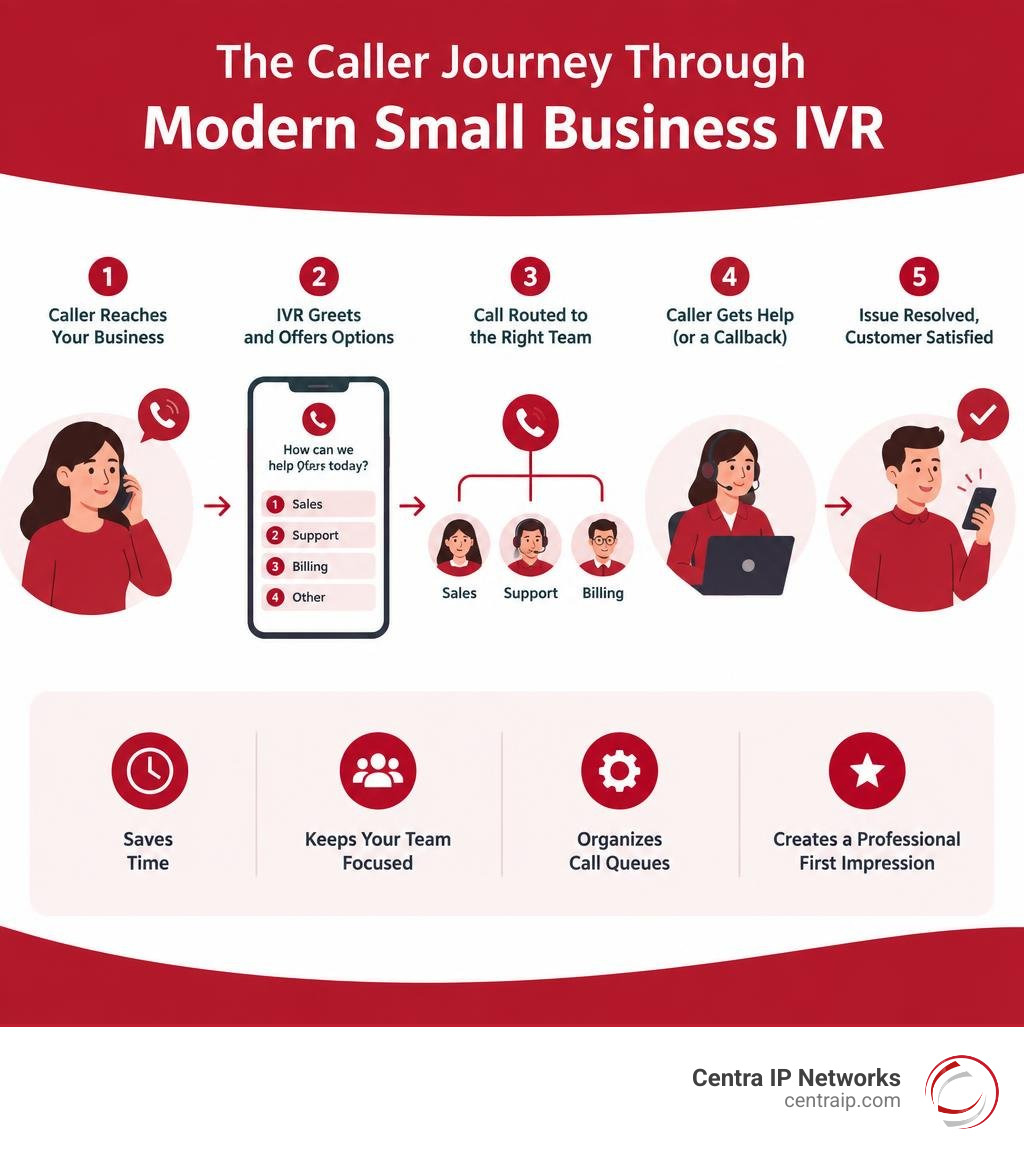
A modern phone menu does more than greet callers. It automates repetitive tasks, organizes your queues, and gives a five-person team the polished front desk of an enterprise organization.
Understanding Small Business IVR: Features, Benefits, and Auto Attendants
Interactive Voice Response (IVR) is an automated telephony technology that interacts with callers, gathers their intent, and routes them to the correct department, agent, or self-service flow. Properly designed conversational IVR flows can correctly route more than 90% of calls and raise first-call resolution (FCR) rates to 74%.
Beyond routing, modern IVR systems reduce overall call-handling costs by 10% to 30% while resolving 30% to 50% of routine inbound inquiries without requiring a live representative. If you want to understand how call routing drives long-term ROI, look at the fundamental business benefits of an IVR and explore strategies for enhancing your customer experience.
How Modern Interactive Voice Response Works
When an inbound call arrives, the IVR greets the caller with a customized greeting and options. The caller provides input through Dual-Tone Multi-Frequency (DTMF) keypad presses (e.g., “Press 1 for Sales”) or spoken phrases analyzed by speech recognition software.
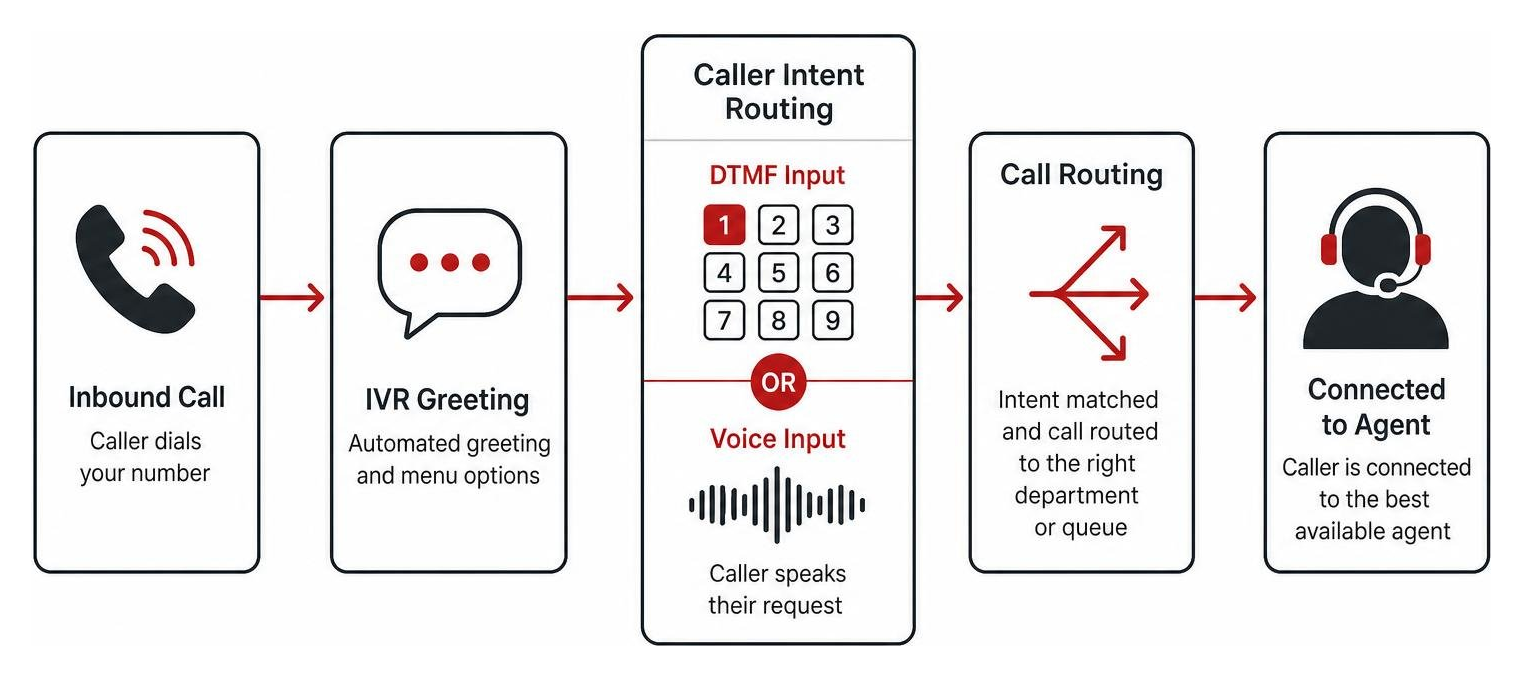
From there, the platform executes automated call distribution (ACD) rules. It can query backend databases or CRM records to verify account numbers, fetch delivery updates, or check open support tickets before transferring the caller.
Key Differences: IVR vs. Traditional Auto Attendants
Business owners often use “auto attendant” and “IVR” interchangeably, but they serve different operational needs. Knowing the difference helps when reviewing the different types of business phone systems:
- Auto Attendants: Electronic switchboards. They play a static greeting and forward callers to an extension, ring group, or voicemail box based on numeric keypad presses. They cannot look up database values or resolve issues on their own.
- Interactive Voice Response (IVR): Dynamic communication systems. An IVR interacts directly with backend software, processes voice commands, and handles multi-tier self-service tasks—such as checking account balances, processing invoice payments, or scheduling appointments—without human intervention.
Essential Features to Look for in Small Business IVR
When evaluating tools, focus on capabilities that streamline day-to-day operations rather than vanity features. Reviewing what you need in a business phone system will help you prioritize:
- Visual Drag-and-Drop Call Designers: Build, test, and adjust routing logic in minutes without writing code.
- Intelligent Call Queuing and Skill-Based Routing: Match incoming customer requests directly to the agent best equipped to solve them.
- Queue Callbacks: Allow callers to save their place in line and receive an automatic callback when an agent becomes available.
- CRM Screen Pops: Present the caller’s complete interaction history, contact notes, and open deals the second an agent picks up.
- Voicemail-to-Email and Transcription: Receive audio recordings and text summaries directly inside your team’s primary inbox.
Top Contenders for the Best IVR System for Small Business
To identify the right fit, we evaluated the market against critical criteria: usability, pricing transparency, CRM integration depth, and deployment speed. Choosing among the best IVR systems to keep your customers happy comes down to your current workflows.
| Provider | Starting Price (Per User/Mo) | Setup Timeline | Standout Capability | Best Fit For |
|---|---|---|---|---|
| Nextiva | $15 – $25 | 1–2 Days | All-in-one UCaaS with XBert AI | General SMBs wanting unified billing |
| Dialpad | $15 – $25 | 1–3 Days | Real-time AI transcription & coaching | AI-first distributed teams |
| Aircall | $30 – $50 | 1 Day | 100+ native CRM & helpdesk syncs | Fast deployment & CRM-heavy workflows |
| CloudTalk | $25 – $49 | 1–3 Days | Visual designer & intent routing | Growing sales & support queues |
| Zendesk Talk | $19 – $55 | 1–2 Weeks | Deep ticketing & support stack integration | Support teams centered on Zendesk |
| Twilio Voice | Usage-based (~$0.014/min) | Weeks to Months | Fully programmable APIs | Teams with dedicated developers |
Nextiva: Best for All-in-One Cloud Communications
Nextiva provides an intuitive unified communications platform combining voice, video, team chat, SMS, and multi-level auto attendants into a single software package. Backed by 99.999% uptime reliability, it ensures your small business stays reachable around the clock.
Their built-in AI receptionist, XBert, handles routine scheduling and dynamic routing without complex configuration. For businesses seeking reliable domestic calling, straightforward administration, and simple billing, Nextiva delivers strong value.
Dialpad: Best for Built-In Conversational AI
Dialpad was built from the ground up around proprietary voice intelligence. Every call comes with real-time live transcription, automatic call summaries, and actionable sentiment tracking.
Its IVR engine lets callers use natural conversational phrases rather than rigid keypad trees. If you run a remote or hybrid team that handles complex customer discussions, Dialpad’s live agent-assist prompts and softphone apps keep everyone aligned.
Aircall: Best for CRM Integration and Rapid Deployment
Aircall is designed for teams that live inside tools like HubSpot, Salesforce, or Zoho. Setting up an IVR flow takes less than an afternoon using their clean browser interface.
Call activity, recordings, and custom tags sync bidirectionally with your CRM records. Aircall also eliminates guesswork with transparent per-user pricing tiers, making it a dependable choice for modern sales and client success teams.
CloudTalk: Best for Growing Sales and Support Teams
CloudTalk focuses on call center efficiency for small-to-medium operations. Its visual call flow designer lets administrators map out complex, multi-branch IVR paths, custom greetings, and queue rules with a few clicks.
Teams using CloudTalk often see up to a 40% reduction in average handling time by using intent-based routing and automated queue callbacks. Multilingual menus make it easy to route callers based on their spoken language or geographic origin.
Zendesk Talk: Best for Dedicated Helpdesk Workflows
If your customer support operations revolve around Zendesk, Zendesk Talk connects your phone channel directly to your helpdesk ticketing engine.
Incoming calls automatically pull up the customer’s full support ticket history, letting agents view past interactions before saying hello. When a call ends, the recording and transcription save directly to an open ticket for continuous accountability.
Twilio Voice: Best for Custom API-Driven IVR Architecture
Twilio offers a flexible developer toolkit for organizations that want to build custom call center workflows from scratch. If pre-packaged SaaS options are too restrictive for your proprietary systems, Twilio’s programmable APIs give you full control.
You pay for what you consume—typically fractions of a cent per minute—making it cost-effective at scale. Building on Twilio requires in-house developer resources to deploy, configure, and maintain your telephony code.
Traditional IVR vs. Conversational AI: Choosing the Right Path
Small business phone systems are shifting from rigid numeric trees to natural-language conversational agents. Understanding how modern cloud-based phone systems use machine learning helps you pick the right balance for your budget and call volume.

Multi-Level DTMF Menus vs. Natural Language Processing
Traditional DTMF systems rely on deep keypad trees (“Press 1 for Sales, then Press 3 for Residential…”). When trees grow past three layers, callers encounter cognitive fatigue; up to 40% of callers abandon calls when trapped in complex menus.
Conversational IVR uses Natural Language Processing (NLP) and Large Language Models (LLMs) to let callers state their issue plainly (e.g., “I need to reschedule tomorrow’s delivery”). Businesses transitioning from standard trees to conversational AI report up to a 25% increase in first-call resolution rates.
How to Choose the Best IVR System for Small Business Growth
Selecting a platform requires balancing your current team capacity with your planned expansion. Our guide to finding the right business phone system for your business outlines three core evaluation steps:
- Calculate Call Complexity: If 80% of your incoming calls are basic routing questions, a clean, single-level auto attendant is reliable and budget-friendly. If your staff spends hours answering repetitive FAQs, an AI-powered conversational IVR will pay for itself.
- Review Your Software Stack: Avoid platforms that only connect to your CRM through fragile third-party webhooks. Prioritize direct, native integrations.
- Check Administrative Simplicity: Your operations team should be able to update holiday greetings, office hours, and routing destinations in minutes without filing an IT support ticket.
Crafting Natural Prompts: Neural TTS and Voice Quality
Nothing turns callers off faster than a robotic, monotone text-to-speech (TTS) voice that sounds like a drive-through speaker. High-quality IVR flows use studio-recorded audio prompts or advanced neural TTS engines that sound warm, clear, and human.
Keep your menu prompts brief:
- State the action before the key (e.g., “For Billing, press 2” instead of “Press 2 for Billing”).
- Keep your top menu to four options or fewer.
- Always give callers an immediate, simple way to connect with a live agent.
Pricing, Setup Timelines, and Implementation Best Practices
Evaluating overall software costs requires looking beyond headline subscription rates. Use our phone system buyers guide to calculate your total cost of ownership.
Average IVR Costs and Subscription Models
Most modern cloud IVR providers operate on predictable per-user monthly tiers:
- Entry-Level Hosted VoIP ($15 – $25/user/month): Includes basic multi-level auto attendants, standard call forwarding, call queues, and voicemail-to-email.
- Mid-Tier Contact Center Software ($30 – $60/user/month): Adds advanced visual flow designers, CRM screen pops, custom skill routing, and queue callbacks.
- Advanced Conversational AI Platforms ($75+/user/month or usage-based): Unlocks automated LLM voice agents, real-time sentiment analysis, and live agent-assist coaching.
Deployment Steps and CRM Integration Timelines
Deploying a cloud-hosted IVR for the small business phone system is much faster than setting up legacy on-premise hardware:
- Call Flow Mapping (Day 1): Diagram your ideal routing paths on paper. Group common call reasons and eliminate unnecessary menu branches.
- Menu Creation and Scripting (Day 2): Write clear voice prompts and generate studio-grade neural voice files or upload custom audio.
- CRM Integration and Testing (Days 3–4): Connect your CRM database, map caller lookup fields, and run test calls through every menu path.
- Number Porting and Launch (Days 5–7): Port your existing business numbers to your cloud carrier with zero operational downtime.
Frequently Asked Questions About Small Business IVR
What Is the Overall Best IVR System for Small Business Teams?
For most small businesses that need straightforward call routing, team messaging, and dependable voice service on a single bill, Nextiva is a solid, well-rounded choice. If your team relies heavily on CRM data and rapid onboarding, Aircall is an excellent alternative.
How Long Does It Take to Set Up an IVR System?
Modern cloud-based IVR systems can be fully configured in one to three business days. Complex deployments involving custom database lookups, multi-department call centers, or API programming typically take one to two weeks.
Can Small Business IVR Software Integrate Directly with HubSpot or Salesforce?
Yes. Leading cloud IVR platforms provide native, bi-directional integrations with popular CRMs like HubSpot, Salesforce, and Zoho. This synchronizes call records, matches inbound phone numbers to customer files, and triggers automatic screen pops on incoming calls.
Conclusion: Streamline Your Communications with the Right IVR
An intuitive IVR system gives your small business an organized, professional front door. By automating routine answers and guiding callers to the right team members on the first attempt, you lower operational costs while building lasting customer trust.
At Centra IP Networks, we help businesses across Dallas, Fort Worth, Orlando, Tampa, St. Petersburg, Clearwater, and Sarasota simplify their voice and data operations. We provide business phone systems, managed IT, and cloud connectivity through a single platform with one clear bill.
Explore advanced voice features and cloud phone solutions to build a phone system tailored to your team’s workflow.