Why a Cloud-Based Fax Server Still Matters in 2026
A cloud-based fax server lets your business send and receive faxes over the internet — no phone lines, no hardware, no paper jams. Here’s a quick look at the top options covered in this guide:
| Provider | Best For | Standout Stat |
|---|---|---|
| Retarus | Large enterprises | 4.6/5 on Gartner, 95% first-call resolution |
| Documo mFax | Healthcare | 5/5 on Gartner, HIPAA-compliant |
| Voxago | Regulated industries | 99.9% uptime SLA, 4.8 avg rating |
| FaxHub | Developers & SMBs | 99.7% delivery rate, <30 sec delivery |
Fax isn’t going away. Healthcare, legal, and finance teams still depend on it daily — because unlike email, a faxed document arrives as an unalterable image that meets strict regulatory standards. The problem isn’t fax itself. It’s the outdated hardware sitting in your office, draining money on analog phone lines, toner, and IT maintenance.
Switching to a cloud-based fax server removes all of that overhead. You get the same legal and compliance credibility of traditional faxing, but delivered through the internet — accessible from any device, integrated with your existing software, and backed by enterprise-grade security.
I’m Patrick Brangan, and over my 20+ years in business technology I’ve helped hundreds of SMBs across Dallas, Tampa, and Orlando ditch legacy fax hardware and move to smarter, cloud-based fax server solutions as part of a unified communications stack. In this guide, I’ll walk you through the best options available in 2026 so you can make the right call for your team.
Understanding the Shift to Modern Digital Faxing
For decades, business communications in Texas and Florida relied on the familiar hum of the office fax machine. But as we move further into 2026, the underlying infrastructure supporting those machines is rapidly disappearing.
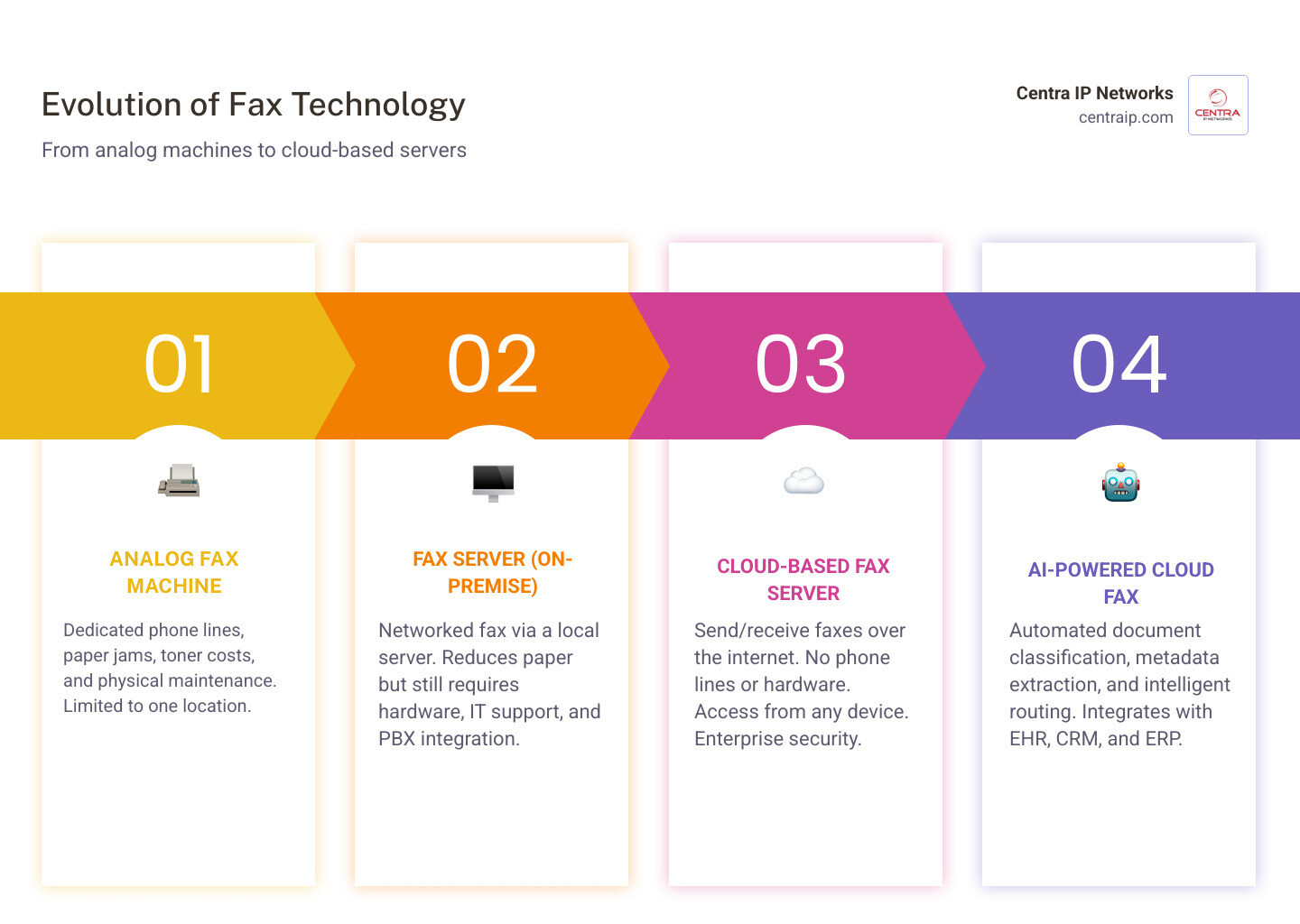
Traditional telecommunications providers are actively phasing out Plain Old Telephone Service (POTS) copper lines. Maintaining these legacy analog lines has become incredibly expensive, and finding replacement parts for aging on-premises fax servers is an ongoing headache for IT departments.
This infrastructure shift is driving a massive digital transformation. By migrating to a cloud-based fax server, organizations are not only saving thousands of dollars in line rental and maintenance fees, but they are also unlocking dramatic improvements in operational efficiency. Staff no longer have to stand by a physical machine waiting for a transmission report; instead, faxes are treated like secure, trackable digital assets.
What is a Cloud-Based Fax Server and How Does It Work?
A cloud-based fax server is a fully hosted, digital alternative to physical fax machines and on-premises fax software. Instead of routing transmissions over analog telephone networks, a cloud fax server processes and digitizes document transfers entirely over secure Internet Protocol (IP) networks.
When you send a digital fax, the cloud server converts your document (such as a PDF or Word file) into a secure, unalterable image. This conversion is crucial: because the final document cannot be edited or manipulated during transit, it retains the legal and regulatory trust of a traditional paper fax. The cloud server then routes this image to the recipient—either delivering it to another digital fax inbox or transmitting it directly to a physical fax machine.
If you are exploring the market, you will find there are many ways to deploy these systems. To see how these options compare, take a look at The Ultimate List of Cloud-Based Fax Solutions to understand the wider landscape.
How Cloud Faxing Works Technically (FoIP, APIs, and Email-to-Fax)
Modern cloud-based faxing relies on several highly flexible transmission methods designed to fit into your existing daily workflows:
- Email-to-Fax / Fax-to-Email: This is the most common workflow for daily office staff. To send a fax, you simply compose an email, attach your document, and address it to the recipient’s fax number followed by a specific domain (e.g.,
11234567890@providerfax.com). Incoming faxes arrive directly in your email inbox as secure PDF attachments. - Web Portals: Providers offer secure, browser-based portals where users can log in, upload documents, customize cover pages, and view detailed transmission histories.
- Print-to-Fax: By installing a virtual print driver on your computer, you can “print” any open document directly to the cloud fax service, which automatically formats and sends it.
- Fax APIs: For automated workflows, developer-friendly REST APIs allow your internal software applications to programmatically send and receive faxes without human intervention.
- Fax Bridges (ATAs): If your office still requires a physical fax machine, a hardware adapter called an Analog Telephone Adapter (ATA) can bridge the gap. This “fax bridge” connects your physical machine to the internet, allowing you to send faxes over IP networks without paying for an analog phone line.
To dive deeper into how IP networks handle these transmissions securely, check out our detailed guide on What is Fax Over IP? Benefits and Best Practices for Businesses.
Evaluating the Best Cloud-Based Fax Server Options for Your Business
Choosing the right provider requires balancing uptime guarantees, ease of use, regulatory compliance, and support quality. Below, we evaluate four of the most reliable cloud-based fax server options on the market, backed by real-world performance metrics and user feedback from Gartner Peer Insights.
To help you compare your options at a glance, we have compiled a quick reference table:
| Provider | Target Audience | Key Compliance Features | Integration Capabilities |
|---|---|---|---|
| Retarus | Large Enterprises | HITRUST e1, HIPAA, SOC 1/2, ISO 27001 | SAP, Epic, Salesforce, REST/SMTP APIs |
| Documo mFax | Healthcare & Regulated SMBs | HIPAA (BAA included), SOC 2, FIPS | EHR/EMR, Print-to-Fax, Web Portals |
| FaxHub | Developers & Modern Teams | HIPAA-compliant, 256-bit AES | REST API (OpenAPI 3.0), AI Assistants |
| Voxago | Multi-Location Teams | HIPAA (BAA signed), Tamper-evident logs | RESTful API, EHR, Cloud Storage |
For a broader evaluation of top-performing options, read our analysis of Cloud Fax Providers That Actually Work.
Retarus Cloud Fax Solutions
Retarus is a global leader in enterprise-grade communications, highly regarded for its robust infrastructure and exceptional customer support. On Gartner Peer Insights, Retarus Cloud Fax Solutions holds a stellar 4.6-star rating based on 23 reviews.
One of Retarus’s biggest operational highlights is its 95% first-call resolution rate for customer support. Instead of routing technical issues through automated chatbots or offshore call centers, Retarus connects businesses directly with human experts who can resolve complex integration or migration issues immediately.
The platform is powered by a highly secure, HITRUST e1 certified fax backend, backed by six redundant data centers worldwide. This carrier-grade infrastructure ensures maximum availability and performance, making it the go-to choice for high-volume enterprise users.
To learn more about their enterprise-tier capabilities, you can explore Retarus’s high-performing cloud fax solutions.
Documo mFax
Documo’s mFax is a highly polished, user-friendly digital fax platform built from the ground up for industries that require airtight security. It holds an impressive 5-star rating on Gartner Peer Insights.
mFax is incredibly popular in the healthcare and legal sectors due to its strict adherence to HIPAA and SOC 2 security standards. Documo makes it easy to maintain compliance by offering signed Business Associate Agreements (BAAs) and ensuring all data is fully encrypted both in transit and at rest. The platform also features a unique “Fax Machine Connector” that allows physical office hardware to hook directly into their secure cloud backend.
For a full breakdown of Documo’s healthcare-specific features, you can explore their secure internet faxing documentation.
FaxHub
For businesses seeking a modern, fast, and developer-friendly solution, FaxHub is an exceptional choice. The platform boasts a 99.7% average delivery rate and an average delivery time of less than 30 seconds per transmission.
FaxHub is designed with a mobile-first philosophy, offering native apps that allow users to snap a photo of a physical document, automatically correct the perspective, convert it to optimized monochrome, and send it instantly.
For technical teams, FaxHub provides a comprehensive REST API featuring 35 distinct endpoints, complete with an OpenAPI 3.0 specification and a dedicated sandbox environment for safe testing. It even supports cutting-edge AI integrations, publishing skill files that allow AI assistants like Claude and ChatGPT to send faxes programmatically.
Review their full API documentation and pricing plans directly on the FaxHub platform.
Voxago Virtual Fax
Voxago offers a highly reliable virtual fax service designed specifically for distributed teams and regulated businesses. Backed by a 99.9% uptime SLA and a 4.8 average rating from over 10,000 active teams, Voxago is built to keep your business running without interruption.
A major advantage of Voxago is its transparent, predictable per-user pricing and its “audit-ready” compliance architecture. Voxago automatically bundles faxes, transmission reports, and tamper-evident audit logs into a single, secure compliance packet—making audit preparation incredibly simple. Additionally, they provide a counter-signed BAA on all plans, ensuring small practices don’t have to pay a premium for HIPAA compliance.
To see how Voxago compares directly with other digital fax options, check out our Digital Fax Service for Business: A Complete Comparison.
Security, Compliance, and AI-Driven Automation
When evaluating a cloud-based fax server, security cannot be an afterthought. Standard email is inherently insecure because messages are sent in plain text and can be intercepted or altered.
Modern cloud fax networks solve this vulnerability by using bank-grade encryption protocols, including TLS 1.2 or higher for data in transit and 256-bit AES encryption for documents at rest. This ensures that sensitive files remain completely protected from the moment they are sent until they are safely archived.
To learn more about protecting your company’s sensitive data, read our guide on the Top Secure Online Fax Services to Save Your Small Business.
Meeting Strict Regulatory Standards (HIPAA, GLBA, and PCI DSS)
For businesses operating in highly regulated sectors across Florida and Texas, compliance is a legal necessity. A secure cloud fax server must provide the technical safeguards required to satisfy major regulatory frameworks:
- HIPAA (Healthcare): Requires secure transmission of Protected Health Information (PHI), strict access controls, detailed audit trails, and a signed Business Associate Agreement (BAA). For regulatory background, the U.S. Department of Health and Human Services provides guidance on the HIPAA Security Rule.
- GLBA (Finance): Mandates the secure handling of non-public personal financial information.
- PCI DSS (Retail & Finance): Governs the secure processing and transmission of cardholder data.
A compliant cloud fax server maintains detailed, tamper-evident audit logs that record the exact timestamp, sender, recipient, and delivery status of every single transmission. This creates an unalterable paper trail that satisfies compliance officers and external auditors alike.
For a complete breakdown of compliance requirements, refer to The Complete Guide to HIPAA Compliant Cloud Fax.
How AI and Machine Learning Supercharge Modern Fax Workflows
One of the most exciting advancements in modern cloud faxing is the integration of Artificial Intelligence (AI), Machine Learning (ML), and Natural Language Processing (NLP).
Historically, incoming faxes were flat, static image files that required manual data entry. Today, AI-powered cloud fax servers can automatically analyze incoming documents, classify them (e.g., separating a referral from an invoice), extract critical metadata (like patient names or billing amounts), and route them to the correct department or database.
In the healthcare space, this AI-driven automation is helping providers transition away from static digital documents toward sophisticated, healthcare-approved HL7/FHIR formats. By converting unstructured fax data into structured, actionable digital records, organizations can eliminate manual entry errors and significantly accelerate patient care.
Enterprise Integration and Seamless Migration
To maximize the ROI of your cloud-based fax server, it should not operate as an isolated silo. True efficiency comes from integrating your fax workflows directly into the business applications your team uses every single day.
Whether your staff relies on custom-built software or enterprise-grade platforms, modern cloud fax servers support seamless integration using robust REST, SOAP, or XML APIs. This allows employees to send and receive faxes directly from their primary software interface.
To understand how these integrations fit into a broader cloud strategy, take a look at The Definitive Guide to Cloud Solutions.
Connecting Fax with EHR, ERP, CRM, and SAP Systems
Enterprise cloud fax solutions offer pre-configured connectors and integration blueprints designed for rapid deployment inside major business systems:
- EHR/EMR (Epic, Cerner): Healthcare systems can route incoming patient referrals, lab results, and prescriptions directly into patient charts, reducing administrative delays.
- ERP & SAP: Manufacturing and logistics companies can automate the transmission of high-volume purchase orders, shipping manifests, and invoices directly from their SAP environment.
- CRM (Salesforce): Sales and support teams can attach signed contracts and customer agreements directly to account records automatically.
To see how enterprise applications leverage these tools, you can explore specialized cloud fax integrations designed for Epic and SAP.
Migrating from an On-Premise System to a Cloud-Based Fax Server
Many IT directors worry that migrating from a legacy physical fax server to the cloud will cause massive operational disruption. However, experienced cloud providers utilize structured migration paths to guarantee a seamless transition.
The secret to a zero-downtime migration is a process called parallel cutover. During number porting (moving your existing Direct Inward Dial, or DID, fax numbers to the cloud carrier), your old system and your new cloud service run in parallel. This ensures that no incoming faxes are lost while the telecom carriers complete the transition.
When planning your migration, follow these key steps:
- Audit Current Usage: Identify all active analog phone lines, physical fax machines, and current monthly fax volumes.
- Verify Compliance Needs: Ensure your chosen provider meets your specific regulatory standards (e.g., HIPAA, PCI DSS) and will sign a BAA if required.
- Map Workflows: Document how faxes are currently routed to ensure inbound faxes are sent to the correct email groups or digital folders.
- Initiate Number Porting: Work with your provider to port existing local or toll-free numbers using a parallel cutover.
- Integrate Applications: Connect your cloud fax APIs with your EHR, ERP, or CRM software.
- Decommission Legacy Hardware: Cancel expensive analog lines and safely recycle outdated physical fax servers.
For more tips on choosing a platform that simplifies this transition, read Best Digital Fax Service: Top Picks for a Paperless Office.
Frequently Asked Questions about Cloud Faxing
What are the different pricing models for cloud fax services?
Cloud fax services generally fall into three distinct pricing structures:
- Per-Page Pricing: You pay a flat rate per page sent or received. This is ideal for low-volume users or small businesses with highly predictable workflows.
- Per-User Pricing: A flat monthly fee per user license, which often includes a shared pool of monthly pages. This is great for standard office environments.
- Flat-Rate / Tiered Subscription Plans: You pay a fixed monthly fee for a set volume of pages (e.g., 500 pages per month), with additional pages billed at a small per-page overage rate.
When choosing a plan, always review the provider’s overage charges to ensure an unexpected spike in monthly volume doesn’t result in a surprisingly high bill.
Can we keep our existing fax numbers when moving to the cloud?
Yes. Under federal regulations, you have the right to keep your existing local and toll-free fax numbers. Your cloud fax provider will handle the porting process with your current telecommunications carrier. By utilizing a parallel cutover, they can ensure your numbers remain fully active and online throughout the entire transition.
How does cloud faxing reduce overall IT infrastructure costs?
Migrating to the cloud eliminates the significant capital and operational expenses associated with physical hardware. You no longer have to pay for dedicated analog phone lines, physical paper, toner, or ongoing server maintenance.
The financial impact of this transition is substantial. For example, OpenText reports that a prominent healthcare provider unlocked $200,000 in immediate cost savings alongside a 20% boost in operational efficiency by modernizing their document exchange. Similarly, the Beth Israel Lahey Health System saved millions of dollars in administrative and faxing costs while dramatically reducing transmission failure rates after migrating their workflows to a secure cloud fax infrastructure.
Conclusion
Transitioning to a cloud-based fax server is one of the easiest ways to eliminate administrative headaches, secure your sensitive business data, and slash unnecessary IT infrastructure costs. Whether you are operating a busy medical clinic in Tampa, a law firm in Fort Worth, or a logistics enterprise in Orlando, modern cloud faxing ensures your critical documents are delivered quickly, securely, and reliably.
At Centra IP Networks, we believe that managing your business communications shouldn’t be complicated. That is why we offer comprehensive Managed IT and Cloud Communications services on one single platform, with a single bill, from a single provider.
Through our 35+ strategic industry partnerships, we can design, deploy, and manage a tailored, cost-effective cloud fax solution that integrates seamlessly with your existing workflows and phone systems.
Ready to say goodbye to paper jams, expensive analog lines, and lost transmissions? Get started with Centra IP Networks Faxing Solutions today, or explore our complete suite of Cloud Services to see how we can support your business growth in 2026.