Choose a Scalable Business Surveillance System That Protects More Than Property
The best surveillance camera systems for business combine reliable cameras, secure recording, and remote access with room to grow. For most offices, retail locations, and warehouses, a wired PoE IP camera system with an NVR is the strongest starting point: it provides continuous recording, high-resolution video, centralized control, and no required monthly cloud fee. Add cloud backup or a cloud-managed platform when off-site retention, multi-location management, or simpler remote administration matters most.
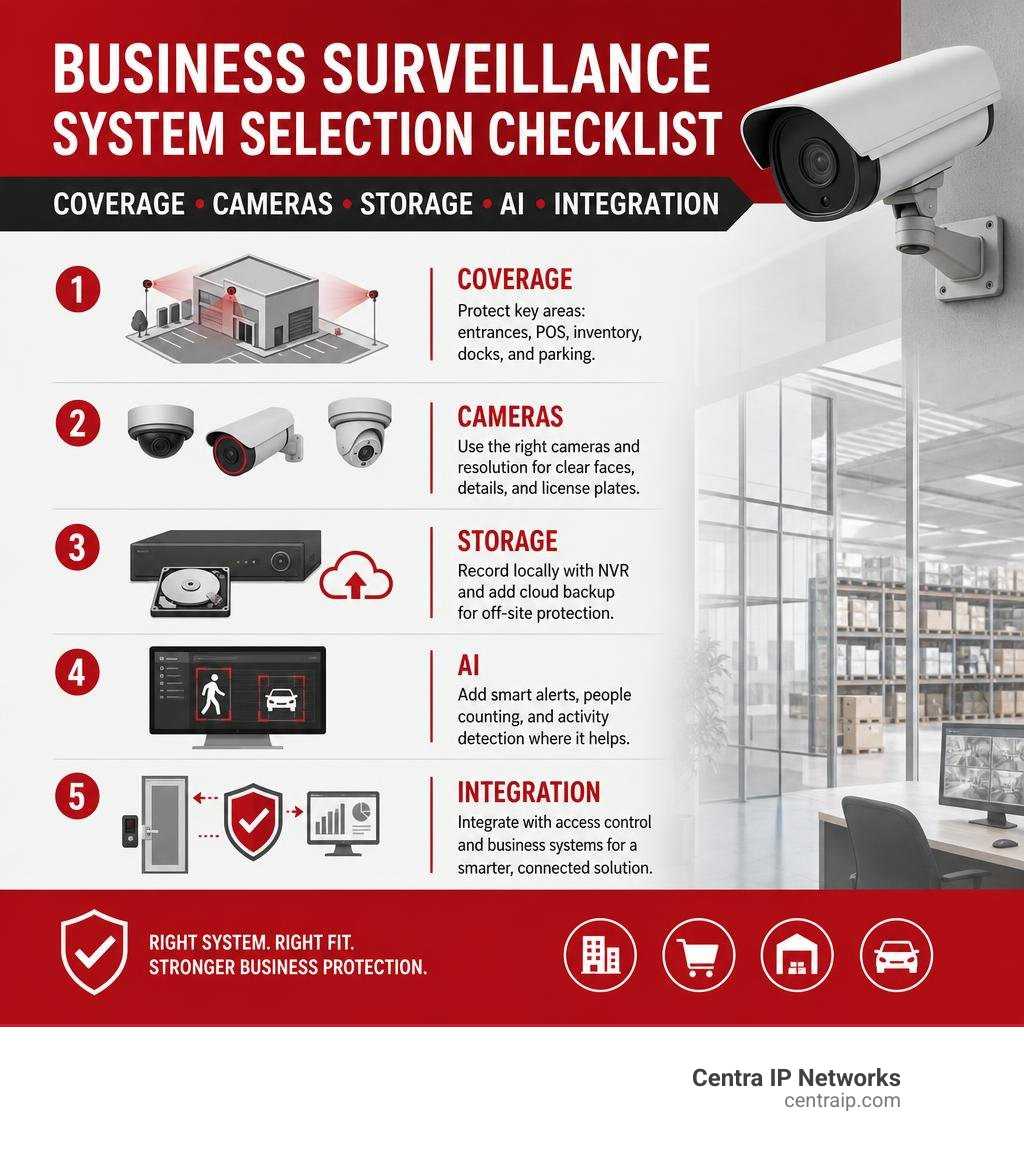
Before you buy, match the system to three practical needs:
- Coverage: Protect entrances, POS areas, inventory rooms, loading docks, and parking areas.
- Evidence quality: Use 4K or varifocal cameras where faces, cash handling, or license plates must be clear.
- Operational fit: Choose AI alerts, people counting, heat maps, or access-control integration only where they solve a real business problem.
Cameras can deter crime, reduce theft and liability risk, and help managers investigate disputes or safety incidents faster. They can also reveal customer traffic patterns, queue issues, and restricted-area activity – making video a useful operations tool, not just a record of what went wrong.
I’m Patrick Brangan, a business technology specialist with more than 20 years of experience helping SMBs simplify communications, managed IT, and surveillance camera systems for business. My work includes fast, coordinated deployments of networks, access points, speakers, and security cameras for organizations that need one reliable technology partner.
Surveillance camera systems for business word list:
- business security camera integration
- surveillance integration with IT
- commercial surveillance systems
Introduction
As of August 2026, security technology is evolving faster than ever. Modern commercial video surveillance is no longer just a grainy camera recording a shadowy figure onto a dusty tape in a back closet. Today, 54% of U.S. businesses have installed or upgraded their cameras over the past 12 months to protect assets, verify workflows, and mitigate massive liability exposures.
The financial incentive is stark. According to research from the University of North Carolina, 60% of burglars actively avoid targets equipped with visible video surveillance. Meanwhile, data from the National Retail Security Survey indicates that small businesses lose between $25,000 to $33,000 every single minute to shoplifters.
Beyond standard loss prevention, modern video architectures shield organizations from fraudulent slip-and-fall claims, document workplace safety (such as OSHA and PPE adherence), and optimize day-to-day operations. When evaluating your facility’s technology roadmap, establishing a resilient physical security plan using The Ultimate Guide to Business Surveillance Systems ensures your cameras work smoothly alongside your existing corporate network.
Core Types and Architecture of Surveillance Camera Systems for Business
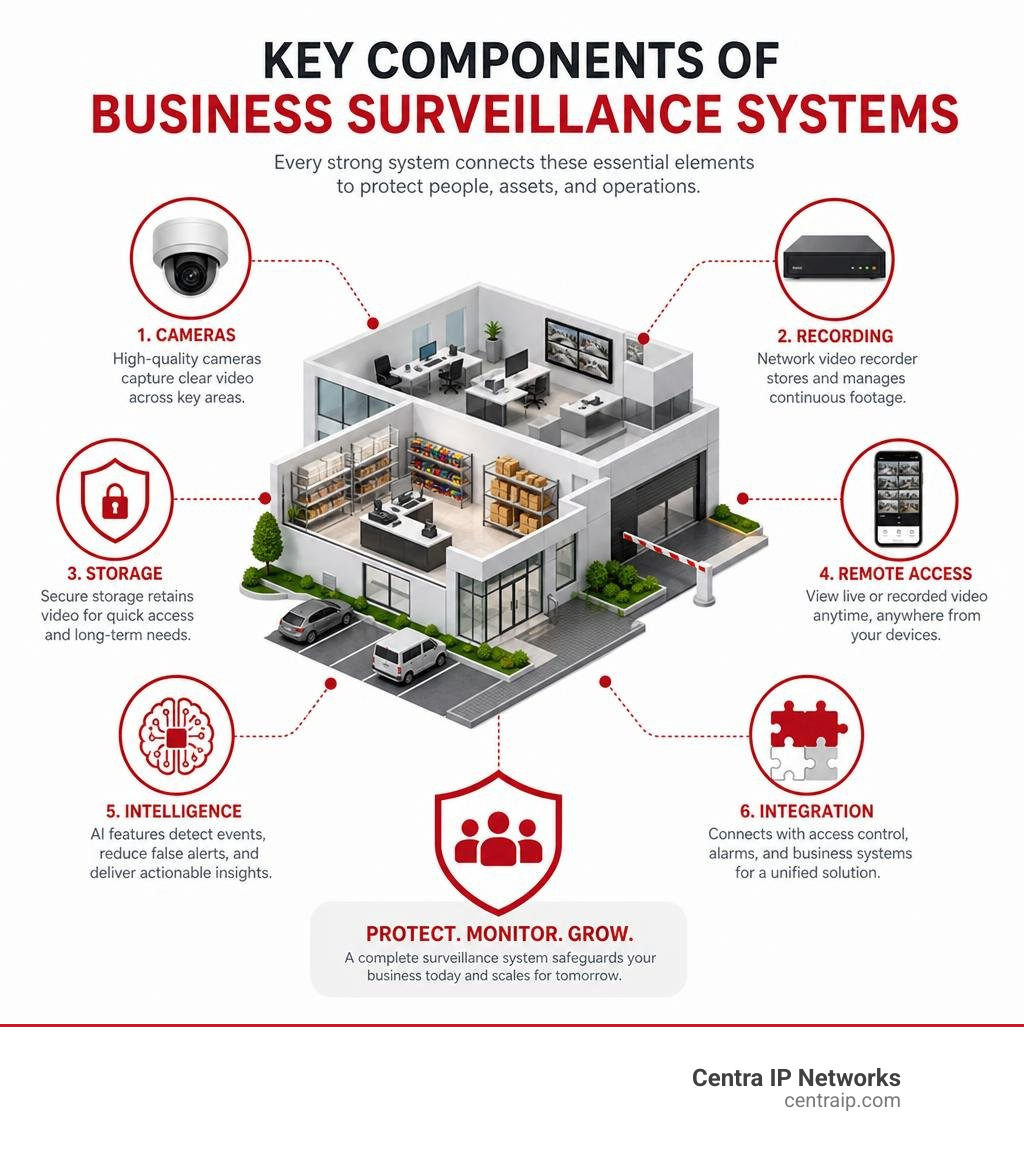
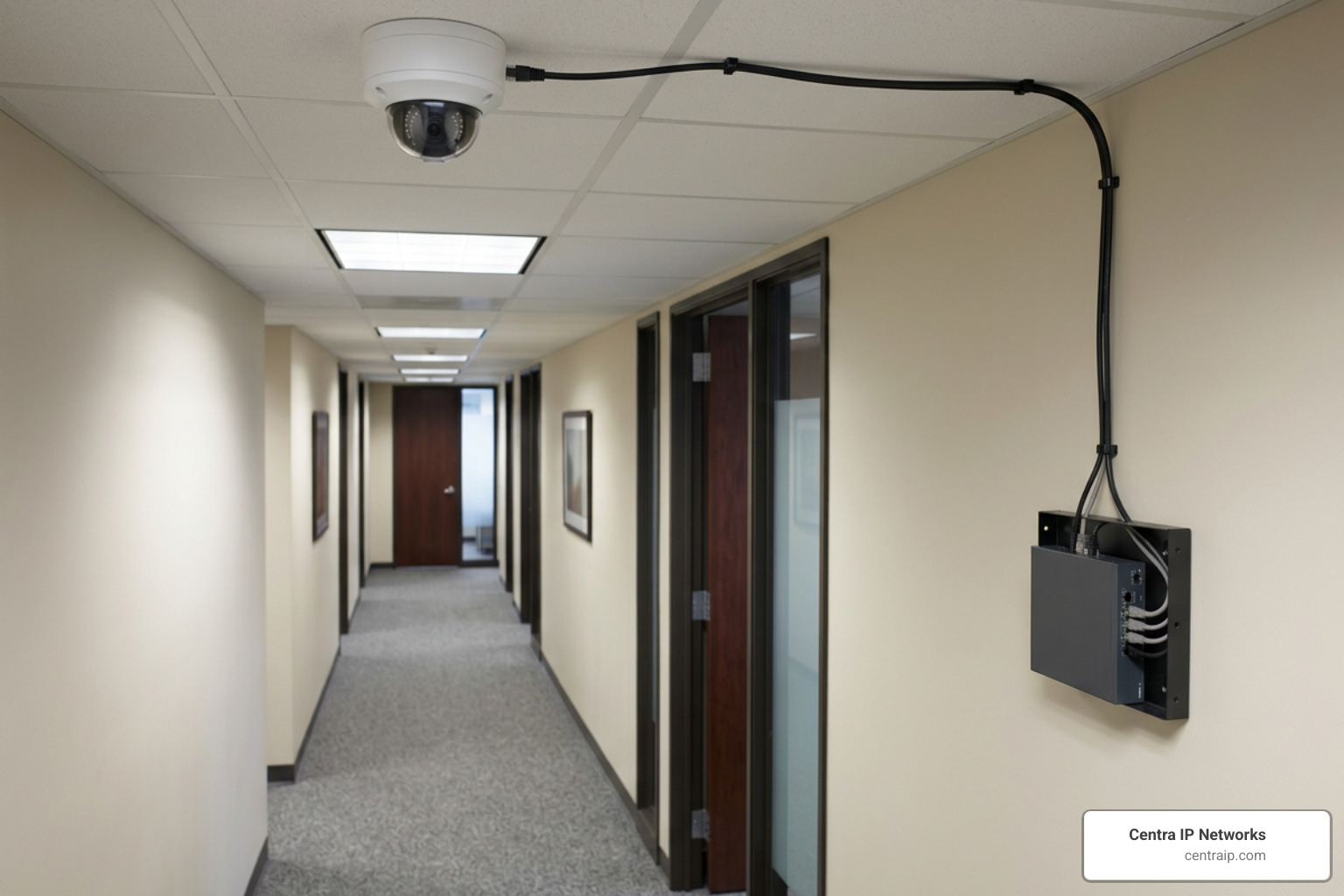
Deploying commercial video starts with choosing the right underlying architecture. A business camera network is fundamentally an IT system: it relies on data pipelines, bandwidth allocation, physical switches, and purpose-built storage arrays.
| Architecture Feature | IP Network Video Recorder (NVR) | Legacy Analog DVR | Enterprise Cloud / Hybrid (VSaaS) |
|---|---|---|---|
| Cabling | Single Cat5e/Cat6 Ethernet (PoE) | Coaxial Cable (RG59) + 18/2 Power | Cat5e/Cat6 Ethernet (PoE) |
| Max Native Resolution | 4K (8MP), 12MP, 16MP composite | Typically capped around 1080p–4MP | 4K (8MP) up to multi-sensor ultra-HD |
| Video Processing | Edge processing on the camera | Processing handled at the DVR recorder | Edge processing on camera + Cloud AI |
| Ongoing SaaS Fees | Optional / Generally $0 | None ($0) | Required annual/monthly license |
| Multi-Site Management | Network port forwarding or central VMS | Fragmented manual connections | Centralized, unified web dashboard |
| Bandwidth Impact | Confined to local LAN unless viewing | Confined to local coax wiring | Low-bandwidth edge; cloud metadata |
IP Network Video Recorders (NVR) vs. Analog DVRs
The core difference between an NVR and a DVR lies in where and how video data is processed:
- Digital IP & NVR Systems: IP cameras encode and process video at the camera itself (edge processing) before sending digital streams over standard Cat6 network cabling to a Network Video Recorder (NVR). This design supports exceptional resolutions (up to 4K and 12MP), intelligent onboard analytics, and global ONVIF (Open Network Video Interface Forum) interoperability.
- Analog DVR Systems: Analog cameras transmit raw, uncompressed electrical video signals over thick RG59 coaxial cables to a central Digital Video Recorder (DVR), which digitizes and compresses the footage. Analog systems face severe resolution ceilings, lack camera-level AI intelligence, and require separate power wiring runs to each camera.
For a detailed technical evaluation between legacy hardware and modern IP options, consult our Compare Commercial CCTV Cameras 101 Survival Guide.
Wired PoE vs. Wireless Video Architecture
Power over Ethernet (PoE) governed by IEEE standards (such as 802.3af and 802.3at PoE+) allows a single standard Ethernet cable to deliver up to 30W of electrical power alongside high-speed data transmission up to 300 feet (100 meters). This eliminates the cost of having licensed electricians run dedicated 120V power outlets to every ceiling or exterior corner.
While commercial-grade Wi-Fi units have their place, relying exclusively on standard Wi-Fi for dozens of 4K streams often clogs corporate wireless bands and creates single points of wireless interference. For remote gates, parking booths, or outlying warehouses where trenching fiber or copper is cost-prohibitive, enterprise setups deploy dedicated point-to-point wireless bridges (operating over 5GHz or 60GHz bands) to bridge signals across 2,000 to 3,000 feet. Sprawling facilities can also utilize extended PoE (ePoE), which transmits power and data across specialized cabling up to 2,000 feet (600 meters) without requiring intermediate inline repeaters. Review our operational guide to Wireless Video Surveillance System architectures to determine when wireless extensions make financial sense.
Camera Form Factors: Dome, Bullet, Turret, and PTZ
Different operational spaces demand specific physical housings to maximize field of view and resist tampering:
- Dome Cameras: Enclosed inside a protective transparent dome, these low-profile cameras make it difficult for onlookers to tell where the lens is pointing. When built with IK10 impact-resistant housings, they are the gold standard for indoor retail aisles, school hallways, and low-clearance building entries.
- Bullet Cameras: Featuring a visible, cylindrical barrel design, bullet cameras act as an unmistakable visual deterrent. They accommodate large motorized varifocal lenses and high-power infrared illuminators, making them ideal for exterior building perimeters, fence lines, and long-range gate entry monitoring.
- Turret (Eyeball) Cameras: Featuring a ball-and-socket design without a glass dome, turret cameras eliminate the optical IR bounce-back and lens reflection common when dust or rain covers dome enclosures. They are increasingly chosen for general outdoor commercial walls and parking structures.
- Pan-Tilt-Zoom (PTZ) & Fisheye Cameras: Fisheye models provide complete 360-degree situational awareness across open rooms without blind spots. PTZ cameras feature motorized mechanical gears that rotate 360 degrees and optically zoom across hundreds of feet, either guided manually by security guards or driven automatically by AI tracking parameters.
To explore the entire spectrum of specialized lens formats, read our breakdown of 10 Different Types of Security Cameras for Business.
Top Commercial Video Surveillance Hardware Roundup
Selecting commercial-grade surveillance hardware requires balancing retention capacity, optical clarity, software ecosystem flexibility, and upfront capital expense. If you are preparing to replace an aging security setup, check out our guide on how to Upgrade Your Security with the Best Commercial CCTV System Available.

Enterprise Hybrid Cloud & Multi-Sensor Platforms
Enterprise hybrid systems bridge on-device edge processing with the convenience of centralized browser management. By leveraging enterprise hardware such as Commercial Video Security Solutions, organizations store high-definition footage directly on high-endurance onboard solid-state storage (ranging from 30 to 365 days of retention) while transmitting low-bandwidth metadata and thumbnails to the cloud.
This hybrid architecture eliminates on-site server racks and port-forwarding vulnerabilities while enabling multi-sensor units (combining four 4K lenses in a single drop) to provide complete 360-degree coverage of vast retail sales floors or road intersections. To understand the operational and administrative value of this design, review How Cloud-Based Video Surveillance Adds Security.
High-Density On-Premise PoE Systems
For facilities that require 24/7 continuous local recording across dozens of high-framerate channels without recurring SaaS subscriptions, high-capacity wired NVRs remain an industry staple:
- Lorex Nocturnal & Elite Series: Systems like the Lorex Elite Series NVR with N4 IP Bullet Cameras support up to 32 channels with native 4K real-time recording at 30 frames per second (FPS). They feature motorized varifocal optical zoom lenses, robust IK10 vandal resistance, IP67 weather ratings, and dual internal SATA bays supporting hard drive mirroring.
- Zosi High-Channel Systems: For massive physical footprints like manufacturing plants and distribution hubs, the 64 Channel 4K PoE Security Camera System pairs enterprise NVRs with multi-tier gigabit PoE network switches and up to 8 hard drive bays capable of supporting 128TB of raw local storage without mandatory licensing overhead.
All-in-One Dual-Lens & Auto-Tracking Systems
Recent innovations in camera optics integrate multiple sensors into a single chassis. The Professional NVR System with AI Security utilizes 2-in-1 hybrid hardware that pairs a fixed 4K ultra-wide lens (122-degree field of view) with an independent 360-degree pan-tilt-zoom module.
Powered by onboard 6 TOPS neural processing units, these systems provide cross-camera subject handoff and auto-frame moving targets at distances up to 164 feet, deploying active visual strobes and audible warnings to deter intruders in real time. For indoor administrative applications, explore our Top Rated CCTV System for Office Use Reviewed to evaluate high-resolution options that blend seamlessly into modern office aesthetics.
Advanced AI Analytics, Business Intelligence, and System Integration
Traditional security systems suffered from one fatal flaw: alert fatigue. Standard pixel-change motion detection triggered endless false alarms from headlights, rustling trees, rain, and insects, leading many operators to simply disable alerts.
Modern deep-learning computer vision processes video locally at the edge, classifying objects into distinct categories (humans, specific vehicle types, bicycles, or animals) and slashing false alarms by 70% to 90%. Learn more about these computational leaps in our deep dive on Security Video Surveillance Technology.
Edge AI Analytics: Heat Mapping and People Counting
Modern surveillance serves a dual purpose: safeguarding physical assets while providing vital operational business intelligence.
- Heat Mapping: Visualizes spatial foot traffic density over time using color-coded spectrums. Retail managers use heat maps to evaluate aisle engagement, measure endcap promotional visibility, and optimize merchandising layouts.
- People Counting & Queue Monitoring: Bi-directional line-crossing counters track store occupancy limits, measure conversion rates against point-of-sale registers, and alert managers when checkout lines exceed customer wait-time thresholds.
- Boundary & Loitering Analytics: Virtual tripwires and perimeter bounding boxes trigger alarms only when an individual lingers in an alleyway or crosses into a restricted warehouse aisle after hours.
For retail-specific deployment strategies, see The Top Surveillance for Retail Businesses to Buy Today.
Designing Surveillance Camera Systems for Business Facilities
Every square foot of a commercial property carries distinct risk profiles that require thoughtful camera placement and lens selection:
- Cash Drawers & POS Counters: Position high-resolution varifocal turret cameras 7 to 9 feet overhead, focused tightly on cash registers and payment terminals to resolve bill denominations, credit card handoffs, and employee cash handling.
- Entry Vestibules & Exits: Place cameras at eye level (5.5 to 6.5 feet) angled toward approaching visitors to capture crisp, glare-free facial profiles, avoiding the backlighting distortions common with high-ceiling mounts.
- Inventory Rooms & Stockrooms: Mount wide-angle dome cameras in overlapping configurations across high-value storage shelving to eliminate blind spots.
- Exterior Parking & Loading Docks: Deploy long-range bullet cameras or PTZ systems equipped with License Plate Recognition (LPR) software at vehicular choke points, paired with active deterrence spotlights to protect unattended trailers and fleet vehicles.
For a detailed blueprint tailored to professional spaces, read The Ultimate Guide to Office Video Surveillance Systems for Modern Workspaces.
Access Control, VMS, and IT Infrastructure Integration
Surveillance delivers maximum ROI when integrated directly with your broader physical security and communications ecosystem:
- Access Control Integration: Linking badge readers with Video Management Software (VMS) automatically pairs badge-swipe timestamps with synchronized video clips. If an unauthorized individual attempts entry, forces an exterior door, or tailgates behind an employee, security teams receive instantaneous video-verified alerts.
- Unified Communications & Phone Systems: Modern IP cameras can integrate with SIP-based VoIP phone systems. When an intercom or perimeter camera detects a visitor or emergency alarm, live video feeds and two-way audio can route straight to desk phones or administrative mobile apps. Learn how to converge these tools in our guide on Surveillance Integration with Phone Systems a Modern Business Guide.
- SARA & Automated Mass Notification: IP video feeds can feed situational awareness engines (like Situational Awareness and Response Assistance – SARA), converting duress alarms or perimeter breaches into automated text, voice, and PA system alerts across facilities.
To ensure your IT network is properly architected for this traffic, consult Surveillance Technology Integration Making Your Cameras and IT Network Best Friends.
Deployment, Storage, and Lifecycle Planning
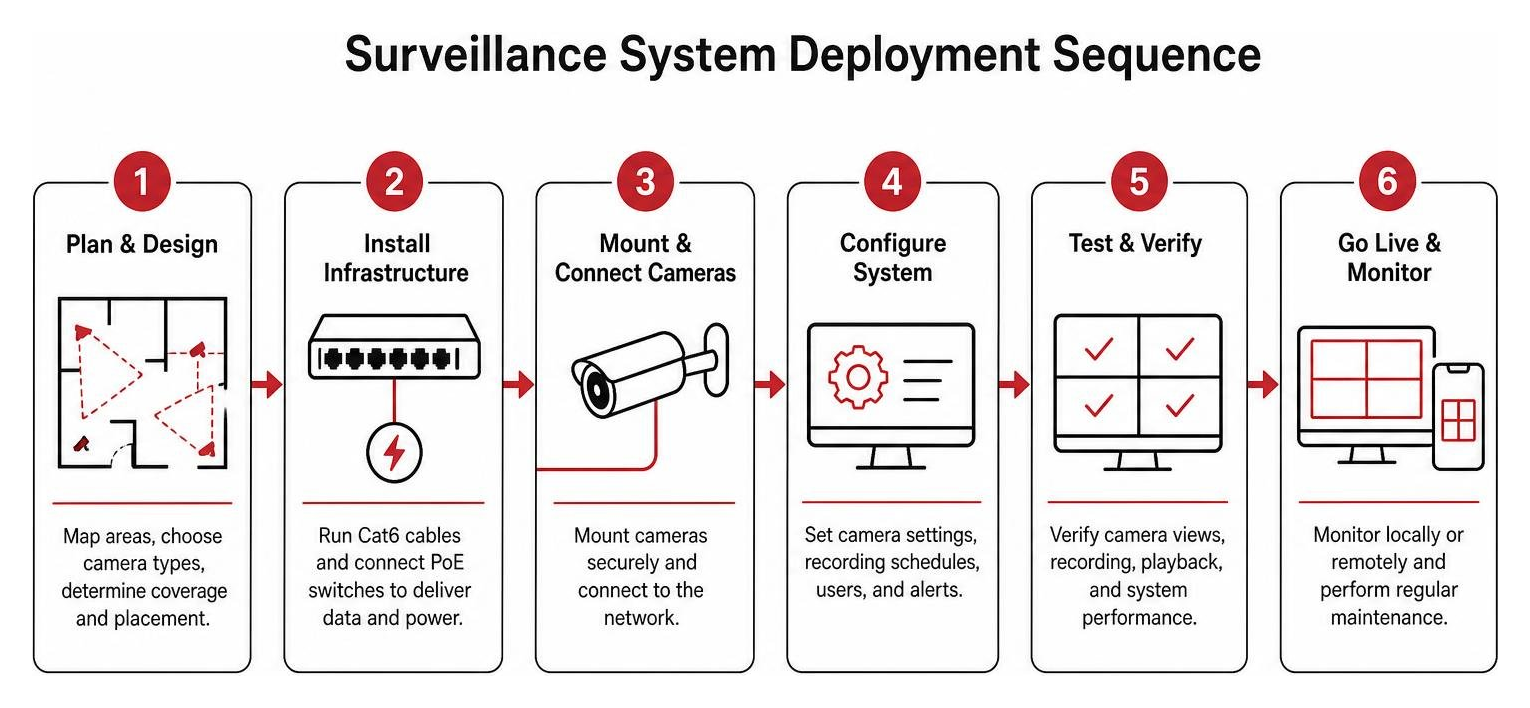
A well-designed physical security plan requires accurate storage modeling, bandwidth management, and durable hardware selection to keep total cost of ownership (TCO) predictable over a 5-to-10-year lifecycle. When planning an enterprise-grade rollout, review How to Choose the Best Enterprise Security Camera System for Your Business.
Storage and Network Sizing for Surveillance Camera Systems for Business
Storage requirements depend on channel counts, recording modes (24/7 continuous vs. motion-only), target framerates (typically 15 to 30 FPS), and compression standards:
- H.265+ Compression: Compared to older H.264 codecs, modern High-Efficiency Video Coding (H.265 and proprietary H.265+ algorithms) reduces video file sizes and network bandwidth consumption by 50% to 70% without sacrificing forensic image clarity.
- Retention Windows: Commercial retention policies typically mandate 30 to 90 days of continuous recording, while heavily regulated financial, gaming, or healthcare environments often require 180 to 365 days.
- RAID Storage Redundancy: Enterprise NVRs utilize RAID 1, RAID 5, or RAID 6 drive arrays. This drive mirroring ensures that if a single mechanical hard drive fails, no video footage is lost while the drive is replaced.
To calculate the exact storage arrays and bandwidth overhead needed for your facility, test our free Video Surveillance Pricing Calculator.
Durability Ratings, Low-Light Optics, and Weatherproofing
Outdoor and industrial environments subject electronic optics to extreme temperatures, vibration, moisture, and potential vandalism:
- IK10 Impact Rating: Indicates an enclosure can withstand a 20-joule mechanical impact (equivalent to dropping a 5 kg steel weight from 400 mm), protecting cameras from intentional vandalism, rocks, and baseball bats.
- IP66 & IP67 Ingress Ratings: IP66 protects against high-pressure water jets, while IP67 certifies complete protection against dust ingress and continuous water immersion up to 1 meter for 30 minutes.
- Low-Light Optics (Starlight / Full-Color Night Vision): Traditional infrared (IR) night vision illuminates scenes with invisible light, resulting in black-and-white video where clothing and vehicle colors are lost. Starlight sensors feature larger physical image sensors (e.g., 1/1.8″ or 1/1.2″) and wide apertures (f/1.0 to f/1.2) that capture full-color forensic details in near-pitch darkness.
To learn how environmental conditions affect commercial surveillance hardware, read Business Security Camera Systems Winter.
Professional Installation vs. Commercial Cost Management
While a homeowner might handle a single battery camera with double-sided tape, enterprise deployments require code-compliant low-voltage engineering:
- Engineered Structured Cabling: Low-voltage technicians certified by BICSI (such as RCDDs – Registered Communications Distribution Designers) engineer cable pathways, plenum ratings, firestopping, and rack patch panels to comply with municipal building codes.
- Network Segmentation & Cybersecurity: Professional integrators configure dedicated Virtual Local Area Networks (VLANs), manage switch port security, enforce TLS/HTTPS encryption, disable unused camera protocols (like UPnP), and maintain firmware upgrade schedules to shield the corporate LAN from cyber threats.
For small business budgeting advice that maximizes capital investment, check out our guide on Best Small Business CCTV System Options to Protect Your Bottom Line.
Frequently Asked Questions about Business Surveillance
How much does a commercial surveillance system typically cost?
Commercial video surveillance pricing varies based on camera count, cabling complexity, storage architecture, and licensing models:
- Small Business Systems (4 to 8 Channels): Complete on-premise 4K PoE systems with an NVR and local storage generally range from $1,500 to $4,500 including hardware and basic professional cabling.
- Mid-Sized Facilities (16 to 32 Channels): High-density systems covering warehouses, retail floors, or commercial offices typically range from $6,000 to $18,000 depending on varifocal lens selections, outdoor conduit requirements, and network switch upgrades.
- Enterprise / Cloud Platforms (32+ Channels): Enterprise deployments with multi-sensor hardware and advanced hybrid cloud platforms typically average $800 to $1,500 per camera point installed, plus ongoing annual cloud software licensing ($150 to $250 per camera/year).
Can existing coax cabling be converted to modern IP surveillance cameras?
Yes. Businesses do not always need to pay for extensive re-cabling when replacing legacy analog systems. By deploying Ethernet-over-Coax (EoC) transceivers or media converters, you can transmit modern digital IP camera data and PoE power across existing RG59 coaxial cables over distances up to 1,000 feet, substantially lowering retrofit labor and material expenses.
What is the difference between on-premise NVR storage and cloud video surveillance?
- On-Premise NVR Storage: Video streams record continuously to local hard drive arrays housed in your server closet. You retain 100% physical ownership of your data with zero monthly subscription fees, but your team is responsible for hard drive maintenance and local physical hardware security.
- Cloud Video Surveillance (VSaaS): Video footage or event clips stream directly to secure offsite data centers or store on edge solid-state drives managed via cloud software. This provides multi-location centralized management, instant remote access without complex router port configuration, and off-site disaster redundancy, in exchange for an ongoing monthly or annual subscription per camera.
Conclusion
A modern business surveillance system is an indispensable foundation of operational intelligence, liability defense, and asset security. Whether you are safeguarding an office building, a high-volume retail floor, or a multi-building industrial campus, choosing the right combination of PoE IP cameras, high-capacity NVR storage, edge AI analytics, and physical access control ensures your facilities remain resilient 24/7.
At Centra IP Networks, we make business technology simple. As a comprehensive Managed IT and Cloud Communications provider, we deliver your phone systems, high-speed Internet connectivity, structured cabling, managed IT infrastructure, and video surveillance on one unified platform with a single bill and a single point of contact. Backed by 35+ industry partnerships, we engineer customized, cost-effective technology ecosystems tailored to your unique operational footprint.
Ready to protect your operations with an enterprise-grade surveillance system designed for long-term scalability? Explore our tailored Cloud Surveillance Services or contact our engineering team today to schedule your comprehensive on-site security assessment.