

Build a Reliable Business IT Infrastructure Foundation
Business IT infrastructure is the full set of technology your company needs to work every day: devices, networks, internet connections, software, cloud services, security, and backup systems. To set it up well, start with four priorities:
- Define what your team must do: communicate, access files, serve customers, and work securely from any location.
- Build a reliable network with enough bandwidth, secure Wi-Fi, and room to grow.
- Protect every layer with multi-factor authentication, updates, backups, and recovery planning.
- Choose systems that work together, so you are not stuck managing a long list of vendors.
When these pieces are designed as one system, IT stops being a daily source of tickets and becomes a foundation for productivity, customer service, remote work, automation, and future tools such as AI and IoT.
The goal is not to buy the most technology. It is to create a secure, scalable setup that fits your budget, reduces downtime, and gives your people dependable access to the tools they need.
I am Patrick Brangan, with more than 20 years of experience helping small and midsize companies build and manage Business IT infrastructure. My work includes unified communications, managed IT, security cameras, and coordinated network deployments designed to simplify technology support.
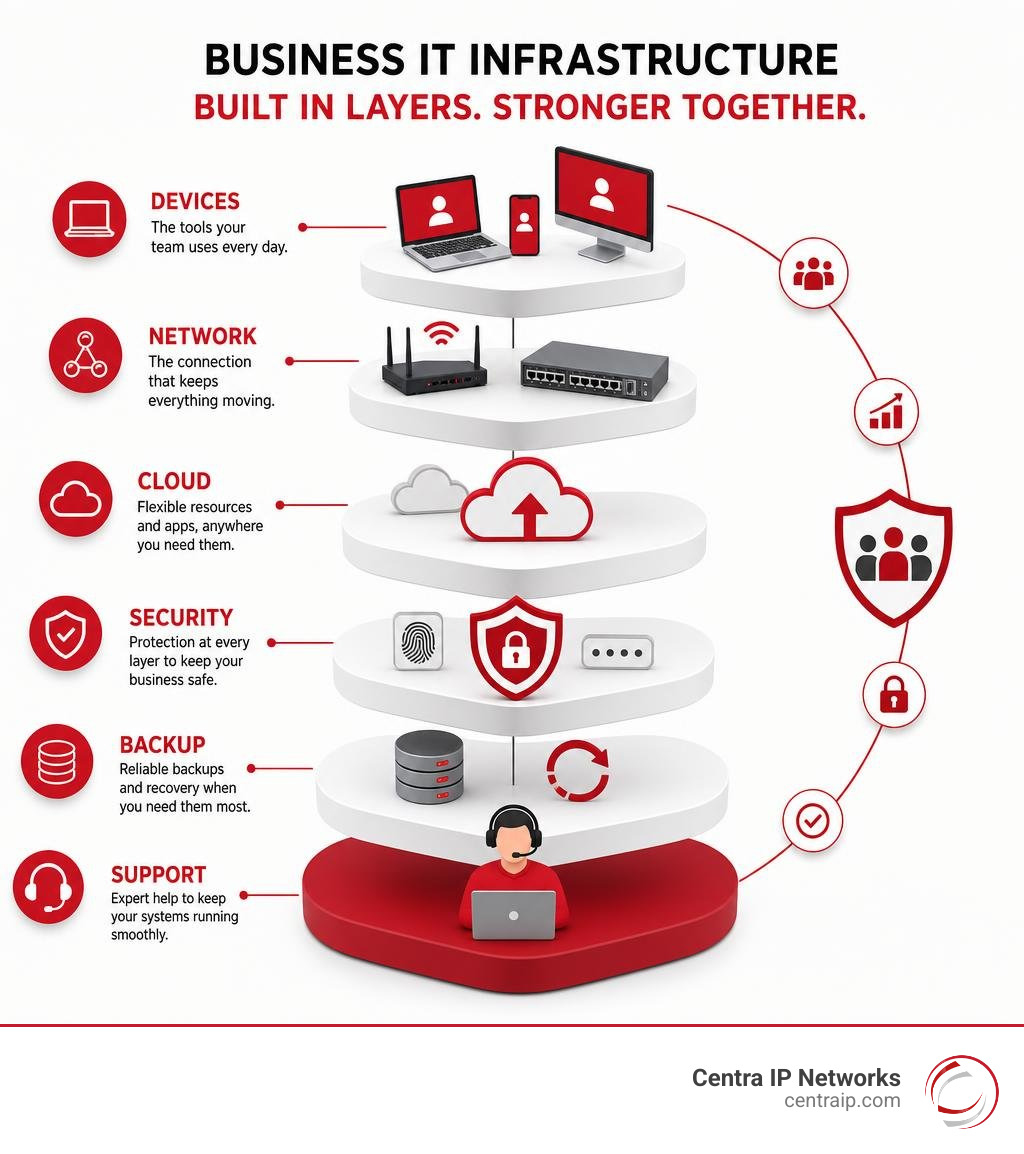
Business IT infrastructure further reading:
Core Components of Modern Business IT Infrastructure
Think of your technology environment like a modern commercial building. You need solid foundations, clean plumbing, continuous power, and clear entryways. If one pipe bursts, the whole office feels it.
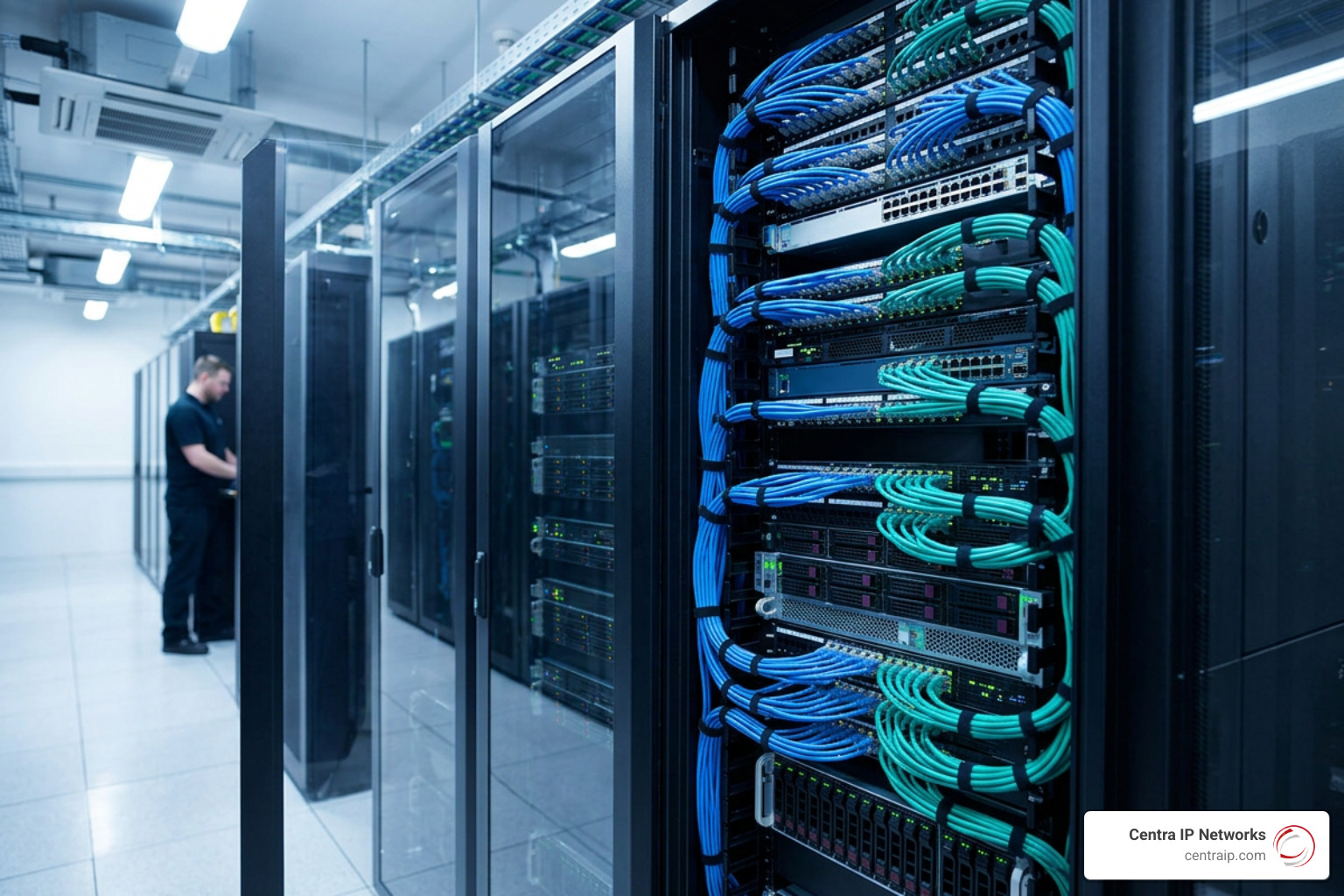
When we look at modern enterprise systems as of August 2026, the global IT infrastructure market is racing from USD 120 billion toward USD 241 billion over a seven-year span (a 10.5% CAGR). This rapid growth is driven by organizations replacing piecemeal setups with unified, high-performing systems. At its core, every business setup consists of three foundational layers: physical hardware, operating software, and data networking.
Hardware, Endpoints, and Physical Facilities
Physical infrastructure includes the tangible gear you can see and touch in your office or data center:
- Servers and Storage Units: Compute powerhouses and dynamic solid-state storage arrays that house databases, customer records, and core applications.
- Workstations and Endpoints: Laptops, desktop PCs, smartphones, barcode scanners, and point-of-sale terminals your staff use daily.
- Power and Environmental Controls: Uninterruptible Power Supplies (UPS), backup diesel generators, and dedicated data center cooling systems that prevent expensive hardware from overheating.
- Powered Peripheral Devices: Connected hardware such as security cameras, access-control card readers, and VoIP desk phones. Utilizing the benefits of a PoE network switch allows you to deliver electrical power and high-speed data over a single Ethernet cable, eliminating redundant electrical wiring.
Essential Software, Platforms, and Operating Systems
Hardware is just an expensive doorstop without software to bring it to life. This layer coordinates resources and gives employees their digital workspaces:
- Operating Systems (OS): Enterprise platforms (predominantly Windows and Linux) that manage machine hardware resources.
- System Virtualization & Hypervisors: Abstraction software that divides physical servers into isolated virtual machines (VMs), maximizing hardware efficiency.
- Middleware and Database Management: Systems like SQL engines and application programming interfaces (APIs) that allow separate applications to exchange records smoothly.
- Business Applications & Development Platforms: Tools like enterprise resource planning (ERP), customer relationship management (CRM), and platform as a service: the developer’s cloud secret for building customized workflows without managing underlying server operating systems.
Data Networking, Cabling, and Connectivity
Networking is the nervous system binding your hardware and software together. If your connectivity stumbles, your whole operation stalls.
- Routers and Firewalls: Intelligent gatekeepers directing internal and external data packets while blocking unauthorized intrusion attempts.
- Managed Network Switches: Hardware that connects computers, printers, and servers within local facilities, establishing distinct Virtual Local Area Networks (VLANs).
- Structured Cabling: High-grade Cat6A copper and single-mode/multi-mode fiber-optic lines built to strict TIA/EIA standards.
- Business-Grade Internet: Symmetric broadband delivered to your facilities. Evaluating whether is fiber internet the right choice for your business ensures your team avoids bandwidth throttling and high packet loss during peak operating hours. Understanding how reliable connectivity can boost team productivity helps leaders protect daily revenue and prevent workflow interruptions.
Comparing Architecture Models: From On-Premises to Cloud
Choosing the right architectural model determines how agile, scalable, and resilient your business will be. Rather than locking yourself into a rigid, legacy approach, explore modern options like Infrastructure Services | IBM to see how hybrid systems balance control with agility.
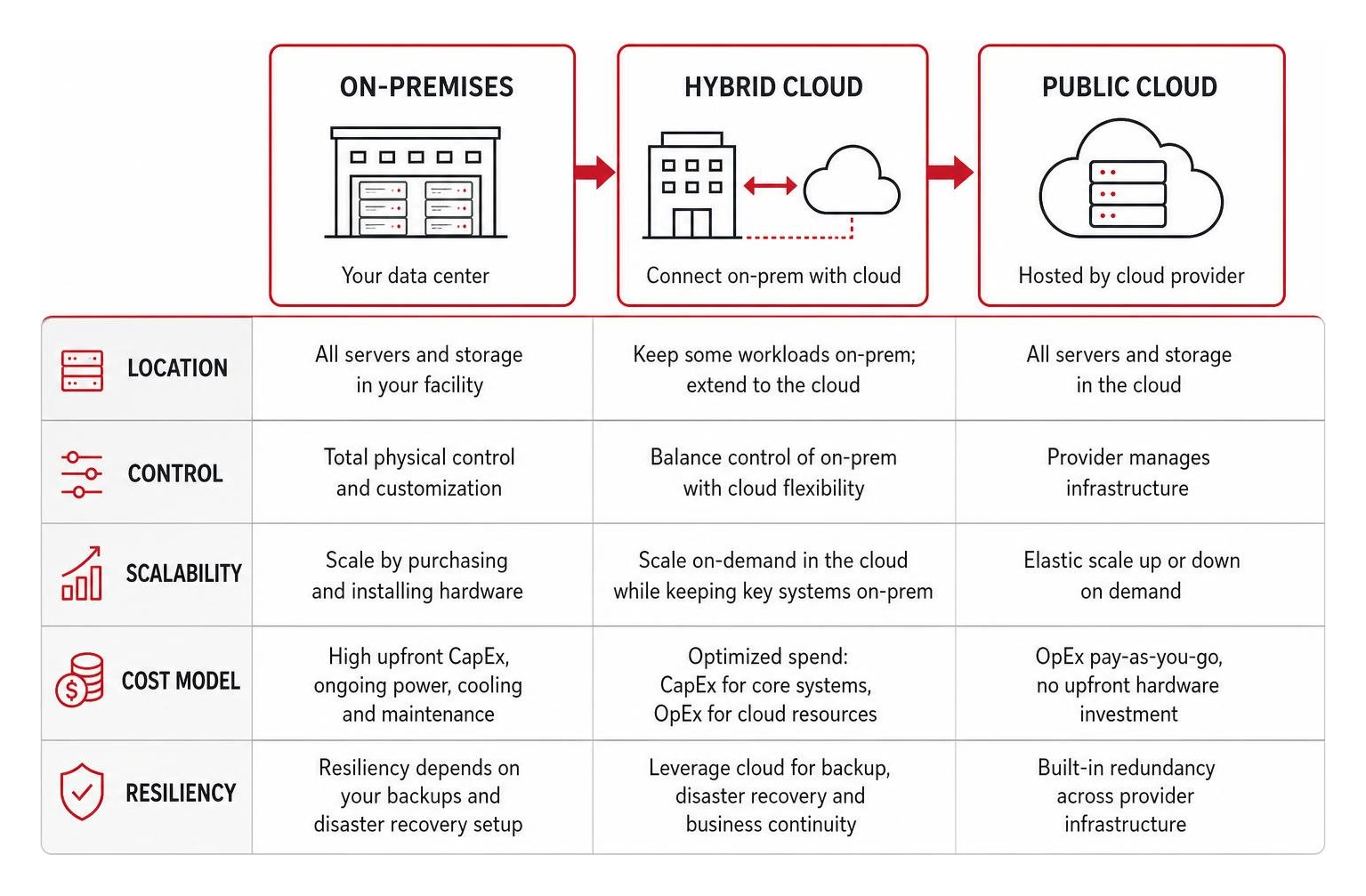
On-Premises vs. Cloud vs. Hybrid Architectures
Deciding where your data and computing power live comes down to three primary models:
- Traditional On-Premises: You purchase, host, and maintain physical server hardware and storage inside your own facility. While this offers total physical control, it demands heavy upfront capital expense (CapEx), high power and cooling costs, and continuous in-house maintenance.
- Public Cloud Infrastructure: You rent compute, storage, and networking capacity over the internet from third-party data centers on an operating expense (OpEx) basis. To learn how these virtual environments operate, see our breakdown on what is a cloud infrastructure?.
- Hybrid Cloud Infrastructure: The most popular approach for growing businesses. You keep sensitive compliance databases or low-latency systems on-premises or in a private cloud while running dynamic applications in the public cloud. For step-by-step migration guidance, read our cloud-based infrastructure: the ultimate guide to moving beyond physical servers. The global hybrid cloud market reached USD 125 billion in 2023 and is projected to expand to USD 558.6 billion by 2032 as organizations seek this balanced flexibility.
| Feature | On-Premises | Public Cloud | Hybrid Model |
|---|---|---|---|
| Cost Model | Heavy upfront CapEx | Predictable utility OpEx | Blended CapEx & OpEx |
| Scalability | Slow (order, ship, install gear) | Instantaneous auto-scaling | Highly elastic on demand |
| Maintenance | 100% internal responsibility | Handled by provider | Shared responsibility |
| Security Control | Direct physical control | Shared security model | Granular workload placement |
| Disaster Recovery | Manual secondary site needed | Built-in geographic redundancy | Automated multi-tier failover |
Hyperconverged and Virtualized Environments
Hyperconverged Infrastructure (HCI) combines compute, storage, and networking into a single, software-driven framework running on standard server hardware. Instead of managing separate storage area networks (SANs), switches, and server racks, HCI uses software hypervisors to pool and manage all physical resources as one cohesive unit.
Virtualization isolates individual virtual machines from one another, preventing software conflicts, streamlining system backups, and allowing you to spin up new internal servers in minutes rather than waiting weeks for new hardware delivery.
How Modern Technologies Transform Business IT Infrastructure
Modern IT setups do far more than process emails and balance spreadsheets. They provide the computational muscle needed to deploy automation, generative artificial intelligence, and edge computing across your organization.

Deploying enterprise-grade frameworks like IT Infrastructure Solutions | IBM allows organizations to run complex, real-time analytics without slowing down day-to-day operations.
Preparing Systems for Enterprise AI and Edge Computing
Generative AI and automated business intelligence require massive compute power, high-bandwidth storage, and ultra-low network latency. Interestingly, 77% of executives say they must adopt gen AI quickly to remain competitive—yet only 25% strongly agree their existing IT infrastructure can support enterprise-wide AI scaling.
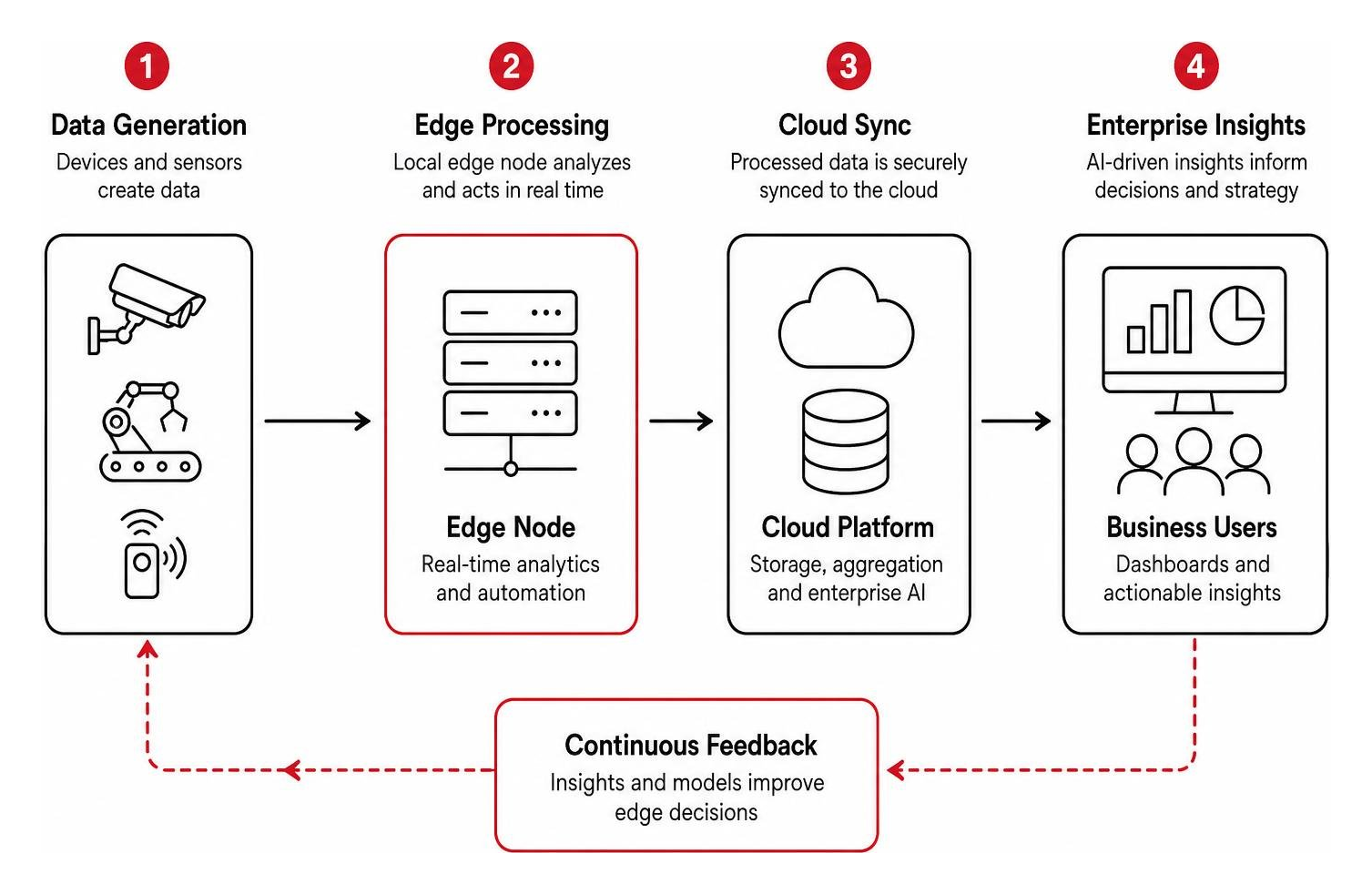
Edge computing solves bandwidth bottlenecks by processing data right where it originates—on factory floors, smart security cameras, or warehouse sensors—rather than routing every byte back to a distant server. This architecture delivers instant insights for automated quality checks, real-time fraud alerts, and immediate equipment diagnostics.
Unified Communications and Network Redundancy
Modern teams cannot afford dropped calls, pixelated video meetings, or sudden communication blackouts. Unified Communications as a Service (UCaaS) brings together cloud voice (VoIP), team messaging, SMS, and video conferencing under one managed platform.
Ensuring continuous uptime requires built-in network redundancy:
- Dual Carrier Routing: Connecting your office to two separate internet service providers (such as fiber paired with a secondary wireless link) to maintain connectivity during an ISP outage.
- Automated SD-WAN Failover: Software-defined networking that detects circuit degradation and switches application traffic to healthy connections in milliseconds.
- Remote Team Enablement: Deploying dedicated business internet service for remote teams with secure virtual private network (VPN) tunnels to maintain branch office security standards for home-based staff.
Best Practices for Managing, Securing, and Modernizing Your Network
Building an advanced tech environment is only half the battle; maintaining and protecting it day in and day out is what keeps your business operational and profitable.
Industry studies show that 60% of server downtime events stem from human configuration errors rather than hardware component failures. Establishing automated, structured management processes is the most effective way to protect your business from preventable outages.
Designing a Scalable Business IT Infrastructure on a Budget
Upgrading your technology does not require an enterprise-sized budget. Smaller organizations can achieve enterprise-grade reliability by following a practical, modular approach:
- Standardize Endpoint Hardware: Purchasing uniform laptop and desktop configurations simplifies device provisioning, imaging, and routine patching.
- Plan Network Architecture Early: If you are configuring a growing facility, follow our step-by-step roadmap for building a small office network to avoid messy, unorganized cabling and weak Wi-Fi coverage.
- Leverage Flexible Cloud Storage: Cut on-site server hardware expenses by using cost-effective cloud storage for small business that expands seamlessly alongside your data requirements.
Proactive Security, Backup, and Disaster Recovery
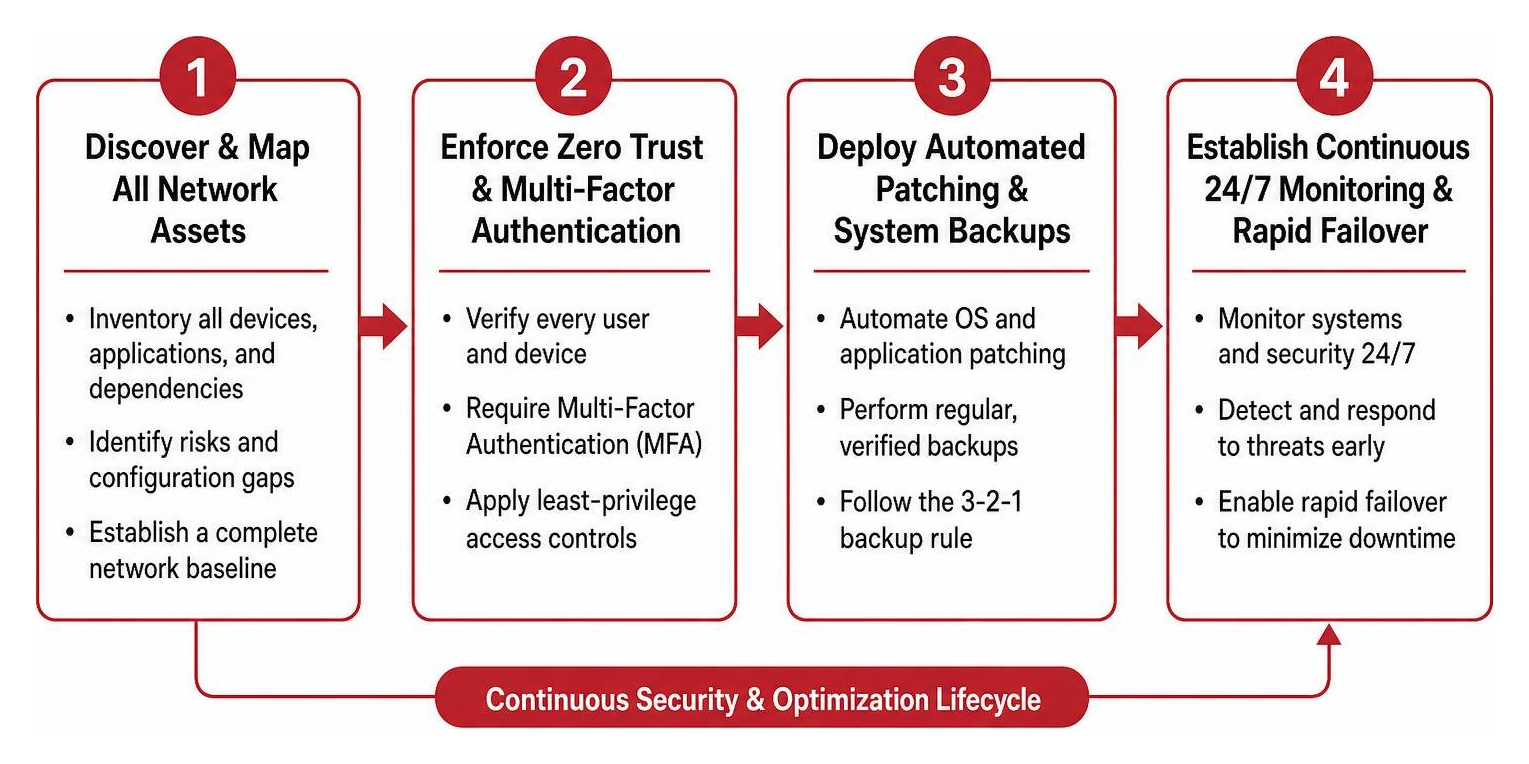
A single ransomware infection or accidental database deletion can paralyze an unprepared business. Robust cybersecurity must be woven across every layer of your network architecture:
- Zero Trust Network Access (ZTNA): Enforce strict identity verification and Multi-Factor Authentication (MFA) for every employee and device accessing internal systems.
- Layered Defense-in-Depth: Combine next-generation firewalls, endpoint detection and response (EDR), and VLAN segmentation as outlined in the managed network security playbook: services, solutions, and why you need them.
- Regulatory Compliance Controls: Safeguard sensitive financial and customer data by maintaining strict data security compliance across your physical and cloud storage repositories.
- Immutable Backups & Disaster Recovery: Apply the 3-2-1 backup rule (three copies of data across two different media types, with one stored offsite in an encrypted repository). Review our checklist on managed disaster recovery services: the things you should consider to ensure your Recovery Time Objectives (RTO) align with your business continuity goals.
In-House IT vs. Managed IT Services
As technology environments grow more complex, managing IT entirely in-house often strains internal resources. Finding specialized engineers for cloud computing, cybersecurity, VoIP systems, and structured cabling is expensive and difficult to sustain.
CEOs note that 35% of their workforce will require retraining and reskilling over the next three years—up from just 6% in 2021. Partnering with a dedicated Managed Service Provider (MSP) eliminates these skill gaps by providing access to a full team of certified specialists for a predictable monthly fee.
Evaluating managed IT vs in-house IT: which is best for your business? helps executive teams determine whether outsourcing operational maintenance makes financial sense.
Modern organizations leverage external experts because discovering how managed IT service providers boost efficiency allows their internal staff to focus on strategic business growth rather than daily helpdesk tickets.
Frequently Asked Questions About Business IT Infrastructure
What is the difference between traditional and cloud IT infrastructure?
Traditional infrastructure relies on physical on-premises servers, storage arrays, and network appliances owned and maintained directly inside your facility. Cloud infrastructure delivers those same computing, storage, and networking resources virtually over the internet from enterprise data centers.
Traditional setups require substantial upfront capital investments, dedicated real estate, and ongoing physical maintenance, whereas cloud setups operate on a flexible utility model that lets you scale capacity up or down instantly.
Why is network reliability critical for modern business operations?
Every modern business tool—from VoIP phone calls and customer payment systems to cloud ERP suites and database queries—depends on continuous connectivity. An unstable network leads to dropped customer calls, stalled sales, lost employee productivity, and reputational damage.
Investing in carrier redundancy, managed switching, and certified structured cabling ensures your mission-critical applications run without interruption.
How do small businesses optimize IT infrastructure without overspending?
Small businesses can optimize their environments without breaking the bank by:
- Migrating on-premise servers to predictable cloud-hosted platforms (IaaS and SaaS) to eliminate expensive server replacement cycles.
- Consolidating voice, internet, and cybersecurity vendors under a single managed provider to reduce administrative overhead and vendor finger-pointing.
- Standardizing staff devices and applying automated patch management to resolve software vulnerabilities before they cause costly downtime.
- Implementing scalable Power over Ethernet (PoE) switching to power Wi-Fi access points and security hardware over existing network drops without hiring electricians.
Conclusion
A well-designed IT environment is not merely an operational cost center—it is the strategic engine that powers your business agility, protects your proprietary data, and fuels sustainable company growth.
When your hardware, network cabling, cloud services, and security protocols operate in harmony, your employees work more efficiently and your systems adapt effortlessly to future innovations.
At Centra IP Networks, we eliminate technical complexity by delivering comprehensive Managed IT, unified cloud communications, dedicated internet connectivity, and enterprise-grade cybersecurity through a single platform with one consolidated bill. By leveraging our 35+ top-tier technology partnerships, we design, deploy, and manage cost-effective, custom-tailored environments for businesses across Dallas, Fort Worth, Orlando, Tampa, St. Petersburg, Clearwater, and Sarasota.
Ready to eliminate recurring technical headaches, protect your business assets, and streamline your operations? Explore tailored cloud services for your business and let our expert engineers build a dependable technology foundation tailored to your exact business goals.