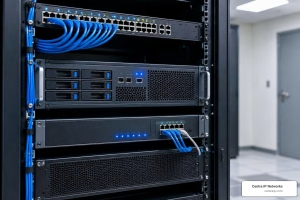
Why Commercial Surveillance Systems Matter for Modern Businesses
Commercial surveillance systems help businesses protect people, property, inventory, and daily operations with reliable video coverage, recording, and alerts. The best choice is not always the system with the most cameras or newest features. It is the one that fits your site, network, risk areas, budget, and plans for growth.
For a quick comparison, most businesses should start here:
| Business need | Best-fit system approach |
|---|---|
| One office, store, or warehouse with dependable local recording | Wired IP cameras with a PoE NVR |
| Existing coax camera wiring and a limited upgrade budget | DVR or hybrid system |
| Multiple locations and remote management needs | Cloud or hybrid video platform |
| Large sites with active security staff | Centralized VMS with AI analytics |
| High-risk doors, lots, or loading docks | AI-enabled cameras with active deterrence and alerts |
Commercial systems differ from home cameras in important ways. They are built for continuous use, larger camera counts, tougher environments, longer recording retention, and integration with access control, alarms, and IT networks. A well-designed system can also do more than record an incident: it can flag people, vehicles, after-hours activity, or restricted-area access in real time.
I am Patrick Brangan, a business technology professional with more than 20 years of experience helping SMBs simplify IT, communications, and commercial surveillance systems. My work includes time-sensitive, multi-system deployments involving networks, access points, speakers, and security cameras, so the comparisons ahead focus on practical fit rather than flashy specs.
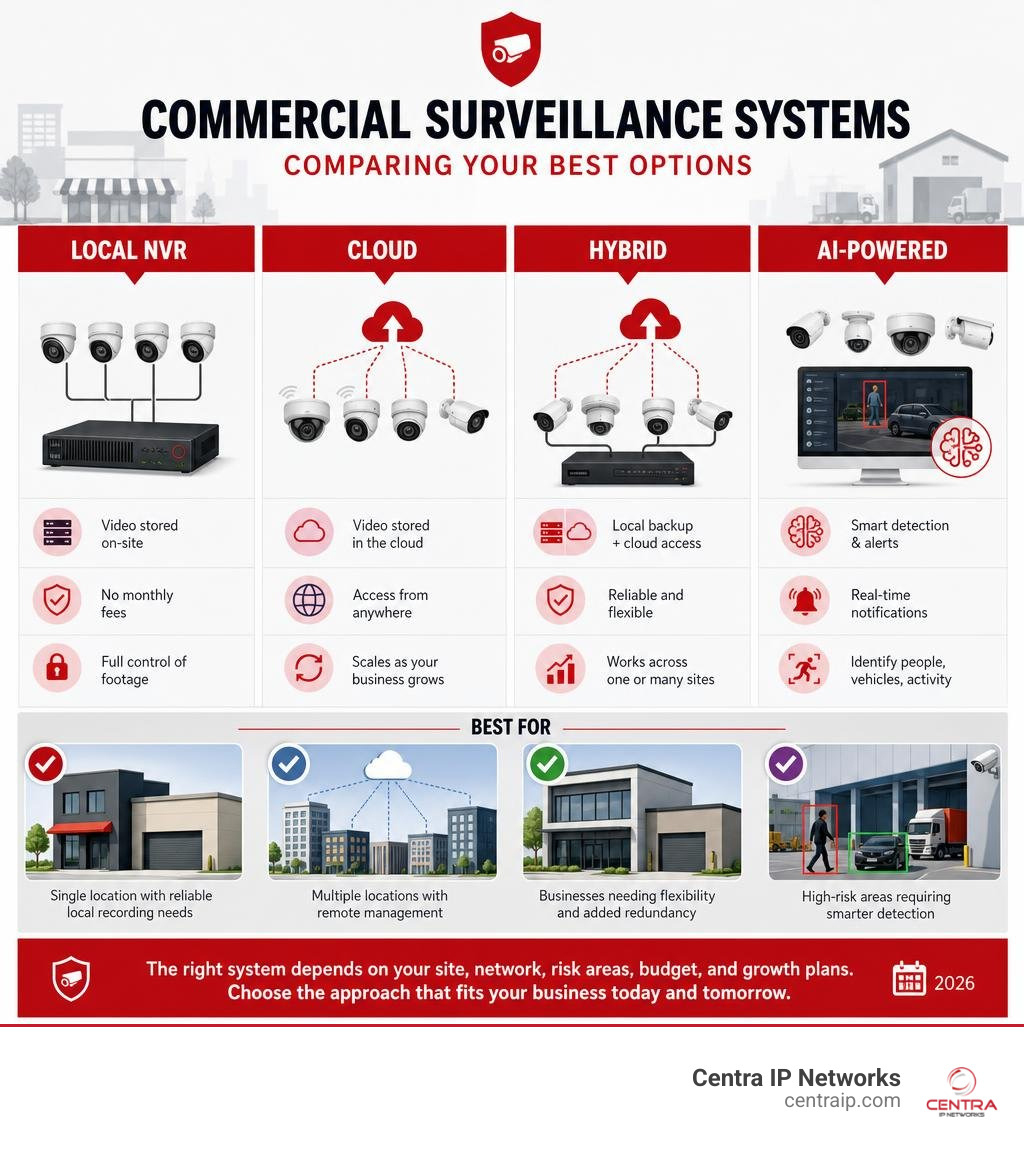
Simple guide to commercial surveillance systems terms:
Comparing Types of Commercial Surveillance Systems: NVR, DVR, Cloud, and Hybrid
When choosing between modern commercial surveillance systems, understanding the underlying system architecture is crucial. How your cameras process, transmit, and store video data directly dictates network bandwidth consumption, reliability, scaling limits, and maintenance costs.
Traditional analog systems rely on Digital Video Recorders (DVRs) connected via coaxial cables. Modern deployments overwhelmingly favor Internet Protocol (IP) security cameras connected via standard Ethernet infrastructure. IP cameras convert video into digital network data right at the camera, sending high-definition video over structured wiring.
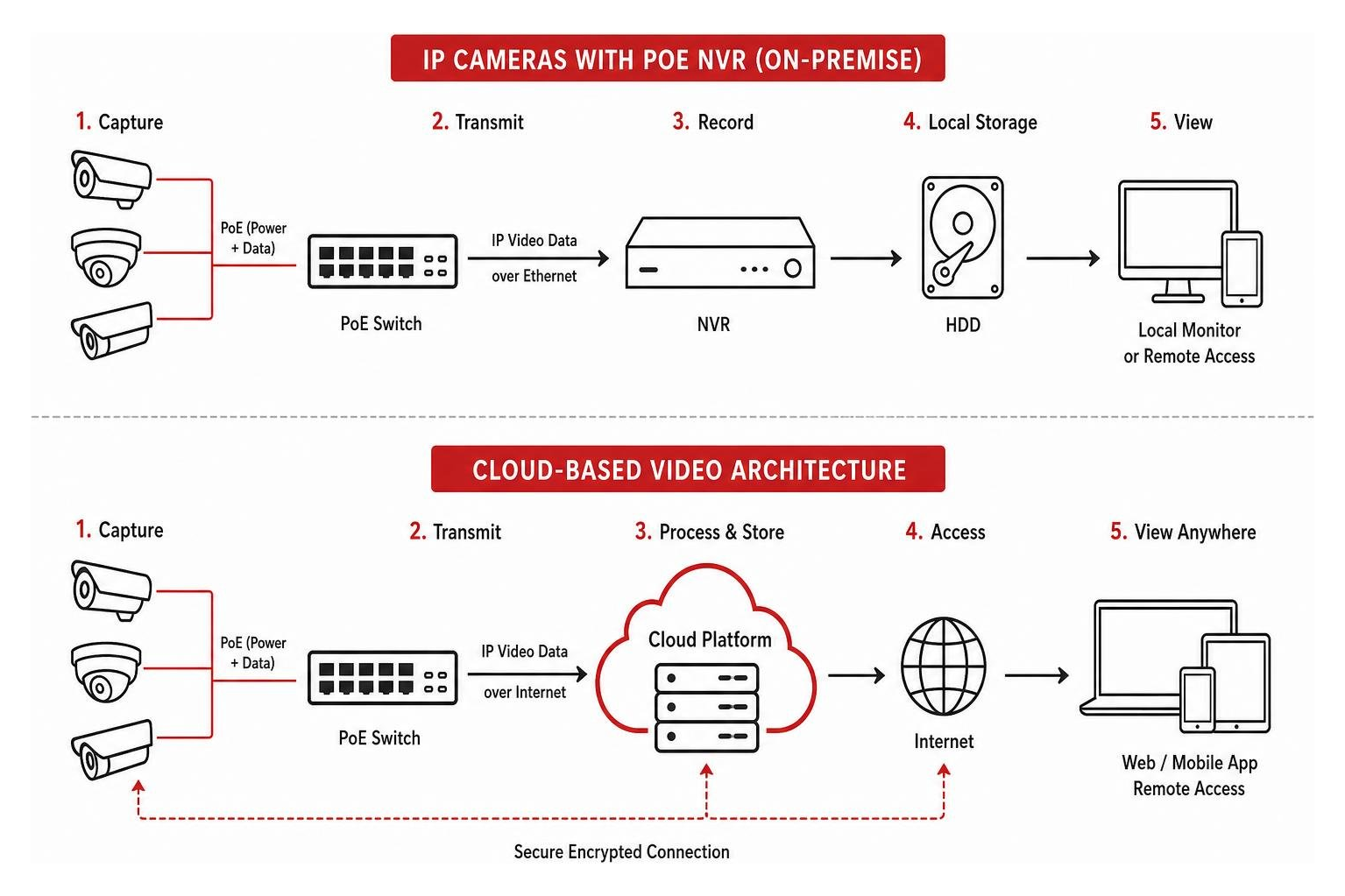
Power over Ethernet (PoE) is the standard cabling architecture for commercial security camera installations. By using a single Cat5e or Cat6 Ethernet cable to deliver power and network transmission simultaneously, PoE eliminates the need for nearby electrical outlets at every camera location. This setup keeps installation simple, reduces low-voltage cabling labor, and provides clean power backed up by central Uninterruptible Power Supply (UPS) units in your server room.
For a detailed evaluation of enterprise architectures, review our guide on How to Choose the Best Enterprise Security Camera System for Your Business.
| Feature / Metric | On-Premise NVR | Analog DVR | Pure Cloud System | Hybrid Cloud Platform |
|---|---|---|---|---|
| Primary Video Recording | Local Hard Drives | Local Hard Drives | Off-site Cloud Storage | Edge SSD + Cloud Backup |
| Cabling Requirement | Cat5e/Cat6 Ethernet (PoE) | RG59 Coaxial Cable | Cat5e/Cat6 Ethernet / Wi-Fi | Cat5e/Cat6 Ethernet (PoE) |
| Video Resolution | 1080p up to 4K / 30MP | Standard Definition / 1080p | 1080p to 4K (Bandwidth dependent) | 1080p to 4K |
| Recurring Licensing Fees | Zero (Standard Hardware) | Zero | Monthly Per-Camera Fee | Optional Cloud Tier Subscription |
| Network Bandwidth Usage | Minimal (Local Network) | None (Closed Circuit) | High Continuous Upload | Low (Metadata & Motion Upload) |
| Multi-Site Remote Access | Port Forwarding / VPN | Limited Mobile Apps | Native Central Dashboard | Native Unified Portal |
On-Premise NVR and DVR Video Recorders
Network Video Recorders (NVRs) record digital IP camera streams locally to dedicated surveillance-grade hard drives. Commercial NVR channel capacities scale from 8 or 16 channels for small office branches up to 32, 64, 128, or 256 channels for large logistics facilities or multi-tenant properties.
The main benefit of on-premise local recording is cost control and network efficiency. Local NVR systems record 24/7 continuous footage directly to internal drives without consuming internet bandwidth or charging ongoing monthly cloud storage fees. For organizations needing reliable 24/7 security without recurring software overhead, options like a Professional NVR System with AI-Powered 24/7 Security offer high-density local storage up to 8TB or more.
However, local NVR setups have hardware physical capacity limits. When local drives reach capacity, older footage is overwritten. Physical NVR units also face risk from local theft, vandalism, or building fires if off-site backup protocols are not put in place.
Cloud-Based and Hybrid Video Surveillance Systems
Cloud-based commercial surveillance systems eliminate central recorder hardware by sending video feeds directly across internet connections to secure cloud environments. This model excels for multi-site commercial enterprises, like retail chains across Dallas, Fort Worth, Orlando, or Tampa, allowing executives and IT managers to oversee cameras at every location through a single browser login or mobile app.
Pure cloud architectures provide automatic firmware updates, zero physical recorder maintenance, and secure off-site retention. However, uploading continuous 4K video streams consumes significant network bandwidth.
Hybrid cloud surveillance systems solve this bandwidth issue. Cameras store high-resolution continuous recordings locally on built-in industrial edge storage (microSD cards or solid-state drives) while uploading lightweight metadata, event clips, and compressed streams to the cloud. This provides instant remote management and redundant backups without saturating local office networks. Learn practical deployment strategies in our article on Cloud Video Surveillance Tips to Implement It.
Architectural Solutions and Platform Roundup
Evaluating Top Enterprise Commercial Surveillance Systems for Multi-Site Business Deployment
Managing video security across multiple enterprise sites requires central monitoring platforms built on universal industry standards. Modern enterprise systems rely on ONVIF (Open Network Video Interface Forum) and RTSP (Real-Time Streaming Protocol) standard protocols to ensure cross-brand camera compatibility.
By avoiding proprietary vendor lock-in, open architecture software allows businesses to integrate legacy camera hardware alongside high-resolution IP models. A centralized monitoring platform acts as a unified hub, bringing live video streams, system health diagnostics, and motion alerts into a central control room interface.
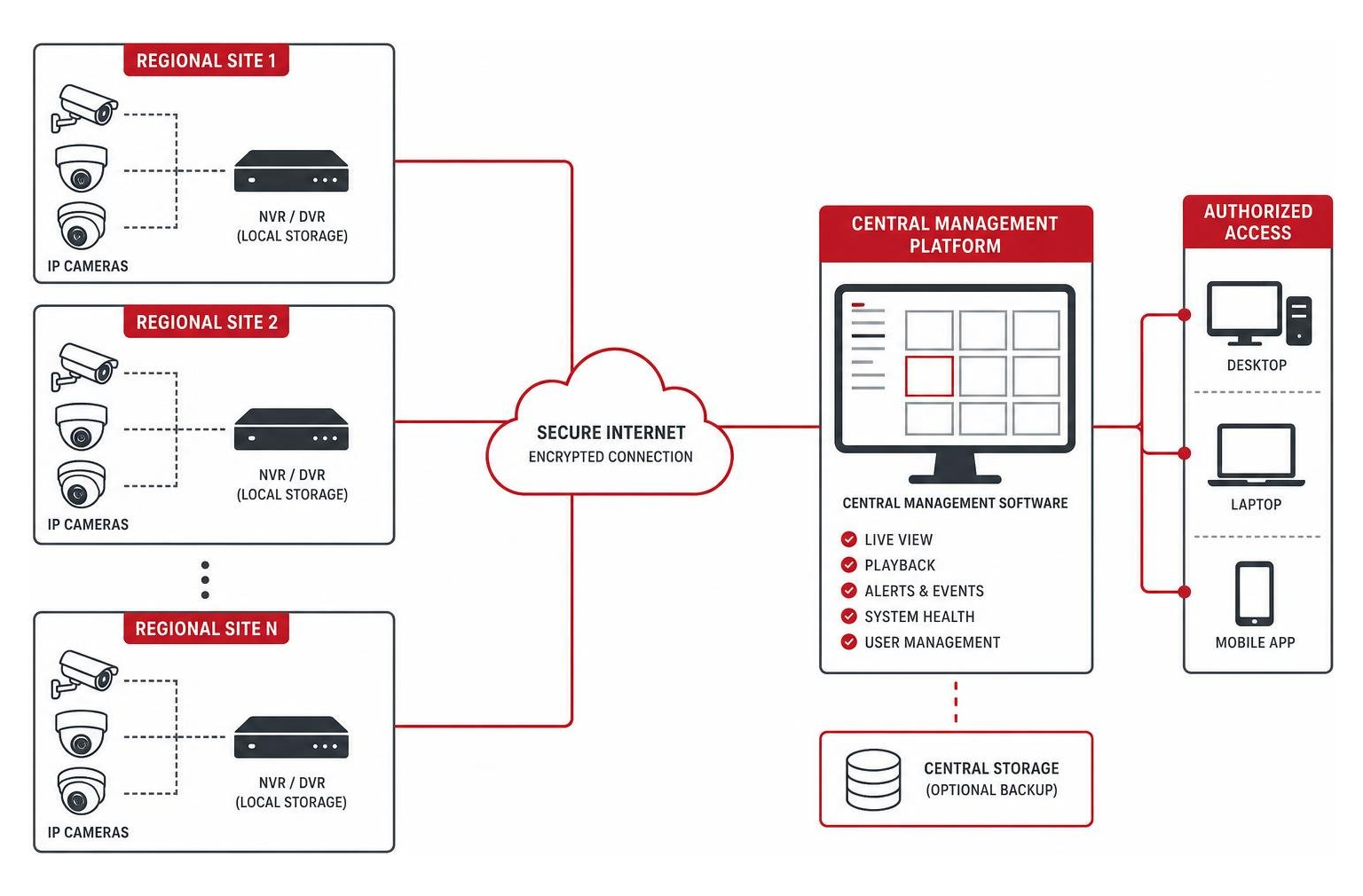
Enterprise platforms easily manage anywhere from 50 to over 10,000 live streams across scattered commercial buildings. Administrators can use interactive e-maps to locate active alerts across multi-building developments in St. Petersburg or Clearwater instantly.
To explore cross-system options, review our Central Monitoring System (CMS) | AI-Powered guide alongside our Compare Commercial CCTV Cameras 101 Survival Guide.
AI-Powered Edge Overlays and Cloud Analytics Platforms
Replacing working surveillance cameras across an enterprise facility can be cost-prohibitive. Fortunately, AI edge appliances and cloud overlay analytics platforms can upgrade legacy ONVIF/RTSP camera infrastructure without requiring total hardware replacement.
By adding a dedicated 1U edge processing appliance to your existing network room, standard video streams undergo real-time visual analysis. These platforms apply deep learning object classification models directly to video feeds, identifying drawn weapons, slips and falls, perimeter loitering, and restricted zone breaches within milliseconds.
To minimize false alerts caused by shadows or rain, edge analytics platforms use multi-frame validation. An alert is only triggered when a target object is detected across consecutive frames. Platforms like Commercial AI Surveillance (holding DHS Safety Act designation for threat detection) and Commercial Security Systems with AI-Powered Monitoring transform passive recording networks into proactive automated security platforms.
Critical Hardware Features and Advanced AI Capabilities
Key Features to Look for in Modern Commercial Surveillance Systems
Selecting the right commercial camera hardware requires matching optical specifications to physical environments:
- 4K Video Resolution: 4K video delivers 400% more pixels per frame compared to standard 1080p HD. This higher pixel density gives security teams clear digital zoom details, making it easy to read license plates, examine access credentials, or identify individuals at distances up to 100 feet.
- Enclosure Durability Ratings: Outdoor commercial cameras require IP67 ratings for complete dust and water protection against Florida rain or Texas dust storms. High-impact public areas require IK10 vandal-proof ratings, ensuring dome housings resist physical impacts.
- Optical vs. Digital Zoom & Lenses: Fixed lenses provide consistent coverage for small hallways, while motorized varifocal lenses let installers adjust field-of-view and focus remotely. Optical zoom uses actual glass adjustment to magnify distant objects without sacrificing video resolution.
- Color Night Vision: Standard infrared (IR) night vision records in black and white, losing clothing or vehicle color details. Modern low-light sensors and warm fill lights enable full-color night vision, preserving critical visual details in low-light environments.
Explore various camera configurations in our guide to 10 Different Types of Security Cameras for Business.
Cutting-Edge AI Analytics and Active Deterrence
Traditional camera systems rely on basic pixel-change motion detection, which triggers constant false alarms from wind-blown trees, insects, or changing headlights. Advanced artificial intelligence changes this completely:
- Object Classification: Deep learning algorithms distinguish human beings and motor vehicles from harmless environmental movement, cutting false alerts by 70 to 90 percent.
- Automated Tailgating Detection: AI tracks personnel entry doors, flagging instances where unauthorized individuals follow behind credentialed employees without badging.
- License Plate Recognition (LPR): Optimized LPR cameras capture vehicle plates at parking gates and loading docks, logging arrival timestamps and cross-referencing access lists.
- Active Deterrence Hardware: Active deterrence cameras feature built-in strobe lights, red-and-blue warning lights, and loud sirens. When an after-hours perimeter line is crossed, the camera flashes lights and issues spoken voice warnings to stop intrusions before damage occurs.
- Intelligent Behavioral Detection: Platforms like Intelligent Detection System | Video Analytics evaluate complex behavior, such as loitering near an exit or leaving packages unattended.
Infrastructure Integration, Regulatory Compliance, and Pricing Factors
System Integration: Access Control, Alarms, and IT Networks
Isolated physical security tools leave blind spots. Converging commercial surveillance systems with door access control, intrusion alarms, and local communications networks creates a unified physical defense matrix.
When door access systems integrate directly with video management software, credential events link directly to short video clips. If an unauthorized badge attempt occurs at a server room door in Dallas or Fort Worth, the system automatically sends a push notification to administrators with attached video showing the person at the reader.
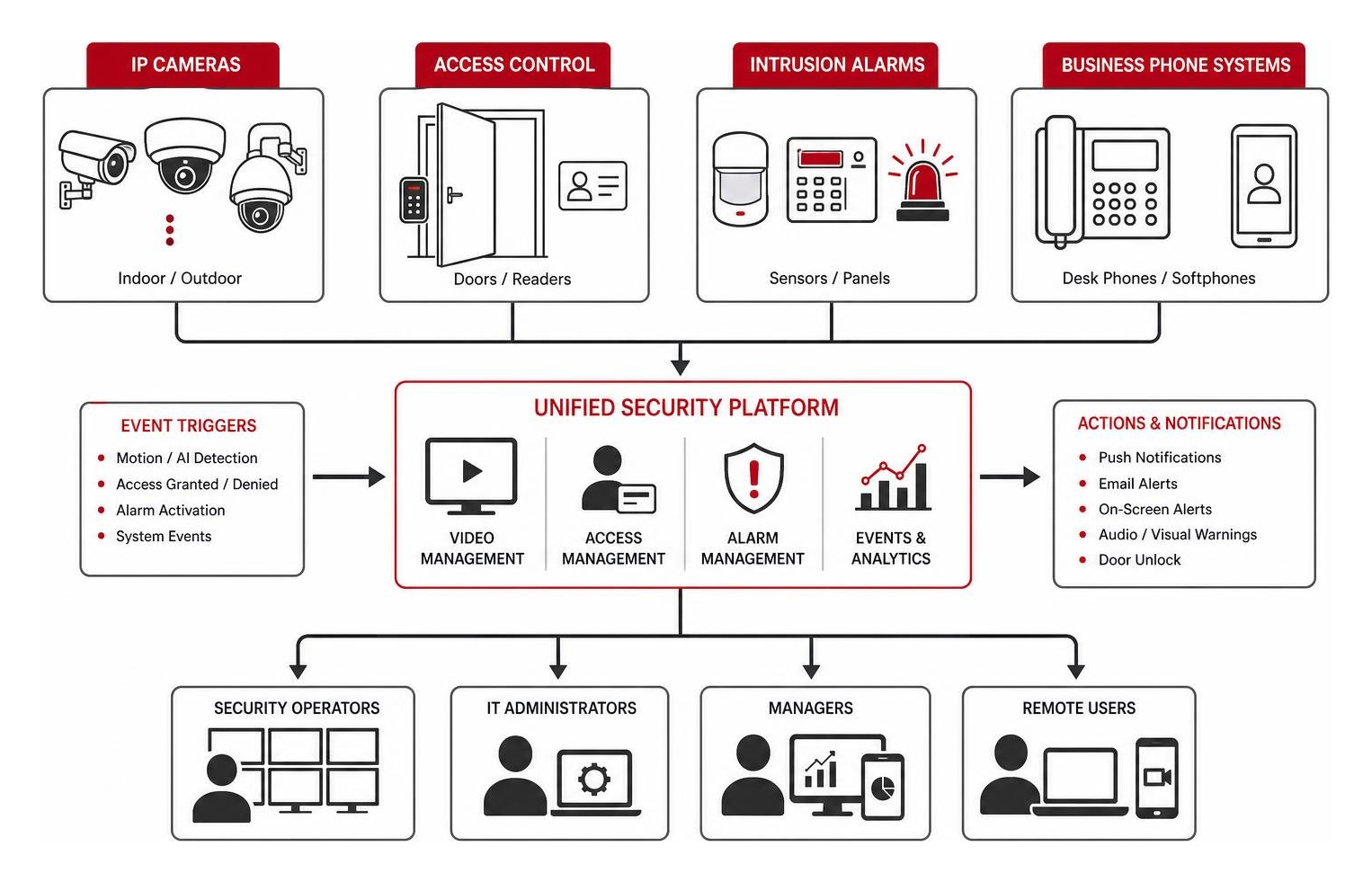
Furthermore, integrating surveillance streams with business phone platforms allows office staff to view camera feeds and unlock entrance doors directly from desk phones or softphone apps. Discover complete setup methods in our guides on Surveillance Integration with Phone Systems: A Modern Business Guide and Surveillance Technology Integration: Making Your Cameras and IT Network Best Friends.
NDAA Compliance, Privacy Regulations, and Total Cost of Ownership
When deploying commercial security technology, understanding legal compliance and budgeting factors prevents costly compliance issues:
- NDAA Compliance: The National Defense Authorization Act (NDAA) prohibits federal agencies, government contractors, and federally funded commercial operations from installing cameras containing components from specific foreign manufacturers. NDAA compliance is required for public sector projects and regulated commercial properties.
- Biometric Privacy Laws: Biometric regulations (such as BIPA) restrict how businesses capture and retain facial recognition data. Visual object detection and motion classification platforms process physical shapes without gathering facial biometric data, keeping operations compliant with strict privacy laws.
- Total Cost of Ownership Breakdown:
- Hardware & Cabling: Installed commercial IP camera deployments average $750 to $1,200 per camera location, covering high-resolution hardware, low-voltage Cat6 cabling, PoE switch ports, and mounting labor.
- Network Infrastructure: Network switch upgrades and cable runs often represent a major infrastructure investment during commercial installations.
- Tax Deductions: Qualified business security system equipment and low-voltage upgrades are frequently eligible for full Section 179 tax deductions in the year installed.
Estimate your project investment using our interactive Video Surveillance Pricing Calculator.
Industry Use Cases and Installation Best Practices
Vertical Use Cases: Retail, Office Workspaces, and Logistics
- Retail Loss Prevention & Operations: Multi-store retail operations use commercial surveillance systems for loss prevention and business intelligence. Heat-mapping analytics reveal customer traffic patterns across product displays, while camera overlays on POS terminals correlate transaction receipts with video footage to stop cashier fraud. Learn more in The Top Surveillance for Retail Businesses to Buy Today.
- Commercial Office Buildings: Corporate offices in Orlando, Tampa, or Sarasota combine lobby cameras, elevator access control, and badging verification to secure common tenant areas. Detailed layouts can be reviewed in The Ultimate Guide to Office Video Surveillance Systems for Modern Workspaces.
- Logistics, Warehouses & Manufacturing: Industrial spaces require wide-angle 180-degree or 360-degree panoramic coverage to eliminate blind spots across loading docks, inventory racks, and assembly lines. Cameras confirm proper PPE usage, log delivery truck arrival times, and protect high-value inventory from internal theft.
Professional Installation Guidelines and Routine Maintenance
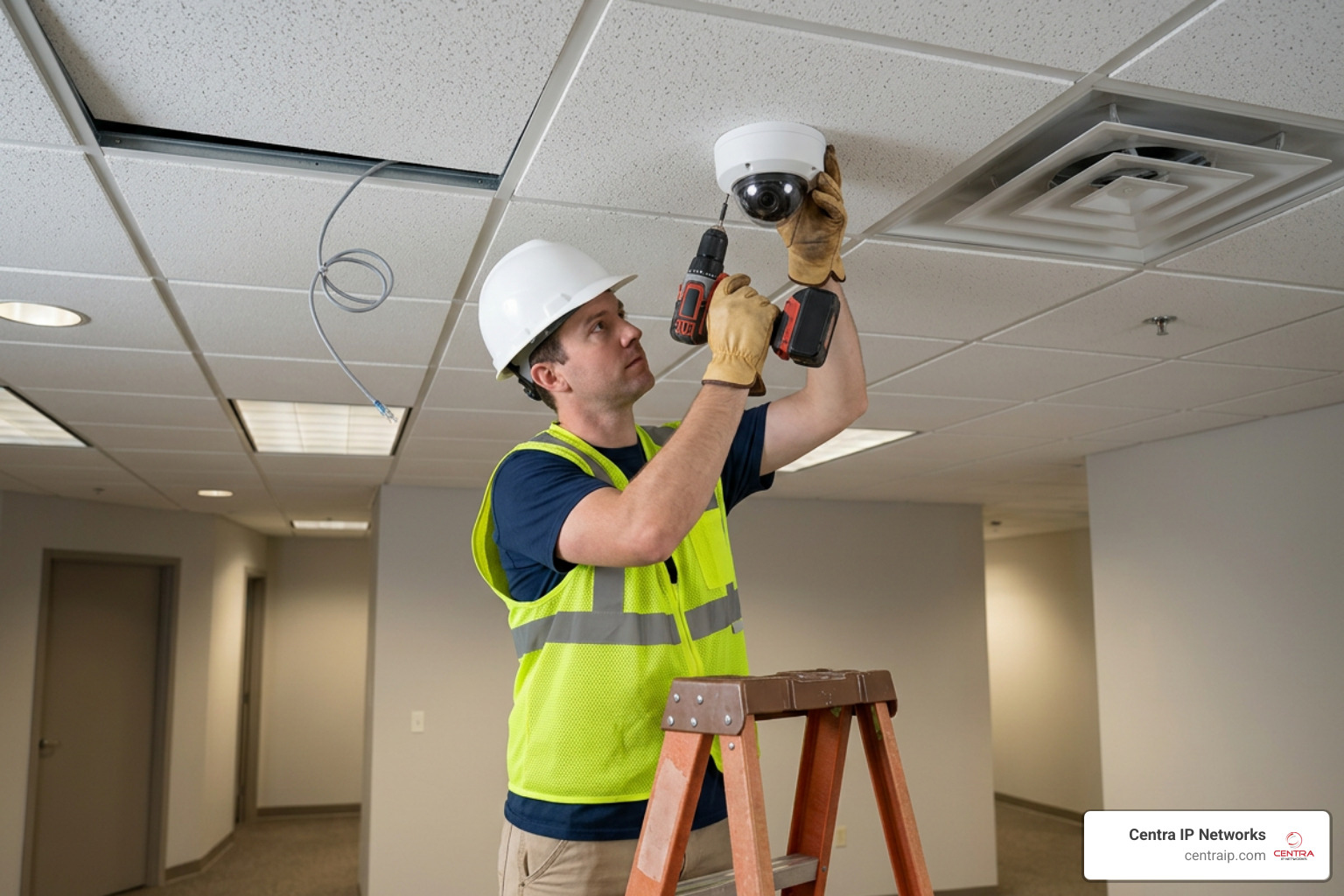
Proper installation and ongoing maintenance guarantee continuous video protection:
- System Blind Spot Mapping: Map out building entryways, perimeter fences, cash-handling desks, and parking areas before running cables. Mount cameras high enough to prevent physical tampering while maintaining ideal angles for clear facial identification.
- Low-Voltage Cable Management: Run plenum-rated Cat6 Ethernet lines inside protective conduit across exposed warehouse spaces. Separate security networks onto isolated Virtual LANs (VLANs) to prevent camera traffic from slowing down corporate business applications.
- Licensed Professional Installation: Partner with licensed low-voltage contractors familiar with regional building codes across Texas and Florida. Standard-compliant installation ensures your wiring passes code inspections and operates reliably. Work with trusted local teams like Local Security Camera Installation Services to guarantee professional results.
- Maintenance Schedule:
- Quarterly: Clean camera dome lenses to remove dust, cobwebs, and water spots; inspect housing seals for moisture.
- Monthly: Test NVR/Cloud backup retention timelines; check hard drive health status; verify time clock synchronization across all access systems.
- Bi-Annually: Audit user access permission lists to remove former employees; update camera firmware to defend against cybersecurity vulnerabilities.
Frequently Asked Questions About Commercial Security Systems
What is the average cost to install commercial security camera systems?
The total investment to deploy a commercial surveillance system depends on camera counts, cabling complexity, recorder storage capacity, and software features. Standard professional installations average $750 to $1,200 per camera, covering commercial camera hardware, Cat6 low-voltage cable installation, PoE switch capacity, and labor.
Small office deployments (6 to 12 cameras) generally range from $5,000 to $12,000, while expansive warehouse or multi-tenant facilities requiring 32 or more 4K cameras with active deterrence and dedicated server hardware run from $25,000 to over $50,000. On-premise NVR setups require higher upfront hardware costs with zero monthly software fees, whereas cloud platforms lower upfront expenses while charging $10 to $25 per camera monthly for software management and cloud retention.
How long should businesses retain commercial video surveillance footage?
Most standard commercial businesses retain recorded video footage for 30 to 90 days. Standard office buildings, retail shops, and warehouses typically select 30-day storage windows to balances hard drive costs with post-incident review requirements.
However, regulated industries mandate significantly longer archive periods. Financial institutions, banking centers, healthcare facilities, and specialized retail operations often require 90 to 365 days of continuous recorded history to meet regulatory compliance mandates and legal audit standards. Calculating your target retention window requires evaluating camera count, resolution, frame rate, and storage compression algorithms (such as H.265).
Can existing legacy security cameras be upgraded with AI monitoring software?
Yes. Businesses do not need to replace operational security cameras to gain modern artificial intelligence analytics. Any existing IP security camera that supports standard ONVIF or RTSP streaming protocols can connect to an AI edge processing appliance or cloud software overlay platform.
By adding an AI software appliance to your existing network room, live video feeds from older cameras are processed in real time. This adds active threat identification, tailgating alerts, natural language video search, and object classification to your current surveillance infrastructure without requiring expensive low-voltage rewiring or full camera replacement.
Conclusion
Securing your business requires reliable physical protection, clear video visibility, and scalable architecture built for future growth. Whether you manage a corporate office in Dallas or Fort Worth, or oversee multi-site retail locations in Orlando, Tampa, St. Petersburg, Clearwater, or Sarasota, choosing the right commercial surveillance system ensures long-term operational peace of mind.
At Centra IP Networks, we make physical security simple by bringing your surveillance, access control, IT network infrastructure, and cloud communications onto a single managed platform. Instead of managing separate vendors for your network cabling, phone systems, and camera software, we provide complete end-to-end integration backed by 35+ industry partnerships and a single point of support.
Explore how our expert team can streamline your commercial security strategy by reviewing our comprehensive Cloud Surveillance Services. Contact Centra IP Networks today for a complete on-site security assessment tailored to your facility’s exact needs.