

Why Office Video Surveillance Systems Matter More Than Ever
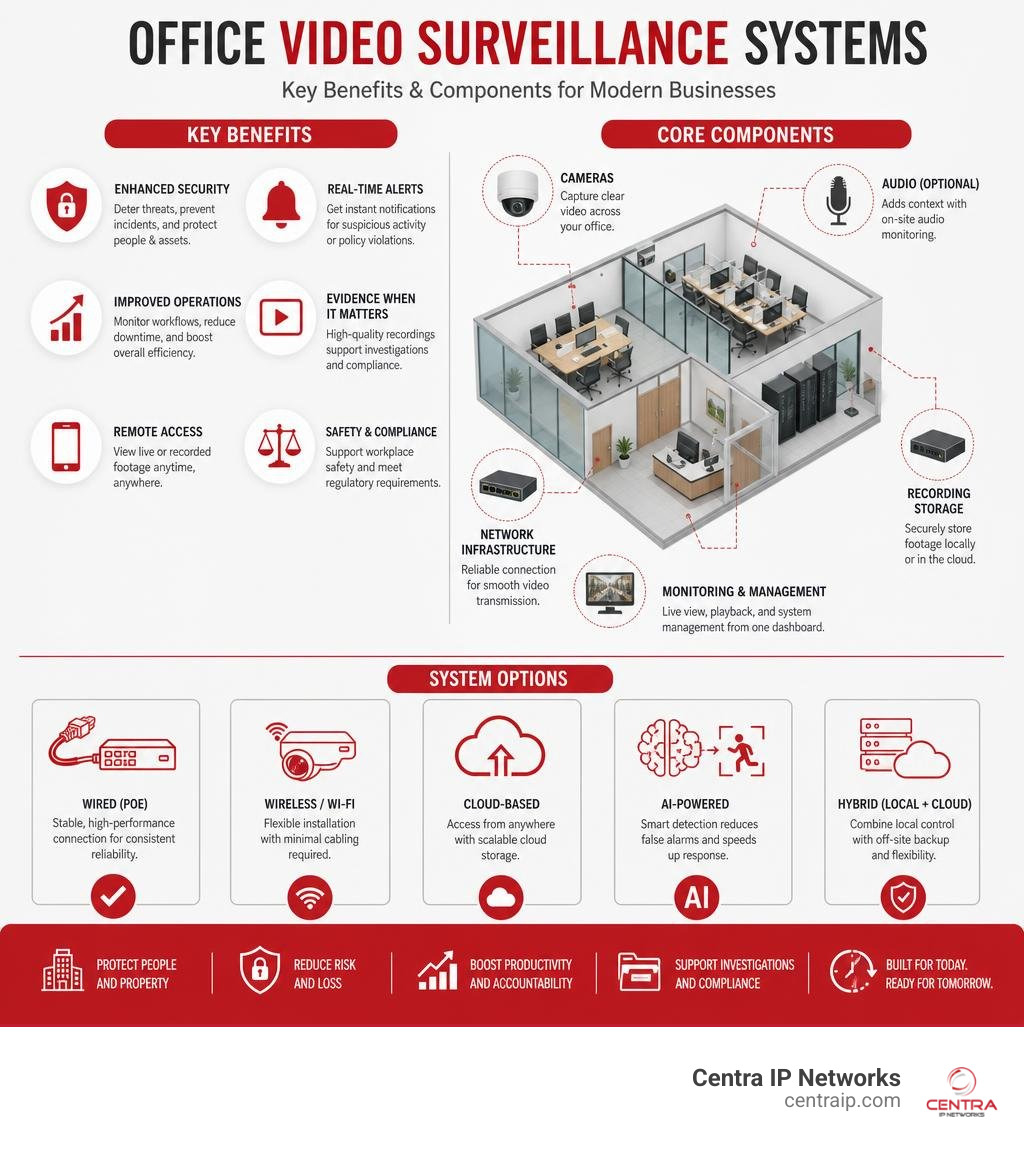
Quick Answer: Best Office Video Surveillance Systems at a Glance
| System Type | Best For | Key Benefit |
|---|---|---|
| Wired PoE NVR | Mid-to-large offices | Reliable, high-quality, no Wi-Fi dependency |
| Wireless/Wi-Fi | Small offices, retrofits | Flexible placement, easy install |
| Cloud-based | Multi-site businesses | Remote access, scalable storage |
| AI-powered | High-security environments | Real-time threat detection, fewer false alarms |
| Hybrid (local + cloud) | Most modern businesses | Redundancy and flexibility |
Office video surveillance systems have become one of the most important investments a business can make — and the options available in 2026 look nothing like they did even five years ago.
Today’s systems do far more than record footage. They detect people and vehicles in real time, trigger instant alerts, integrate with access control, and can be managed remotely from your phone. Yet with hundreds of products on the market — from simple wireless cameras to enterprise AI platforms — choosing the right setup for your workspace is genuinely overwhelming.
Here’s why it matters: 54% of U.S. businesses have installed or upgraded their cameras in the past year, and security cameras are shown to deter around 60% of burglaries. Yet research also shows that less than 1% of surveillance footage ever receives live monitoring — which means the intelligence built into your system matters far more than the number of cameras on the ceiling.
This guide cuts through the noise. It covers every major decision point — camera types, wired vs. wireless, storage options, AI features, legal compliance, and integration with your existing IT stack — so you can build a system that actually protects your business.
I’m Patrick Brangan, and over my 20+ years in business technology I’ve designed and installed office video surveillance systems for SMBs across Dallas, Tampa, and Orlando — including complex multi-site deployments completed on tight timelines and budgets. In the sections that follow, I’ll walk you through everything you need to make a confident, informed decision.
Relevant articles related to office video surveillance systems:
Types of Commercial Security Cameras and Systems
When setting up office video surveillance systems, the physical design of the camera dictates where it should go and what it can see. There is no one-size-fits-all camera; a functional layout usually mixes and matches several types of hardware.
To get a complete picture of the hardware landscape, you can check out our guide on the 10 Different Types of Security Cameras for Business. For now, let’s focus on the three heavy hitters found in almost every commercial layout:
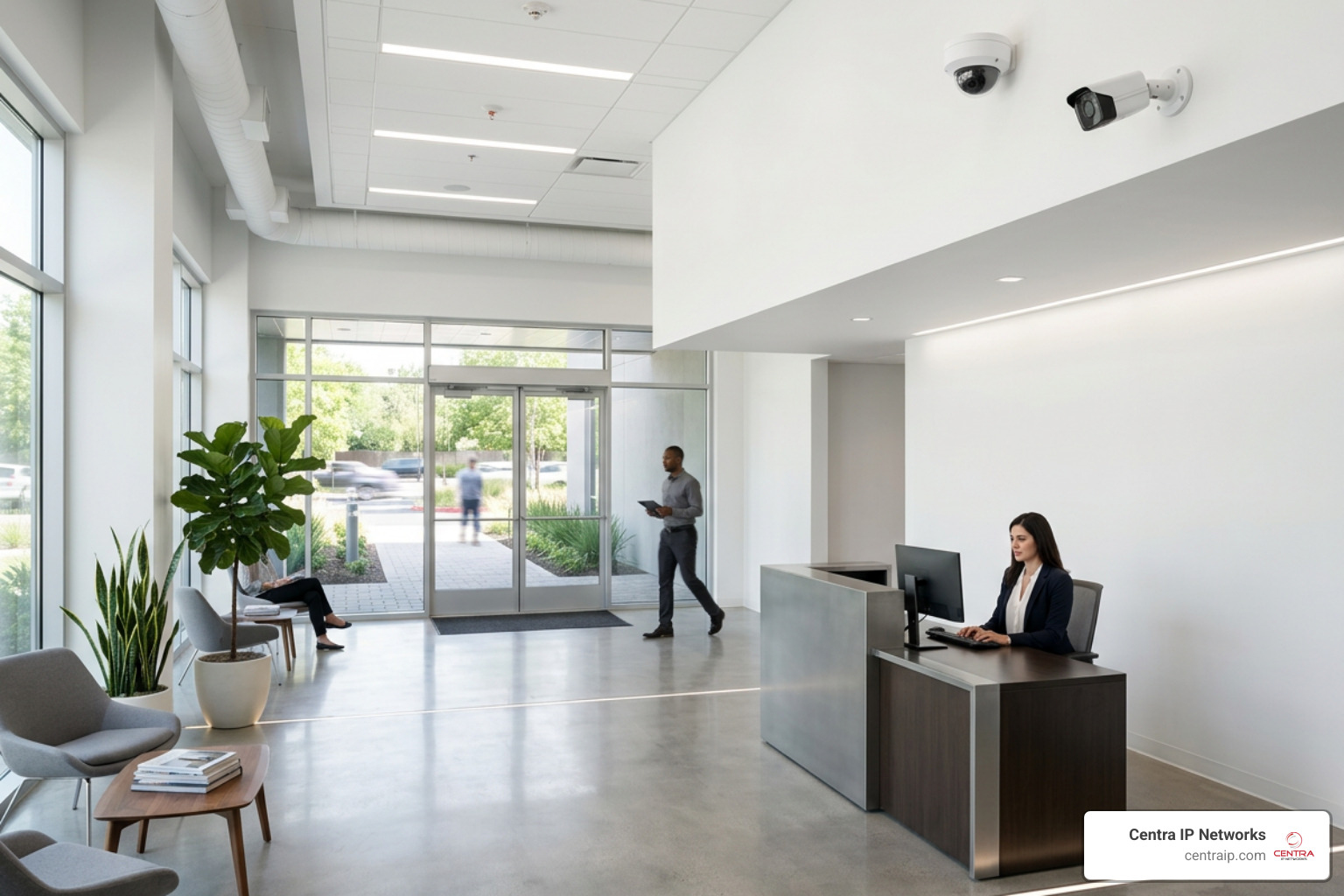
- Dome Cameras: These are the circular, low-profile cameras you see on office ceilings. Because of their protective plastic dome, it is difficult for onlookers to tell exactly where the lens is pointing. This design makes them excellent visual deterrents for lobbies, corridors, and open office spaces. They are also highly vandal-resistant, as they are tough to redirect or damage.
- Bullet Cameras: Characterized by their long, cylindrical shape, bullet cameras are highly visible and point clearly in one direction. They are ideal for long hallways, parking lots, and building perimeters where you want to send a clear message: We are watching. They often feature longer-range lenses and better protective housing against harsh weather conditions.
- Pan-Tilt-Zoom (PTZ) Cameras: These active cameras can rotate horizontally, tilt up and down, and zoom in on specific targets. They are perfect for large, open spaces like warehouses, outdoor courtyards, or massive trading floors. Modern PTZ options, such as those detailed in the Cisco Room Vision PTZ Data Sheet – Cisco , combine mechanical flexibility with built-in AI tracking to automatically follow speakers or moving objects across a room.
Choosing the Right Office Video Surveillance Systems for Your Layout
Designing a layout is a game of angles, lighting, and coverage. If you place a camera in the wrong spot, you end up with expensive hardware that captures nothing but glare from a window or the top of a vending machine.
To map your office effectively, we recommend starting with a comprehensive layout plan that identifies your high-value assets and primary entry points. We cover these design principles deeply in The Ultimate Guide to Business Surveillance Systems.
Key focus areas should include:
- Primary Entrances and Exits: Capture clear, eye-level facial details of everyone entering or leaving the building.
- Transition Zones: Hallways, elevator banks, and stairwells where people must pass to move through your office.
- High-Value Rooms: Server rooms, executive offices, and areas where physical cash, checks, or inventory are handled.
- Blind Spot Reduction: Placing cameras in overlapping configurations so that an intruder cannot bypass one camera without stepping directly into the path of another.
If your office is located in Florida, working with a localized expert who understands regional building codes and environmental challenges is critical. For businesses in the Tampa Bay area, consulting with experienced security professionals can ensure your hardware is positioned correctly to withstand both local building layouts and Florida’s extreme weather.
Key Features of Modern Office Video Surveillance Systems
If you haven’t looked at security cameras since the early 2010s, you are in for a shock. The grainy, black-and-white, movie-style footage of the past has been replaced by high-definition, intelligent data streams.
When evaluating modern office video surveillance systems, look closely at these core technical features:
- Ultra-HD Resolution (4K vs. 1080p): While 1080p is still acceptable for tight indoor spaces, 4K resolution (which uses 8 million pixels compared to 1080p’s 2 million) is becoming the standard for open areas. 4K allows you to digitally zoom in on recorded footage to read a license plate or identify a face without the image turning into a pixelated mess.
- Advanced Night Vision: A security system is only as good as its performance in the dark. Look for cameras featuring True Day/Night functionality, Infrared (IR) cut filters, or modern low-light sensors that can capture full-color video even in near-total darkness.
- Edge Processing vs. Cloud Processing: Modern cameras often process video right on the device (the “edge”) to identify motion before sending it to your storage. This saves massive amounts of network bandwidth.
To understand how these hardware features work together, explore our detailed breakdown of Security Video Surveillance Technology. Additionally, modern AI-powered platforms show how cameras can utilize on-premises hardware to turn basic video feeds into visual audit trails and automated attendance trackers.
AI-Powered Threat Detection and Analytics
The biggest leap forward in security technology is the transition from reactive recording to proactive detection. Traditional motion detection was notorious for sending false alarms every time a shadow shifted, a spider crawled across the lens, or the HVAC system blew a piece of paper.
Modern AI-powered systems use advanced algorithms to categorize what they see:
- Object Classification: The system instantly distinguishes between humans, vehicles, and animals. You can configure your system to only alert you if a human is detected in the server room after 10 PM, completely ignoring minor environmental shifts.
- Behavioral Analytics: Cameras can detect loitering (someone standing near an exit for an unusual amount of time) or tailgating (an unauthorized person slipping through a door directly behind an employee who just scanned their badge).
- False Alarm Reduction: By filtering out irrelevant motion, AI-powered systems reduce false alarms by 70% to 90%, ensuring your security team only responds to genuine threats.
For enterprise environments, platforms like the Avigilon Unity On-Premise Managed Video Security System leverage generative AI and natural language search. This means instead of scrubbing through 12 hours of footage, you can simply type, “Show me a person in a red jacket carrying a laptop bag near the back exit,” and the system will pull up the exact clip in seconds.
Wired (PoE) vs. Wireless Systems for Commercial Use
One of the first structural decisions you will make is how your cameras connect to your network and power supply. For commercial spaces, this usually comes down to Power over Ethernet (PoE) vs. Wireless (Wi-Fi) systems.
| Feature | Wired (PoE) Systems | Wireless (Wi-Fi) Systems |
|---|---|---|
| Power Source | Single Ethernet cable (PoE) | Battery, solar, or local power outlet |
| Data Reliability | 100% stable; immune to RF interference | Subject to Wi-Fi drops and signal degradation |
| Bandwidth Impact | Zero impact on corporate Wi-Fi networks | Can heavily congest office Wi-Fi networks |
| Installation Flexibility | Requires running network cables to each spot | Extremely easy to place and relocate |
| Scalability | Highly scalable (limited only by switch ports) | Limited by Wi-Fi router capacity |
| Cybersecurity | Highly secure; physical port access required | Vulnerable to wireless jamming and hacking |
While wireless cameras are incredibly popular for residential use and small retail shops, they are rarely the primary choice for enterprise offices. If you want to dive deeper into how wireless options fit into a broader security strategy, read our guide on the Wireless Video Surveillance System.
For most offices in Dallas or Fort Worth, we strongly recommend a wired PoE setup as your backbone. Running a single Cat6 cable to each camera location provides both high-speed data transmission and stable power, ensuring your cameras never drop offline because someone turned on a microwave or updated the guest Wi-Fi password.
Storage and Video Management Options
Once your cameras are capturing beautiful, high-definition footage, you have to store it. You have three primary paths: local storage, cloud storage, or a hybrid of both.
- Local Storage (NVR/DVR): This involves saving video directly to a physical Network Video Recorder (NVR) located in your office’s server closet. It requires no monthly cloud subscription fees, works entirely offline, and provides massive storage capacities (often up to 4TB or more, retaining footage for months). However, if a fire occurs or an intruder steals the physical NVR, your evidence is gone.
- Cloud Storage: Cloud-based systems stream footage directly to secure off-site data centers. This offers unparalleled remote access, makes it easy to share clips via secure links, and ensures your data is safe from local physical damage. To understand the security architecture behind this setup, read How Cloud-Based Video Surveillance Adds Security.
- Hybrid Storage: The gold standard for modern workspaces. Hybrid systems record footage locally to the camera’s internal storage (like an onboard SD card) or a local NVR and back up critical events to the cloud. If your internet connection goes down, the cameras keep recording locally; once the connection is restored, the data syncs back to the cloud.
For large-scale, multi-site organizations, managing these storage streams requires an enterprise-grade Video Management System (VMS) like the Flir Latitude 9.3 Network Video Management System | Flir . These platforms support unlimited camera channels, redundant storage configurations, and global administration across different cities and offices.
Video Management Software (VMS) Selection
Your VMS is the cockpit of your security system. It is the software your IT team, HR department, or security guards will interact with daily to view live feeds, search archives, and export clips.
When choosing a VMS, look for open-platform architecture. An open platform allows you to mix and match camera brands rather than locking you into a single manufacturer’s ecosystem.
Solutions like the Video Insight Video Management Software (VMS) | i-PRO Products support over 5,000 camera models from hundreds of manufacturers. This flexibility allows you to keep your existing functional cameras while upgrading your software backend, drastically lowering your total cost of ownership.
System Integration, Costs, and Maintenance
Investing in a commercial security system is about more than just the initial purchase price of the cameras. You must calculate the total cost of ownership, which includes installation, licensing, network upgrades, and ongoing maintenance.
To get a realistic view of budgeting and hardware lifecycles, check out our resource on how to Upgrade Your Security with the Best Commercial CCTV System Available.
Generally, commercial installations involve:
- Professional Installation: Running low-voltage cabling through commercial ceilings and drop tiles requires certified technicians. In Florida, working with a licensed provider is essential to ensure compliance with local building and electrical codes.
- Maintenance Agreements: Cameras located outdoors or in high-traffic hallways need regular cleaning, firmware updates, and lens adjustments to perform at their best.
- Hardware Lifecycles: Plan to refresh your camera hardware every 5 to 7 years to take advantage of processing upgrades and security patches.
Integrating Office Video Surveillance Systems with Access Control
Surveillance cameras are incredibly powerful on their own, but they become exponentially more effective when integrated with the rest of your physical security stack.
Our Commercial Video Surveillance System Guide highlights the power of unified security management. By linking your cameras to your electronic door access control and alarm systems, you create a cohesive, intelligent security ecosystem:
- Visual Verification of Access Events: When an employee scans their keycard at the back door, the camera instantly logs a short video clip of the event. If someone uses a lost card, you can immediately verify if the person holding the card is the actual owner.
- Alarm-Triggered Camera Actions: If a fire alarm or glass-break sensor is triggered, your PTZ cameras can automatically spin around, zoom in on the affected zone, and broadcast live video to first responders or your mobile app.
- Simplified Auditing: Instead of manually matching door access logs with video timestamps, a unified platform allows you to click on any log entry and instantly view the corresponding video feed.
Legal, Privacy, and Compliance Considerations
Before you mount a single camera, you must understand the legal boundaries of workplace surveillance. Failing to comply with privacy laws can result in massive fines, lawsuits, and unusable evidence in court.
When deploying Business Video Surveillance, keep these legal and compliance guardrails top of mind:
- Expectation of Privacy: You cannot install cameras in areas where employees or visitors have a reasonable expectation of privacy. This includes restrooms, locker rooms, changing areas, and employee break rooms (in certain jurisdictions).
- Clear Signage: In many states, including Texas and Florida, you are legally required to post visible signage at your entrances notifying people that video surveillance is active on the premises.
- Audio Recording Laws: Federal and state wiretapping laws are much stricter regarding audio recording than video recording. In “two-party” or “all-party” consent states (like Florida), recording audio without the explicit consent of everyone in the room is a felony. We strongly advise disabling microphone recording on your office cameras unless you have cleared it with your legal counsel.
- Data Protection Regulations (GDPR/CCPA): If your business handles data for European residents (GDPR) or California residents (CCPA), your video footage is considered personal biometric data. You must implement strict data retention policies, secure encryption, and role-based user access controls to ensure that only authorized personnel can view or export footage.
For businesses operating in highly regulated regions like Sarasota or Orlando, partnering with an established, compliant local security provider can help you design a system that meets all local, state, and federal compliance standards.
Frequently Asked Questions about Office Surveillance
How long do commercial security cameras keep footage?
The industry standard for commercial footage retention is 30 to 90 days. However, the exact duration depends on your storage capacity, camera resolutions, and regulatory requirements.
For instance, financial institutions, healthcare facilities, and government contractors may be legally required to keep footage for six months to a year. You can learn more about balancing storage space and retention times in our guide on Video Surveillance Systems for Business.
What are the legal requirements for office video surveillance?
Generally, you must avoid placing cameras in private zones (restrooms, breakrooms), post clear warning signs at entrances, and comply with state-specific audio recording laws.
We always recommend drafting a formal written company policy that outlines why cameras are installed, who has access to the footage, and how long the data is stored. For a deeper dive into policy templates, read Surveillance Cameras for Business.
Can we integrate existing cameras into a new cloud system?
In most cases, yes! You do not necessarily have to rip and replace all of your existing hardware to upgrade to a modern cloud or hybrid system.
Using cloud bridge devices or open-platform VMS software, we can often bring your legacy analog or older IP cameras onto a unified, modern cloud platform, saving you thousands of dollars in hardware costs. Explore the operational advantages of this transition in our guide on the Benefits of Security Cameras for Businesses.
Conclusion
Building a modern office video surveillance system is no longer just about mounting cameras on a wall and hoping for the best. It is about creating an intelligent, integrated security network that deters crime, simplifies your daily operations, and protects your business’s bottom line.
At Centra IP Networks, we deliver comprehensive Managed IT, Cloud Communications, and advanced physical security solutions on a single, unified platform. Whether you are operating a corporate headquarters in Dallas, a medical facility in Fort Worth, or a multi-site operation across Orlando, Tampa, St. Petersburg, Clearwater, and Sarasota, we design custom, cost-effective surveillance systems tailored to your unique workspace.
Ready to secure your office with the latest in intelligent surveillance technology?
Secure Your Workspace with Centra IP Cloud Surveillance Services


