Why Getting a Phone Number Has Never Been Easier — or More Confusing
Knowing how to get a phone number today means choosing between more options than ever — traditional carriers, virtual apps, cloud platforms, and everything in between. The right choice depends on your needs, your budget, and how you run your business.
Here’s how to get a phone number quickly:
- Pick your number type — local, toll-free, or vanity
- Choose a provider — such as Google Voice, RingCentral, or a cloud VoIP service
- Create an account — most providers let you sign up online in minutes
- Select your area code and number — available numbers are shown instantly
- Activate and start calling — download the app or configure call forwarding
That’s the short version. But the right choice takes a little more thought — especially for businesses managing multiple locations, remote teams, or customer communications at scale.
The stakes are real. Your phone number is on your website, your Google Business Profile, your signage, and in the contact lists of every client and vendor you’ve built a relationship with. Getting this decision wrong costs time, money, and credibility.
Virtual phone numbers — which route calls over the internet instead of a physical line — have become the go-to solution for businesses that need flexibility without the high cost of traditional systems. Virtual phone subscriptions typically cost $15–$50 per user per month, compared to up to $1,000 per user for on-premises PBX systems.
I’m Patrick Brangan, and with over 20 years of experience helping SMBs navigate unified communications and phone system decisions, I’ve guided hundreds of businesses through exactly this process of figuring out how to get a phone number that actually fits how they work. In the sections below, I’ll walk you through everything you need to know to make a confident, informed choice.
What is a Virtual Phone Number and How Does It Work?
If you are trying to figure out how to get a phone number without buying a second physical phone or installing a tangle of copper wires in your office, you are looking for a virtual phone number.
A virtual phone number is a cloud-based phone line that is not tied to a specific physical location, copper wire, or individual SIM card. Instead, it relies on Voice over Internet Protocol (VoIP) technology to transmit your calls and text messages as data packets over the internet.
Think of a virtual phone number like a telecommunications “ghost.” It doesn’t live inside a single desk phone; instead, it floats in the cloud. You can access this ghost from your smartphone, your tablet, your laptop, or even a specialized desk phone. When someone dials your virtual number, the cloud platform instantly routes that call to whatever device you have active at that moment.

For a deeper dive into the architecture of these systems, check out our comprehensive guide on Virtual Phone Number 101.
Virtual vs. Traditional Phone Lines
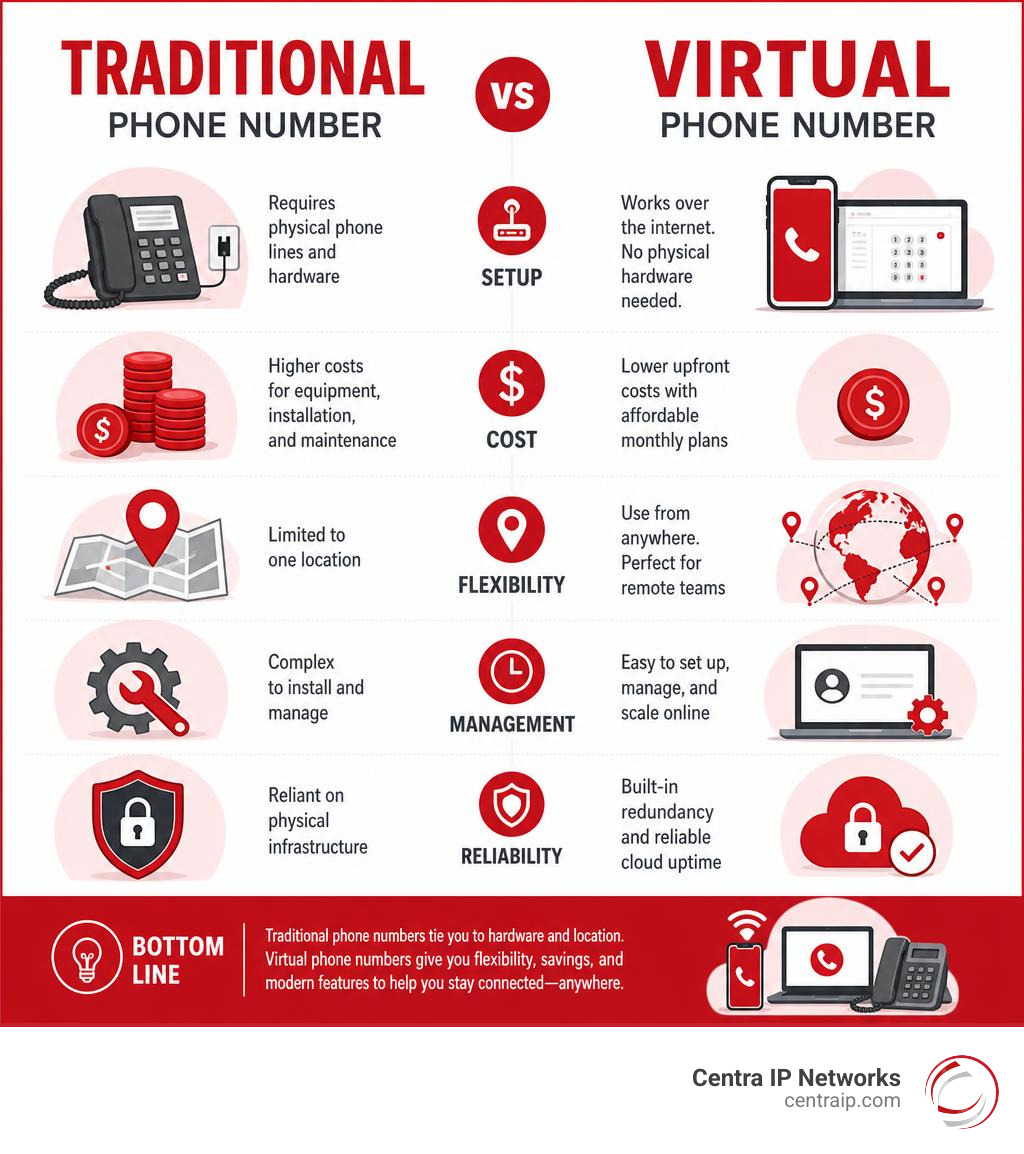
To understand why virtual numbers have taken over, it helps to look at what they replaced. Traditional phone lines require physical infrastructure—either a copper landline running into your building or a physical SIM card tied to a single cell tower network. If you wanted to set up an office phone system back in the day, you had to purchase an expensive physical PBX (Private Branch Exchange) box, run wires through your walls, and buy proprietary desk phones that cost hundreds of dollars each.
With virtual phone lines, the hardware is gone. The entire system is managed through software. This shift brings immense flexibility but also a few trade-offs. Here is a quick look at the pros and cons of going virtual:
Pros of Virtual Phone Numbers:
- Work from Anywhere: You can answer calls on your cell phone while working from home, at a coffee shop, or traveling.
- Massive Cost Savings: Smaller businesses can save thousands of dollars on business phone system costs by avoiding on-premises hardware and steep maintenance fees.
- Instant Scalability: Need to add a new line for a new hire? You can provision one online in seconds without waiting for a technician.
- Unified Communications: Most virtual providers bundle calling with SMS texting, voicemail-to-email, call routing, and video conferencing into a single application.
Cons of Virtual Phone Numbers:
- Internet Dependency: Because calls run over the internet, a weak Wi-Fi or cellular data connection will degrade your call quality.
- Emergency Service Limitations: Traditional landlines automatically send your exact physical address to 911 dispatchers. Virtual numbers rely on Enhanced 911 (E911), which requires you to manually update your physical location in your provider’s settings.
- Learning Curve: While modern apps are highly intuitive, older team members used to standard physical desk phones may require a brief adjustment period.
Security, Privacy, and Traceability of Cloud Numbers
One of the most common questions we hear is: Can a virtual phone number be traced?
The short answer is yes, but it is more difficult than tracing a traditional landline. Traditional numbers are tied to a physical address or a registered SIM card. Virtual numbers, because they exist in the cloud, are linked to an account with a service provider.
While a casual caller won’t be able to easily find your physical location just by looking at your virtual number, reputable providers still require identity verification and keep records of account owners. Under federal laws like the Communications Assistance for Law Enforcement Act (CALEA), providers must comply with legal requests from law enforcement to trace numbers when necessary.
From a privacy standpoint, virtual numbers act as an excellent shield. If you are a freelancer, a real estate agent, or a side-hustler, giving out your personal cell phone number exposes you to spam, identity theft, and late-night client calls. Using a virtual number allows you to keep your primary personal digits completely private. If your business line starts getting flooded with robocalls, you can easily implement automated spam filters, set strict business hours to route calls straight to voicemail, or swap the number entirely without affecting your personal device.
How to Get a Phone Number Online: A Step-by-Step Guide
The process of securing a new line is incredibly straightforward. You do not need to visit a retail store, sign a multi-year carrier contract, or wait for an installation technician to show up at your office.
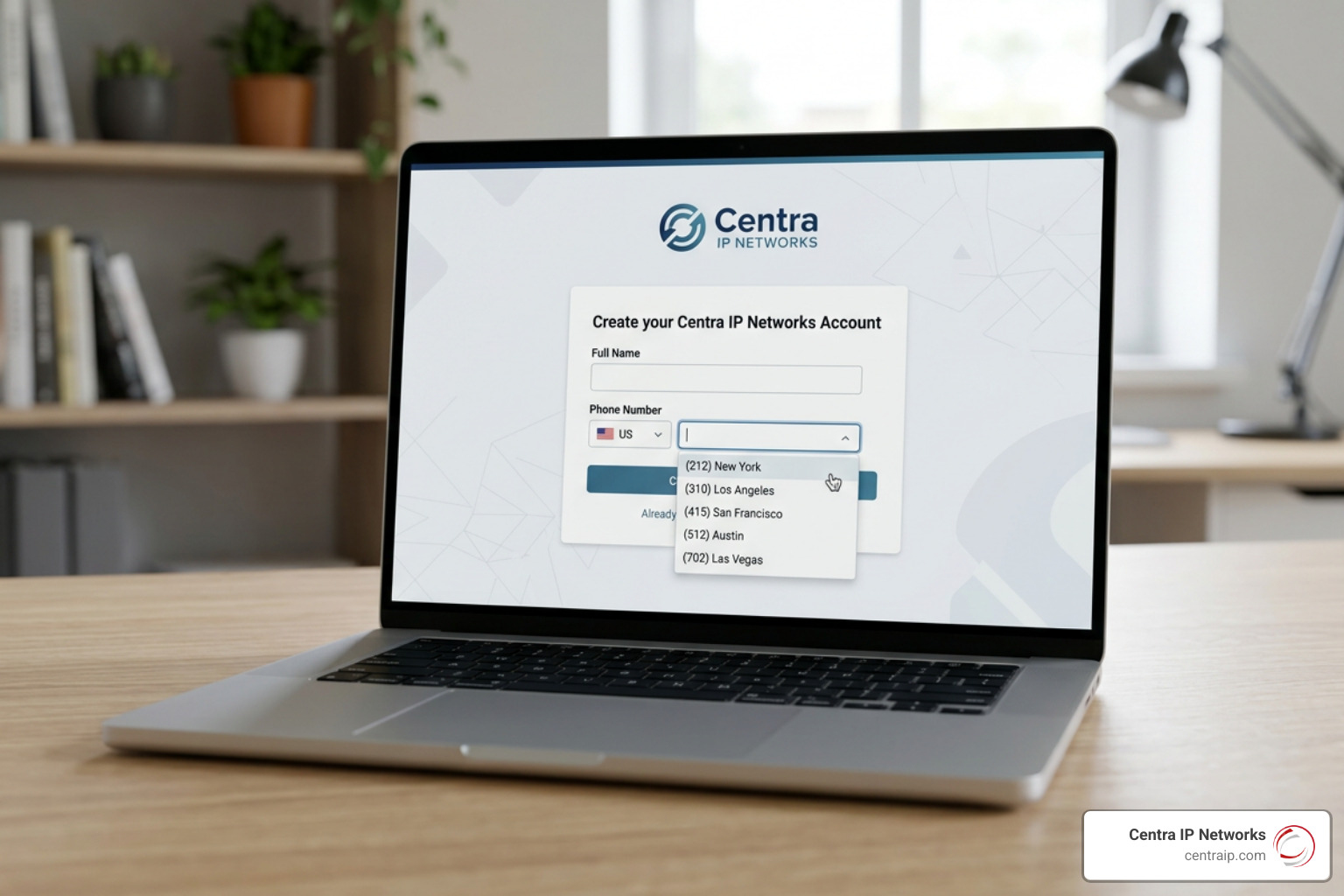
If you are ready to get started, you can find a detailed breakdown of the setup process in our article, How Do I Get a Virtual Phone Number?. Below, we have outlined the three core steps to get your line active today.
Step 1: Identify Your Communication Needs
Before you start looking at area codes, take a step back and identify exactly what you need this number to do. Ask yourself:
- Who will use this number? Is it just for you, or do you need a shared inbox where multiple team members can answer incoming calls and texts?
- What devices will you use? Do you want to take calls entirely on your existing smartphone, or do you need a system that integrates with desktop computers and physical IP desk phones?
- What is your budget? Are you looking for a low-cost secondary line for occasional use, or a robust, enterprise-grade cloud system?
- Do you need messaging? If you plan to send marketing texts or automated reminders to customers, you will need a provider that supports compliant business texting.
Step 2: Choose Your Number Type and Location
Once you know your requirements, you need to choose the style of phone number that fits your brand. You have three primary options:
- Local Numbers: These feature a specific geographic area code. They are perfect for building trust with local customers. If you operate in Texas, you might want to look into Dallas phone numbers with area codes like 214, 972, or 469, or secure Fort Worth phone numbers utilizing the 682 or 817 area codes. If you are operating in Florida, you can establish an instant local presence by grabbing an Orlando 407 area code, setting up Tampa phone numbers with local area codes, or looking into options to get a St. Petersburg virtual phone number. You can even look up local contact directories like the Contact Us – City of Clearwater page to see what local prefixes dominate the region, or easily get a Sarasota 941 area code phone number to connect with customers along the Gulf Coast.
- Toll-Free Numbers: Starting with prefixes like 800, 888, 877, or 866, these numbers allow callers from anywhere in the country to reach you without incurring long-distance charges. They give your business an instant national footprint and a highly professional, established image.
- Vanity Numbers: These are customized numbers that spell out a word or phrase (like 1-800-FLOWERS or a local option like 813-ROOFING). They are incredibly memorable and serve as excellent marketing tools for radio, billboards, and digital ads.
Step 3: Select a Provider and Activate Your Line
With your number type and location in mind, it is time to choose a provider and activate your line. The sign-up process is usually completed in a few minutes:
- Create an account on your chosen provider’s website.
- Search for your desired number by entering your preferred area code, toll-free prefix, or vanity word.
- Select your number from the list of available options. Most platforms will hold your selected number in a virtual cart for about 15 to 16 minutes while you finish checking out.
- Choose your plan and complete the payment process.
- Download the provider’s app onto your smartphone or computer, log in, and grant the app permission to use your microphone and notifications.
For a complete breakdown of the purchasing process, check out our guide on Everything You Need to Know About Buying Phone Numbers Online.
Key Features to Look For in a Modern Phone Provider
Not all phone providers are created equal. Some offer bare-bones forwarding services, while others provide complete unified communications platforms.
When evaluating providers, look beyond the price tag and focus on the features that will make your daily operations smoother.
Essential Calling and Texting Capabilities
At a bare minimum, your provider should offer seamless, high-quality voice calling and two-way SMS/MMS texting. However, a truly professional setup requires several additional core features:
- Customizable Caller ID: You should be able to control exactly what name and number appear on your customers’ screens when you call them.
- Visual Voicemail with Transcription: Instead of dialing in and listening to voice messages, look for a service that transcribes voicemails to text and emails them to you as an MP3 attachment.
- Intelligent Call Forwarding: This allows you to route incoming calls to multiple devices simultaneously or sequentially. For example, you can set the system to ring your desk phone first, then your cell phone, and finally route to a colleague if you don’t answer. To see how this can transform your daily workflow, read our guide on how to Unlock Business Freedom: How Virtual Number Call Forwarding Works for You.
Advanced Integrations and Business Texting
For growing businesses, your phone system shouldn’t exist on an island. It needs to connect with the other digital tools you use every day.
Look for a provider that integrates directly with CRM platforms like Salesforce or HubSpot. This integration ensures that every call log, text message, and voicemail is automatically recorded under the correct customer profile, giving your team full context before they even pick up the phone.
Additionally, if you plan to use your virtual number for customer service or marketing, ensure the provider supports SMS automation, auto-replies for after-hours inquiries, and compatibility with platforms like WhatsApp Business. Programmatic access via APIs is also incredibly useful if you plan to integrate automated notifications into your custom software applications.
Understanding the Costs: Free vs. Paid Phone Numbers
When researching how to get a phone number, you will undoubtedly run into advertisements promising 100% free phone numbers. While free options exist, they come with substantial caveats that make them unsuitable for professional use.
| Feature | Free Virtual Numbers | Paid Virtual Subscriptions |
|---|---|---|
| Average Cost | $0 (Ad-supported) | $15–$50 per user/month |
| Number Ownership | No ownership; numbers can be reclaimed due to inactivity | You own the number; fully portable to other carriers |
| Ad-Free Experience | No; apps are usually heavily ad-supported | Yes; clean, professional user interface |
| Spam Protection | Minimal; free numbers are often recycled and flagged as spam | Advanced; built-in AI spam blocking and verification |
| Business Compliance | Extremely difficult to pass A2P 10DLC registration | Fully supported with guided registration tools |
| Customer Support | Self-service forums only | Dedicated email, chat, and phone support |
How to Get a Phone Number for Free: Limitations of Free Apps
Free services like the personal version of Google Voice or ad-supported calling apps are fine for casual personal use—like listing an item on Craigslist or signing up for store loyalty programs without giving away your real digits.
However, using a free number for business is a risky gamble. Because these numbers are free, they are frequently recycled. This means your “new” business number might have been used by a spammer last week, resulting in your calls being automatically blocked or flagged as “Spam Likely” by major carriers. Furthermore, free apps offer no customer support; if your line goes down, you have no way to get it back quickly, which can paralyze your business.
If you want to explore the personal side of free numbers, you can read our article on why you should Stop Giving Out Your Real Digits and Get a Google Voice Number Instead. But if you are representing a business, a paid plan is always the safer, more professional route.
Paid Virtual Subscriptions and Enterprise Plans
Paid virtual subscriptions are highly affordable, typically starting around $15 to $50 per user per month. This small investment buys you peace of mind, reliable call quality, ad-free applications, and dedicated customer support.
As your business grows, paid plans scale with you. You can easily add auto-attendants (interactive voice response menus like “Press 1 for Sales”), set up department call queues, record calls for training and compliance, and purchase additional local or toll-free lines for just a few dollars more per month.
Legal and Compliance Requirements for Business Texting
If you plan to use your virtual phone number to send text messages to customers in the United States, you must navigate a strict landscape of federal regulations. Ignoring these rules can result in your messages being blocked by major carriers, or worse, heavy financial penalties.
A2P 10DLC Registration and Trust Hubs
The most critical regulatory framework to understand is A2P 10DLC (Application-to-Person 10-Digit Long Code). This is a system implemented by US telecom carriers to regulate business text messaging sent from local 10-digit phone numbers.
Under A2P 10DLC regulations, every business must register its brand and its messaging campaigns before sending texts to customers. This process involves submitting your legal business name, tax ID (EIN), physical address, and examples of the types of messages you plan to send. This registration is handled directly through your provider’s “Trust Hub” or admin console and typically takes about 5 to 7 business days to approve.
How to Get a Phone Number Verified for SMS
To ensure your messages actually reach your customers’ inboxes, you must verify your phone numbers. This involves registering your traffic and complying with the Telephone Consumer Protection Act (TCPA). The most important rule of the TCPA is simple: you must obtain explicit, documented opt-in consent from your customers before sending them any business text messages.
You must also provide an easy, automated way for customers to opt out of your messages at any time (usually by replying “STOP”). Leading cloud platforms utilize advanced verification tools to register your numbers and keep your messaging traffic compliant. Developers looking to build custom communication workflows can learn more about configuring and purchasing compliant numbers through the Phone Numbers | Twilio documentation, or explore programmatic number management via the Quickstart – Get and manage phone numbers using Azure Communication Services | Microsoft Learn resource.
Frequently Asked Questions about Virtual Numbers
Can I port my existing phone number to a virtual service?
Yes! Under Federal Communications Commission (FCC) regulations, you have a legally protected right to keep your existing phone number when switching providers. This process is called “number porting.”
To port your number, you will need to provide your new carrier with a recent copy of your phone bill, your account number, and a signed Letter of Authorization (LOA). The porting process typically takes 5 to 10 business days for local numbers and 5 to 15 business days for toll-free numbers.
Critical Tip: Do not cancel your current phone service until the porting process is completely finished. If you cancel your old service too early, your number will be released back into the general carrier pool, and you may lose it forever.
Do virtual phone numbers work for WhatsApp and SMS verification?
It depends on the provider and the specific service you are trying to verify. Many financial institutions and platforms like WhatsApp, Google, and Facebook use short-code SMS messages for two-factor authentication (2FA) and account verification.
Because of fraud prevention measures, some platforms automatically block virtual VoIP numbers from receiving these verification codes, requiring a physical mobile number instead. However, most reputable, paid virtual business numbers can easily be used to set up and run a WhatsApp Business account.
Can I get an international phone number from the US?
Absolutely. One of the greatest benefits of virtual phone systems is the ability to establish a global presence from your desk in the US.
Most virtual providers allow you to purchase local phone numbers in dozens of countries around the world. When an international customer dials that local number, the call is routed over the internet directly to your app in the US, allowing you to support global clients without paying international long-distance rates. Many countries have strict local compliance requirements and may require you to provide proof of identity or a local address before provisioning an international number.
Conclusion
Figuring out how to get a phone number doesn’t have to be a headache. Whether you need a local line in Dallas, Fort Worth, Orlando, Tampa, St. Petersburg, Clearwater, or Sarasota, virtual phone numbers offer the ultimate blend of flexibility, professional features, and cost savings.
But managing multiple technology vendors, internet connections, and phone systems can quickly become overwhelming. That is where we come in.
At Centra IP Networks, we offer comprehensive Managed IT and Cloud Communications services designed specifically for growing businesses. We consolidate your business phone systems, high-speed internet connectivity, and cloud solutions onto one single platform with one clear bill. Leveraging over 35 strategic partnerships, we build tailored, cost-effective communication solutions that fit your exact business needs.
Ready to upgrade your communications and claim your new business line? Read our in-depth guide on How to Get a Business Phone Number to find your perfect fit today!