Is Your Business Drowning in IT Problems? Here’s What You Need to Know
Managed IT support is a service model where a third-party provider — called a Managed Service Provider (MSP) — takes over the day-to-day management, monitoring, and maintenance of your technology infrastructure, typically for a fixed monthly fee.
Quick answer — what managed IT support covers:
- Remote monitoring — 24/7 oversight of your network, devices, and systems
- Help desk support — fast access to tech experts when something goes wrong
- Patch management — automatic updates to keep systems secure and current
- Cybersecurity — threat detection, endpoint protection, and incident response
- Backup and disaster recovery — protecting your data if the worst happens
- Strategic IT planning — aligning technology with your business goals
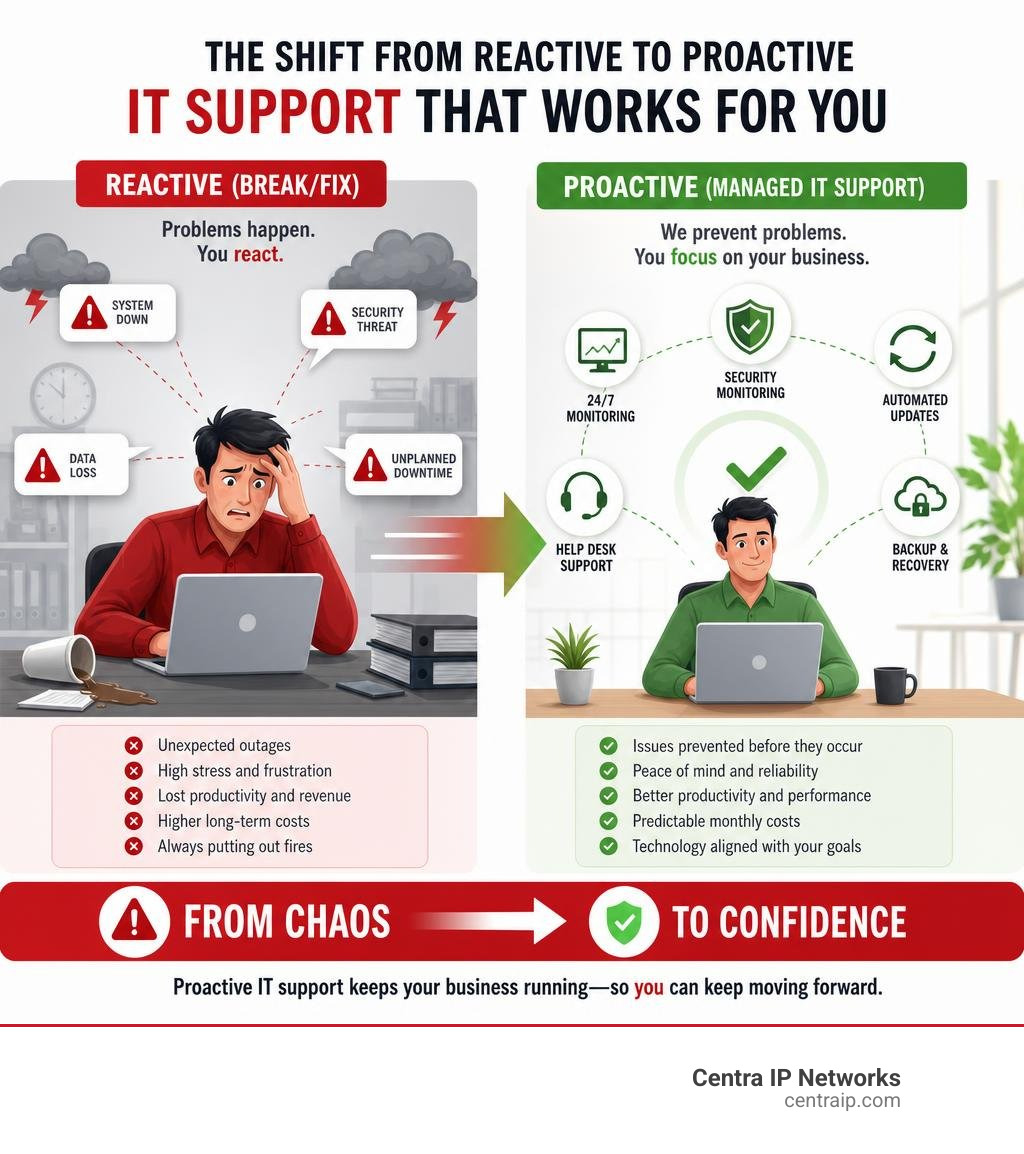
Instead of waiting for something to break and then calling for help, managed IT flips the model. Problems are caught and fixed before they impact your business.
That shift matters more than most business owners realize. Unplanned downtime averages $5,600 per minute in lost productivity and revenue. And 60% of small businesses close within six months of a major data breach.
Reactive IT isn’t just frustrating — it’s a serious business risk.
I’m Patrick Brangan, a business technology specialist with over 20 years of experience helping SMBs with managed IT support, unified communications, and security solutions across Dallas, Tampa, and Orlando. Having guided hundreds of small and mid-sized businesses through the shift from break/fix chaos to proactive, managed technology environments, I’ll walk you through everything you need to make a confident decision.
Related content about Managed IT support:
Demystifying Managed IT Support: What It Is and How It Works

To understand why managed IT support has become the gold standard for modern businesses in June 2026, it helps to look at where we started.
Back in the 1990s, the early ancestors of modern MSPs were known as Application Service Providers (ASPs). These pioneers offered basic hosting and remote applications. However, if a computer or server in your office stopped working, you had to call a technician who charged by the hour to drive out and fix it. This was the classic “break/fix” model.
In the early 2000s, the technology evolved. Remote Monitoring and Management (RMM) software emerged, allowing technicians to peer into networks from afar. Suddenly, IT professionals didn’t have to wait for your server to melt down to know there was a problem. They could see a hard drive failing in real time and replace it before you ever experienced a second of downtime.
Today, this proactive philosophy defines the modern Managed Service Provider model. Instead of paying an IT company to react to disasters, you partner with an MSP to prevent those disasters from happening in the first place.
Here is a quick look at how traditional break/fix IT stacks up against modern managed IT support:
| Feature | Traditional Break/Fix IT | Managed IT Support |
|---|---|---|
| Approach | Reactive (fix things after they break) | Proactive (prevent issues before they occur) |
| Cost Structure | Unpredictable hourly rates and emergency fees | Predictable flat monthly fee |
| System Uptime | Lower; suffers from frequent disruptions | Higher; continuous monitoring minimizes downtime |
| Security | Basic or outdated; reactive patches | Multi-layered; automated updates and 24/7 SOC |
| Strategic Alignment | None; technician only cares about the current ticket | High; includes roadmapping and compliance |
The Business Case: Key Benefits of Outsourcing Your IT

Why are so many growing companies across Texas and Florida ditching their reactive setups? The answer is simple: business efficiency and peace of mind. When you choose to delegate your technology management, you unlock several transformative advantages.
Predictable IT Spending and Cost Efficiency
With the break/fix model, your IT budget is a roller coaster. One month you spend $100; the next month, a server crashes or ransomware hits, and you are staring at a $15,000 emergency bill.
By contrast, modern MSPs offer a flat monthly fee for their maintenance services, which helps businesses budget and plan their IT expenses effectively. You know exactly what your technology overhead will be on the first of every month, turning unpredictable capital expenditures into steady, manageable operating expenses.
Bridging the Talent Gap
Finding, hiring, and retaining top-tier IT talent is incredibly difficult and expensive. If you hire a single in-house IT generalist, that person has to sleep, take vacations, and eventually face a technical problem they don’t know how to solve.
When you outsource, you gain access to an entire team of specialists—from cloud architects to cybersecurity analysts—for a fraction of the cost of a single full-time hire. You can learn more about how this dynamic works by reading about the Benefits of Managed IT Services.
Massive Boosts in Operational Efficiency
When your systems are monitored around the clock, they run faster, crash less, and stay secure. Your employees spend their time doing their actual jobs rather than wrestling with slow computers or waiting hours for a callback from a busy technician.
To see how this translates directly to your bottom line, Explore how managed IT service providers boost efficiency.
What is Included in a Managed IT Support Package?
A comprehensive managed IT support package isn’t just a basic help desk. It is a fully integrated ecosystem designed to keep your business secure, compliant, and highly productive. Depending on your business location, choosing a comprehensive local package is vital. For instance, businesses in Central Florida can read about why Managed IT Services in Orlando Are Critical to stay competitive and secure.
Generally, a robust managed IT package is built on two core pillars.
The Core Components of Managed IT Support
Every standard managed IT agreement should include the fundamental services required to keep your business running smoothly day-to-day:
- 24/7/365 Help Desk Support: Fast, friendly remote assistance for your team. Whether someone locked themselves out of their email or a printer refuses to connect, our engineers are just a phone call or chat away.
- Automated Patch Management: Software updates and security patches are applied automatically during off-hours, ensuring your operating systems and software applications are always protected without disrupting your workday.
- Network and Infrastructure Management: Continuous monitoring of your switches, routers, firewalls, and wireless access points to maintain optimal performance and prevent bottlenecks. If your business operates in the Tampa Bay area, accessing these foundational services is critical to keeping your operations running smoothly.
Advanced Cybersecurity and Compliance Solutions
In June 2026, basic antivirus is no longer enough to protect your business. Cybercriminals now use AI-driven phishing attacks and sophisticated ransomware that can bypass traditional security tools in minutes.
That is why modern managed IT support includes enterprise-grade cybersecurity as a standard foundation, not an optional add-on:
- Behavior-Based Endpoint Detection & Response (EDR): Replacing outdated antivirus with smart tools that recognize malicious behavior in real time and isolate infected devices instantly.
- Business Continuity and Disaster Recovery (BCDR): Regular, automated backups stored both locally and in a secure cloud environment. We verify and test these backups monthly to ensure that if a natural disaster or ransomware attack strikes, we can restore your entire system in minutes.
- Compliance and Auditing Support: For specialized fields like healthcare or finance, meeting regulatory guidelines is non-negotiable. If you run a medical clinic or dental practice, you can protect patient data and avoid massive fines by utilizing specialized healthcare IT solutions and reviewing the latest Managed IT Services for Healthcare strategies.
Understanding Pricing Models and Contract Flexibility
One of the most common questions we hear is: “How much does this actually cost?” The truth is, managed IT pricing is highly customizable depending on your infrastructure, the number of users, and the level of support you require.
When evaluating providers, you will typically encounter four main pricing models:
- Per-User Pricing: A flat monthly fee per employee (e.g., $100 to $200 per user/month). This is highly popular because it is incredibly easy to predict. If you hire three new employees next month, you know exactly how your IT bill will change.
- Per-Device Pricing: You pay a set fee for every server, workstation, firewall, or mobile device monitored. This is common for businesses with shared workstations or complex hardware setups.
- Tiered Pricing: The MSP offers pre-packaged service bundles (e.g., Bronze, Silver, Gold). Bronze might include basic monitoring and patch management, while Gold includes 24/7 support, advanced cybersecurity, and strategic consulting.
- Value-Based (Flat-Fee) Pricing: The provider bundles all support, security, cloud services, and strategic planning into a single, comprehensive monthly agreement tailored to your business goals. This aligns the MSP’s incentives with yours—since they pay for the labor, they want your network to run flawlessly.
For a deeper dive into how these pricing structures are applied locally, check out Tampa Managed IT Services to see how local businesses budget for their technology needs.
Potential Drawbacks and Limitations of Managed IT Services
While we firmly believe that managed IT is the best path forward for most small and mid-sized businesses, we also believe in complete transparency. Outsourcing your technology is a major partnership, and it is not without potential challenges.
- Holding Providers Accountable: If your MSP doesn’t have clearly defined Service Level Agreements (SLAs), you might find yourself waiting in a generic support queue when you need urgent help. It is critical to choose a partner that guarantees responsive, local support.
- The Risk of “Cookie-Cutter” Solutions: Some national MSPs try to force every client into the exact same mold, ignoring the unique workflows of your industry. A law firm has vastly different software and compliance needs than an accounting office or a manufacturing plant.
- Loss of Immediate On-Site Presence: Unlike having a dedicated IT guy sitting in the back office, an MSP will resolve about 95% of your issues remotely. While this is usually faster, some business owners miss having a physical technician instantly walk over to their desk.
To help you weigh these pros and cons for your specific organization, we have put together a comprehensive comparison guide: Managed IT vs In-House IT Which Is Best For Your Business.
How to Evaluate and Onboard Your New MSP
If you have decided that outsourcing your technology is the right move, the next step is choosing the right partner and preparing for a smooth transition. A great onboarding experience is the foundation of a successful, long-term relationship.
How to Choose the Right Managed IT Support Partner
Don’t just sign up with the first provider that sends you a proposal. Use this checklist to evaluate potential partners:
- Do they have local experience? Working with an MSP that understands your regional business climate is invaluable. If you are based in North Texas, look for trusted local experts who understand the unique demands of the Dallas-Fort Worth market.
- Do they require standardization? The best MSPs don’t just “react” to your existing mess. They will work with you to standardize your operating systems, identity controls, and security baselines to prevent issues before they occur.
- Are they strategic or just reactive? Ask if they provide a dedicated Technical Account Manager and conduct regular business reviews to help you plan your technology roadmap for the next 1-3 years.
To guide you through this selection process, you can explore our Managed IT Consulting Services.
What to Expect During the Onboarding Process
Once you select your partner, a professional onboarding process typically takes 30 to 90 days and follows a structured path:
- The Deep-Dive Audit: The MSP will run advanced scans to inventory all your hardware, software, user accounts, and security vulnerabilities.
- Standardization and Cleanup: We will patch outdated systems, secure your email configurations, verify your backups, and document your entire network architecture.
- Team Training: We will introduce our help desk to your employees, showing them exactly how to submit a ticket, call support, or flag a suspicious email.
- Strategic Alignment: We will sit down with your leadership team to align your technology roadmap with your business goals, ensuring your IT infrastructure is built to support your future growth.
Frequently Asked Questions about Managed IT Support
What is the average cost of managed IT support?
While pricing varies based on your specific needs, most small and mid-sized businesses can expect to invest between $100 and $250 per user, per month for a fully managed IT and security package. This flat monthly fee covers all support, proactive maintenance, and advanced cybersecurity tools, making your technology expenses predictable and easy to budget.
How does 24/7 monitoring prevent unplanned downtime?
Our monitoring systems track the health of your network, servers, and devices in real time. If a backup fails, a hard drive begins to degrade, or an unauthorized user attempts to log in, our system instantly alerts our security operations center. We can resolve the issue remotely—often during off-hours—before it ever causes downtime for your team.
Can an MSP work alongside our existing in-house IT team?
Absolutely! This is known as co-managed IT. We can handle the routine, day-to-day tasks like help desk tickets, system patching, and 24/7 security monitoring, freeing up your internal IT director to focus on high-value, strategic business projects.
Conclusion
At Centra IP Networks, we believe that managing your business technology shouldn’t feel like a second job. We offer comprehensive Managed IT and Cloud Communications services designed to eliminate your technology headaches entirely.
Our unique value proposition is simple: we provide your managed IT support, business phone systems, high-speed Internet connectivity, and secure cloud solutions on one single platform, with a single bill, from a single trusted provider. By leveraging our 35+ strategic industry partnerships, we deliver highly customized, cost-effective solutions tailored specifically to your business across Dallas, Fort Worth, Orlando, Tampa, St. Petersburg, Clearwater, and Sarasota.
Ready to stop worrying about servers, slow computers, and security patches? Let us handle the technology so you can focus on growing your business.