Managed IT Services for Small Business: What You Need to Know
Managed IT services give a small business ongoing tech support for a set monthly fee. Instead of waiting for something to break, a provider monitors systems, installs updates, helps employees, and manages security and backups. If you are juggling IT vendors or dealing with repeat outages, start by asking for a plan that lists what is covered, how fast help arrives, and what costs extra.
The right plan can bring support, security, and data recovery under one roof. That makes IT easier to manage, but the details matter: not every plan includes the same services or response times.
I’m Patrick Brangan, and I have more than 20 years of experience helping SMBs choose managed IT services for small business operations, phone systems, and security cameras. I’ll walk through what to expect and what to check before you sign.
What Are Managed IT Services for Small Business and How Do They Differ from Break-Fix?
Running a business means wearing dozens of hats. However, acting as your company’s default Chief Technology Officer, network cable untangler, and Wi-Fi resetter shouldn’t be one of them. For years, the standard approach to tech support was simple: something stopped working, you called an outside technician, they billed you by the hour to repair it, and you hoped the invoice wouldn’t derail your quarterly budget.
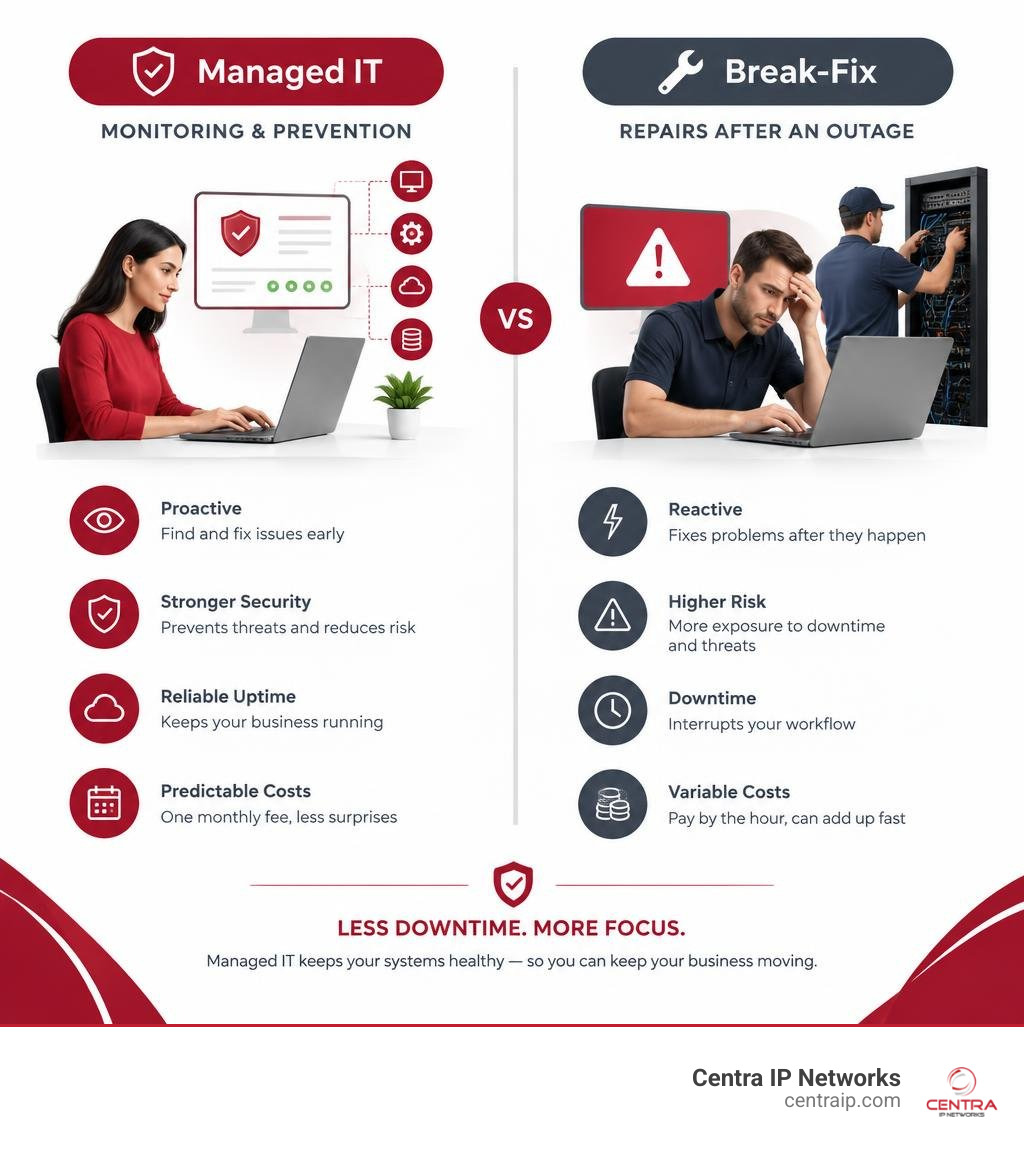
This traditional setup is known as the break-fix model. While it might feel economical on paper because you only pay when an emergency occurs, it creates an inherent conflict of interest. A break-fix technician only generates revenue when your systems fail. They have zero incentive to ensure your network runs flawlessly tomorrow; their entire business model thrives on your downtime today.
In contrast, partnering with a Managed Service Provider (MSP) flips this dynamic on its head. Under a managed services agreement, we deliver continuous, proactive maintenance, automated patching, round-the-clock monitoring, and unlimited day-to-day user support for a predictable monthly fee. Because our team is compensated on a flat-rate basis, our primary goal is to ensure your technology never breaks in the first place.
When you review outsourced IT support services explained without the tech jargon, the operational advantages become immediately clear. You shift from high-stress fire drills to quiet, predictable stability. We manage the foundational infrastructure behind the scenes—from firewalls and endpoint security to cloud backups—so your staff can focus on revenue-generating projects.
| Feature / Metric | Traditional Break-Fix Support | Modern Managed IT Services |
|---|---|---|
| Approach | Reactive (wait until something breaks) | Proactive (prevent issues before disruption occurs) |
| Cost Structure | Unpredictable, volatile hourly rates | Predictable, flat-rate monthly investment |
| System Monitoring | None; failures are discovered by users | Continuous 24/7/365 real-time monitoring |
| Cybersecurity | Basic, unmanaged antivirus (often outdated) | Multi-layered defense: EDR, SOC, MFA, DNS filtering |
| Backups & Recovery | Manual, ad-hoc, rarely tested | Automated, encrypted, immutable, verified daily |
| Downtime Impact | Significant; average downtime costs $5,600/min | Minimized through immediate automated remediation |
| Strategic Planning | None; reactive purchases during failures | 12-to-36-month technology roadmap alignment |
Building a dependable digital workspace requires understanding your core technology assets. If you want to dive deeper into the hardware, software, and networking gear that power your day-to-day operations, our non-techie guide to business IT infrastructure walks through every layer in plain English.
Key Signs Your Business Has Outgrown Reactive IT Support
How do you know when your company has officially hit the ceiling of break-fix support? The transition is rarely sudden; instead, small friction points slowly compound until operational efficiency grinds to a halt.
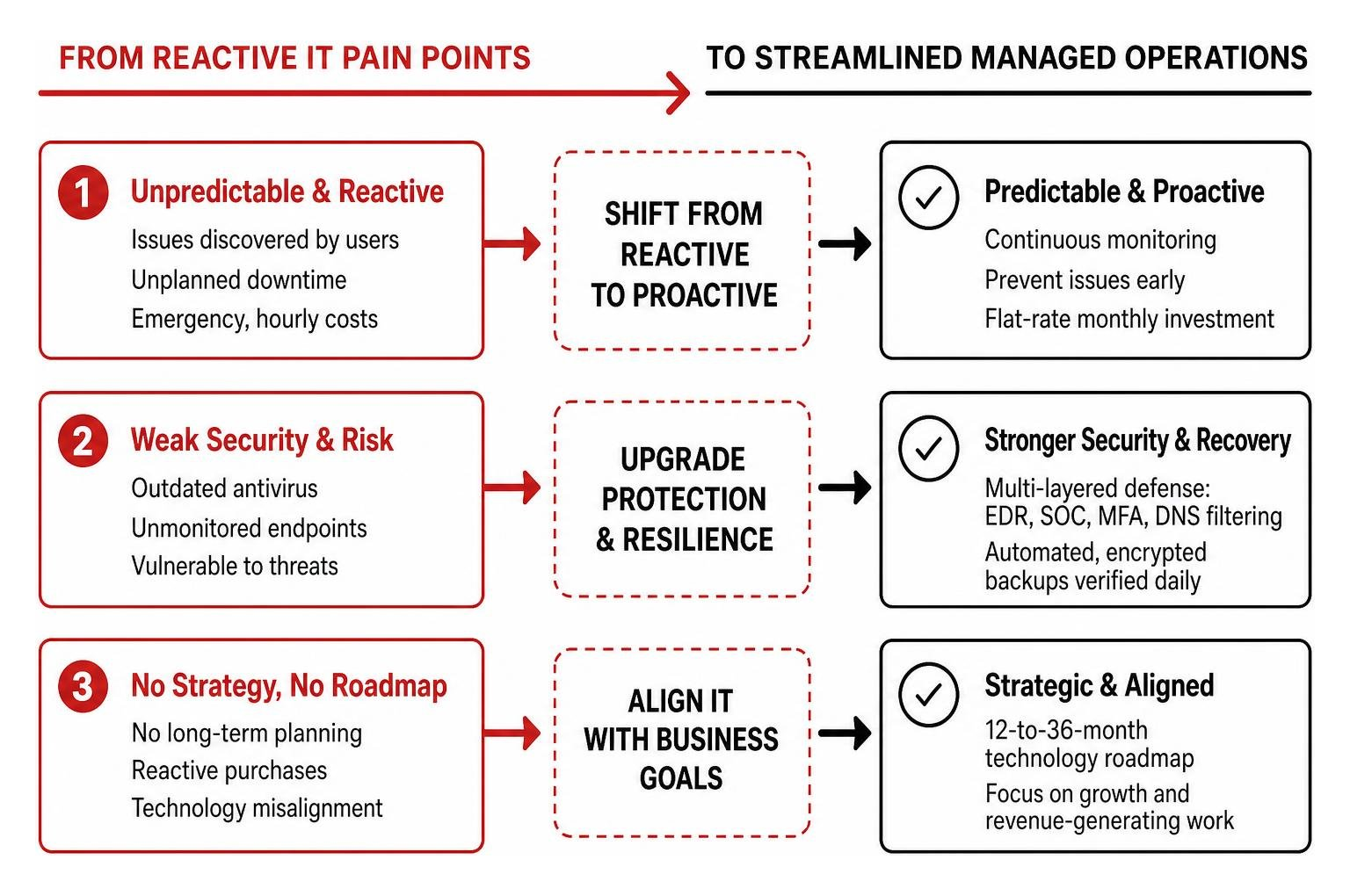
Here are the most common warning signs that it is time to transition to a professional managed service model:
- Recurring System Crashes and Slow Performance: If your employees lose an hour every morning waiting for local applications to load, or if your primary network router reboots spontaneously during client calls, you are losing billable productivity.
- The “Accidental IT Admin” Trap: In many growing firms with 5 to 50 employees, the most tech-savvy employee (often an operations manager or the business owner) becomes the default IT support desk. Every hour they spend troubleshooting a frozen spreadsheet or resetting an email password is an hour stolen from growing the business.
- Unmonitored, Fragmented Endpoints: With hybrid and remote work now standard, employees access sensitive company data from home laptops, tablets, and mobile phones. If you cannot verify whether every laptop has active disk encryption, current security patches, and active endpoint protection, your company is vulnerable.
- Surprise Invoices and Tech Debt: An unexpected server failure or a massive data restoration project can instantly trigger a $10,000+ emergency invoice from a break-fix technician.
- No Structured Technology Roadmap: If you are buying replacement hardware only after a machine catches fire (sometimes literally), you lack a predictable lifecycle budget.
When these symptoms appear, continuing with ad-hoc fixes only magnifies your risk. Business owners who decide to outsource the headache using a guide to managed IT support discover that offloading these daily operational hurdles pays immediate dividends in reduced stress and higher employee retention.
What Is Included in a Comprehensive Managed IT Plan?
A common misconception among small business owners is that managed IT is just a glorified help desk that answers the phone when your inbox glitches. In reality, an enterprise-grade managed IT solution functions as your complete external technology department.

Rather than forcing our clients to juggle separate vendors for internet connectivity, business phone systems, server hosting, and cybersecurity, we believe in radical simplicity. Centra IP Networks delivers a single platform with a single monthly bill and a dedicated team of experts. By leveraging over 35 premier industry partnerships, we eliminate finger-pointing between software providers, hardware vendors, and internet service providers.
Because no two businesses operate identically, avoiding generic bundles is essential. Recognizing why off-the-rack IT doesn’t fit your business anymore helps you tailor a service package that precisely matches your risk tolerance, compliance mandates, and operational growth goals.
Core Components of Managed IT Services for Small Business
When evaluating managed service packages, look for these foundational pillars to ensure comprehensive coverage:
- 24/7/365 Remote Help Desk Support: Rapid, friendly assistance from certified technicians who can remotely access endpoints to solve user issues, software bugs, and permission bottlenecks in minutes.
- Automated Patch Management: Seamless, scheduled deployment of operating system updates, third-party software patches, and firmware upgrades during off-hours so your staff is never interrupted by unexpected restart prompts.
- Proactive Network and Server Monitoring: Automated sensors that track CPU utilization, storage capacity, memory bottlenecks, and network anomalies to resolve hardware degradation before it triggers an outage.
- Cloud and Productivity Suite Administration: Comprehensive management of Microsoft 365, Google Workspace, and cloud platforms like Managed.com for running modern business applications, ensuring secure user provisioning, license optimization, and identity management.
- Automated Onboarding and Offboarding: Standardized deployment processes that ensure new hires receive fully configured, secure devices on day one, while departing staff immediately have their system access revoked to protect intellectual property.
- Vendor Management: We communicate directly with your third-party software providers, ISP, and hardware manufacturers, sparing you hours of hold music and technical jargon.
How Managed IT Services for Small Business Protect Against Cyber Threats
Cybercriminals no longer target only Fortune 500 enterprises. Today, automated bots and ransomware cartels deliberately target small and mid-sized businesses because they frequently lack dedicated security defenses. The financial realities are stark:
- The average ransomware attack demands and downtime damages exceed $200,000+, catching business owners who believed they were “too small to be a target.”
- According to IBM, the average phishing-triggered security breach costs organizations $4.88 million, with phishing serving as the initial attack vector in 16% of all confirmed security breaches.
- Even more alarming, 60% of small businesses close their doors within 6 months of suffering a major data breach, typically because they relied on outdated, untested backups that failed during restoration.
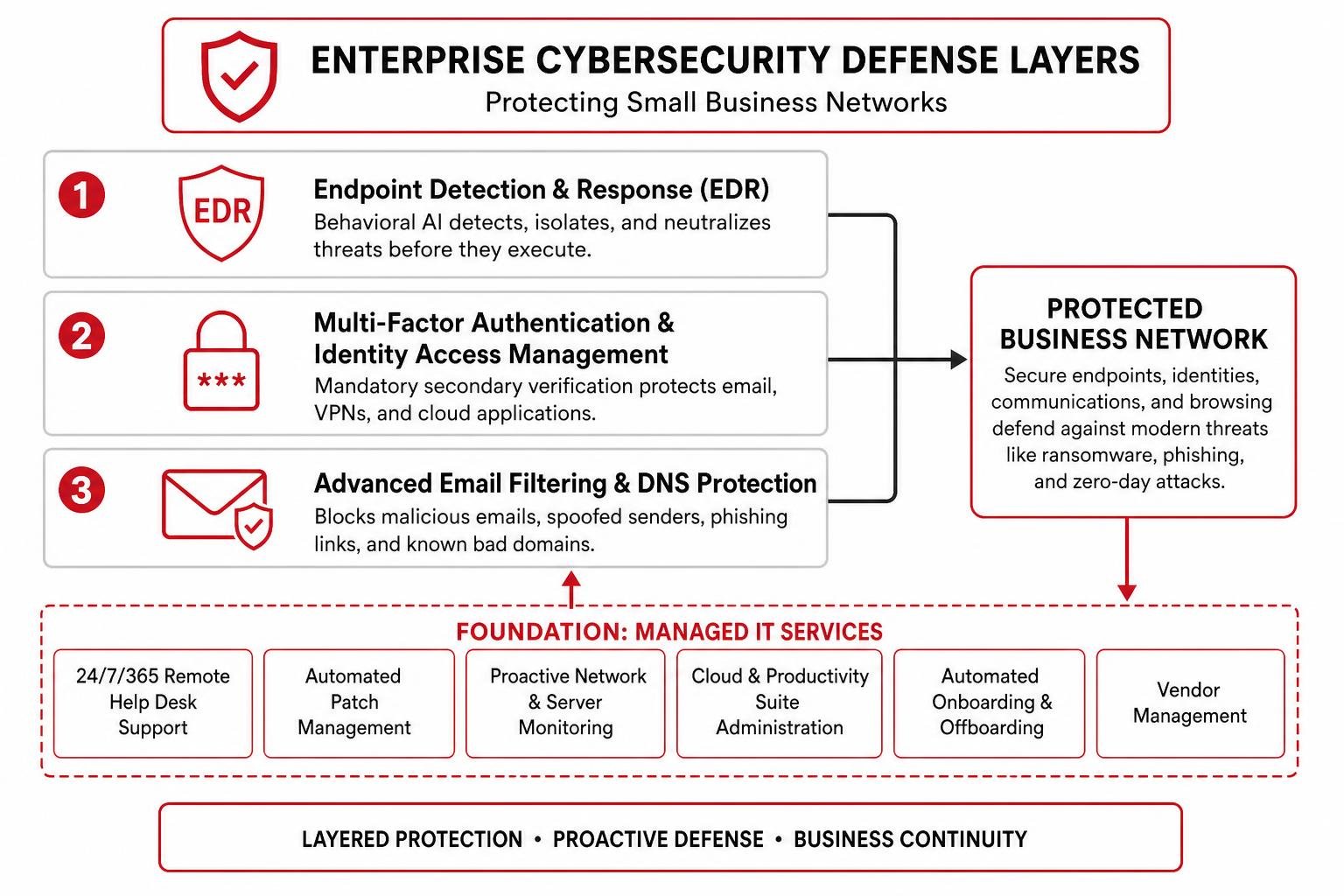
To defend against modern threats, a comprehensive managed IT plan implements a layered security architecture:
- Endpoint Detection and Response (EDR): Replacing traditional signature-based antivirus, modern EDR leverages behavioral artificial intelligence to isolate and neutralize zero-day malware before it executes.
- Multi-Factor Authentication (MFA) & Identity Access Management: Enforcing mandatory secondary verification across all corporate email accounts, VPNs, and cloud applications to render stolen passwords useless.
- Advanced Email Filtering & DNS Protection: Scanning inbound messages in real time for malicious attachments, spoofed senders, and credential-harvesting links, while blocking employee browsers from loading known phishing domains.
- Immutable, Air-Gapped Cloud Backups: Backing up critical servers, workstations, and Microsoft 365 / Google Workspace data to encrypted offsite repositories. These backups are tested on a recurring schedule to prove they can be restored instantly during a disaster.
- Ongoing Employee Security Awareness Training: Conducting automated, simulated phishing campaigns that educate your staff to recognize social engineering tactics before clicking dangerous links.
To learn more about structuring your defensive perimeter, read the managed network security playbook for services and solutions. If you are evaluating security investments across different tiers, explore our breakdown on navigating modern IT security services from low-cost to high-end.
Pricing Models, Budgeting, and Onboarding Expectations
When budgeting for IT, business owners often face opaque proposals and hidden fees. High-quality managed IT providers prioritize transparency, offering clear pricing structures that align directly with your headcount or infrastructure footprint.

Most reputable MSPs offer two primary pricing structures:
- Per-User Pricing (Most Common): Typically ranges from $100 to $250+ per user, per month. This model includes unlimited support for all devices utilized by a specific employee (desktop, laptop, mobile phone, tablet), along with their productivity licensing, email security, and cloud backup. This makes budgeting simple: as you hire new team members, your IT investment scales predictably.
- Per-Device Pricing: Typically ranges from $50 to $100 per workstation/laptop and $150 to $350+ per server, per month. This structure works well for businesses with shift workers who share physical terminals.
When evaluating pricing, it is important to clearly understand the operational and financial worth of comprehensive managed services versus the hidden costs of downtime ($5,600 per minute on average across critical business systems).
What to Expect During the Onboarding Phase
A professional onboarding process ensures a seamless transition without disrupting your daily operations:
- Discovery & Environment Audit: We conduct a non-intrusive audit of your current hardware, network switches, firewall rules, software licenses, domain registries, and existing backup integrity.
- Remediation & Standardization: We resolve lingering security vulnerabilities, update unpatched operating systems, standardize administrative credentials, and deploy centralized management agents across all endpoints.
- Documentation & Process Mapping: We document your entire technology stack, create customized onboarding/offboarding workflows, and establish emergency escalation channels.
- Service Kickoff & Staff Introduction: We introduce our support desk to your staff, providing simple single-click access for submitting support tickets whenever they need assistance.
Co-Managed IT: Collaborating with Your In-House IT Specialist
If your company already employs a dedicated internal IT manager or a solo technician, you do not need to replace them to benefit from managed services. Many growing companies utilize a Co-Managed IT model.
In this collaborative setup, we act as an extension of your internal IT department:
- Eliminating Burnout: We take over tier-1 support tickets (password resets, software installations, printer jams) and provide 24/7 coverage so your in-house technician can take vacations, disconnect on weekends, and focus on strategic, high-value projects.
- Enterprise Tooling Access: Your internal specialist gains direct access to our enterprise-grade remote monitoring, ticketing systems, vulnerability scanners, and automated patch management software without paying expensive standalone licensing fees.
- Tier-2 & Tier-3 Escalation: When complex infrastructure migrations, cloud rollouts, or security audits occur, our senior systems engineers work alongside your staff to complete the initiative efficiently.
Adopting a collaborative IT model helps protect your internal staff while setting up long-term stability. For a broader perspective on sustainable infrastructure strategies, check out the art of future-proofing your digital world.
How to Choose the Right Managed Service Provider for Your Business
Selecting a technology partner is one of the most critical decisions an executive will make. The right MSP acts as a proactive driver of business growth, while the wrong provider leads to lingering tickets, poor communication, and dangerous security gaps.
When vetting prospective IT service providers, evaluate these essential factors:
- Clear, Enforceable Service Level Agreements (SLAs): Ensure the contract clearly outlines response and resolution time guarantees categorized by ticket severity (e.g., 15-minute response for critical network outages vs. 2-hour response for standard software requests).
- Industry & Compliance Expertise: If your company operates under specific regulatory frameworks—such as HIPAA in healthcare, SOC 2 in software, or CMMC in defense contracting—verify that the provider has verifiable experience auditing and enforcing those standards.
- Local On-Site Presence: While 95% of IT issues can be resolved remotely, hardware failures, physical cabling, and office relocations require on-site technical resources. Ensure your provider maintains local, certified technicians within your geographic market.
- Unified Communications & Single-Provider Simplicity: Choose a partner capable of consolidating your entire technical footprint—including managed voice (VoIP), cloud connectivity, cybersecurity, and help desk support—onto a unified platform with a single monthly bill.
If you are evaluating service providers across our primary operating hubs, review our detailed local guides on choosing your tech partner for managed IT services in Dallas and discovering Clearwater managed services that actually deliver results across the greater Tampa Bay region.
Frequently Asked Questions About Managed IT Support
How fast will a managed IT provider respond when something breaks?
Response times depend on your provider’s Service Level Agreement (SLA) and the severity of the issue. A top-tier MSP typically maintains response windows such as:
- Critical Emergencies (Server down, office-wide outage, ransomware alert): Immediate live response within 15 minutes, initiating automated isolation and hands-on remediation protocols.
- High Priority (Key individual user unable to work, accounting payroll blocker): Response within 30 to 60 minutes.
- Standard Requests (New user provisioning, general software questions): Response within 2 to 4 business hours.
Our help desk is staffed around the clock by experienced engineers who resolve the majority of standard tickets during the very first contact.
Do I have to sign a long-term contract or can I choose month-to-month?
While standard industry agreements typically span 12 to 36 months to offset initial onboarding costs and enterprise tool deployments, modern MSPs offer flexible terms.
At Centra IP Networks, we believe our service quality should earn your partnership every single day. We offer transparent 12-month agreements featuring built-in 90-day renewal review windows, as well as flexible month-to-month service options with zero multi-year lock-in traps. If your operational needs change, your technology plan can adapt without penalty.
What happens if our business is hit by ransomware while using an MSP?
If a malicious link is clicked or a zero-day exploit bypasses initial defenses, a mature MSP initiates a coordinated Incident Response Playbook:
- Automated Endpoint Isolation: Our 24/7 Security Operations Center (SOC) instantly cuts the infected device off from the local network and cloud repositories, preventing the ransomware from spreading laterally.
- Threat Neutralization: Forensic tools identify the root cause, terminate malicious background scripts, and remove backdoors.
- Immutable Backup Restoration: Rather than paying extortion fees, we wipe compromised drives and restore your systems to clean, verified states captured prior to the intrusion.
- Post-Incident Hardening: We perform vulnerability scans and update security policies to ensure the exploit cannot be reused.
This multi-layered response prevents data loss and safeguards your organization from the catastrophic 60% post-breach failure rate.
Conclusion
Managing a growing company is challenging enough without losing sleep over server errors, unexpected hardware bills, and looming cyber threats. Continuing with a reactive break-fix IT model leaves your revenue, client trust, and team productivity exposed to preventable downtime.
By switching to a comprehensive managed IT strategy, you gain a dedicated team of certified engineers, robust cybersecurity defenses, tested cloud backups, and predictable monthly expenses. At Centra IP Networks, we simplify your entire technology ecosystem—combining managed IT, cloud communications, and business Internet onto a single reliable platform backed by local experts across Dallas, Fort Worth, Orlando, Tampa, St. Petersburg, Clearwater, and Sarasota.
Ready to eliminate IT stress and secure your digital workplace? Take the first step today: discover reliable managed IT service providers in Tampa to safeguard your growing business and schedule your free, no-obligation technology and security assessment.