Why Your Phone System Choice Matters More Than Ever in 2026
Cloud PBX vs on-premise is the critical decision facing businesses today as they modernize their communication infrastructure. Here’s what you need to know:
| Factor | Cloud PBX | On-Premise PBX |
|---|---|---|
| Upfront Cost | Low ($15-$60/user/month) | High ($800-$1,000+ per user) |
| Maintenance | Provider-managed | In-house IT required |
| Scalability | Instant adjustments | Hardware upgrades needed |
| Remote Work | Native support | Limited flexibility |
| Installation | Days to deploy | Weeks + $4,800+ average |
| Best For | Growing SMBs, hybrid teams | Large enterprises with strict data control |
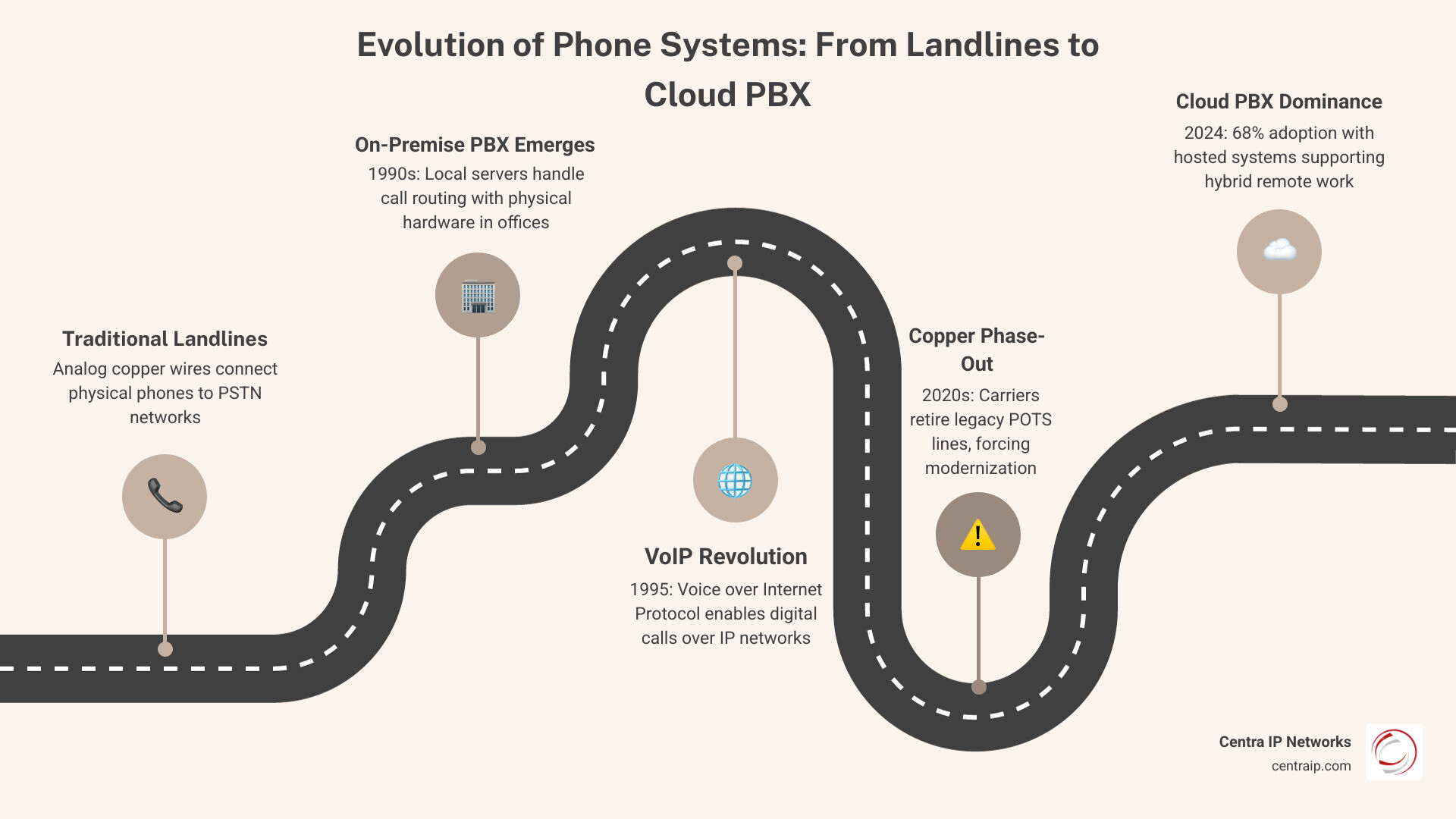
The telecommunications landscape has shifted dramatically. 75% of U.S. adults whose jobs can be done from home are working remotely at least some of the time, fundamentally changing how businesses need to communicate. Meanwhile, legacy copper lines are being phased out by major carriers, and businesses face mounting costs from aging hardware.
Your phone system isn’t just about making calls anymore. It’s about enabling your distributed workforce, controlling costs, and staying competitive. The wrong choice can mean thousands in wasted investment, frustrated employees unable to work flexibly, or catastrophic downtime.
The stakes are real. 54% of businesses experience costs over $100,000 from a serious outage, and 16% report losses topping $1 million. Whether you’re managing multiple office locations across Dallas, Tampa, or Orlando, or supporting remote workers nationwide, your phone system needs to deliver reliability without breaking your budget.
This isn’t about following trends—it’s about matching your communication infrastructure to how your business actually operates. Cloud PBX has reached 68% adoption heading into 2026 for good reasons, but on-premise systems still make sense for specific situations. The key is understanding which approach fits your budget, IT resources, growth plans, and operational requirements.
I’m Patrick Brangan, and over 20+ years I’ve helped hundreds of SMB companies navigate the cloud PBX vs on-premise decision, implementing solutions across unified communications and managed IT. As a full-service business technology firm with regional focus in Dallas, Tampa, and Orlando, I’ve seen how the right phone system choice transforms operations—and how the wrong one creates costly headaches.
Cloud PBX vs On-Premise: The Fundamental Differences
To understand the cloud pbx vs on-premise debate, we first have to look at where the “brains” of the system live. In a traditional on-premise setup, you have a physical box—the Private Branch Exchange (PBX)—bolted to a wall or sitting in a server rack in your office. This hardware handles all the routing, switching, and call management locally.
Conversely, cloud telephony eliminates the need for traditional on-site equipment by moving those “brains” to a secure, off-site data center. Instead of connecting to a physical phone line coming out of your wall, your desk phones or computer apps connect to the system via your internet connection. We often refer to this as a cloud-based phone system, where the service is delivered over the internet rather than through local copper wires.
The fundamental difference lies in ownership and responsibility. With on-premise, you own the hardware, the wires, and the maintenance headaches. With cloud, you subscribe to a service where the provider handles the heavy lifting of infrastructure and software updates.
What is Cloud PBX?
Cloud PBX operates on a Software-as-a-Service (SaaS) model. Because the infrastructure is hosted in professional data centers, cloud-based PBX adoption reached 68% in 2024.
When you use a cloud system, we ensure your updates are handled automatically by the provider. You get “virtual extensions” that aren’t tied to a specific desk. Whether your employee is in our Dallas office or working from a coffee shop in Sarasota, their extension follows them. It’s a flexible, nimble approach that favors rapid deployment and modern features like AI-driven call routing.
What is On-Premise PBX?
An on-premise phone system is the “old school” (but still powerful) way of doing things. It requires local servers, physical wiring throughout your building, and a dedicated space with proper cooling.
The main draw here is total control. Your in-house IT team manages every setting, and your data stays within your four walls. Many of these systems now use SIP trunking integration, which allows them to use the internet for calls while keeping the physical hardware on-site. It’s a heavy-duty solution for those who have already invested deeply in their local infrastructure.
Cost Analysis: Upfront Investment vs. Monthly Subscriptions
When comparing cloud pbx vs on-premise, the financial conversation usually boils down to Capital Expenditure (CapEx) versus Operating Expense (OpEx).
| Cost Item | On-Premise PBX (CapEx) | Cloud PBX (OpEx) |
|---|---|---|
| Initial Hardware | $1,000 – $20,000+ | $0 (if using softphones) |
| Per User Setup | $800 to $1,000 | $0 – $50 |
| Monthly Service | Low (line rentals only) | $15 – $60 per user |
| Maintenance | High (IT staff/contracts) | Included in subscription |
| Upgrades | Expensive (new hardware) | Included in subscription |
For many of our clients in the Tampa and Fort Worth areas, the new cloud PBX package plans are much easier to swallow because they trade a massive upfront check for a predictable monthly fee.
Hidden Costs of On-Premise Systems
Don’t let the “ownership” aspect fool you; on-premise systems come with a tail of hidden expenses. Average installations cost around $4,800 per office, but that’s just the beginning. You have to account for:
- Electricity and Cooling: Those servers generate heat and eat power 24/7.
- Hardware Replacement Cycles: Most physical PBX hardware becomes obsolete every 5 to 7 years.
- Emergency Repairs: If a card blows in your PBX at 3 PM on a Friday, you’re paying premium rates for a technician to drive to your office.
Predictable Pricing in Cloud PBX vs On-Premise
Cloud systems offer a “pay-as-you-grow” model. This is why 44% of SMEs are using cloud-hosted PBX for cost-effectiveness. You aren’t paying for 50 lines if you only have 12 employees.
By bundling features like video conferencing, SMS, and call recording into one per-user price, we help businesses reduce “vendor sprawl”—the headache of paying five different companies for five different communication tools.
Reliability, Security, and Compliance in the Modern Office

Reliability is non-negotiable. As we mentioned, 54% of businesses experience costs over $100,000 from a serious outage. When deciding between on-premise phone systems and cloud, you have to ask: “What happens if my building loses power?”
With on-premise, if your building goes dark, your phones go dark. Cloud systems, however, offer geo-redundancy. If a data center in Dallas has an issue, your calls are automatically routed through a center in another region. Your customers never even know there was a problem.
Security and Compliance Considerations
Security is a top priority, especially for our healthcare and legal clients. Cloud providers are deploying AI features and security updates more rapidly than a local IT team usually can.
Furthermore, modern systems must comply with federal laws:
- Kari8s Law: Requires systems to allow direct dialing of 911 without a prefix (like dialing ‘9’ first).
- RAY BAUM8s Act: Requires “dispatchable location” info to be sent to emergency services, ensuring they know exactly which floor or office a call is coming from.
Cloud systems often handle these updates automatically, whereas on-premise systems may require manual (and costly) software upgrades to stay compliant.
Internet Requirements for Cloud PBX vs On-Premise
For a cloud system to work, your internet needs to be up to the task. We generally recommend about 100 kbps per concurrent call. If you have 10 people on the phone at once, you need 1 Mbps of dedicated “clean” bandwidth just for voice.
Solutions like business-grade IP voice and connectivity services can replace legacy POTS and provide a more resilient foundation for VoIP. We often implement SD-WAN or LTE backup for our Clearwater and St. Petersburg clients to ensure that if the primary fiber line is cut, the phones stay up via a cellular connection.
Scalability and the Future of Remote Work
The workplace has changed forever. With 75% of U.S. adults with remote-eligible jobs working from home at least some of the time, your phone system can’t be trapped in your office building.
Furthermore, 83% of employees prefer hybrid work arrangements. If you want to attract top talent in competitive markets like Orlando or Fort Worth, you need to unlock seamless communication with cloud platforms that allow employees to work from anywhere.
Why Cloud PBX vs On-Premise Wins for Hybrid Teams
Cloud PBX is built for mobility. It uses softphones (software on a computer) and mobile apps to turn any device into a business extension. This is a huge reason why 87% of startups plan to use VoIP to enhance performance.
- Presence Indicators: See if a colleague is “on a call” or “available” even if they are 50 miles away.
- Unified Communications: Switch a voice call to a video meeting with one click.
- One Number: Employees don’t have to give out their personal cell numbers to clients.
When On-Premise Still Makes Sense
We aren’t here to tell you that cloud is the only answer. There are still times when a premise-based vs cloud-based comparison favors the hardware on-site:
- Extreme Data Sovereignty: If you are in a highly regulated industry that mandates all data stay on physical servers you touch.
- Poor Internet Infrastructure: If your office is in a rural area where high-speed internet is unreliable.
- Significant Sunk Costs: If you just spent $50,000 on a new PBX last year, it might make sense to sweat that asset for a few more years using SIP trunking.
Making the Move: Migration and Business Size Factors
Transitioning doesn’t have to be a nightmare. When we help a business migrate, we follow a phased approach:
- Needs Assessment: How many users? Do you need paging, faxing, or door buzzers?
- Pilot Testing: We set up a few users on the new system to test call quality.
- Number Porting: Moving your existing numbers from the old carrier to the new one.
- Training: Ensuring your team knows how to use the new mobile apps and features.
With Gartner predicting global enterprise IT spending will reach $5.4 trillion by 2028, it’s clear that businesses are investing heavily in modernization. Choosing the right office phone system is a foundational part of that investment.
Considerations for Small and Medium Businesses
Small businesses rarely have a full-time “phone guy” on staff. This is why cloud-based UC&C deployments are rapidly replacing on-premise systems. SMBs need the enterprise-grade features—like auto-attendants and call queues—without the enterprise-grade price tag or technical complexity.
Frequently Asked Questions about Cloud PBX vs On-Premise
Is an on-premise PBX cheaper in the long run?
Typically, no. While you stop paying a monthly per-user fee after the hardware is paid off, the “long run” usually involves rising maintenance costs, expensive software licenses, and eventually, the cost of replacing the entire system when it reaches end-of-life. When you factor in the IT labor required to manage it, Cloud PBX usually has a lower Total Cost of Ownership (TCO).
Can I keep my existing phone numbers when moving to the cloud?
Yes! This process is called Local Number Portability (LNP). We coordinate with your current carrier to “move” your numbers to the cloud. During the transition, we often use temporary call forwarding so you don’t miss a single customer call.
What happens to my cloud phone system if the internet goes down?
This is the beauty of the cloud. Because the system lives in a data center and not your office, it stays “alive” even if your office internet is cut. Calls can automatically failover to employee mobile apps or be routed to a different office location. Your auto-attendant will still answer, and voicemails will still be recorded and emailed to you.
Conclusion
The choice between cloud PBX vs on-premise isn’t just a technical decision-it’s a strategic one. For most modern businesses in Dallas, Orlando, and Tampa, the flexibility, lower upfront costs, and remote-work capabilities of the cloud make it the clear winner. However, every business is unique.
At Centra IP Networks, our single-platform advantage means you get your phone system, internet connectivity, and managed IT all from one provider with one bill. We leverage over 35 carrier partnerships to ensure you get the most cost-effective, tailored solution for your specific needs.
Ready to stop worrying about your dial tone and start focusing on your growth? Explore our Cloud-Based Phone Systems today and let us help you find the perfect fit for your team.