

Cloud Based Infrastructure: A Simple Definition
Cloud based infrastructure is the on-demand mix of servers, storage, networking, security tools, and software that runs through a cloud provider instead of living only in your office server room. Your business accesses these resources over a network, while the provider maintains the physical data centers and underlying hardware.
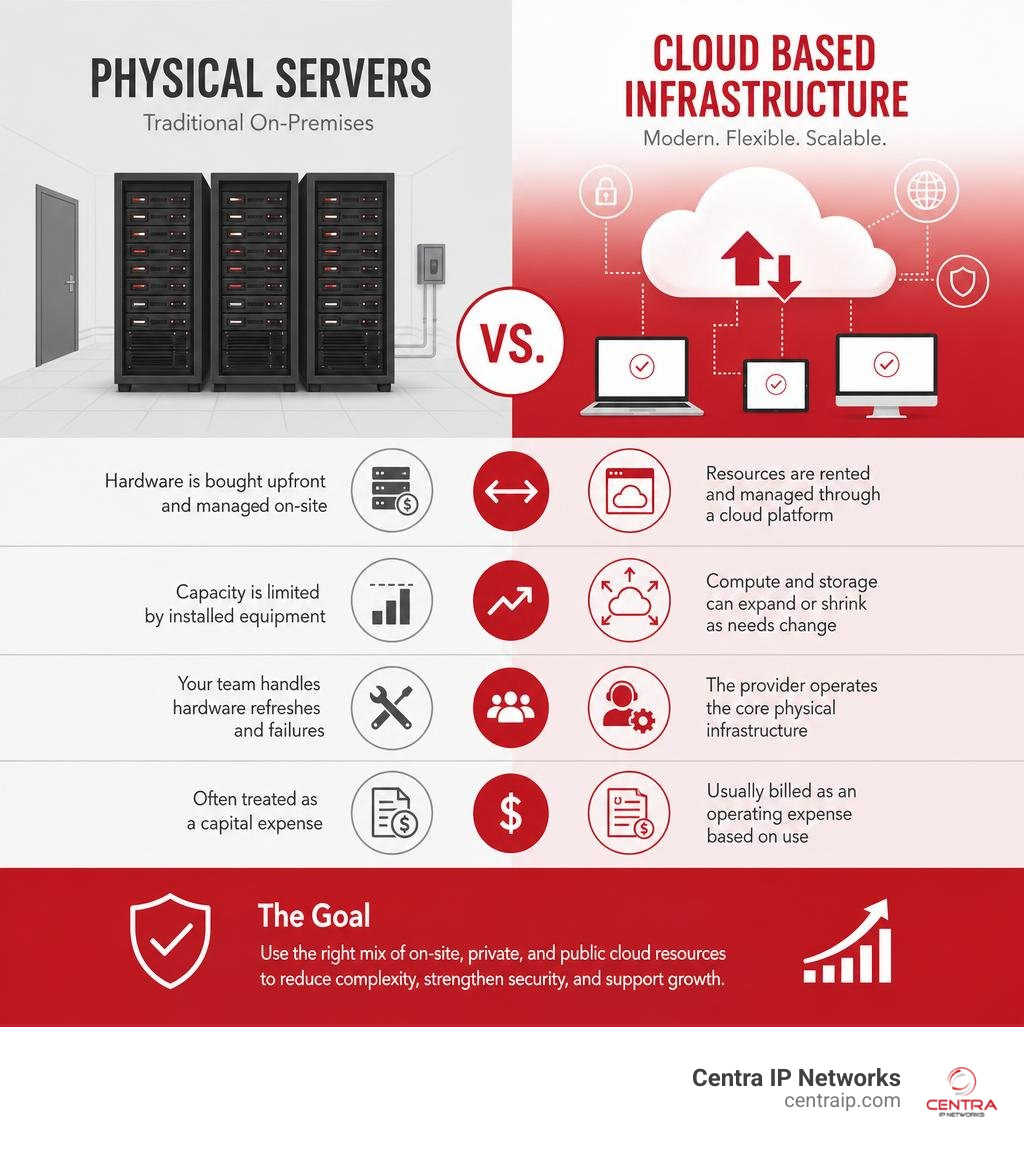
In simple terms, it changes IT from buying, housing, and replacing physical servers to using the computing capacity you need, when you need it.
| Traditional physical servers | Cloud based infrastructure |
|---|---|
| Hardware is bought upfront and managed on-site | Resources are rented and managed through a cloud platform |
| Capacity is limited by installed equipment | Compute and storage can expand or shrink as needs change |
| Your team handles hardware refreshes and failures | The provider operates the core physical infrastructure |
| Often treated as a capital expense | Usually billed as an operating expense based on use |
This does not mean every workload belongs in a public cloud. Many businesses use a blend of on-site systems, private resources, and public cloud services to balance cost, speed, control, and compliance. The goal is not simply to “move to the cloud.” It is to make technology easier to manage, safer to use, and ready to support growth.
I am Patrick Brangan, a business technology professional with more than 20 years of experience helping small and midsize organizations simplify communications, managed IT, and secure network environments. My work with cloud based infrastructure focuses on practical systems that reduce vendor sprawl without adding unnecessary complexity.
Basic cloud based infrastructure glossary:
What Is Cloud Based Infrastructure and How Does It Work?
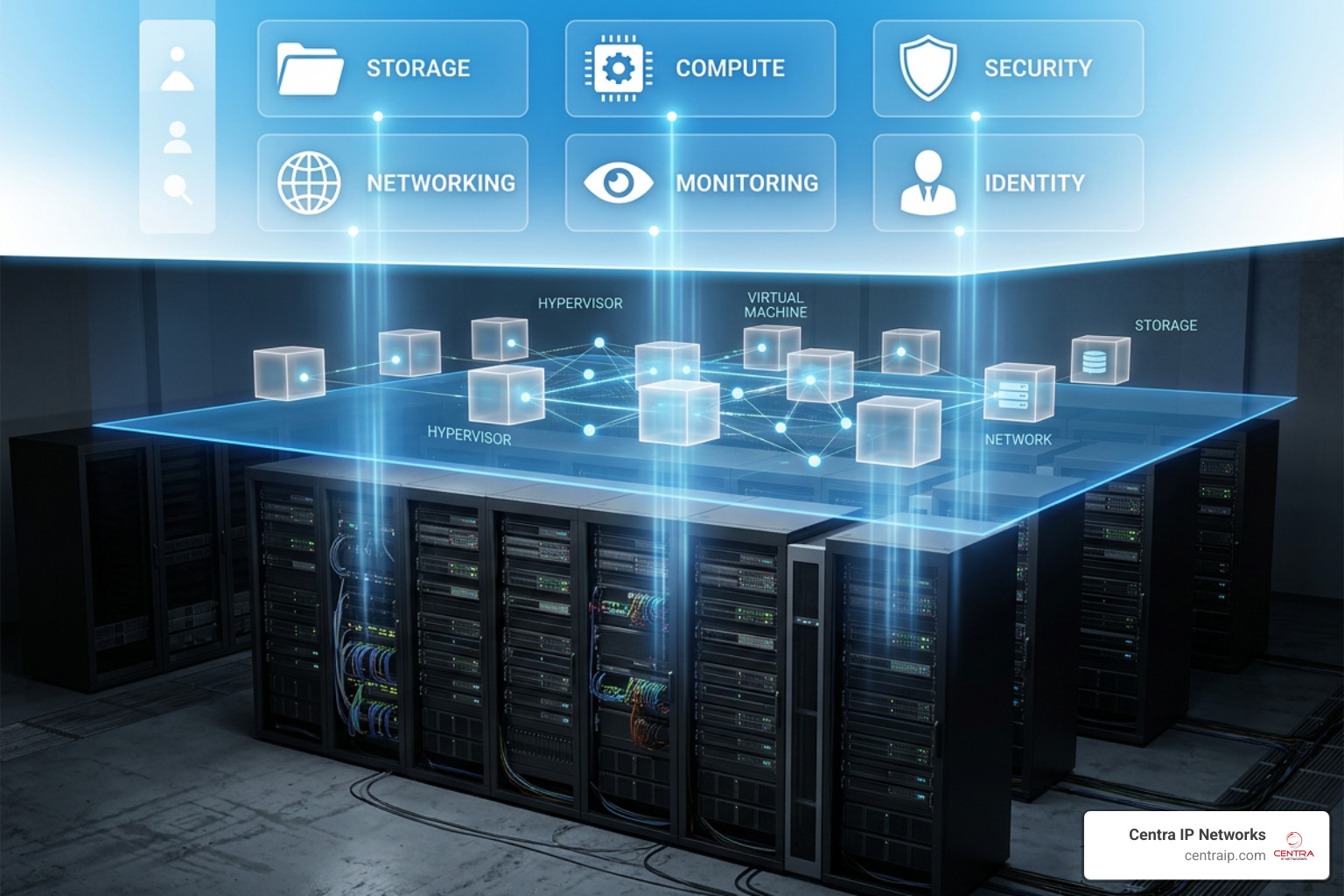
At its foundation, cloud based infrastructure abstracts physical hardware into flexible software resources. In a traditional office setting, if you need a new application server, someone orders a physical box, waits for shipping, installs it into a server rack, runs Ethernet lines, configures the operating system, and hooks up external storage arrays.
Cloud environments remove those physical bottlenecks. Provider data centers contain vast farms of specialized enterprise hardware. A virtualization software layer abstracts those physical resources, exposing them via Application Programming Interfaces (APIs). When your organization requests a virtual machine, the cloud management layer allocates CPU, memory, network bandwidth, and disk space across available physical server racks automatically.
Understanding what is a cloud infrastructure starts with appreciating this shift: infrastructure becomes programmatic. Instead of managing cables and power supplies, your IT team manages code, parameters, and digital policies.
This model dramatically lowers network latency and operational costs. For instance, businesses operating across Dallas, Fort Worth, Orlando, or Tampa can deploy edge computing or cloud compute resources in localized data centers close to their employees and customer bases. High-speed provider fiber backbones ensure low-latency data access without requiring localized physical server maintenance.
Hardware and Software Components of Cloud Infrastructure
The core building blocks of cloud infrastructure divide neatly into hardware and software layers:
- Hardware Layer: Bare-metal physical servers, high-performance solid-state drives (SSDs), physical networking switches, routers, load balancers, and fiber-optic backbones.
- Software Abstraction Layer: Hypervisors, virtual switches, software-defined networking (SDN) controllers, and storage orchestration layers.
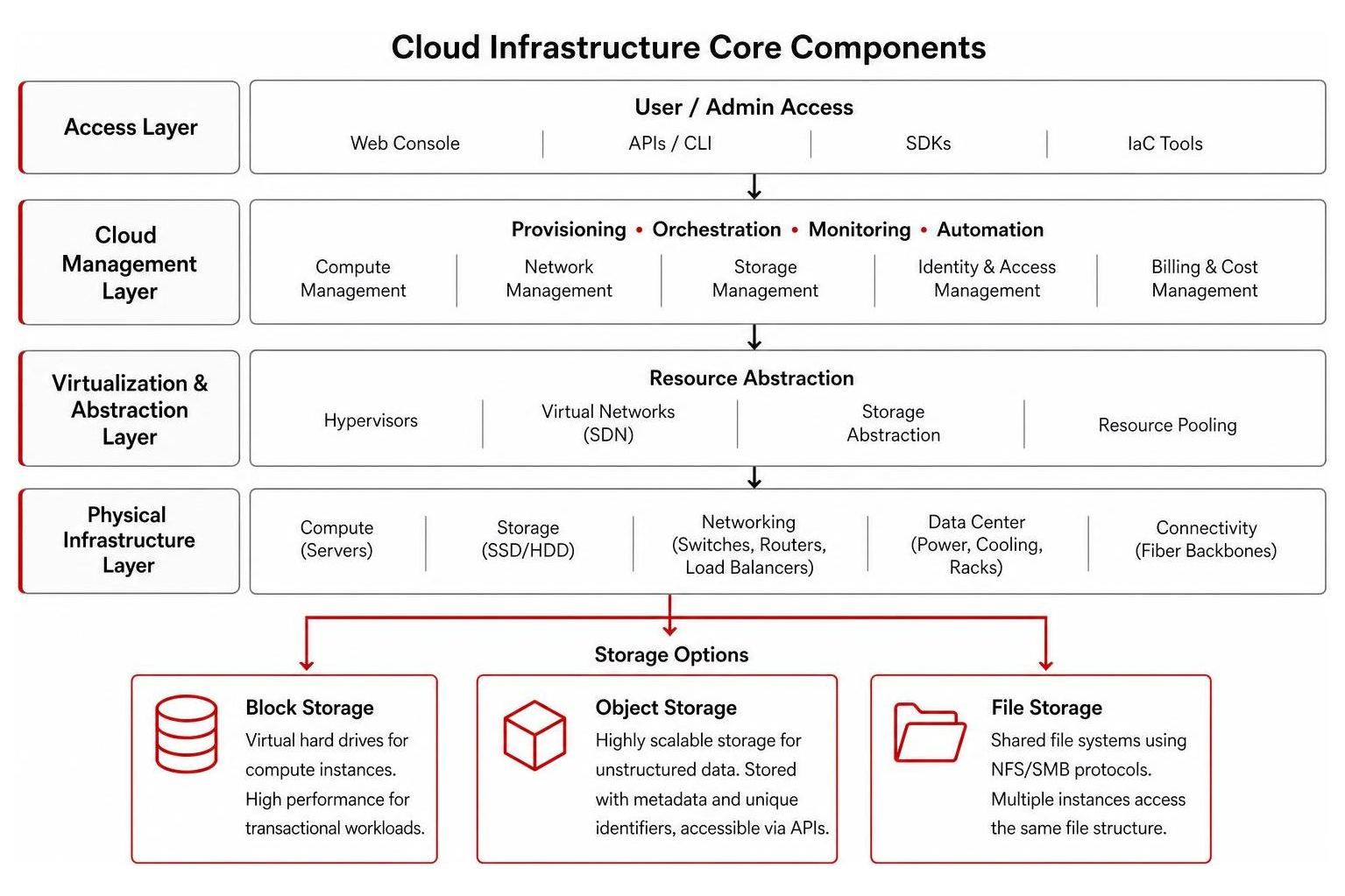
When selecting storage within cloud environments, engineers balance performance against cost across three main categories:
- Block Storage: Virtual hard drives attached directly to compute instances (like secure and resizable cloud compute – Amazon EC2 – Amazon Web Services). Ideal for high-speed transactional databases requiring ultra-fast read/write cycles.
- Object Storage: Highly scalable storage for unstructured data (images, videos, backups). Data is stored alongside metadata and unique identifiers, accessible globally via APIs.
- File Storage: Shared file systems using traditional protocols (NFS/SMB), allowing multiple compute instances to read and write to the exact same folder structure concurrently.
Hypervisors orchestrate the underlying bare-metal machines. Platform virtualization platforms remain dominant across legacy and private cloud ecosystems, with VMware holding approximately 42.77% market share in the virtualization platform marketplace.
Virtualization and Containerization in Modern Cloud Platforms
Virtualization changed IT by letting a single physical server run multiple operating systems concurrently via a hypervisor (such as KVM or VMware ESXi). However, containerization takes virtualization a step further.
While a virtual machine (VM) virtualizes the underlying physical hardware and requires a complete guest operating system, containers package application code together with only its specific dependencies and libraries. Containers share the host operating system’s kernel, making them lightweight, rapid to launch (milliseconds versus minutes), and efficient in resource utilization.
Orchestration platforms like Kubernetes automate the deployment, scaling, and management of these containerized microservices architectures across thousands of underlying server nodes.
Taking dynamic computing further, Serverless Computing or Function-as-a-Service (FaaS) allows developers to deploy isolated code snippets that execute purely in response to event triggers (such as an API call or database update). The cloud platform automatically provisions compute resources for the millisecond duration of execution, scaling down to zero when idle—completely hiding the server management layer from the user.
Delivery and Deployment Models for Cloud Infrastructure
Core Service Delivery Models: IaaS, PaaS, and SaaS
Cloud delivery models dictate how operational responsibilities are split between your business and the cloud service provider. This framework is called the Shared Responsibility Model.
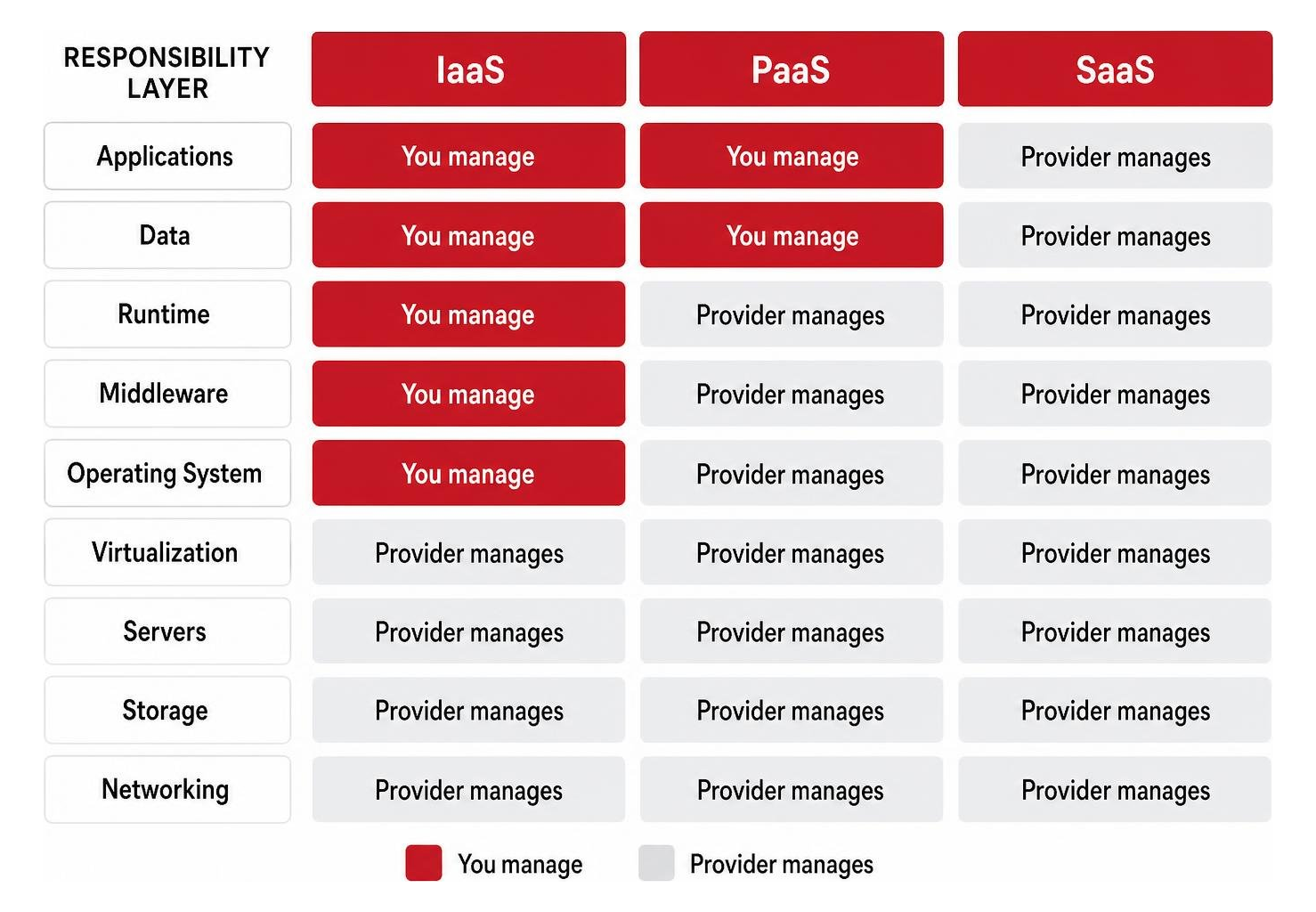
- Infrastructure as a Service (IaaS): The provider supplies the raw physical server racks, networking, hypervisors, and storage systems. You control the operating systems, middleware, database configurations, installed software applications, and access security rules.
- Platform as a Service (PaaS): The provider manages hardware, operating systems, and runtime frameworks. Your team simply uploads custom code and data. Learning about demystifying the cloud: what is a cloud based platform reveals why development teams favor PaaS—it removes server patching and OS updates from their daily workload. Discover how platform as a service: the developers cloud secret speeds software rollouts by providing pre-configured deployment channels.
- Software as a Service (SaaS): Ready-to-use application software delivered directly through a web browser or client interface. The provider handles everything: hardware, software updates, storage infrastructure, security patching, and uptime guarantees.
Choosing the Right Deployment Model for Cloud Based Infrastructure
Selecting where your cloud infrastructure actually resides requires matching your workload requirements against four distinct deployment architectures:
- Public Cloud: Shared, multi-tenant hardware owned and managed entirely by third-party hyperscalers (like AWS, Microsoft Azure, Google Cloud, or Oracle). Extremely scalable with low upfront costs.
- Private Cloud: Single-tenant infrastructure dedicated exclusively to your business. Can be built on-premises in your own facility or hosted in a specialized data center. Delivers maximum data control and isolation for strict compliance needs.
- Hybrid Cloud: Connects private or on-premises infrastructure directly with public cloud platforms using secure, high-speed encrypted tunnels or direct fiber links.
- Multicloud: Using two or more distinct public cloud platforms (e.g., executing enterprise databases on Oracle Cloud while running front-end web apps on AWS) to prevent vendor lock-in and optimize pricing.
An IBM Institute for Business Value analysis of more than 50 enterprise organizations demonstrated 3 times higher return on investment (ROI) from IT programs over 5 years when organizations intentionally adopt “hybrid-by-design” principles. Rather than blindly pushing every application to public clouds, hybrid designs place each enterprise application where it performs best.
Before picking a model, evaluate your workloads against critical operational criteria:
- Data Sovereignty & Compliance: Does regulatory oversight (such as HIPAA, PCI-DSS, or CJIS) mandate physical isolation of patient or financial records?
- Latency Mandates: Do local processing requirements (like manufacturing line control or point-of-sale systems) demand microsecond local response times?
- Workload Volatility: Are your resource requirements steady and predictable, or do you experience sudden, volatile spikes in consumer demand?
- Existing Technical Skillsets: Does your internal team possess the specialized skills to configure and maintain complex multi-tenant environments securely?
Review our complete breakdown in the definitive guide to cloud solutions to match these models against your business structure.
Strategic Benefits, Security, and Cloud Optimization
Shifting away from legacy server rooms to modern cloud environments delivers immediate strategic and operational advantages:
- Rapid Elasticity & Dynamic Provisioning: Automatically scale compute capacity during unexpected traffic spikes without manual hardware installation.
- FinOps & Cost Optimization: Convert volatile capital expenditures (CapEx)—such as massive multi-year server replacements—into operational expenses (OpEx) that match actual month-to-month consumption.
- Automated Business Continuity & Disaster Recovery: Multi-region backups and automated failover capabilities ensure enterprise resilience even during physical facility outages. Read about the core 5 reasons to switch to cloud hosting to evaluate business continuity improvements.
Security in the cloud operates under a modern Zero Trust Architecture (“never trust, always verify”). Cloud security controls prioritize automated threat monitoring, identity and access management (IAM), data encryption at rest and in transit, and continuous compliance enforcement across frameworks like SOC 2, HIPAA, and GDPR. See how navigating the clouds: why cloud security is your business’s new best friend to secure your endpoints effectively.
Infrastructure as Code and Automated Governance
Modern cloud infrastructure is built and managed using software code—a paradigm called Infrastructure as Code (IaC).
Instead of manually clicking through web administrative interfaces to deploy virtual servers, IT teams write declarative configuration templates using tools like Pulumi or Terraform. These templates describe the desired state of your network, servers, storage, and firewalls.
Using platforms like the unified platform for infrastructure teams – Pulumi | Pulumi, engineering teams build infrastructure using modern programming languages like TypeScript, Python, or Go.
Advanced IaC implementations incorporate:
- Policy-as-Code: Enforces security rules before resources are created (for instance, automatically blocking any command that attempts to open a storage bucket to the public internet).
- Dynamic Credentials via OpenID Connect (OIDC): Eliminates long-lived access credentials stored on local developer machines by exchanging short-lived tokens automatically during deployments.
- Self-Service Developer Portals: Empowers developers to deploy approved, pre-secured compute environments (“golden paths”) safely without waiting for manual IT tickets.
Implementing these practices transforms how your business approaches technical management. To establish clear operational boundaries, explore what is cloud management? A strategic approach to efficiency.
Comparing Enterprise Providers for Cloud Based Infrastructure
Major cloud hyperscalers maintain sprawling data centers worldwide, but each platform brings unique technical strengths and pricing differentiators to market.
To provide reliable connection speeds and high availability, providers build global geographic footprints. For example, the AWS Cloud spans 123 Availability Zones across 39 Geographic Regions worldwide. In Texas, data center hubs like the Dallas/Ft. Worth hyperscale data center campus provide low-latency regional infrastructure connectivity for business operations.
| Feature / Metric | Amazon Web Services (AWS) | Microsoft Azure | Google Cloud Platform (GCP) | Oracle Cloud Infrastructure (OCI) |
|---|---|---|---|---|
| Primary Differentiator | First-mover market scale & service catalog breadth (240+ services) | Deep enterprise integration with Windows Server, Active Directory, & Microsoft 365 | Leading enterprise big data analytics (BigQuery) & advanced AI capabilities | Aggressive compute, storage, & network bandwidth pricing models |
| Global Footprint | 123 Availability Zones across 39 Geographic Regions | Spans 60+ global regions offering 200+ products | Operates globally across 40+ regions | Spans 50 interconnected geographic regions globally |
| Standout Capability | Amazon EC2 custom silicon (Graviton) & broadest instance variety | Unified management across hybrid environments via Azure Arc | Superior managed Kubernetes infrastructure (GKE) | Consistent global region pricing & bare-metal HPC support |
| Cost Differentiator | Broad array of spot instances & committed savings plans | Azure Hybrid Benefit discounts for existing Windows licenses | BigQuery 26% to 34% lower 3-year TCO compared to cloud alternatives | Claims up to 50% lower compute, 70% lower block storage, & 80% lower egress costs |
Selecting the ideal hyperscaler often comes down to matching your existing software stack against individual provider ecosystems. Oracle Cloud’s pricing consistency across global commercial and government regions makes it attractive for database-heavy enterprise setups, while Azure naturally complements existing Microsoft Active Directory environments.
Frequently Asked Questions about Cloud Infrastructure
How does cloud based infrastructure differ from traditional on-premises IT?
Traditional on-premises IT requires purchasing, installing, cooling, and maintaining physical server racks, power supplies, and storage arrays inside your company’s physical premises. This requires significant upfront capital expenditures (CapEx) and creates capacity limits tied directly to installed equipment.
Conversely, cloud based infrastructure abstracts hardware resources into web-accessible digital assets billed under an operational expense (OpEx) consumption model. When your business needs additional processing power, resources scale programmatically within seconds rather than requiring multi-week hardware procurement projects.
What is the difference between cloud infrastructure and cloud architecture?
The distinction lies between the physical/virtual building blocks and the overall design blueprint:
- Cloud Infrastructure: The actual physical servers, storage arrays, network switches, hypervisors, and operating systems running within data centers.
- Cloud Architecture: The strategic design blueprint describing how those infrastructure components, APIs, databases, container registries, and microservices interact to deliver business applications securely and reliably.
Think of infrastructure as the concrete, steel, pipes, and wires of a building, while cloud architecture is the structural architect’s master schematic.
What career opportunities and salaries exist in cloud infrastructure engineering?
The transition to cloud platforms has created immense demand for specialized IT professionals across the United States. According to the US Bureau of Labor Statistics (BLS), jobs for database administrators and architects are expected to grow 4 percent from 2024 to 2034.
Common specialized positions, required skills, and current national median compensation include:
- Cloud Architect: Strategic design of resilient, secure, multi-tier cloud environments. Median Total Pay: $202,000 per year.
- Senior Cloud Engineer: Hands-on IaC implementation, automation pipelines, and infrastructure management. Median Total Pay: $179,000 per year.
- Cloud Security Engineer: Zero Trust identity implementation, threat detection, and continuous compliance enforcement. Median Total Pay: $169,000 per year.
- Cloud Support Engineer: Infrastructure troubleshooting, networking support, and resource monitoring. Median Total Pay: $138,000 per year.
Professionals entering these fields typically achieve industry-standard certifications such as AWS Certified Solutions Architect, Microsoft Certified: Azure Solutions Architect Expert, or Certified Kubernetes Administrator (CKA).
Conclusion
Transitioning away from physical office servers to modern cloud based infrastructure is a fundamental shift in how your business delivers technological value. Whether you adopt public cloud hyperscalers, build a secure private cloud environment, or design a resilient hybrid setup, the goal remains clear: reducing technical friction while ensuring high availability, continuous security, and operational flexibility.
Navigating hardware virtualization, containerization, Infrastructure as Code, and vendor selection can quickly feel overwhelming. That is where we come in.
At Centra IP Networks, we bring clarity to enterprise technology. We provide comprehensive Managed IT, cloud solutions, and business communications integrated onto one unified platform—backed by a single bill and a single point of contact. By leveraging our 35+ strategic technology partnerships, we design tailored cloud infrastructure environments built around your operational needs across Dallas, Fort Worth, Orlando, Tampa, St. Petersburg, Clearwater, and Sarasota.
Ready to simplify your business IT infrastructure? Explore our tailored Cloud Services today to discover how our team can help you build a reliable, secure cloud environment for the future.