Why Every Business and Traveler Is Searching for a Virtual Indian Mobile Number for SMS Receiving
A virtual indian mobile number for sms receiving lets you get OTP codes and SMS verification messages online — no physical SIM card required. Here’s a quick answer if that’s all you need:
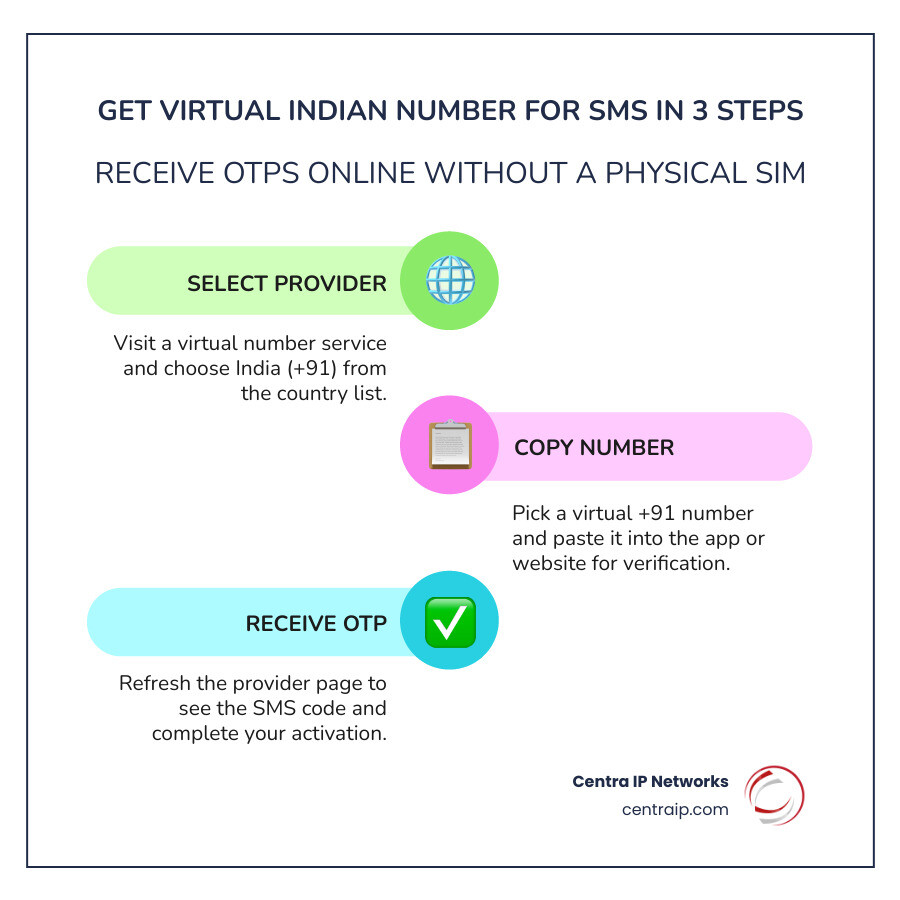
How to get a virtual Indian number for SMS in under 2 minutes:
- Visit a provider like sms24.me, SMSPVA, or a similar service
- Select India (+91) from the country list
- Copy a listed virtual number
- Paste it into the app or website asking for your phone number
- Return to the provider’s page and refresh to see your OTP
Important: Free public numbers are shared with other users. Never use them for banking, passwords, or sensitive accounts.
In India, a mobile number isn’t just for calls. It’s the key to UPI payments, app registrations, and nearly every digital service from Paytm to Instagram. But sharing your real number with every platform you sign up for means spam, privacy risks, and unwanted calls. That’s exactly why demand for virtual +91 numbers has exploded — with services now offering over 500,000 virtual numbers from 180+ countries, including a growing pool of Indian numbers refreshed daily.
I’m Patrick Brangan, and with over 20 years in business technology and unified communications, I’ve helped hundreds of SMBs navigate smarter, cleaner phone and messaging setups — including solutions involving virtual indian mobile number for sms receiving for teams managing remote access and multi-platform verification. In the sections below, I’ll walk you through everything you need to know to get this working reliably.
Why Use a Virtual Indian Mobile Number for SMS Receiving?

In today’s hyper-connected world, your phone number is essentially your digital DNA. In the Indian IT market—one of the fastest-growing in the world—nearly every service requires a +91 number for entry. Whether you’re an NRI (Non-Resident Indian) trying to manage property from Florida, a business traveler in Tampa, or a developer testing an app, having a virtual indian mobile number for sms receiving is a game changer.
One of the primary reasons we see people seeking these numbers is maintaining-privacy-while-using-a-mobile-number. Every time you enter your real digits into a random coupon site or a new social app, you risk your data being sold to telemarketers. By using India Temporary Phone Numbers, you create a “buffer zone” that keeps your personal inbox clean.
Furthermore, India’s digital economy is heavily reliant on the “Aadhaar” ecosystem and UPI payments. For those abroad, getting a physical SIM can be a logistical nightmare involving heavy documentation. Virtual numbers bypass the need for a physical card while still allowing you to receive the critical One-Time Passwords (OTPs) needed for registration.
| Feature | Free Public Inboxes | Private One-Time Use | Monthly Rentals |
|---|---|---|---|
| Cost | $0 (Free) | Low ($0.50 – $2.00) | Monthly Subscription |
| Privacy | Low (Publicly visible) | High (Private to you) | Maximum (Exclusive use) |
| Best For | Low-risk testing | Single app sign-ups | Long-term accounts/2FA |
| Reliability | Hit-or-miss | Very High | Guaranteed |
Step-by-Step: How to Get a +91 Number for OTP
If you’ve ever wondered how-do-i-get-a-virtual-phone-number, the process for an Indian number is surprisingly straightforward. Most people start by looking for a Temp Number India | Receive SMS Online Now.
Here is the professional workflow we recommend:
- Choose Your Provider: Select a reputable service that offers Indian (+91) inventory.
- Format Correctly: When entering the number into your target app, ensure you use the E.164 international format. This means including the +91 prefix without extra zeros.
- Trigger the OTP: Click “Send SMS” on the app (like WhatsApp or Telegram).
- Monitor the Dashboard: Go back to your virtual number provider’s site. Most will have an “Inbox” or “Messages” section that refreshes every 30 to 60 seconds.
Choosing Your Virtual Indian Mobile Number for SMS Receiving Route
Not all virtual numbers are created equal. Depending on your needs, you might choose India Phone Numbers which are free but public. These are great for a quick forum registration where you don’t care if others see the message.
However, if you are setting up a real account, you should look for a Temporary India Virtual Phone Number for OTP & SMS that offers private routes. Private routes ensure that the number hasn’t been “burnt” or blacklisted by major platforms like Google or Facebook. High-quality providers add new numbers daily to mitigate fraud and ensure high delivery rates.
Activating Your Number for WhatsApp, Telegram, and Instagram
Social media platforms are notoriously picky about virtual numbers. Because they want to prevent bot accounts, they often block “VoIP” ranges.
- WhatsApp: According to the WhatsApp FAQ, you must be able to receive an SMS or a phone call to verify. If the SMS doesn’t arrive, many virtual services offer a “Voice Call” fallback where they transcribe the code for you.
- Telegram: As noted in Telegram Support, verification is instant if the number is “fresh.” If you’re using a used number, you might face delays.
- Instagram: Often requires verification when you switch devices or locations. Using a virtual number helps you maintain access without needing your original SIM card present.
For businesses, understanding business-sms-how-it-works-and-use-cases is vital for managing customer engagement across these platforms without tying accounts to an employee’s personal device.
Comparing One-Time Activations vs. Monthly Rentals
When you Rent an Indian Phone Number for SMS Verification, you need to decide how long you need it.
One-Time Activations are “disposable.” You pay a small fee, get the code, and the number is gone. This is perfect for a quick sign-up. However, if that app ever asks for Two-Factor Authentication (2FA) again in the future, you’re locked out because you no longer have access to that number.
Monthly Rentals are a better fit for professionals. If you’re learning how-to-get-business-phone-number for long-term use, a rental gives you exclusive access. Services like Get a Mobile Virtual Number for India | Receive SMS & Calls allow you to keep the number for months. This is essential for 2FA stability and long-term account recovery.
If you are just looking for a quick test, OnlineSim India provides a middle ground with temporary numbers that can be extended if needed.
Troubleshooting: What to Do if Your OTP Doesn’t Arrive
It’s the most frustrating feeling: you’re staring at the screen, and the code just won’t show up. Don’t panic! Here’s the “Patrick’s Pro-Tip” list for troubleshooting:
- The 60-90 Second Rule: SMS delivery can take anywhere from 2 to 180 seconds. Wait at least a full minute and a half before hitting “Resend.”
- Check the Format: Did you include the +91? Some sites like Free India Virtual Mobile Number for SMS Receiving remind users that an incorrect country code is the #1 cause of failure.
- Switch Routes: If a “Public” number isn’t working, it might be because that specific number has reached its limit for that app. Try a different number or upgrade to a private route.
- Network Latency: Sometimes the issue isn’t the number; it’s the app’s server. business-texting-statistics show that during peak hours in India, carrier delays can happen even for virtual systems.
Frequently Asked Questions about Indian Virtual Numbers
Is using a virtual Indian mobile number for SMS receiving legal?
Yes, using a virtual indian mobile number for sms receiving is generally legal for lawful purposes like privacy protection and app testing. However, you must comply with TRAI (Telecom Regulatory Authority of India) regulations. Most reputable providers require some form of “Know Your Customer” (KYC) for long-term rentals to prevent fraud. Always ensure your usage aligns with the platform’s terms of service—don’t use them for spam or illegal activities!
Can I use these numbers for banking and UPI apps like PhonePe?
This is a tricky area. Many Indian fintech apps use “SIM-binding” technology. This means the app checks if the physical SIM card is actually inside the phone. Because virtual numbers don’t have a physical SIM, they often fail the security checks for apps like PhonePe, Google Pay (India), or Paytm. While you might get an OTP to arrive, the app may block the final activation. As we discuss in how to improve-customer-loyalty-with-business-texting, security is paramount in finance, so these apps are intentionally restrictive.
Are there API options for developers to automate SMS receiving?
Absolutely. For developers in Dallas or Orlando looking to automate their testing, many providers offer an SMS API. This allows you to programmatically request a number and “listen” for the incoming OTP via webhooks. This is a staple in 5-industries-that-benefit-from-sms-marketing, as it allows companies to test their own sign-up flows in a sandbox environment before going live.
Conclusion
Navigating Indian virtual numbers doesn’t have to be a headache. Whether you’re protecting your privacy or expanding your business reach into the vibrant Indian market, the right tools make all the difference.
At Centra IP Networks, we specialize in making complex communications simple. While we focus on providing high-end managed IT and cloud communications for businesses in Dallas, Fort Worth, and throughout Florida (from Tampa to Sarasota), we understand that staying connected globally is a top priority for our clients.
If you’re ready to move beyond temporary fixes and want a robust, professional communication strategy for your team, we’re here to help. We offer phone systems, internet connectivity, and cloud solutions all on one platform with a single bill.
Get started with a professional cloud-based phone system today and see how we can streamline your business communications!