Why Choosing the Right CCTV Camera for Office Use Matters in 2026
Finding the best CCTV camera for office use doesn’t have to be complicated — here’s a quick snapshot of the top picks for 2026:
| Camera | Best For | Resolution | Key Feature |
|---|---|---|---|
| ANNKE HZ804 | Multi-channel PoE setups | 4K (8MP) | 4X optical zoom, active deterrence |
| MOBOTIX M ONE | Decentralized AI edge storage | 4K | No NVR needed, NDAA compliant |
| Godrej STI-VFB70IRM-4KSWV | Varifocal bullet coverage | 8MP | 70m IR, 120dB True WDR |
| Brovotech FTC | Analytics and LPR | 8MP/5MP | Face recognition, people counting |
Office security is no longer just about recording footage. It’s about knowing what happened, when, and who was involved — before a small incident becomes a big problem.
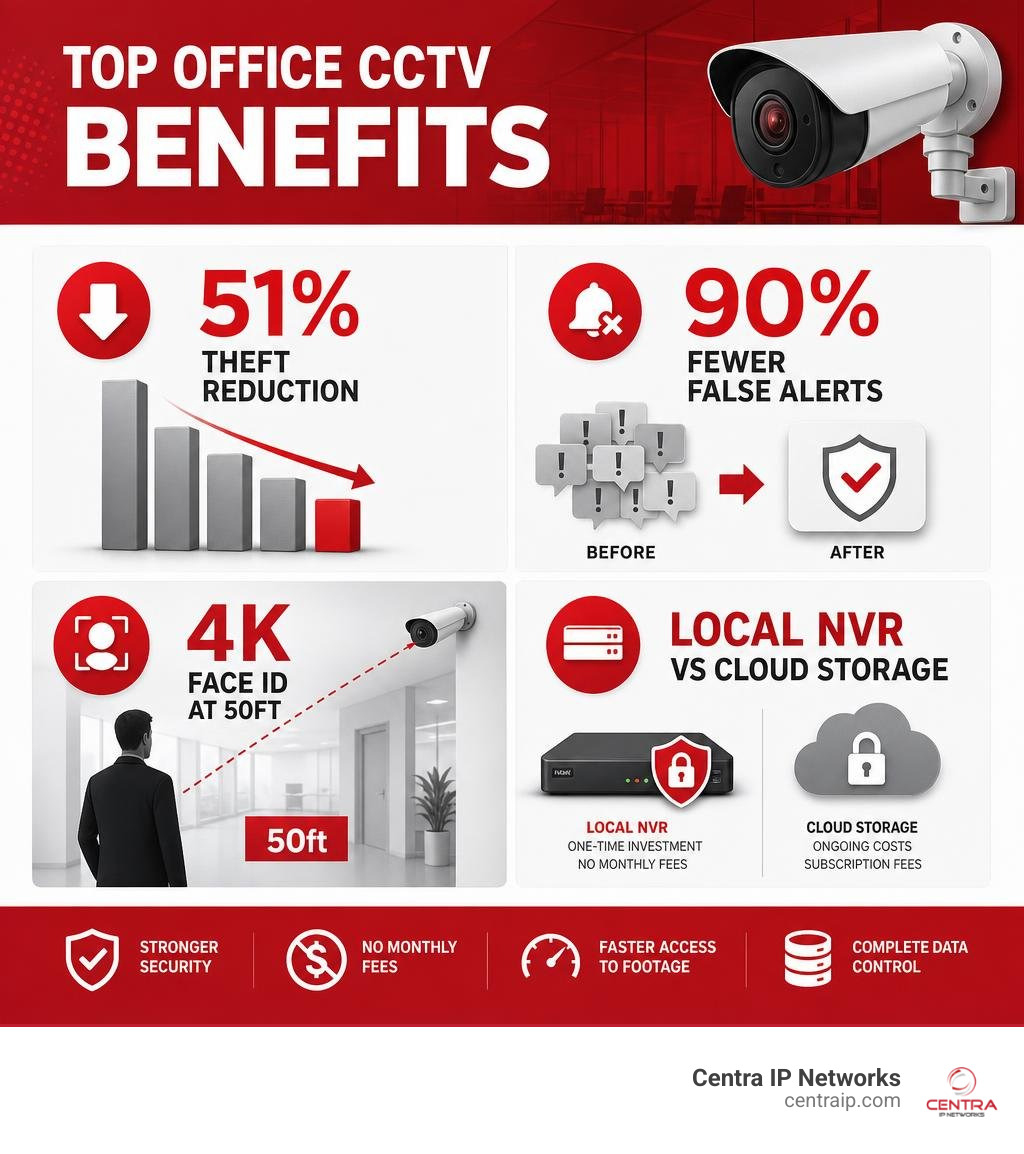
Businesses using commercial-grade CCTV systems report up to a 51% reduction in theft and vandalism. And with AI-powered detection now cutting false alerts by up to 90%, the gap between consumer cameras and true office-grade systems has never been wider.
In 2026, the most forward-thinking offices are moving away from basic Wi-Fi cameras and toward PoE systems with local NVR recording, AI analytics, and scalable multi-channel setups — all managed from a single platform without monthly cloud fees eating into the budget.
Less than 1% of surveillance footage ever gets watched live. That means your system needs to be smart enough to surface the right moments automatically — not just record everything and hope someone reviews it later.
I’m Patrick Brangan, a business technology specialist with over 20 years of experience helping SMBs select and deploy the right security camera solutions — including hands-on installations of multi-camera CCTV systems in offices, learning centers, and commercial facilities. I’ve evaluated what works in real office environments, and this guide reflects that experience to help you find the best CCTV camera for office use without the guesswork.
Glossary for best cctv camera for office use:
Top Rated Office CCTV Systems Reviewed for 2026
When evaluating the market for the best CCTV camera for office use, we looked at options that balance physical durability, high-resolution imaging, and advanced software features. Whether you operate a compact corporate branch in Tampa or a sprawling multi-floor headquarters in Dallas, selecting the right physical hardware is the foundation of your overall security posture.
To help you protect your bottom line, we have reviewed the top-performing commercial-grade cameras for 2026. For a deeper dive into choosing systems that match your specific organizational size, you can read our guide on the Best Small Business CCTV System Options to Protect Your Bottom Line or learn how to navigate the market by reading about Finding the Best Company CCTV Camera Without Losing Your Mind.
ANNKE HZ804: Best CCTV Camera for Office Use with Multi-Channel PoE
For offices requiring comprehensive coverage across multiple rooms, entry points, and hallways, the ANNKE HZ804 system stands out as a powerful, all-in-one solution. This system is sold in highly scalable configurations, making it incredibly easy to customize for your specific building layout.
Depending on the size of your space, you can deploy either the ANNKE HZ804 4K 16 Channel 10 Cameras PoE Security System for larger corporate layouts or the ANNKE HZ804 4K 8 Channel 5 Cameras PoE Security System for mid-sized office environments.
- Resolution and Optics: The HZ804 features true 4K Ultra HD (3840×2160 pixels) resolution. It is equipped with a premium 1/2.4″ image sensor and a 2.8 – 12 mm motorized varifocal lens. This varifocal lens enables a 4X optical zoom, allowing you to adjust the field of view remotely to zoom in on critical details—such as cash desks, server racks, or main entrance doorways—without losing image quality.
- Active Deterrence: To proactively prevent security breaches, these cameras feature built-in strobe lights and siren alarms. When the on-board AI detects an unauthorized human or vehicle in a restricted zone after hours, it can automatically trigger the visual and audible alarms to scare away intruders before they can cause damage.
- Night Vision & Durability: The system uses smart dual-light night vision, which switches from discreet infrared recording to bright color night vision using built-in spotlights when motion is detected. Built with an IP67 weatherproof rating and IK08 vandal-proof housing, these cameras are tough enough to handle both internal hallways and external parking areas.
MOBOTIX M ONE: Best CCTV Camera for Office Use with Decentralized AI
If your business prioritizes data privacy, robust cybersecurity, and advanced edge computing, the German-engineered MOBOTIX M ONE series represents the pinnacle of decentralized video surveillance.
- Decentralized Architecture: Unlike traditional CCTV systems that require a constant connection to a central server or NVR to process video and run analytics, the MOBOTIX M ONE Smart IP Camera & AI Video Surveillance operates on a decentralized model. The camera itself acts as a high-powered computer, processing all video analytics and storing footage directly on its internal storage (it supports up to 1TB internal storage and comes with a 64GB microSD card). This eliminates single points of failure and significantly reduces network bandwidth consumption.
- NDAA Compliance and Security: For government contractors, financial institutions, or security-conscious corporate offices in areas like Fort Worth or Orlando, NDAA (National Defense Authorization Act) compliance is critical. The M ONE is fully NDAA compliant, ensuring it meets strict federal security standards. It also features end-to-end encrypted video transmission and a highly secure boot process.
- Built to Last: MOBOTIX cameras are famous for their longevity, boasting a Mean Time Between Failures (MTBF) of over 10 years. With a 5-year warranty, a salt-water-resistant housing, and an operating temperature range of -40°C to 65°C, this camera is a long-term investment that delivers an incredibly high return on investment (ROI).
Godrej STI-VFB70IRM-4KSWV: Best Varifocal Bullet Camera
For offices that need long-distance monitoring, such as overlooking outdoor parking lots, loading docks, or long corridors, the Godrej STI-VFB70IRM-4KSWV bullet camera is an exceptional choice.
- Extreme Night Vision: This camera is built for long-range surveillance, featuring an incredible infrared (IR) night vision distance of up to 70 meters (approx. 230 feet). This makes it perfect for securing dark perimeters or expansive warehouse spaces attached to your corporate office.
- True WDR (Wide Dynamic Range): Offices often suffer from challenging lighting conditions, such as glass lobbies where bright sunlight streams in, creating harsh shadows. The Godrej camera features 120dB True WDR, which automatically balances the bright and dark areas of an image to ensure faces remain clearly identifiable even when backlit.
- Varifocal Flexibility: To learn more about this model’s technical specifications or to purchase it for your facility, you can view the Buy Godrej STI-VFB70IRM-4KSWV (8MP IP AI True WDR Varifocal Bullet) IP Cameras Online at Best Price page. It offers a motorized varifocal lens with a wide viewing angle range (horizontal: 97° to 32°), giving you total control over your focal points.
Brovotech FTC: Best for Advanced Analytics and LPR
For modern enterprises looking to leverage cutting-edge artificial intelligence to optimize both security and daily business operations, the Brovotech FTC series provides an unmatched suite of analytical tools.
- Comprehensive AI Suite: The Brovotech FTC Camera with Face Recognition does far more than just record video. It features built-in deep learning algorithms capable of face recognition, face detection, vehicle detection, people counting, loitering detection, and even fire/smoke detection.
- License Plate Recognition (LPR/ANPR): If your office has a private parking garage or a gated entrance, the Brovotech FTC can be deployed as a dedicated LPR camera. It automatically reads and logs license plates, allowing you to integrate it with gate control systems to automatically grant access to registered employee vehicles.
- Industry-Leading Contrast Handling: With a massive 140dB WDR capability and Super Starlight low-light technology, this camera can capture full-color images in near-total darkness (down to 0.0001 Lux) without relying on bright, intrusive white LEDs.
Key Features of the Best CCTV Camera for Office Use
Choosing the best CCTV camera for office use requires looking past flashy marketing terms and understanding the core technologies that keep your workplace safe. When we consult with businesses across Florida and Texas, we emphasize that a commercial security system must be reliable, clear, and intelligent.
To understand why upgrading to professional hardware is critical for your liability and asset protection, read about the Benefits of Security Cameras for Businesses.
- Commercial-Grade vs. Consumer Cameras: Many small offices make the mistake of buying consumer-grade smart home cameras (like Ring, Nest, or Arlo). While these are fine for watching a residential front porch, they are poorly suited for office environments. Commercial-grade systems are built with metal, vandal-resistant housings (IK10 rated), support continuous 24/7 recording, and can scale up to hundreds of cameras on a single network. Consumer cameras rely on battery power or weak Wi-Fi signals and often suffer from severe latency and missed events.
- Resolution and Facial Identification: The industry standard has shifted from 1080p (2 Megapixels) to 4K (8 Megapixels). While a 1080p camera is sufficient for general monitoring of a small breakroom, it cannot capture fine details at a distance. A high-quality 4K camera can capture identifiable facial details and license plates up to 50 feet away. If an incident occurs, having 4K footage can mean the difference between providing the police with a blurry silhouette or a crystal-clear face.
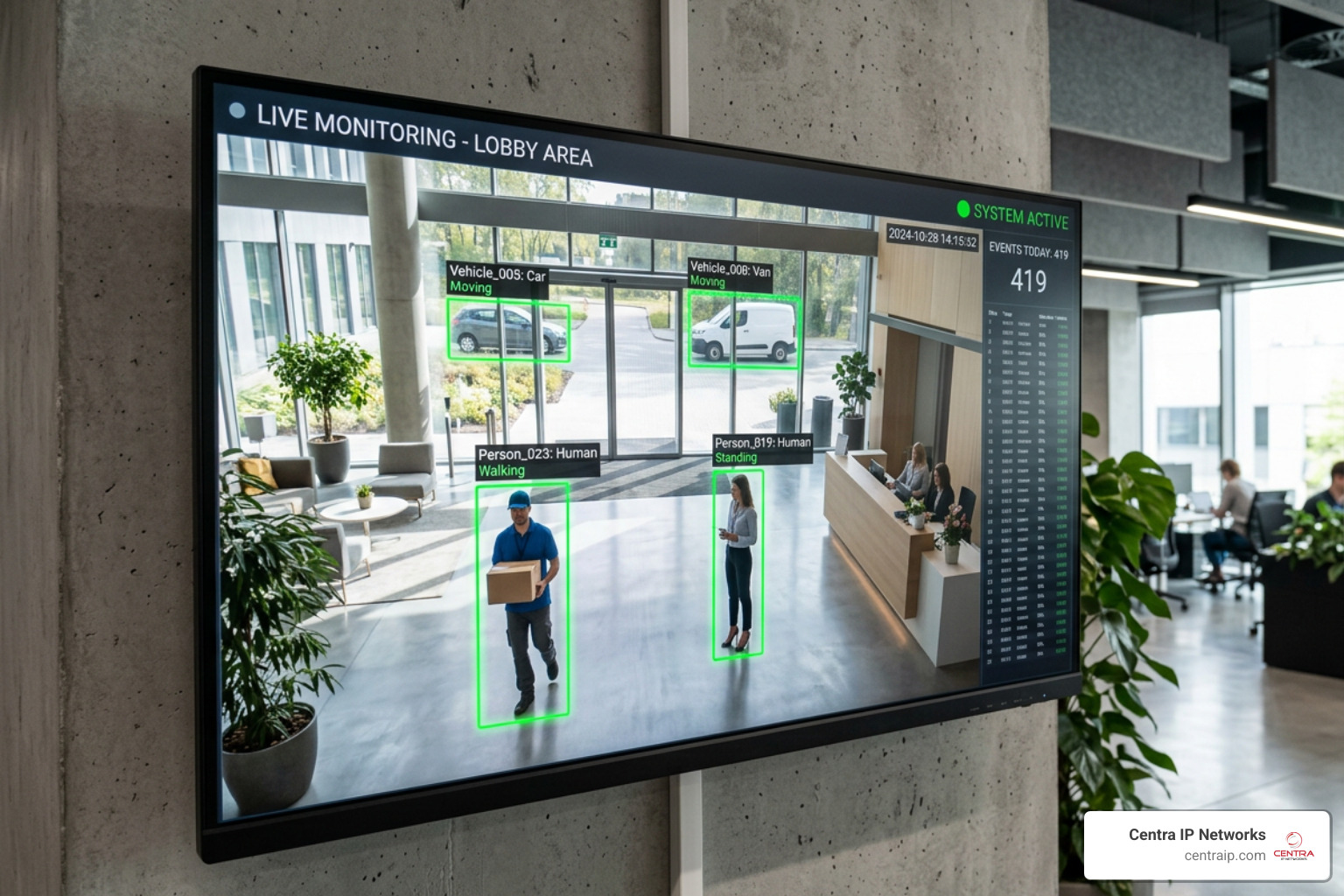
- AI and Smart Detection: Traditional motion detection is notorious for sending false alerts. A passing cloud, a shadow from an office window, or a cleaning crew vacuuming at night can trigger an alarm. Modern AI-powered cameras utilize edge classification to distinguish between humans, vehicles, and irrelevant motion. This reduces false alarms by up to 90%, ensuring that when your security team receives an alert, it represents a real event.
Wired PoE vs. Wireless Wi-Fi Systems
One of the most critical decisions you will make during the planning phase is choosing how your cameras connect to your network and receive power. For a comprehensive breakdown of commercial infrastructure, consult our Commercial Video Surveillance System Guide.
Wired PoE Connection:
[ Camera ] <=== Single Cat5e/Cat6 Cable (Power & Data) ===> [ PoE Switch / NVR ]

Wireless Wi-Fi Connection:
[ Camera ] <--- Wi-Fi Signal (Data Interferences) ---> [ Router ]
[ Camera ] <=== Power Cable (Requires Nearby Outlet) ===> [ Power Outlet ]
- Power over Ethernet (PoE): PoE is the gold standard for commercial installations. It uses a single Cat5e or Cat6 Ethernet cable to transmit both high-definition video data and electrical power to the camera. This eliminates the need to run separate electrical wiring or install cameras near power outlets.
- Network Stability: Wired PoE systems are immune to the wireless interference, signal drops, and bandwidth congestion that plague Wi-Fi networks. In a busy office building with dozens of laptops, smartphones, and wireless printers, relying on Wi-Fi for security cameras is a major vulnerability.
- Wired vs. Wireless Comparison:
- PoE Pros: Unmatched reliability, superior cyber security, supports 24/7 continuous high-bandwidth recording, and allows for centralized backup power (UPS) in the server closet.
- PoE Cons: Requires professional cable routing through ceilings and walls during initial setup.
- Wi-Fi Pros: Easier to install in finished spaces where running cables is physically impossible.
- Wi-Fi Cons: Vulnerable to signal jamming, requires local power outlets for each camera, and can choke your office’s wireless network bandwidth.
Local NVR Storage vs. Cloud Subscriptions
Where and how your security footage is stored has massive implications for your monthly operating costs, data privacy, and compliance. For an in-depth analysis of business data management, read The Ultimate Guide to Business Surveillance Systems.
- Local NVR Storage: A Network Video Recorder (NVR) is a dedicated physical hard drive array located securely inside your office (usually in a locked server room or IT closet). The cameras stream footage directly to the NVR over your local network.
- Benefits: No monthly subscription fees, total ownership of your data, zero internet bandwidth consumption for local recording, and the ability to store months of continuous, uncompressed 4K footage.
- Cloud Storage: Cloud-based systems stream footage over your internet connection to a remote data center.
- Benefits: Easy remote access from anywhere and redundant off-site storage that remains safe even if the physical camera or office is damaged.
- Drawbacks: High monthly subscription fees per camera, massive internet upload bandwidth requirements, and potential security risks if the cloud provider is breached.
- The Hybrid Solution: Most modern office installations utilize a hybrid model. The system records continuously to a local NVR for maximum reliability and zero subscription costs, while critical AI-triggered events (like an after-hours door opening) are backed up to secure cloud storage for remote viewing and redundancy.
Strategic Camera Placement and Scalability Planning
An expensive 4K camera is useless if it is pointed at a blank wall or blinded by a glaring light fixture. Designing a strategic layout is just as important as choosing the physical hardware. When we design systems for offices, we map out coverage zones to eliminate blind spots while respecting employee privacy.
For a detailed look at planning your corporate layout, review our guide on Business Security Video Surveillance and explore how to design Video Surveillance Systems for Business.
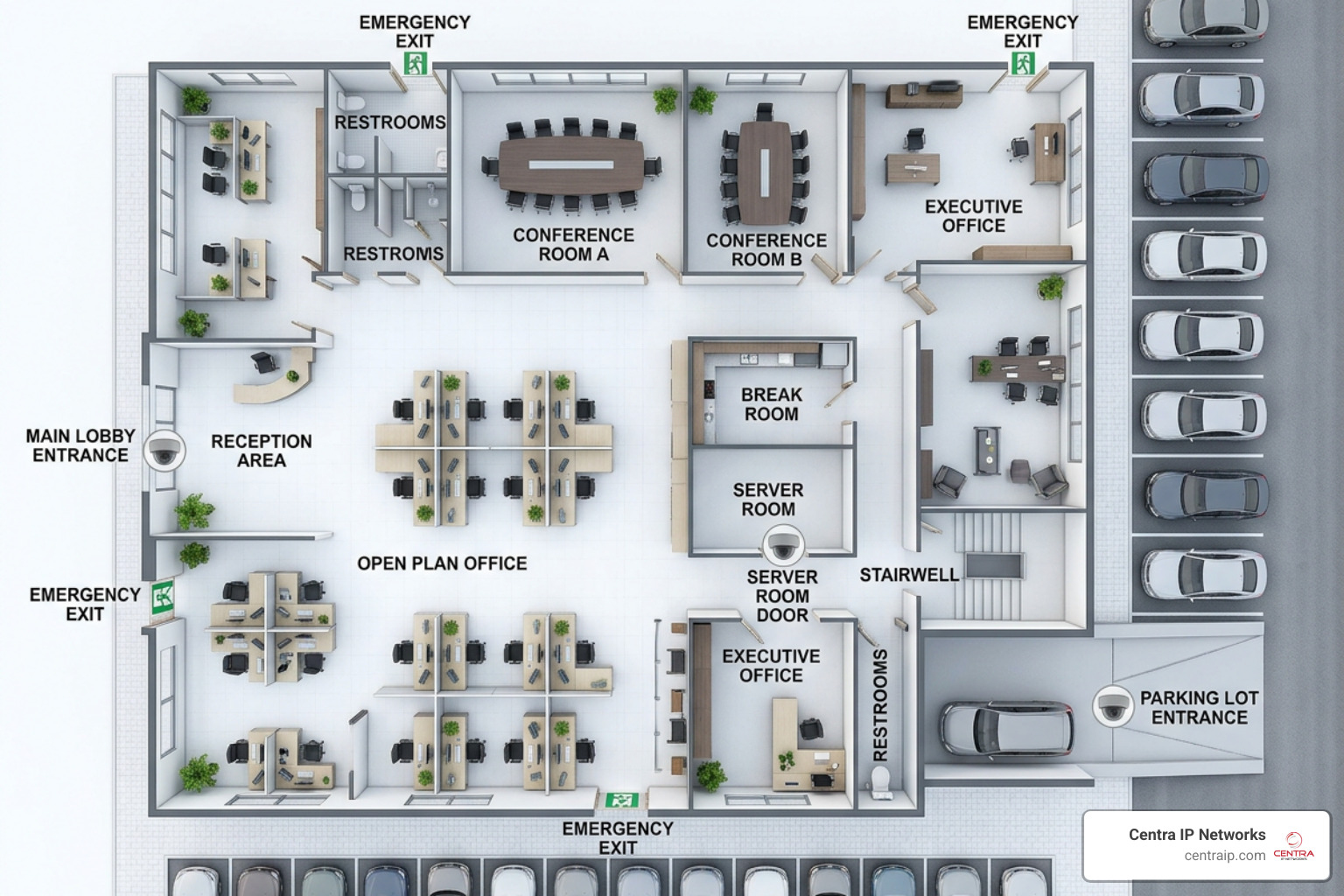
- Primary Entrances and Exits: Place high-resolution, wide-angle cameras directly facing all public and employee entry points. Ensure the camera is mounted at an angle that captures clear facial details of anyone entering the building.
- Common Areas and Hallways: Monitor high-traffic corridors, reception desks, and elevator lobbies. This helps document slips, trips, and falls for worker’s compensation clarity, while keeping track of visitor movements.
- Restricted Zones and High-Value Assets: Server rooms, executive offices, cash-handling areas, and inventory closets should have dedicated, continuous monitoring. Consider integrating these cameras with door access control systems so that every badge-in event is automatically linked to a video clip.
- Outdoor Perimeters and Parking Lots: Secure your exterior with weatherproof bullet or PTZ (Pan-Tilt-Zoom) cameras. Focus on vehicle entry gates, dark walkways, and loading docks to protect employees leaving late and deter vehicle break-ins.
- Scalability for the Future: Your business will grow, and your security system should be able to grow with it. By deploying a PoE network switch architecture, adding a new camera is as simple as plugging another Ethernet cable into the switch. Ensure your initial NVR purchase has spare channels (e.g., buying a 16-channel NVR even if you only plan to deploy 10 cameras initially) so you can scale without replacing your core hardware.
Frequently Asked Questions about Office CCTV Systems
How many cameras do I need for a standard office space?
The number of cameras depends entirely on your office square footage, layout complexity, and security goals. For a standard 2,500-square-foot office with a reception area, a breakroom, a conference room, and two main exits, a 5-to-8 camera system is usually ideal.
To determine the exact density and resolution requirements for your specific building layout, consult a professional installer who can analyze your floor plan using specialized Security Video Surveillance Technology.
What is the benefit of LPR cameras in office parking lots?
License Plate Recognition (LPR) cameras use specialized high-speed shutters and optical character recognition (OCR) software to capture legible license plates on vehicles moving up to 60 MPH, even in pitch-black conditions.
In an office setting, LPR cameras allow you to track every vehicle entering or leaving your property, black-list unauthorized vehicles, and automate gate access for registered employees, significantly enhancing perimeter security.
Are subscription-free business security cameras reliable?
Yes, they are highly reliable. Subscription-free commercial cameras rely on local storage (NVRs or internal high-capacity SD cards) rather than cloud servers. Because they do not depend on an active internet connection to record, they will continue to protect your property and capture footage even if your office internet goes down. Plus, they save your business thousands of dollars in recurring annual fees.
Conclusion
Securing your office space is an investment in your business’s continuity, liability protection, and employee peace of mind. By choosing commercial-grade PoE hardware, leveraging local NVR storage, and utilizing smart AI detection, you can build a robust security shield that operates 24/7 without costly monthly subscription plans.
At Centra IP Networks, we make securing your business simple. We provide comprehensive Managed IT, Cloud Communications, and advanced cloud surveillance solutions all on a single platform. That means you get your internet connectivity, office phone systems, and state-of-the-art security camera management on one single bill from one trusted provider.
Whether you are located in Dallas, Fort Worth, Orlando, Tampa, St Petersburg, Clearwater, or Sarasota, our local expert teams are ready to help you design, install, and support your commercial security infrastructure.
Ready to upgrade your office security without the headache? Secure your office with Centra IP Cloud Surveillance Services today, or contact our team for a free on-site security and network assessment.