Why HIPAA Compliant Cloud Fax Still Matters in 2026
HIPAA compliant cloud fax is a digital faxing service that meets the federal security and privacy standards required when sending or receiving protected health information (PHI). Here is what you need to know at a glance:
| Question | Quick Answer |
|---|---|
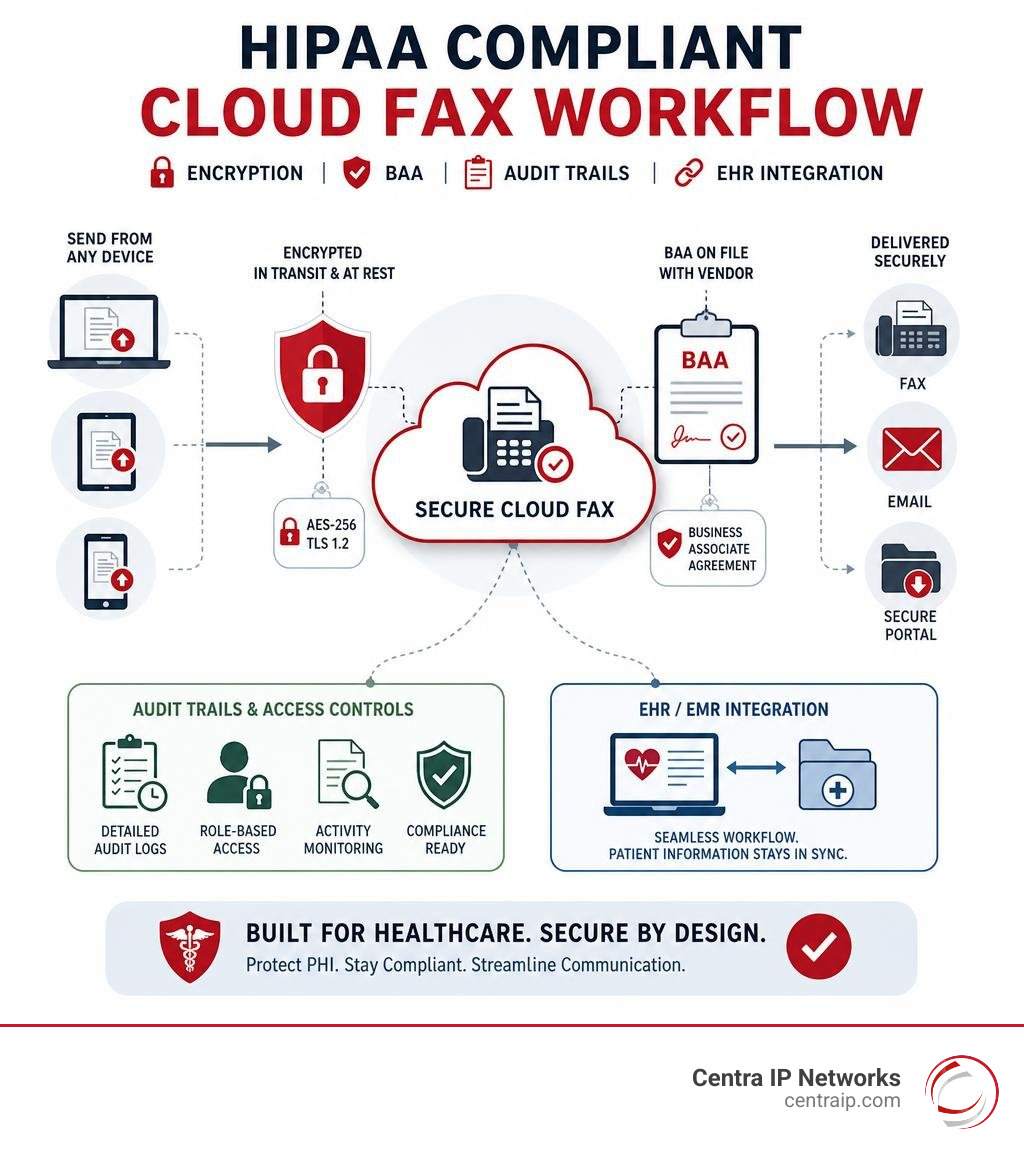
| What makes a cloud fax HIPAA compliant? | Encryption (AES-256/TLS 1.2), signed BAA, access controls, and audit trails |
| Do I still need a fax machine? | No — cloud fax works from any device with an internet connection |
| Is standard email-to-fax HIPAA compliant? | Not by default — only if the service uses encrypted transmission |
| What is a BAA? | A legally required contract with your vendor for handling PHI |
| How much can I save? | The average enterprise saves $150,000 per year switching from physical fax infrastructure |
Fax is not going away in healthcare. It is regulated — and that distinction is important.
Healthcare organizations process billions of fax pages every year. Prescriptions, lab results, referrals, prior authorizations — all of it moves through fax channels because regulators, insurers, and clinical workflows have been built around it for decades. The problem is that most organizations are still running that volume through aging hardware that creates real compliance risks.
Think about what happens when a fax prints to an open tray in a busy clinic. Anyone walking by can see it. That single moment can constitute a HIPAA violation.
Cloud faxing solves that — but only when it is set up correctly. Not every online fax service is truly HIPAA compliant, and the difference between a compliant and non-compliant setup can expose your organization to serious liability.
I’m Patrick Brangan, and over my 20+ years in business technology I’ve helped hundreds of small and mid-sized organizations — including healthcare providers — navigate the move to unified communications platforms, including HIPAA compliant cloud fax solutions that fit cleanly within a single, manageable IT environment. This guide covers everything you need to make a confident decision.
Hipaa compliant cloud fax definitions:
What is a HIPAA Compliant Cloud Fax and Why is it Essential?
At its core, a HIPAA compliant cloud fax service is an internet-based platform that allows healthcare providers to send and receive faxes securely without physical paper or analog phone lines. Unlike consumer-grade online faxing, a compliant cloud fax solution is specifically engineered to meet the administrative, physical, and technical safeguards mandated by the Health Insurance Portability and Accountability Act (HIPAA).
In modern healthcare, patient information moves constantly between primary care providers, specialized facilities, local pharmacies, and insurance billing networks. Every single handoff represents a potential vulnerability where Protected Health Information (PHI) could be exposed. If a document containing medical records or lab results is intercepted, viewed by unauthorized personnel, or lost, your practice faces severe legal and financial penalties.
Using a secure cloud fax solution is essential because it eliminates these vulnerabilities. Instead of sending raw, unencrypted data over public networks or printing physical pages that sit unattended, cloud faxing keeps documents entirely digital and encrypted. This legal requirement is more than just a best practice; it is a fundamental pillar of modern data security compliance.
For healthcare providers operating in bustling medical hubs like Dallas, Fort Worth, Orlando, and Tampa, maintaining patient trust is paramount. Implementing a dedicated HIPAA-compliant cloud fax system ensures that your administrative workflows remain fast, secure, and fully aligned with federal standards.

Traditional Fax vs. Cloud Fax: The Security and Compliance Gap
To understand why healthcare organizations are rapidly abandoning physical fax machines, we have to look closely at the massive security and compliance gap between old and new technologies.
Traditional faxing relies on physical machines connected to analog copper phone lines. While point-to-point analog transmission is historically secure from remote hacking, it is exceptionally vulnerable to local physical security breaches and human error.
For instance, manual dialing is notoriously prone to mistakes. A single mistyped digit can send highly sensitive medical records to a local business or a residential home. Furthermore, physical fax machines print incoming documents directly onto open paper trays. In a busy clinic in Clearwater or Sarasota, those papers might sit unattended for hours, accessible to any patient, visitor, or unauthorized staff member walking past.
Cloud-based faxing, often referred to as what is Fax over IP, completely redesigns this process. Because faxes are routed digitally to secure, password-protected inboxes, only authorized personnel with verified login credentials can view them. There are no physical papers left on trays, no expensive toner cartridges to buy, and no dedicated analog phone lines to maintain.
| Feature / Metric | Traditional Physical Fax | HIPAA Compliant Cloud Fax |
|---|---|---|
| Transmission Medium | Analog Copper Phone Lines | Secure HTTPS / Internet Protocols |
| Physical Security | Highly Vulnerable (Unattended paper trays) | Exceptionally Secure (Digital, password-protected) |
| Risk of Human Error | High (Manual dialing mistakes, lost papers) | Low (Pre-programmed contacts, digital routing) |
| Audit Capabilities | Minimal (Basic paper logs easily lost/altered) | Immutable (Automatic digital logs of every transaction) |
| Average Hardware Cost | $200 to $800 purchase price + maintenance | $0 (Runs on existing computers and mobile devices) |
| Monthly Line Costs | $30 to $75 per month per dedicated line | Included in predictable software subscription |
Key HIPAA Requirements for Secure Digital Faxing
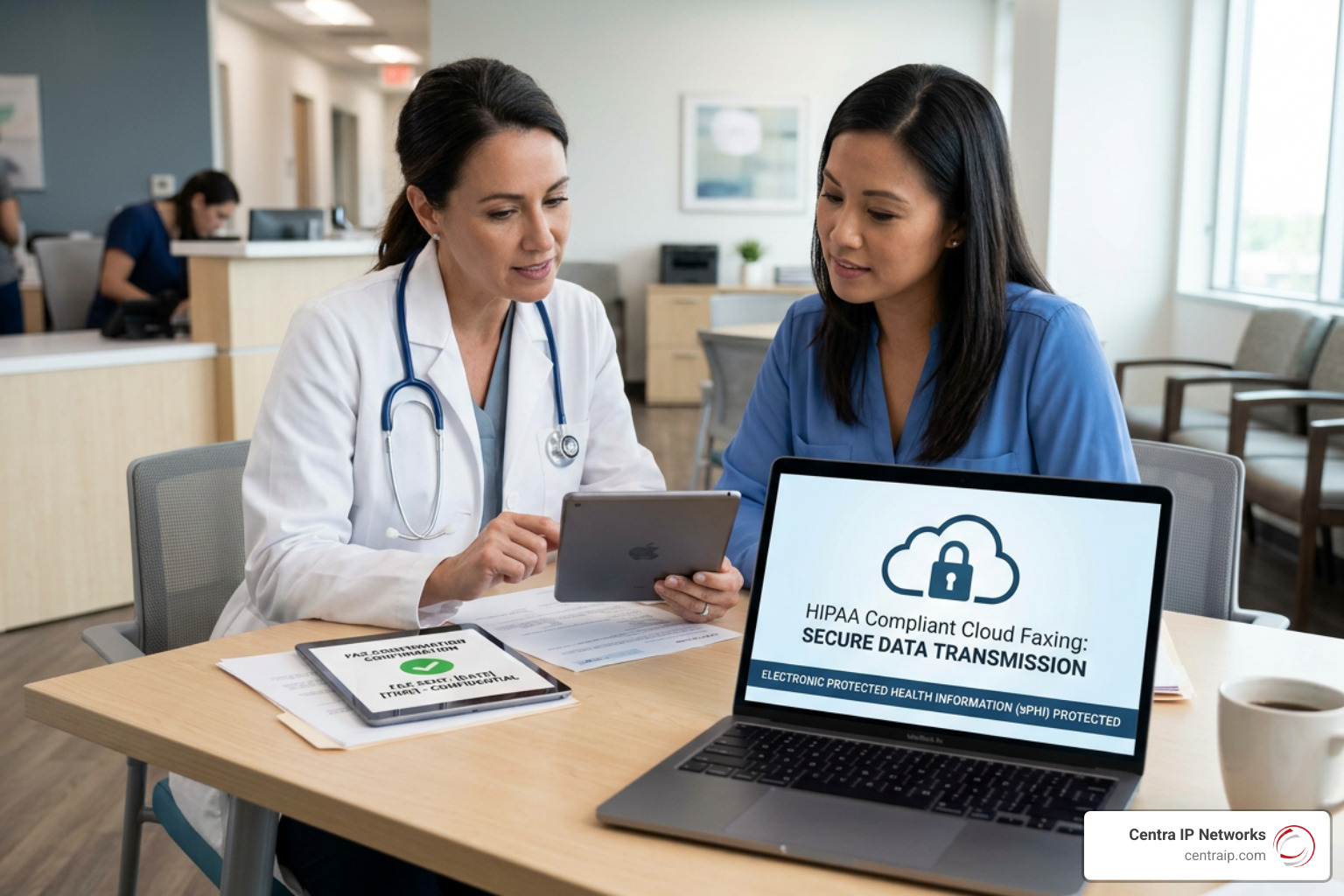
To legally transmit PHI via the cloud, your digital faxing workflows must adhere to the strict guidelines outlined in the HIPAA Security Rule. It is a common misconception that simply using an online service is enough. In reality, a standard internet fax service is not HIPAA compliant out of the box.
To satisfy federal audits, your platform must implement robust administrative, physical, and technical safeguards. This ensures that your patient data is protected at every stage of its lifecycle. Let’s look at how we evaluate how safe is your company’s data when moving to a digital model.
The Crucial Role of the Business Associate Agreement (BAA)
The absolute first step in establishing a HIPAA compliant cloud fax workflow is executing a Business Associate Agreement (BAA). Under HIPAA regulations, any third-party vendor that stores, processes, or transmits PHI on behalf of a covered entity is classified as a “Business Associate.”
A BAA is a legally binding contract that establishes the vendor’s legal liability for safeguarding patient data. It outlines the specific security measures the vendor must maintain and dictates their responsibilities in the event of a data breach.
Many popular, consumer-grade online fax platforms explicitly state in their fine print that they will not sign a BAA. If you use a service to transmit PHI without a signed BAA, your organization is in direct violation of HIPAA, regardless of how strong their encryption protocols are. When choosing a partner, you must ensure they are willing to sign a BAA at your account level, which is a standard practice offered by dedicated enterprise providers.
Technical Safeguards: Encryption and Audit Trails
Beyond the legal paperwork, your cloud fax solution must employ advanced technical safeguards to protect data from interception or unauthorized access. This is broken down into two primary states: data in transit and data at rest.
- Data in Transit: When a fax is sent from your computer to the recipient, it must be encrypted using industry-standard protocols. This typically involves TLS 1.2 or TLS 1.3 (Transport Layer Security) and secure HTTPS connections. This ensures that even if the data packet is intercepted as it travels across the internet, it remains completely unreadable without the corresponding decryption keys.
- Data at Rest: Once the fax is received and stored in your cloud archive, it must remain encrypted. The gold standard for data at rest is AES 256-bit encryption (Advanced Encryption Standard).
- Immutable Audit Trails: HIPAA requires detailed tracking of all activities involving PHI. Your cloud fax platform must automatically generate unalterable logs showing who sent the fax, who received it, when it was accessed, and which user viewed the document. These logs are crucial for compliance officers during routine internal reviews or formal federal audits.
How to Choose a HIPAA Compliant Cloud Fax Provider
Selecting the right cloud fax partner can feel overwhelming given the sheer number of vendors on the market. However, by focusing on a few non-negotiable compliance and operational criteria, you can easily filter out underperforming services.
When conducting your evaluation, it helps to review lists of verified cloud fax providers that actually work to ensure you are only considering enterprise-grade options.
Key Features of a HIPAA Compliant Cloud Fax Provider
A truly compliant cloud fax service should offer a comprehensive set of administrative and user-level features designed to streamline clinical workflows while maintaining airtight security:
- Multi-Factor Authentication (MFA): To prevent unauthorized access to your fax portal, the system must require users to verify their identity through a secondary method (such as an SMS code or authenticator app) in addition to their password.
- Role-Based Access Controls: Administrators must be able to assign specific permissions to different staff members. For example, a front-desk receptionist in a St. Petersburg clinic may need permission to receive and route faxes, while only clinical directors should have permission to permanently delete records.
- Custom Branded Cover Sheets: The platform should allow you to create standardized cover pages that automatically append legally required confidentiality statements, ensuring you never transmit PHI on the cover sheet itself.
- Seamless Number Porting: To maintain business continuity, your provider must allow you to port your existing analog fax numbers to the cloud, as highlighted in guides for the best digital fax services.
Compliance Certifications to Look For
While a vendor’s promise of HIPAA compliance is a start, independent third-party validations provide the ultimate peace of mind. Look for providers that hold recognized security and compliance certifications:
- HITRUST CSF Certification: The Health Information Trust Alliance (HITRUST) Common Security Framework is the gold standard for healthcare data security. It harmonizes multiple compliance standards (including HIPAA, ISO, and NIST) into a single, highly rigorous audit.
- SOC 2 Type II Attestation: A SOC 2 report evaluates an organization’s security, availability, and processing integrity over an extended period, proving that their security controls are consistently active and effective.
- Data Residency Controls: Ensure your provider hosts their servers in highly secure, US-based data centers with 24/7 physical surveillance, biometric access controls, and redundant power supplies to guarantee high uptime, a feature prioritized by clinical platforms.
Common Pitfalls and Hidden Costs
When migrating to the cloud, healthcare administrators must look closely at the pricing models to avoid unexpected expenses.
Many providers advertise incredibly low monthly rates but gate essential features — like the mandatory HIPAA BAA or multi-factor authentication — behind their most expensive “Enterprise” tiers.
Another common pitfall is overage fees. Most plans include a set number of pages per month. If your busy practice in Fort Worth or Orlando exceeds that limit during a peak season, some vendors charge exorbitant per-page overage rates.
To avoid these surprises, it is critical to perform a detailed cost comparison of a digital fax service for business before signing a contract.
Practical Workflows: Sending Faxes, Email-to-Fax, and EHR Integrations
Transitioning to a hipaa compliant cloud fax service does not mean you have to completely retrain your clinical staff. In fact, modern cloud fax workflows are designed to mimic the simplicity of everyday digital tools, significantly reducing the time spent on administrative tasks.
Manual document processing (printing, scanning, manually entering data, and filing) can cost healthcare organizations an estimated $6 to $8 per page. By automating these processes with a secure cloud fax platform, organizations can reduce per-transaction costs by up to 85% and cut handling times by more than half.
How to Send a HIPAA Compliant Cloud Fax
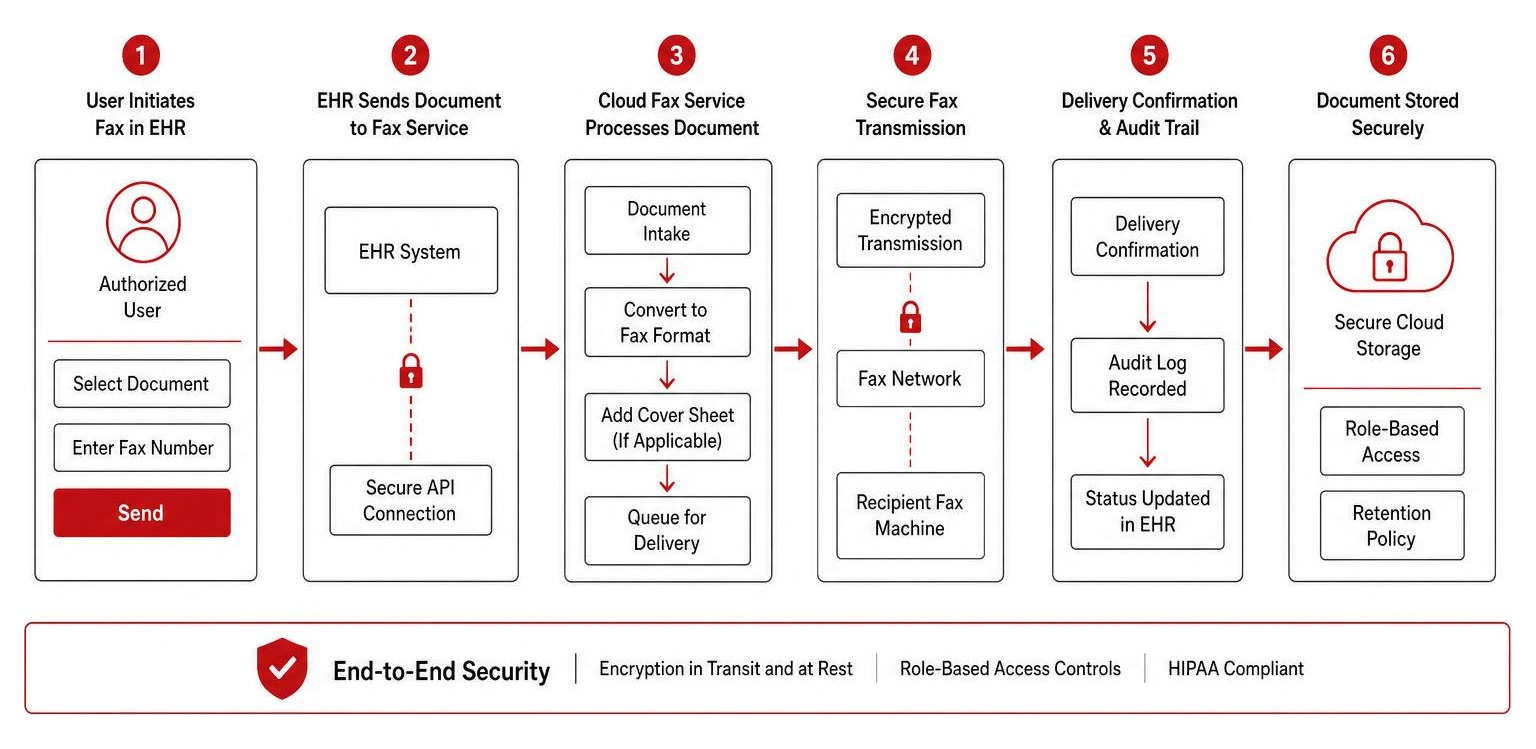
Sending a secure cloud fax is incredibly straightforward and can be completed in just a few steps from any computer, tablet, or mobile device:
- Log In Securely: Access your cloud fax web portal or mobile application using your unique credentials and complete the multi-factor authentication prompt.
- Enter Recipient Details: Type in the recipient’s fax number. Many systems allow you to pre-program frequently used numbers to eliminate manual dialing errors.
- Attach Your Documents: Upload your digital files (such as PDFs, JPEGs, or Word documents). If you have a physical paper document, you can use a built-in mobile document scanner app to capture and optimize the image securely.
- Apply a Cover Sheet: Select a standardized, compliant cover sheet. Ensure it includes a prominent confidentiality notice, the total page count, and sender/recipient contact details, but contains zero sensitive patient health information in the subject or notes fields.
- Transmit and Track: Hit send. The system will encrypt the file and transmit it. You will receive an instant digital delivery confirmation, which is automatically saved to your unalterable audit log for future reference.
Is Fax-to-Email HIPAA Compliant?
A very common question we receive from healthcare administrators is: “Can we just use our existing email to send and receive faxes?”
The short answer is: Standard email-to-fax is not HIPAA compliant.
Standard email travels across the open internet in plain text, making it highly vulnerable to interception. However, fax-to-email can be made HIPAA compliant if you implement specific security measures:
- Use TLS 1.2+ Encryption: Your email server and your cloud fax provider’s server must both support and enforce Transport Layer Security (TLS 1.2 or higher) to encrypt the message during transit.
- Secure Portal Delivery: Instead of attaching the actual medical record directly to an insecure email notification, many compliant providers send a secure email alert containing a link. To view the fax, the recipient must click the link and log into a secure, encrypted web portal.
- Sign a BAA with Your Email Provider: If you are routing faxes through your corporate email (such as Google Workspace or Microsoft 365), you must have a signed BAA with that email provider in addition to your cloud fax provider, a critical step detailed by industry compliance standards.
Integrating Cloud Fax with EHR/EMR Systems
For maximum efficiency, your cloud fax solution should not live in a silo. Modern healthcare organizations integrate their faxing workflows directly with their Electronic Health Record (EHR) or Electronic Medical Record (EMR) systems, such as Epic, Cerner, or athenahealth.
Using programmable APIs (Application Programming Interfaces), inbound faxes can be automatically routed directly into a patient’s digital chart. Advanced platforms even utilize AI-powered Optical Character Recognition (OCR) to automatically scan incoming documents, extract key patient demographics or lab values, and sync them with your database.
This level of interoperability eliminates the need to print, manually enter data, and re-scan files, drastically reducing administrative errors and accelerating patient care transitions.
Transitioning Your Healthcare Practice to Cloud Faxing
If your practice in Dallas, Tampa, or Orlando is ready to make the switch, we recommend following a structured transition plan to ensure zero disruption to your daily operations:
- Audit Your Current Volumes: Determine how many physical fax lines you currently operate and your average monthly page volume. This helps you select the right cloud subscription tier.
- Initiate Number Porting: Submit a request to port your existing fax numbers to your new cloud provider. This process typically takes 2 to 5 business days and incurs zero downtime when managed correctly.
- Configure User Accounts: Set up your administrative portal, assign role-based permissions, and mandate multi-factor authentication for all staff members.
- Install Print-to-Fax Drivers: Set up digital print drivers on your office computers. This allows staff to send a fax directly from any application (like Word or an EHR) simply by selecting “Print to Fax.”
- Decommission Legacy Hardware: Once porting is complete, cancel your expensive analog phone lines and safely recycle your old physical machines. For hybrid environments that absolutely must retain a physical machine, you can use specialized VoIP hardware adapters to bridge the legacy machine to your secure cloud network, as discussed in The Ultimate List of Cloud-Based Fax Solutions.
Frequently Asked Questions about HIPAA Faxing
Navigating healthcare telecom compliance can be complex. Here are clear answers to some of the most common questions we hear from practice managers and IT directors.
Can I port my existing fax number to a cloud fax service?
Yes, absolutely. You can keep your existing fax numbers to maintain business continuity and avoid having to update your business cards, website, directory listings, or patient intake forms. The porting process is highly standardized and usually takes between 2 to 5 business days. During this transition window, your service remains fully active so you never miss an incoming clinical document.
How does cloud fax compare to secure email or Direct messaging?
While secure email and Direct messaging (such as the DirectTrust network) are highly secure and designed specifically for healthcare interoperability, they require both the sender and the receiver to be on compatible, pre-verified networks.
Fax remains the universal “lowest common denominator” in healthcare. Because any clinic, pharmacy, or insurance provider can receive a fax, cloud faxing ensures you can communicate with 100% of your external partners instantly, without worrying about whether they have set up a specific secure email portal.
How do cloud fax services handle high-volume and international faxing?
Enterprise cloud fax platforms are built on highly scalable global networks. They utilize advanced T.38 and G.711 Fax-over-IP protocols to handle thousands of concurrent transmissions without busy signals. Whether you are sending a single referral locally in Sarasota or broadcasting high-volume updates to hundreds of pharmacies across multiple states, the cloud scales dynamically to handle the load in seconds.
Conclusion
Transitioning to a HIPAA compliant cloud fax solution is one of the easiest ways for healthcare organizations to reduce overhead, eliminate security vulnerabilities, and improve daily clinical workflows.
At Centra IP Networks, we understand that managing multiple technology vendors is a headache you don’t need. That is why our unique value proposition is delivering all your essential business communications — including secure cloud faxing, robust business phone systems, and high-speed internet connectivity — on a single, unified platform with a single, clear bill.
By leveraging our extensive network of over 35 industry partnerships, we design tailored, exceptionally cost-effective communication systems for healthcare practices throughout Dallas, Fort Worth, Orlando, Tampa, St. Petersburg, Clearwater, and Sarasota.
Are you ready to modernize your healthcare communications while maintaining strict HIPAA compliance? Explore our custom Centra IP Networks Faxing Solutions today and experience secure, efficient, and hassle-free document transmission.