Why the Best Small Business CCTV System Is a Business Essential
The best small business CCTV system options for 2026 vary by budget and use case, but here are the top picks to know right away:
| System | Best For | Key Strength |
|---|---|---|
| AvaEye PoE (CCTV Camera World) | Commercial-grade coverage | No subscription, AI detection |
| Arlo Pro 4 | Easy wireless setup | 2K HDR, wire-free, smart alerts |
| Lorex 4K PoE | DIY wired installs | Local storage, no monthly fees |
| Ring for Business | Budget-conscious owners | Affordable, versatile, 1080p |
| Night Owl | No-fee local storage | App-based, expandable, NDAA-compliant |
| ZOSI 32-Channel | Multi-location scaling | Up to 16TB HDD, centralized app |
| ADT Commercial | Full-service monitoring | 145 years experience, pro install |
Over 50% of small businesses in the US experienced retail theft in the last year, according to recent data. And theft is just one risk. Slip-and-fall liability claims, employee disputes, and after-hours break-ins can all hit your bottom line hard.
A reliable CCTV system does more than record footage. It deters incidents before they happen, gives you evidence when they do, and even helps you run a tighter operation day-to-day.
The challenge? There are dozens of systems on the market — wired, wireless, cloud-based, local storage, DIY, and professionally installed. Knowing which one actually fits a small business (without overpaying or under-protecting) takes some sorting out.
I’m Patrick Brangan, a business technology specialist with 20+ years of experience helping SMBs find the right security solutions. Finding the best small business CCTV system is something I do regularly for clients across Dallas, Tampa, and Orlando — from small retail shops to multi-site operations. Let’s break down exactly what works.
Key Features of the Best Small Business CCTV System
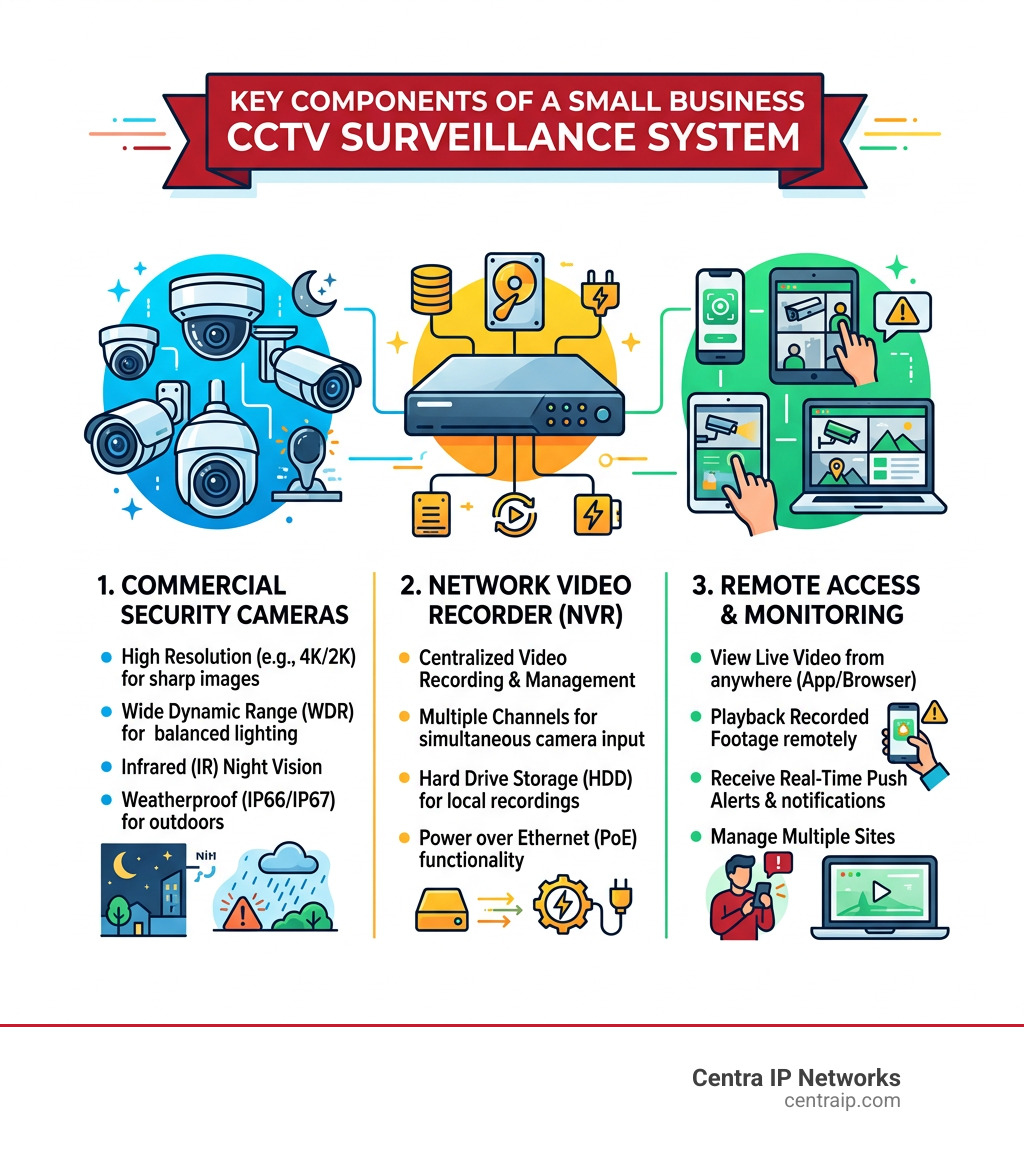
When we evaluate a best small business CCTV system, we aren’t just looking for a “nanny cam.” Commercial environments demand higher durability and smarter features. The benefits of security cameras for businesses extend far beyond catching a shoplifter; they provide a digital paper trail for every interaction on your property.
High Resolution and Clarity
In 2026, 4K resolution is the gold standard. A 4K camera uses 8 million pixels—four times more than standard 1080p. Why does this matter? It’s the difference between seeing a “person in a red hoodie” and being able to read the license plate on their getaway car or identifying facial features from 50 feet away. For instance, an AvaEye 4K camera can capture clear facial details up to 50 feet, while their specialized License Plate Capture cameras can grab tags up to 140 feet away at speeds of 35mph.
AI Detection and Active Deterrence
Modern systems use Artificial Intelligence to filter out the noise. Instead of getting an alert every time a stray cat walks by your Dallas storefront, AI detection focuses on person recognition and vehicle identification. Some systems even feature “active deterrence,” which uses built-in strobe lights and sirens to warn trespassers they are being recorded before they even touch a door handle.
Camera Shapes and Specialized Tech
The “best” camera depends on where you put it:
- Dome Cameras: Discreet and vandal-resistant (IK10 rating), making them perfect for low ceilings in offices.
- Bullet Cameras: Highly visible, acting as a visual deterrent for parking lots and alleyways.
- PTZ (Pan-Tilt-Zoom): These can spin 360 degrees and zoom in on targets. High-end PTZ models can track a person’s face from up to 800 feet away during the day.
- Panoramic Views: A single 180-degree camera can often replace two standard cameras, saving you money on cabling and licensing.
Best Small Business CCTV System for Retail and Restaurants
In the world of Florida’s hospitality scene, from St. Petersburg cafes to Orlando boutiques, the commercial video surveillance system guide highlights the importance of POS (Point of Sale) monitoring. You need to see exactly what is happening at the register.
Turret cameras or discreet domes like the AvaEye IP2KDE are favorites here. They offer wide angles to monitor customer flow and employee productivity without making guests feel like they’re in a high-security prison. Two-way audio is another massive plus, allowing managers to communicate with the floor or listen in on transactions to resolve disputes.
Best Small Business CCTV System for Warehouses and Offices
Warehouses in the Dallas-Fort Worth area have different needs: high ceilings and vast floor plans. Motorized zoom lenses allow you to adjust the focus remotely, while thermal technology can detect intruders in total darkness or through smoke and fog.
For these larger layouts, a 32-channel system from a brand like ZOSI or Night Owl ensures every loading dock and side entrance is covered. Many of these systems are also NDAA-compliant, which is a requirement for certain regulated industries like cannabis or government contracting.
Top Recommended CCTV Systems for Small Businesses in 2026
Choosing the best small business CCTV system often comes down to how much “DIY” you want to do versus how much “peace of mind” you want to buy.
1. Arlo Pro 4: The King of Wire-Free
If you rent your office space and can’t drill holes for wires, Arlo Pro 4 is a top contender. It connects directly to Wi-Fi, offers 2K HDR video, and features a built-in spotlight. The downside? You’ll need to charge batteries and likely pay for a subscription for long-term cloud storage.
2. Lorex & Night Owl: The “No Monthly Fee” Champions
Both Lorex and Night Owl cater to the business owner who wants to own their data. These systems typically use local NVR storage, meaning your video stays on a hard drive in your office. Night Owl systems are particularly popular because they are easy to set up via an app and require zero IT expertise.
3. ADT Commercial: The Professional Powerhouse
With 145 years in the industry, ADT is the go-to for businesses that want professional installation and 24/7 monitoring. While it’s often the most expensive option, the integration with alarms and fire safety makes it a complete “set it and forget it” solution.
4. AvaEye and ZOSI: Scalable Commercial Grade
For those who need 16 to 32 cameras, brands like ZOSI and AvaEye offer high-channel NVRs that can support up to 16TB of storage. These are PoE (Power over Ethernet) systems, which we highly recommend for any permanent business location.
Wired vs. Wireless: Choosing the Right Infrastructure
This is the most common question we hear in Tampa and Sarasota: “Do I really need to run wires?”
The Case for PoE (Wired)
Power over Ethernet (PoE) is the gold standard for commercial use. It uses a single cable to provide both power and data to the camera.
- Pros: Extremely reliable, no Wi-Fi interference, and supports higher resolutions (4K and up).
- Cons: Requires professional or semi-professional installation to run cables through walls or ceilings.
The Case for Wireless (Wi-Fi)
A wireless video surveillance system is great for small offices or temporary locations.
- Pros: Fast setup and lower upfront labor costs.
- Cons: Can be flaky if your Wi-Fi signal is weak. High-resolution video can also eat up your network bandwidth, slowing down your office internet.
| Feature | Wired (PoE) | Wireless (Wi-Fi) | Hybrid |
|---|---|---|---|
| Reliability | Excellent | Moderate | Good |
| Installation Cost | Higher | Lower | Moderate |
| Video Quality | Up to 4K/12MP | Usually 1080p-2K | Varies |
| Maintenance | Low | Battery/Signal checks | Moderate |
Storage, Costs, and Legal Compliance
A common mistake is buying the best small business CCTV system but forgetting about the “tail.” That includes storage costs and legal requirements.
Local vs. Cloud Storage
Local NVR storage is generally superior for businesses. It’s a one-time cost, it works if the internet goes out, and there are no monthly fees. However, cloud video surveillance tips to implement it suggest that cloud is excellent for off-site backups—if your NVR is stolen during a break-in, your cloud footage is still safe.
Use a video surveillance pricing calculator to estimate your needs. For a 4-camera system recording 24/7 in 4K, you’ll likely need at least a 2TB hard drive to keep two weeks of footage.
Costs and Expenses
- Budget Pick: $300–$600 (4 cameras, DIY wireless).
- Mid-Range: $900–$2,500 (8 cameras, PoE, local NVR).
- Premium: $5,000+ (16+ cameras, professional install, AI analytics).
Legal Compliance
In Florida and Texas, you must be careful about privacy laws. Never place cameras in restrooms or break rooms where employees have a “reasonable expectation of privacy.” Always provide employee notification—a simple sign at the entrance stating “Surveillance in Progress” usually suffices.
Installation and Maintenance Tips for Optimal Coverage
Where you put the camera is just as important as the camera itself. A surveillance cameras for business strategy should focus on high-risk zones.
- Entrances and Exits: Mount cameras at eye level if possible to catch clear facial details.
- Point of Sale: Ensure the camera can see both the cash drawer and the customer’s face.
- Parking Lots: Use bullet cameras with long-range night vision to monitor vehicles.
- Blind Spots: Use a site assessment to find irregular walls or shelving that might hide activity.
Maintenance Matters
Don’t just install it and forget it. Check your system monthly to ensure:
- Lenses are clean (spiders love to build webs over IR lights).
- Firmware is updated to protect against cybersecurity threats.
- The hard drive is still recording correctly.
Frequently Asked Questions about Small Business CCTV
Do I need a subscription for my business security cameras?
Not necessarily. Systems like Lorex, Night Owl, and AvaEye offer local storage with no monthly fees. However, if you want advanced AI features or off-site cloud backup, a subscription (like Arlo Secure or Ring Protect) is usually required.
How many cameras do I need for a 2,000 square foot office?
Generally, 4 to 6 cameras provide solid coverage for a standard 2,000 sq. ft. layout: one for the entrance, one for the back exit, and 2-4 to cover the main workspace and storage areas.
Can I monitor my business cameras from my phone?
Yes! Almost every best small business CCTV system in 2026 comes with a free mobile app for remote viewing. This allows you to check on your shop in Dallas while you’re on vacation in Orlando.
Conclusion: Protecting Your Bottom Line with Centra IP Networks
At Centra IP Networks, we know that a security system is only one part of your business infrastructure. Our mission is to simplify your technology by offering Managed IT, Cloud Communications, and security solutions all on one platform.
Whether you are looking for cloud surveillance services that integrate with your existing office network or a brand-new PoE setup for your Fort Worth warehouse, we leverage our 35+ technology partnerships to find the most cost-effective solution for you.
Don’t leave your business to chance. With a single bill and a single point of contact, we make it easy to protect what you’ve built across Dallas, Tampa, and beyond.