
Why Choosing a Managed Network in Fort Worth Is One of the Most Important IT Decisions You’ll Make
Quick Answer: What to Look for in a Managed Network Fort Worth Provider
| Factor | What to Look For |
|---|---|
| Monitoring | 24/7 proactive network monitoring and alerts |
| Support | Flat-fee, predictable pricing with local helpdesk |
| Security | Firewall management, threat detection, compliance support |
| Experience | Relevant certifications and verifiable local track record |
| Scalability | Cloud-managed infrastructure that grows with your business |
| Hybrid Work | VPN, remote access, and cloud connectivity support |
Finding a reliable managed network in Fort Worth is harder than it sounds — especially when every provider promises the same thing: “always-on,” “secure,” and “worry-free.”
But the reality for most Fort Worth businesses looks very different. Networks go down. Vendors point fingers at each other. And your team loses hours — sometimes an entire day — waiting for someone to fix a problem that could have been caught before it started.
Here’s a number that puts it in perspective: a small or mid-sized business can lose thousands of dollars in a single hour of network downtime. That loss grows even larger when the outage hits after business hours — exactly when no one is watching.
Meanwhile, research from Gartner found that roughly 70% of IT investment typically goes toward just “keeping the lights on” — maintaining basic infrastructure instead of actually moving the business forward. That’s a lot of money spent treading water.
This guide cuts through the noise. It explains what managed network services actually are, what separates a great Fort Worth provider from an average one, and how to make a smart decision without getting tangled in vendor promises.
I’m Patrick Brangan, a business technology specialist with over 20 years of experience helping SMBs across Dallas–Fort Worth consolidate their IT and communications under one reliable solution — including managed network fort worth deployments for companies with up to 200 users. At Centra IP Networks, we’ve seen what separates a network that holds a business back from one that helps it grow.
What is Managed Network Infrastructure vs. In-House IT?

To understand why so many North Texas businesses are shifting their technology strategy, we first have to look at what a network actually does.
A company’s IT network connects all devices, data, and applications to make them accessible, shareable, and compatible. It is the digital nervous system of your business. When you send an email, access a file in the cloud, or make a VoIP call, your network routing determines how fast and secure that action is.
When choosing how to manage this critical system, business owners typically face a crossroads: do you build and maintain an internal IT team, or do you partner with a managed service provider (MSP)? We have written extensively about this decision in our guide on Managed IT vs. In-House IT: Which Is Best For Your Business, but let’s break down how this dynamic specifically impacts your network performance.
Traditional In-House IT Limitations
For years, the standard approach was to hire a dedicated IT person or a small internal team. While having someone down the hall sounds convenient, it comes with significant operational hurdles:
- The “Keeping the Lights On” Trap: As mentioned earlier, approximately 70% of IT investment is typically dedicated to basic infrastructure connectivity and security. Instead of working on strategic projects that drive growth, your internal team spends their days resetting passwords, patching servers, and troubleshooting Wi-Fi dead zones.
- Resource Constraints: A small in-house team simply cannot possess deep expertise in every IT discipline. The person who is great at configuring your routers might struggle with advanced cybersecurity compliance or cloud virtualization.
- Staff Turnover: If your sole IT manager decides to leave for a job in the Dallas tech corridor, they take all the network passwords, documentation, and historical knowledge with them.
- Burnout: Expecting a small team to provide 24/7/365 coverage is a recipe for exhaustion. When a critical switch fails at 2:00 AM on a Sunday, who answers the call?
When internal resources are stretched thin, connectivity suffers. And as we discuss in our article on How Reliable Connectivity Can Boost Team Productivity, network lag and dropped connections directly drain employee morale and operational efficiency.
The Rise of Cloud-Managed Network Infrastructure
Managed network services represent a fundamental shift from the old “break-fix” model. Instead of buying expensive hardware upfront and waiting for it to break, businesses utilize cloud-managed network infrastructure.
In this modern framework, your network is managed remotely by a team of specialists using centralized software. This includes:
- Cloud-Managed Routers: These devices allow technicians to perform nearly instant security and routing updates remotely. If a routing rule needs to change, it is deployed in seconds across all your office locations.
- Automated Firmware Updates: Keeping network hardware under warranty and updated with firmware is essential to maintain security and performance. MSPs handle this automatically during low-traffic maintenance windows.
- Active Router Monitoring: Software continuously tracks device health, bandwidth utilization, and latency, catching anomalies before they cause an outage.
- Hardware Replacement Warranties: Many modern providers bundle the hardware into the service. If a switch or router fails, it is replaced under warranty at no additional cost to you, saving you thousands of dollars in emergency equipment purchases.
A strong cloud-managed network strategy gives Fort Worth businesses centralized visibility, faster updates, and more predictable support without relying on a single internal employee to manage every device manually.
Key Benefits of a Managed Network in Fort Worth

Whether your business is located in the heart of the Fort Worth Stockyards, downtown near Sundance Square, or operating out of a suburban office in Keller, local market dynamics demand maximum uptime. Partnering with a specialist for your managed network in Fort Worth delivers several distinct advantages.
Proactive 24/7 Monitoring and Downtime Prevention
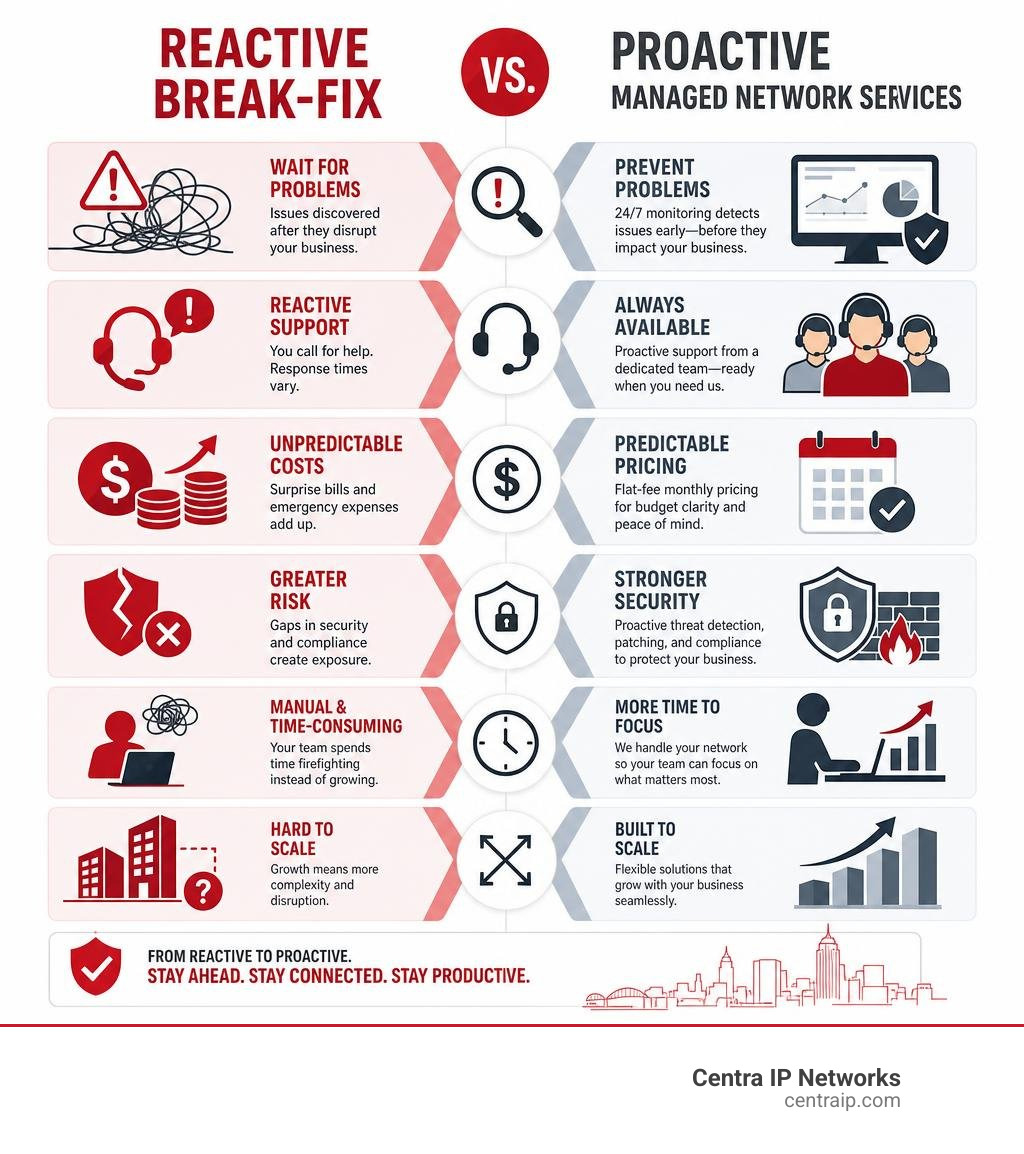
The old way of handling IT was entirely reactive: something broke, you called a technician, they drove out to your office, and you paid them by the hour to fix it. Meanwhile, your employees sat idle, and your customers grew frustrated.
With a managed network, we use advanced Remote Monitoring and Management (RMM) tools to keep eyes on your infrastructure 24/7/365.
- Immediate Alerting: If a core switch goes offline at midnight, our system alerts an on-duty engineer immediately. In many cases, we can reboot the device or route traffic to a backup connection before your employees even arrive at the office the next morning.
- Historical Trends: The shift toward managed services is not new. In fact, industry data shows that the number of Managed Service Providers grew by roughly 23% from 2011 to 2012, and Gartner historically projected that by 2016, 60% of SMBs would use managed network services for some aspect of their IT. This long-term growth reflects a simple reality: proactive management works.
- Uptime Support: For businesses with multiple locations in North Texas, we design and manage secure Wide Area Networks (WANs) and site-to-site VPNs to keep your branches connected.
If you want to explore the technical architecture behind these setups, check out our localized insights on Data Networking Dallas. For general benefits, read our guide on the Benefits of Managed IT Services.
Robust Cybersecurity and Regulatory Compliance
A company’s network is the primary target for cybercriminals. If an intruder gains access to your local network, they can deploy ransomware, steal sensitive customer data, and disrupt your entire operation.
A professional managed network provider secures your environment at every layer:
- Enterprise Firewall Management: We configure, patch, and monitor your firewalls to block unauthorized external traffic.
- Network Segmentation: We separate your staff, guest, and Internet of Things (IoT) devices into distinct virtual networks (VLANs). This ensures that if a guest connects a compromised laptop to your guest Wi-Fi, they cannot access your internal financial database.
- Texas Safe Harbor Law Compliance: Texas is one of a growing number of states to adopt cybersecurity Safe Harbor laws. Under these regulations, businesses that implement recognized cybersecurity frameworks (such as the CIS Controls) receive legal protections and are shielded from punitive damages in the event of a data breach. A qualified local partner will help you align your network security with these frameworks. You can review the underlying requirements in Texas Business and Commerce Code Chapter 521.
- Industry Standards: Whether you must comply with HIPAA for healthcare data or PCI-DSS for credit card processing, a managed network ensures that your data flows securely.
We cover these protective strategies in detail in The Managed Network Security Playbook: Services, Solutions, and Why You Need Them and our overview of Data Security Compliance.
Supporting Hybrid Work and Cloud Migration
The modern Fort Worth workforce is no longer confined to a single office building. Your employees likely work from home some days, access files on their phones from coffee shops, and collaborate using cloud platforms like Microsoft 365 or AWS.
This hybrid model introduces significant security and performance challenges. A managed network solves this by implementing:
- Secure Remote Access: Setting up encrypted Virtual Private Networks (VPNs) so remote employees can safely access local files.
- SD-WAN (Software-Defined Wide Area Network): Prioritizing critical business traffic (like VoIP calls and video conferences) over less important web browsing, preventing choppy audio and dropped video calls.
- Cloud Connectivity: Optimizing your network design to ensure fast, low-latency paths to your cloud-hosted applications.
To understand how these remote access systems impact your day-to-day operations, read our guide on Understanding VPNs and How They Impact Your Business. You can also learn more about building tailor-made environments in our article on Providing Customized Data Networking Solutions for Business.
How to Evaluate and Choose the Right Managed Network Fort Worth Provider
With hundreds of IT firms operating in the Dallas–Fort Worth metroplex, choosing the right partner can feel overwhelming. To make an informed decision, you need to look past basic marketing claims and evaluate providers on concrete operational criteria.
Key Criteria for Selecting a Managed Network Fort Worth Partner
When interviewing potential providers, we recommend focusing on four main pillars:
- Relevant Certifications: Does the provider hold active certifications with leading networking and security brands (such as Cisco, Meraki, Fortinet, or HPE Aruba)?
- Industry Experience: Have they designed and managed networks for businesses similar in size and industry to yours? A medical clinic has very different security and network needs than a manufacturing warehouse.
- Communication Capabilities: How does the provider communicate during an emergency? Do they offer a dedicated account manager and a clear escalation path, or will you be stuck waiting in a generic ticketing queue?
- Local Presence: While remote monitoring is highly effective, physical proximity still matters. If a lightning storm damages your physical switches, you want a provider who can quickly dispatch a local technician to your Fort Worth office.
For a deeper dive into evaluating technology partners, refer to our guide on How to Determine the Best Network Solutions for IT Services. You should also ask each provider for specific service level agreement details, escalation procedures, and examples of how they support businesses in the Fort Worth area.
Below is a comparison table outlining the key differences between various types of network management providers:
| Provider Type | Best For | Typical Strengths | Potential Drawbacks |
|---|---|---|---|
| National “Big Box” MSPs | Large enterprises with offices nationwide | Broad resource pool, standardized processes | Less personalized service, higher overhead, slower local onsite dispatch |
| Local Break-Fix Technicians | Very small businesses with minimal IT needs | Low upfront cost, local face-to-face contact | Reactive support, no 24/7 monitoring, unpredictable billing |
| Boutique Local MSPs (Centra IP) | Growing SMBs (10–200 users) | Personal relationships, rapid local dispatch, customized solutions, predictable pricing | Limited fit for massive multinational corporations |
Understanding Pricing Models for a Managed Network Fort Worth
Managed network services generally move your IT spend from a capital expense (CapEx) to an operating expense (OpEx). Instead of a massive upfront bill for hardware and installation, you pay a predictable monthly fee.
The most common pricing structures include:
- Per-Device Pricing: You pay a flat monthly fee for every router, switch, firewall, and wireless access point managed by the provider.
- Per-User Pricing: A flat fee per employee, which typically covers all of their associated devices (laptop, phone, tablet) and network access.
- Tiered Service Packages: Standardized packages ranging from basic monitoring and patching to fully co-managed or fully outsourced IT support.
The primary value of these models is predictable billing. You can accurately budget your technology costs for the entire year, with no surprise charges when a piece of hardware needs to be updated or replaced.
Frequently Asked Questions About Managed Network Services
What is the difference between managed network services and traditional break-fix support?
Traditional break-fix support is entirely reactive. Under this model, you only interact with your IT support when something stops working. You pay an hourly rate for repairs, which incentivizes the technician to spend more time fixing the problem.
Managed network services are proactive. You pay a flat monthly fee to keep your network running smoothly. Because our financial interests are aligned with yours — we both want your network to stay online and secure — we focus heavily on preventative maintenance, automated patching, and continuous performance optimization.
How long does it take to implement a managed network for a Fort Worth business?
For most small to mid-sized businesses, a standard network installation and onboarding process takes 1 to 2 weeks. For larger organizations, multi-site deployments, or environments requiring extensive structured cabling, the project timeline typically ranges from 4 to 8 weeks.
A professional onboarding process involves a thorough technology assessment, documenting all existing network assets, configuring new security policies, and scheduling the final cutover during off-hours to minimize any disruption to your business operations.
How do managed network services help with industry-specific compliance like HIPAA or PCI?
Compliance standards require strict control over how data is accessed, transmitted, and stored. We help you meet these requirements by implementing:
- Least-Privilege Access Controls: Ensuring employees only have access to the specific data needed to perform their jobs.
- Detailed Audit Trails: Maintaining logs of all network access and configuration changes to prove compliance during audits.
- Network Segmentation: Keeping sensitive data environments (like payment terminals or electronic health records) completely isolated from general office traffic.
For more information on how we support medical offices, clinics, and healthcare providers, read our specialized guide on Managed IT Services for Healthcare.
Conclusion
Your network shouldn’t be something you constantly worry about — it should be a quiet, reliable asset that supports your team and fuels your business growth.
At Centra IP Networks, we believe in making business technology simple. By consolidating your managed network, IT services, and cloud communications onto a single platform, we eliminate vendor finger-pointing and deliver a streamlined, cost-effective solution with one clear monthly bill.
If you are ready to stop fighting with tangled cables, slow Wi-Fi, and unpredictable IT bills, let’s talk about building a secure, high-performance network for your business.
Get started with reliable internet and managed network services today.