
Why Enterprise Cloud Backup Services Are Critical for Business Continuity
Enterprise cloud backup services are solutions that automatically copy and store your business data — including servers, virtual machines, and applications — to secure, off-site cloud infrastructure, so you can recover quickly from any disaster.
Top enterprise cloud backup services at a glance:
| Provider | Best For | Key Strength |
|---|---|---|
| Acronis Cyber Protect | All-around protection | Malware protection + VM backup |
| Veeam Data Cloud | Microsoft 365 & SaaS | Unified SaaS resilience platform |
| HYCU | Agentless cloud backup | Multi-cloud, zero-learning curve |
| AWS Backup | AWS-native environments | Centralized policy-based automation |
| Unitrends | Cost-conscious enterprises | 33%+ savings vs. native tools |
Your data in the cloud is not as safe as you think. Cloud providers keep their infrastructure running — but they won’t protect you from human error, ransomware, or accidental deletion. That’s your responsibility.
The numbers make this clear:
- 86% of cloud-hosted data was affected in organizations’ most recent ransomware attack
- 80% of discovered vulnerabilities involve Microsoft 365 data
And yet many businesses still rely on native cloud tools or — worse — no backup at all.
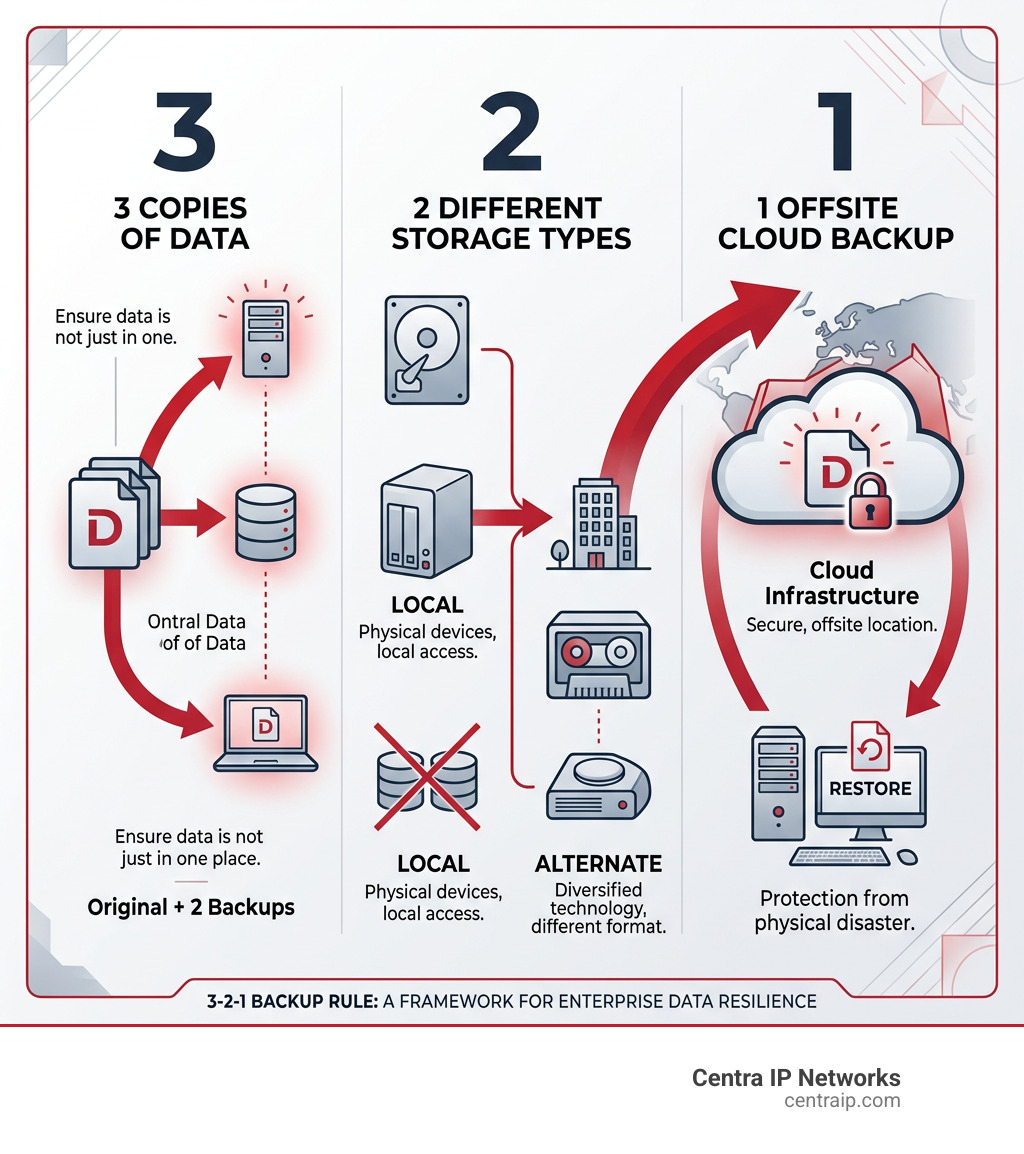
A dedicated enterprise cloud backup service fills that gap. It creates multiple, recoverable copies of your data across locations, automates disaster recovery testing, and keeps your business running even when the worst happens.
I’m Patrick Brangan, and with 20+ years in business technology solutions for SMBs, I’ve helped countless companies navigate the complexity of enterprise cloud backup services as part of a broader managed IT strategy. In this guide, I’ll cut through the noise so you can confidently compare your options and protect what matters most.
Understanding Enterprise Cloud Backup Services vs. Cloud Storage
In our experience working with businesses across Dallas, Orlando, and Tampa, we often hear the terms “backup” and “storage” used interchangeably. While they both involve the cloud, they serve entirely different masters. If you treat your cloud storage like a backup, you might be in for a rude awakening when a server goes down or a ransomware note pops up on your screen.
Defining Cloud Backup, Storage, and SaaS Backup
To choose the right strategy, we first need to clear up the definitions.
- Cloud Storage: Think of this as a digital filing cabinet. Services like Google Drive or Dropbox are fantastic for The Advantages of Cloud Storage Every Business Should Know, such as sharing files with colleagues or accessing a document from your phone. However, if you accidentally delete a file and it syncs, it’s often gone from the “cabinet” too.
- Enterprise Cloud Backup: This is a comprehensive application that automatically replicates your entire cloud infrastructure—including applications, virtual machines (VMs), and operating systems—to a secure off-site location. It’s built for recovery, not just access.
- SaaS Backup: This is a specialized form of Cloud Storage for Small Business and enterprise alike, specifically designed to protect data within platforms like Microsoft 365, Salesforce, and Google Workspace. Since these platforms are often the “source of truth” for your business, backing them up independently is a non-negotiable.
Why Enterprise Cloud Backup is Essential
Why can’t you just trust the big cloud providers to keep your data safe? It comes down to the Shared Responsibility Model. Microsoft, Amazon, and Google promise that their platform will stay up, but they do not guarantee the safety of your data against your own mistakes or outside attacks.
The risks are real and growing. Research shows that 86% of cloud-hosted data was impacted in organizations’ most recent ransomware attacks. Furthermore, with 80% of discovered vulnerabilities involving Microsoft 365 data, relying solely on native tools is a gamble.
Beyond protection against ransomware, these services provide a safety net against:
- Human Error: The accidental “Delete All” click that happens more often than we’d like to admit.
- Malicious Insiders: Employees who might delete data before leaving the company.
- Compliance Failures: Many industries require you to keep data for years, which native “trash bins” don’t support.
Essential Features of Enterprise Cloud Backup Services
When we evaluate enterprise cloud backup services for our clients in Fort Worth or Sarasota, we aren’t just looking for “a place to put files.” We are looking for a fortress.
Key Features of Enterprise Cloud Backup Services
A true enterprise-grade solution should offer more than just a sync button. Here is what we consider the “gold standard”:
- AES-256 Encryption: Your data should be encrypted while it’s moving (in-transit) and while it’s sitting on the server (at-rest).
- Granular Recovery: You shouldn’t have to restore an entire server just to get one email back. Look for “application-aware” backups that let you pluck out exactly what you need.
- Immutability: This is a fancy way of saying “unchangeable.” Once a backup is made, it cannot be modified or deleted by ransomware.
- Compliance Support: Whether it’s HIPAA or GDPR Compliance, your backup provider should help you meet regional and industry data governance frameworks.
- Automated DR Testing: A backup is only as good as its last successful restore. Modern tools automatically “test-fire” your backups to ensure they actually work.
Security and Ransomware Protection
Ransomware is the “big bad” of the digital age. Top-tier providers like Veeam Data Cloud have moved toward a “Zero Trust” architecture. This includes:
- Air-Gapped Vaults: Keeping a copy of your data completely disconnected from the main network so hackers can’t reach it.
- Zero-Knowledge Encryption: This means the provider doesn’t even have your decryption key. If they get hacked, your data remains a scrambled mess to the attackers.
- Malware Scanning: Some services scan your backups for hidden malware before you restore them, preventing you from re-infecting your clean environment.
Comparing Top Enterprise Cloud Backup Services: Performance and Pricing
Choosing a provider often feels like comparing apples to… well, slightly different apples. To help you decide, we’ve broken down the heavy hitters based on performance and cost.
| Feature | Acronis | Veeam | HYCU | AWS Backup |
|---|---|---|---|---|
| Primary Focus | Cyber Protection | Multi-cloud Resilience | SaaS & Hybrid | AWS Ecosystem |
| CPU Usage | ~1% (Very Low) | Moderate | Low (Agentless) | Native |
| Pricing Model | Per workload/GB | Subscription/SaaS | Per User/TB | Pay-as-you-go |
| Recovery Speed | Excellent | Very Good | Good | Good |
Comparing Top Enterprise Cloud Backup Services
- Acronis Cyber Protect: This is the “Swiss Army Knife.” It combines backup with active AI-based anti-malware. In tests, it showed incredibly low resource usage (around 1% CPU), making it ideal if you don’t want your backup software slowing down your servers.
- Veeam Data Cloud: Veeam is the industry titan for a reason. Their new SaaS-based Veeam Data Cloud is a powerhouse for Microsoft 365 and Azure, providing a unified interface that simplifies “Radical Resilience.”
- AWS Backup: If your entire life is in the Amazon ecosystem, AWS Backup is a natural fit. It centralizes and automates data protection across AWS services and even hybrid workloads using AWS Storage Gateway.
- HYCU: We love HYCU for its “zero-learning curve.” It’s an agentless solution, meaning you don’t have to install clunky software on every single machine. It’s purpose-built for multi-cloud environments like Nutanix, Google Cloud, and Azure.
- Unitrends: If your CFO is breathing down your neck about costs, Unitrends is worth a look. They claim to save businesses 33% or more compared to native cloud protection tools while offering “infinite retention” options.
Performance Metrics and Pricing Models
Performance isn’t just about speed; it’s about impact. For example, Backblaze B2 is often used as the “storage backbone” for many platforms because of its S3 compatibility and lack of hidden egress fees.
When evaluating pricing, watch out for:
- Egress Fees: Some providers charge you every time you try to pull your data out. This can turn a “cheap” backup into a very expensive recovery.
- Retention Costs: Storing data for 30 days is cheap; storing it “forever” for compliance can get pricey. Look for providers that offer deduplication to shrink your storage footprint.
Strategic Selection: Hybrid Clouds and Cost Optimization
Most enterprises today don’t live in just one cloud. You might have some servers in a local data center in Dallas, a few VMs in Azure, and your email in Microsoft 365. This is where things get tricky.
Evaluating and Selecting a Provider
When selecting a provider, you need to account for the skills shortage. Currently, 22% of organizations cite a lack of IT skills as their #1 challenge for innovation. If a backup solution is too complex, your team won’t use it correctly.
Ask these questions:
- Does it support our specific “stack”? (VMware, SQL Server, Salesforce, etc.)
- Is it S3-compatible? This avoids “vendor lock-in” and allows you to move data more easily.
- Does it offer SLA-based alerting? You need to know immediately if a backup fails, not three days later when you actually need it.
Managing Hybrid and Multi-Cloud Environments
For businesses with local footprints in Florida or Texas, Managed Disaster Recovery Services are often the best route. These services can bridge the gap between your physical office and the cloud.
A centralized management “pane of glass” is essential. You shouldn’t have to log into five different websites to see if your data is safe. Solutions like Veeam Cloud Connect allow you to maintain full data sovereignty—keeping control of your encryption keys and data location—even when using public cloud storage.
Frequently Asked Questions about Enterprise Cloud Backup
What is the difference between RPO and RTO?
These are your two most important metrics. RPO (Recovery Point Objective) is about data loss: how much time can pass between backups? (e.g., “We can afford to lose 4 hours of data”). RTO (Recovery Time Objective) is about downtime: how quickly can we get back online? (e.g., “We need to be up in 30 minutes”).
How does the Shared Responsibility Model affect my backups?
It means the cloud provider (like Microsoft) is responsible for the “Cloud” (the hardware and power), but you are responsible for the “Data” (the files and configurations). If you delete an email, Microsoft isn’t obligated to get it back for you unless you have a backup service.
Are cloud backup services cost-effective for large enterprises?
Yes, especially when you factor in the cost of a data breach or extended downtime. Using features like data deduplication and automated tiering (moving old data to cheaper storage) can significantly lower the Total Cost of Ownership (TCO).
Conclusion
Navigating enterprise cloud backup services doesn’t have to be a solo mission. At Centra IP Networks, we understand that every business in Dallas, Fort Worth, and throughout Florida has unique needs. Whether you’re looking to protect a few critical servers or an entire multi-cloud ecosystem, we provide managed IT and cloud solutions that bring everything under one roof.
Our USP is simple: one platform, one provider, and one bill. We leverage over 35 partnerships to ensure you get the most cost-effective, high-performance backup strategy tailored to your specific industry.
Ready to stop worrying about ransomware and start focusing on growth? More info about enterprise cloud services is just a click away. Let us help you build a resilient future.