
How to Compare Business Internet Plans
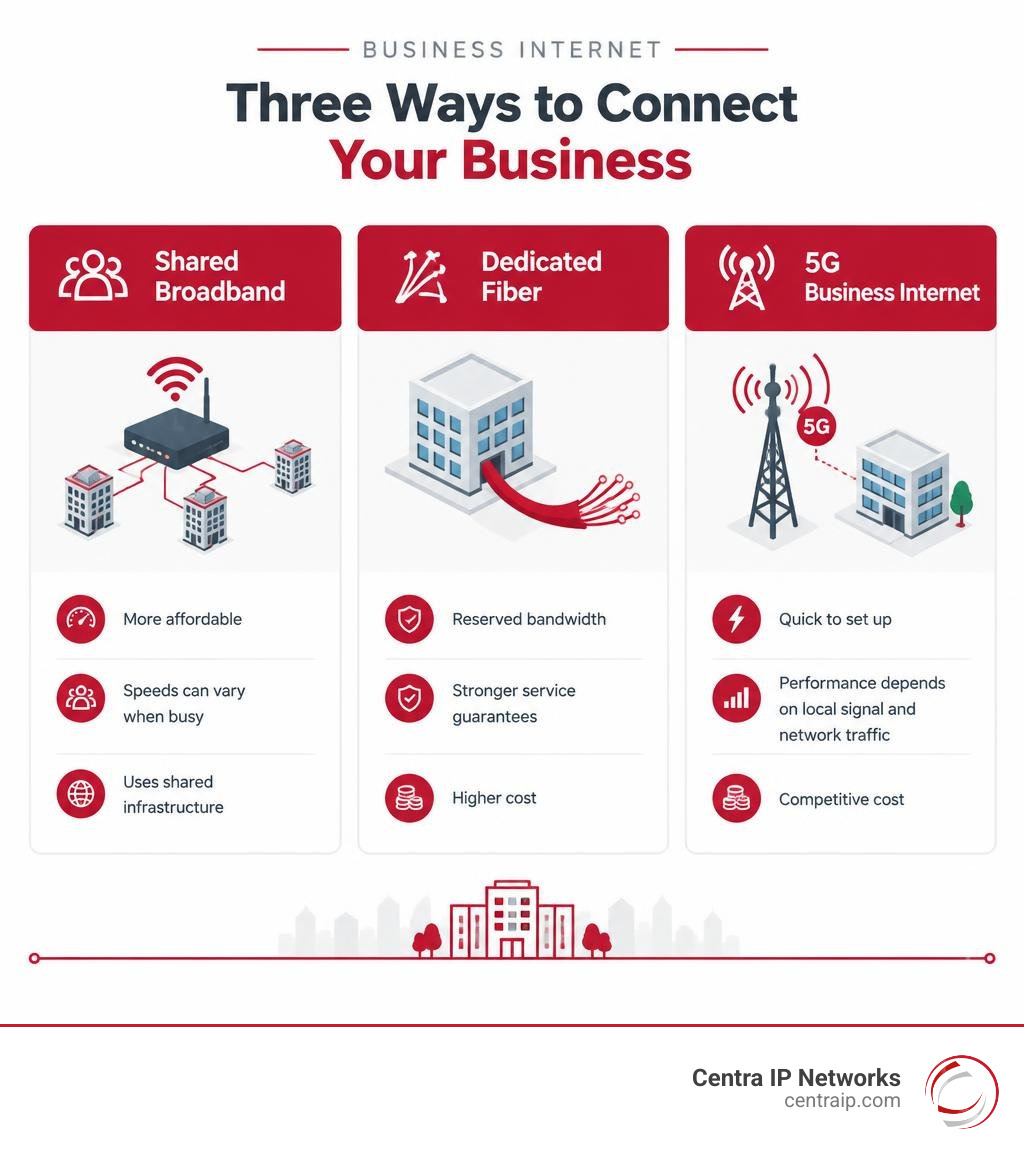
The best business internet plan depends on your upload needs, outage risk, and budget, not just its advertised download speed. Shared fiber and cable broadband usually cost less, but speeds can vary when the network is busy. 5G fixed wireless can be quick to set up, though performance depends on local signal and network traffic. Dedicated fiber costs more but offers reserved bandwidth and stronger service guarantees.
Start by checking the upload and download speeds at your address. Then compare the full monthly cost, equipment, contract terms, and backup options. If your phones, payments, or cloud tools depend on the connection, a second line may be worth more than a faster primary plan.
I’m Patrick Brangan, and I’ve spent more than 20 years helping small and midsize businesses choose business internet and communications systems. I’ll use that experience to help you compare plans without adding more vendor complexity.
Understanding the Core Types of Business Internet
Choosing the right commercial connection requires understanding how data reaches your facility. Business connections fall into four primary categories: shared fiber, cable broadband, 5G fixed wireless, and Dedicated Internet Access (DIA). Each architecture handles bandwidth allocation, latency, and uptime differently, directly impacting your daily business IT infrastructure.

| Connection Type | Typical Speed Range | Symmetrical Speeds? | Latency Profile | SLA Backing | Best Fit For |
|---|---|---|---|---|---|
| Shared Fiber Broadband | 300 Mbps – 5 Gbps | Yes | Low (5–15 ms) | Best-effort (99.9% uptime target) | High-demand offices, standard cloud workloads |
| Cable Broadband | 100 Mbps – 1.25 Gbps | No (Asymmetric) | Moderate (15–35 ms) | Best-effort | Retail storefronts, small offices, basic web browsing |
| 5G Fixed Wireless | 25 Mbps – 300+ Mbps | No (Variable) | Moderate to High (30–60 ms) | Best-effort | Pop-up sites, rapid deployment, secondary failover |
| Dedicated Fiber (DIA) | 100 Mbps – 100 Gbps | Yes (Guaranteed) | Ultra-Low (<5 ms) | Enterprise SLA (99.99%+ uptime & MTTR) | Mission-critical apps, data centers, mid-to-large enterprises |
Shared fiber delivers light-based data transmission through shared local hubs (Passive Optical Networks). While it provides symmetrical bandwidth (identical download and upload speeds), the throughput can experience minor fluctuations during neighborhood peak hours. Cable broadband uses existing coaxial copper networks, delivering high download speeds but severely restricted upload bandwidth, creating bottlenecks during heavy data dispatches.
Fixed wireless relies on cellular 5G and LTE towers to beam internet over the air to an on-site gateway. It bypasses physical trenching, making it ideal for immediate deployment, though weather and cell tower congestion can introduce latency jitter.
Dedicated Internet Access provides a private, unshared optical pipeline directly from the carrier’s core exchange to your server rack. Regulated under Business Data Services standards set by the FCC, DIA comes with guaranteed throughput that never slows down regardless of public network traffic.
Bandwidth Demands: Symmetrical Speeds vs. Shared Broadband
Historically, internet usage was asymmetrical: employees downloaded large websites or files and uploaded virtually nothing beyond simple keystrokes and search queries. Today, modern operations rely heavily on cloud-based infrastructure, continuous cloud synchronization, and real-time collaboration.
When an internet provider sells a “Gigabit” cable connection, it typically provides 1,000 Mbps downstream but only 35 to 50 Mbps upstream. If ten employees join HD video calls while your point-of-sale system processes transactions and local servers back up data, an asymmetric pipe gets choked instantly. Symmetrical business internet ensures your outbound data moves as quickly as inbound traffic.
Why Upload Speeds Dictate Cloud Performance
Upstream bandwidth directly influences application responsiveness across your organization. Without adequate upload speeds, business-critical workflows experience significant degradation:
- Video Conferencing: Real-time platforms require steady upload streams; insufficient upstream capacity causes frozen video frames, packet loss, and robotic audio.
- Continuous Backups: Automated enterprise cloud backup services push gigabytes of modified database records and system snapshots off-site. Slow upload pipelines force backups to spill into working hours, consuming operational bandwidth.
- Cloud File Collaboration: Uploading large architectural drawings, medical imaging, or high-resolution marketing media to cloud storage stalls without symmetrical fiber.
- Point-of-Sale & SaaS Responsiveness: Interactive web-based ERP and CRM platforms send constant API calls upstream. Upstream congestion delays transaction processing and customer checkout speeds.
Assessing Required Bandwidth by Team Size and Workload
To avoid paying for idle capacity or dealing with constant buffering, match your tier to your actual operational headcount and application profile:
- Light Workload (1–5 Users): 100 to 300 Mbps download / 20–300 Mbps upload. Suitable for basic web browsing, single-line POS processing, and routine email tasks.
- Moderate Workload (6–20 Users): 300 to 500 Mbps symmetrical. Supports concurrent HD video meetings, standard CRM interaction, and stable cloud-based VoIP services with dedicated voice priority.
- Heavy Cloud Workload (21–50 Users): 500 Mbps to 1 Gbps symmetrical. Accommodates continuous large-file transfers, multi-channel video conferences, cloud-hosted accounting systems, and multiple static IP endpoints for local servers.
- Enterprise Operations (50+ Users or Multi-Site Hubs): 1 Gbps to 10 Gbps dedicated fiber. Designed for complex data environments running hybrid data centers, dense call centers, and intensive real-time replication.
Provider Comparison: Pricing, Guarantees, and Bundled Services
Business internet plans vary widely in contractual guarantees, bundled hardware, and long-term cost stability. The table below outlines major nationwide and regional carrier options:
| Provider / Tier | Starting Monthly Cost | Max Advertised Speed | Key Guarantees & Terms | Included Equipment & Extras |
|---|---|---|---|---|
| T-Mobile 5G Business | $35/mo | Up to 300 Mbps | 5-Year Price Guarantee; No annual contract | Wi-Fi 7 gateway included; up to $800 ETF credit |
| Comcast Business | $70/mo | Up to 2 Gbps (Coax/Fiber) | 5-Year Price Lock option; 30-day money-back guarantee | Gateway included on Gig tiers; SecurityEdge protection |
| AT&T Business Fiber | ~$65–$80/mo | Up to 5 Gbps | No annual contract; 99.9% uptime target | Wi-Fi gateway included; 5G backup add-on available |
| Optimum Business | $65/mo | Up to 2 Gbps (Secure Fiber) | 2 to 3-year price lock; $100+ contract buyout credit | Built-in network security; Auto-pay/paperless savings |
| Verizon LTE/5G Business | $35/mo (paired with phone plan) | Up to 100+ Mbps | Multi-line credits (up to 6 lines); Fixed promo rates | Wireless router; Failover/backup configurations |
| SumoFiber | Custom Quote | 1 Gbps Symmetrical | 99.9% uptime target; Multi-location failover | Static IP options on all plans; Managed Wi-Fi |
| Atlas Networks | Custom Quote | Up to 10 Gbps | 99.99% to 99.999% SLA; No bandwidth caps | Static IPs included; Managed router add-ons available |
| Beanfield | Custom Quote | Up to 100 Gbps (Active Ethernet) | Dedicated industry SLA; Extensive direct peering | Symmetrical bandwidth; No proprietary CPE required |
| In-Telecom | Custom Quote | Up to 10 Gbps | Disaster-resilient underground fiber routing | Dedicated local metro support; Voice integration |
Evaluating Top Business Internet Plans and Price Locks
A major consideration for operational budgeting is price volatility. Standard introductory rates from traditional telecom providers frequently expire after 12 months, leading to steep rate hikes.
To combat this, several carriers now market fixed-rate stability. T-Mobile provides a 5-Year Price Guarantee on its fixed wireless 5G business plans, starting at $35 per month with no mandatory annual contract. Comcast Business similarly provides a 5-Year Price Lock Guarantee on select tiers up to 2 Gbps, requiring only an initial one-year commitment. Optimum Business features 2 to 3-year price protections alongside contract buyout credits up to $1,500 to offset early cancellation penalties from previous carriers.
For high-capacity environments, regional fiber specialists like Atlas Networks and In-Telecom offer speeds reaching 10 Gbps, backed by underground conduit designs that shield lines from extreme weather disruptions.
Bundling Voice, Security, and Mobile Add-ons
Carrier bundling allows organizations to consolidate communications and capture recurring bill discounts. Pairing internet lines with small business internet phone systems routinely unlocks $10 to $30 monthly credits while eliminating separate vendor invoices.
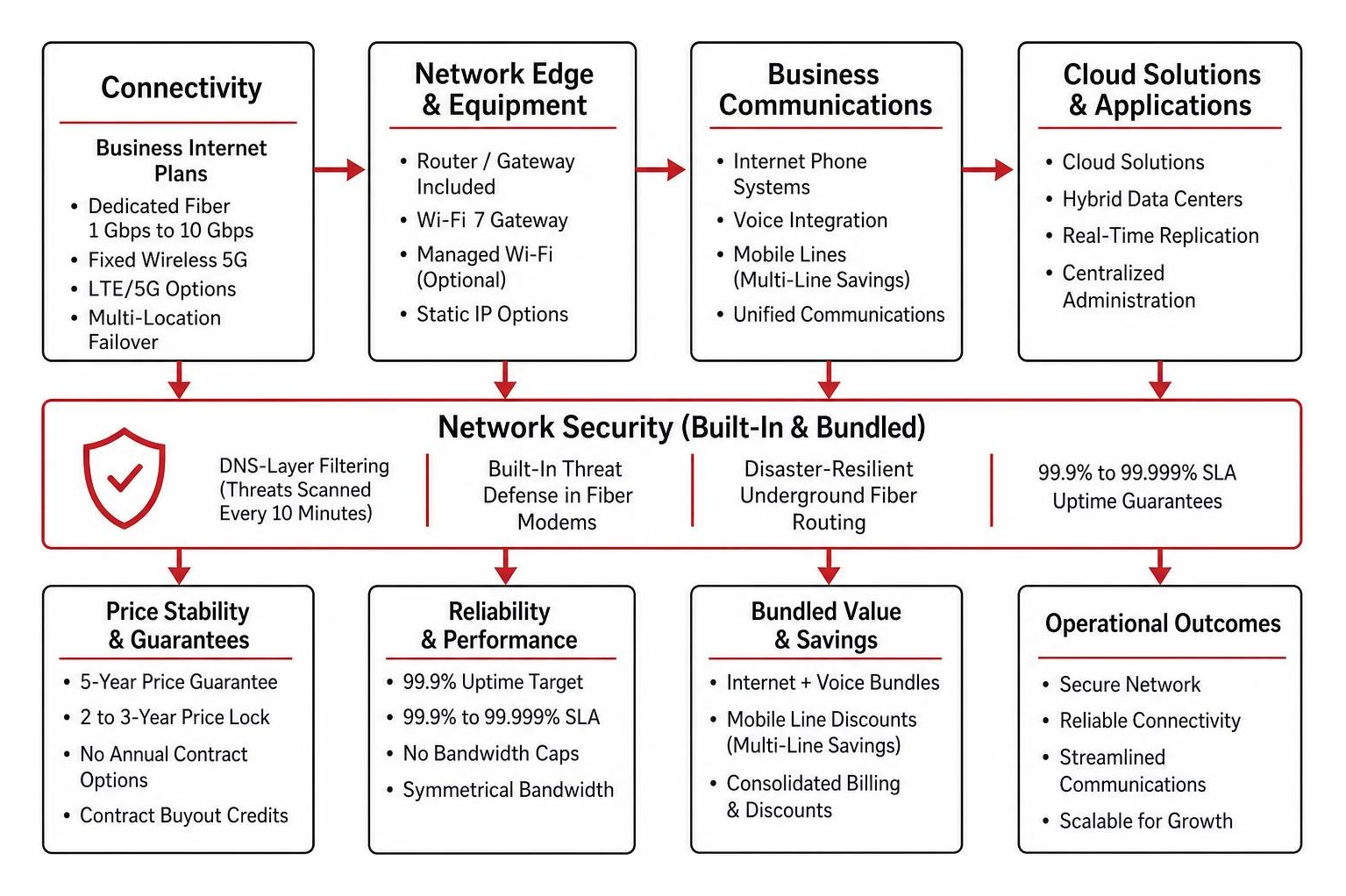
Bundles often incorporate foundational cybersecurity elements. Comcast Business includes its SecurityEdge DNS-layer filtering, scanning for threats every 10 minutes. Optimum builds baseline threat defenses directly into its fiber modems.
Additionally, mobile lines paired with business internet—such as Verizon’s $35/month wireless business rate for smartphone plan subscribers—provide significant multi-line savings across distributed teams. Consolidating these tools with comprehensive cloud solutions ensures your telephony, network edge, and computational infrastructure work seamlessly under a single administrative umbrella.
Site Readiness, Hardware, and Deployment Timelines
Securing business internet involves physical logistics that depend directly on your commercial facility’s existing wiring and carrier presence.
Building Infrastructure, Lit Status, and Demarc Extensions
Before ordering service, you must verify your building’s “lit” status:
- On-Net (Lit Building): The carrier already has optical fiber or coaxial cables terminated in the building’s Main Distribution Frame (MDF) inside the central telecom room. Turn-up time generally takes 5 to 15 business days.
- Off-Net (Unlit Building): The carrier’s nearest fiber runs down the public street but has not breached the property line. Bringing the circuit inside requires civil construction, street trenching, lateral boring, and municipal permits, pushing installation windows out to 60–120 days.
- Demarc Extensions: The point of demarcation (Demarc) is where the carrier’s physical responsibility ends—typically in the ground-floor basement or utility room. If your office suite is on the 4th floor, you are responsible for running low-voltage wiring through the building riser to your Intermediate Distribution Frame (IDF). Coordinating a low-voltage technician early prevents delivery delays.
Included Equipment vs. Managed Hardware Needs
Understanding what hardware comes with your service prevents unexpected line-item expenses on your first invoice:
- Gateways & Optical Network Terminals (ONT): Providers like AT&T and T-Mobile supply basic Wi-Fi gateways or ONTs at no extra charge on primary business tiers.
- Business-Grade Wi-Fi 7 & Mesh APs: Entry-level equipment often struggles to support more than 25 concurrent connections. Upgrading to commercial Wi-Fi 7 access points or mesh systems (such as eero networks) ensures robust client handling, seamless floor roaming, and isolated guest portals.
- Managed Routers & Traffic Prioritization: Unmanaged modems treat all network traffic equally. A managed router allows IT teams to implement Quality of Service (QoS) rules, ensuring SIP voice packets and POS terminal transactions take precedence over staff video streaming or file downloads.
Contract Safeguards, SLAs, and Network Redundancy
A standard commercial internet contract contains operational clauses that require careful review before signing.
Decoding SLAs, Auto-Renewals, and Early Termination Fees
Standard shared broadband is sold as a “best-effort” service without strict financial penalties for performance dips. In contrast, Dedicated Internet Access agreements include a binding Service-Level Agreement (SLA) specifying:
- Uptime Commitments: Enterprise SLAs guarantee 99.99% to 99.999% uptime, equating to less than 5 minutes of unplanned downtime per year.
- Latency and Packet Loss Thresholds: The carrier commits to maintaining average round-trip latency under strict limits (e.g., <20 ms) and zero packet loss across their backbone.
- Mean Time to Repair (MTTR): The provider guarantees dedicated dispatch within a defined window (typically 4 hours) during a physical circuit severance.
- Auto-Renewal and ETF Clauses: Watch for evergreen clauses that automatically renew contracts for multi-year terms unless written cancellation is submitted 60 to 90 days prior. Early Termination Fees (ETFs) frequently require paying 80% to 100% of the remaining monthly balance if you disconnect early.
Deploying Cellular Backup and Redundant Business Internet
No single terrestrial connection is immune to fiber line cuts, equipment malfunctions, or utility maintenance accidents. Relying on a single ISP introduces a single point of failure that can halt retail checkout lines, incoming phone calls, and real-time operations.
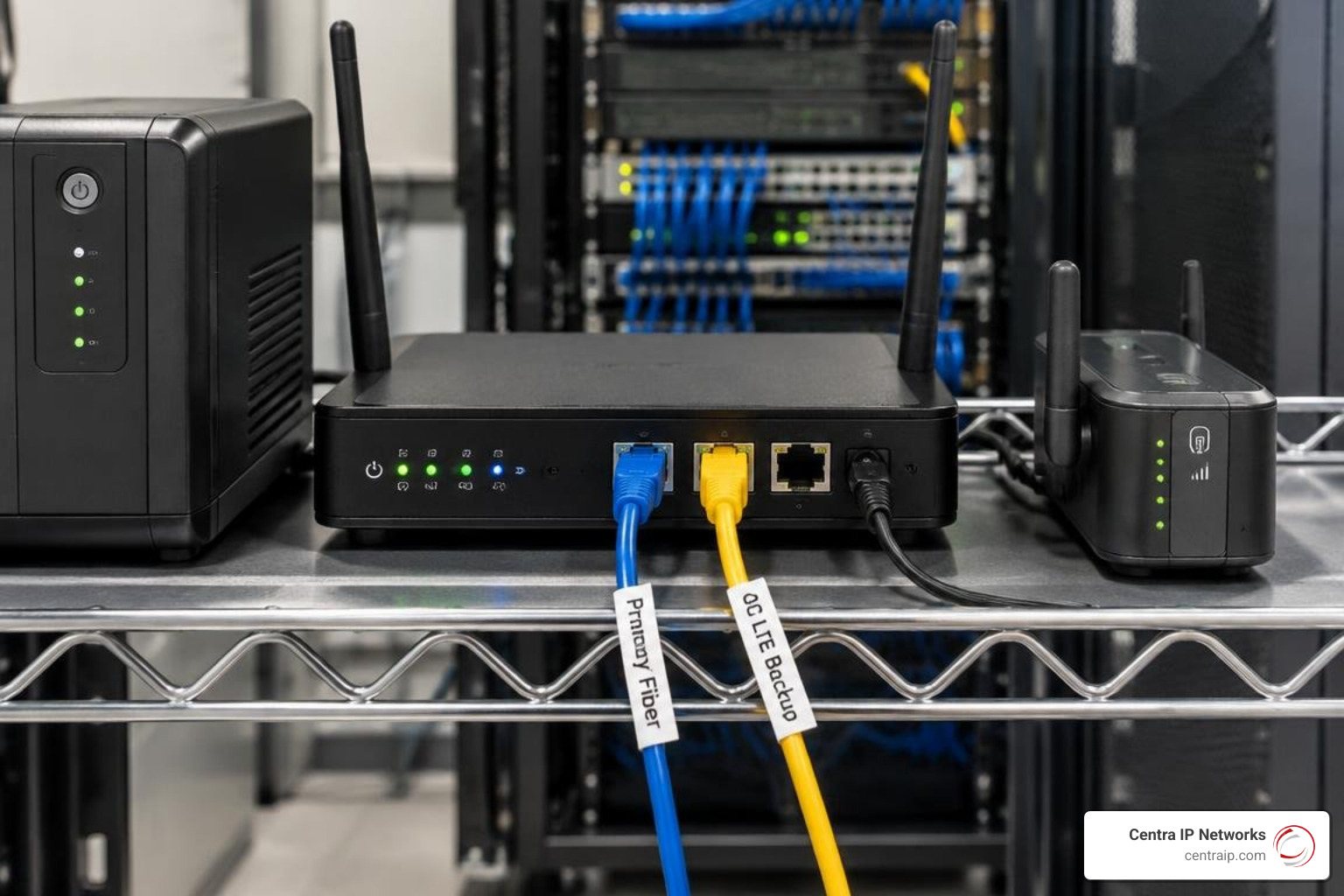
Deploying a dual-WAN failover configuration ensures high availability. In this setup, your primary high-speed fiber connection pairs with a secondary circuit—such as an automated 4G/5G LTE cellular gateway or an alternate carrier’s line along a physically diverse route.
Using an SD-WAN appliance or failover router, the system continuously monitors the primary circuit. If packet loss spikes or the fiber link drops, network traffic automatically reroutes to the backup connection within seconds. Solutions like Comcast Connection Pro provide up to 8 hours of internal battery backup alongside cellular failover, keeping your core business functions operational through local power disruptions.
Frequently Asked Questions About Commercial Connectivity
How long does fiber installation typically take for commercial buildings?
If your commercial building is already on-net (wired with the carrier’s optical gear in the telecom closet), installation usually wraps up within 10 to 21 business days. If the site is off-net and requires outside plant engineering, civil excavation, and municipal permitting, the deployment timeline ranges from 45 to 90+ days.
What is the difference between shared broadband and dedicated internet access?
Shared broadband pools your connection with other neighborhood businesses over a distributed network tree; during high-demand hours, speeds can fluctuate, and speeds are often asymmetric. Dedicated Internet Access (DIA) provides an unshared, private data circuit directly to your suite with identical, guaranteed upload and download speeds backed by a strict SLA.
Can 5G fixed wireless replace a wired commercial internet connection?
Yes, for many small offices, branch locations, and pop-up retail stores, business 5G fixed wireless provides a cost-effective, rapidly deployed primary connection with no trenching required. However, for organizations running hundreds of concurrent users or hosting latency-sensitive local application servers, wired dedicated fiber remains the gold standard for latency and consistent throughput.
Conclusion
Choosing the right commercial connectivity requires balancing speed metrics, upload demands, contract protections, and redundancy. While standard retail broadband might satisfy basic browsing, modern organizations running distributed voice, cloud workflows, and real-time collaboration need predictable throughput and reliable failover safeguards.
Navigating carrier quotes, multi-year contracts, and equipment configurations across multiple locations can pull internal teams away from core operations. At Centra IP Networks, we eliminate carrier friction by acting as your single point of contact. We leverage over 35 top-tier carrier partnerships to source, engineer, and deploy dedicated business internet services, voice solutions, and cloud environments—all consolidated into one unified platform with single-bill simplicity. Contact our connectivity specialists today to conduct a comprehensive network audit and secure the ideal commercial infrastructure for your enterprise.