

Why Cloud Storage Choices Matter for Growing Businesses
Cloud storage keeps files, backups, and application data in remote data centers so authorized users can access them from almost anywhere. The right option should match your data type, security needs, recovery goals, performance demands, and total cost – including storage, data transfer, and API fees.
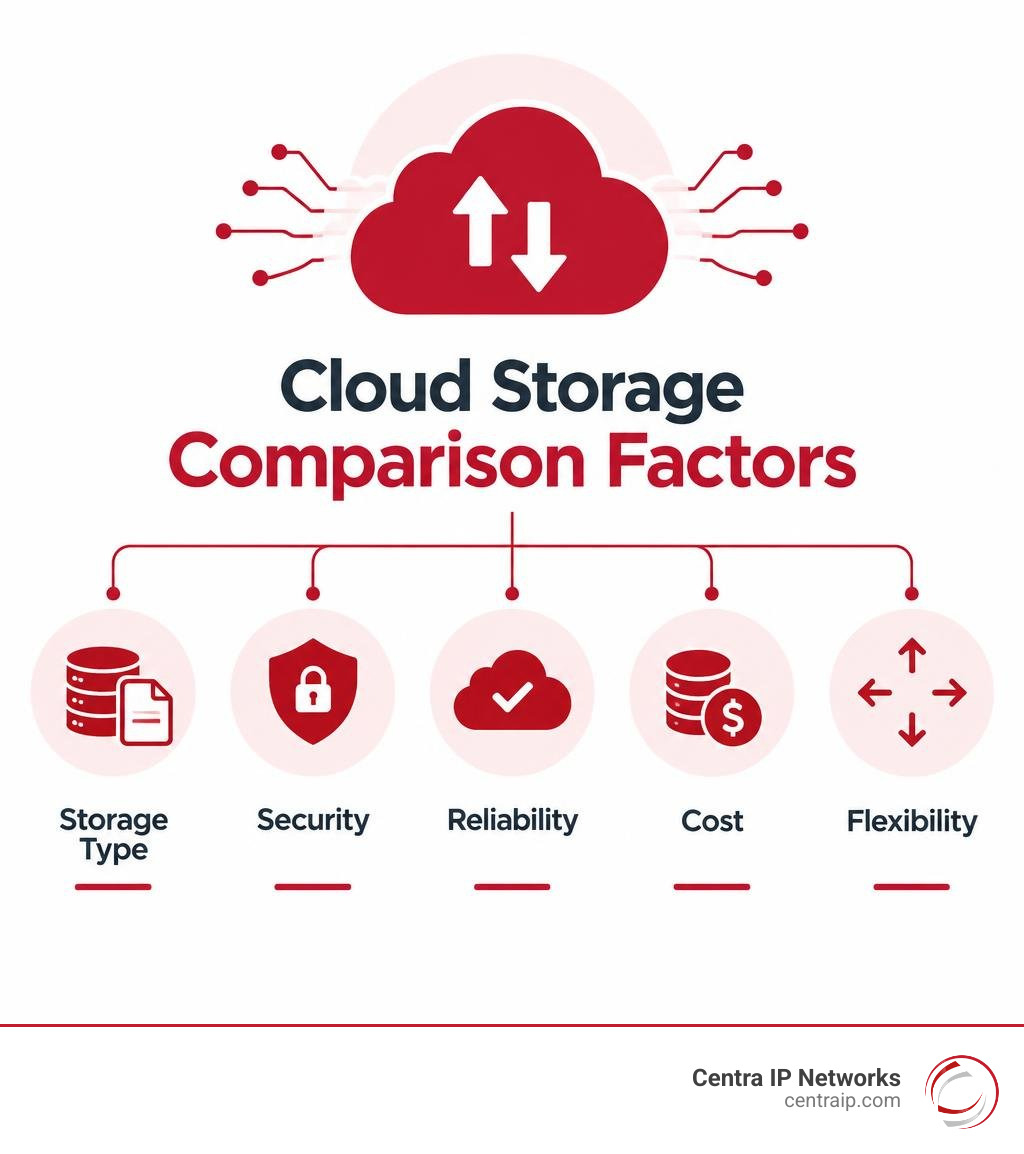
For a simple starting point, compare every provider on these five factors:
- Storage model: File storage for shared folders, block storage for applications and databases, or object storage for large-scale backups, media, and data lakes.
- Security: Encryption, multifactor authentication, access controls, audit logs, and immutable backups that ransomware cannot alter.
- Reliability: Redundant copies, service-level commitments, and clear recovery time and recovery point targets.
- Cost: Monthly capacity, retrieval, minimum-retention, operations, and egress charges – not just the advertised per-GB rate.
- Flexibility: Support for hybrid or multicloud environments, open APIs, and tools your team already uses.
This matters because most business data is unstructured, from documents and recordings to images, video, and application logs. As that volume grows, storage is no longer just a place to put files. It becomes a key part of productivity, compliance, disaster recovery, and AI-ready data planning. For a broader technical overview, see cloud storage on Wikipedia.
I am Patrick Brangan, with more than 20 years of experience helping small and midsize organizations simplify technology decisions across communications, managed IT, and secure cloud storage. This guide will help you compare options without adding another confusing vendor conversation to your day.
Understanding How Modern Cloud Storage Works
At its core, modern off-site storage decouples your physical storage media from the operating system and applications that consume it. Instead of maintaining spinning disks or local flash arrays in an on-premises server closet, data transfers over secure, encrypted network connections into massive enterprise data centers.
Behind the scenes, providers pool raw hardware capacity across thousands of physical drives using advanced server virtualization and distributed file systems. When an organization uploads a file, the platform breaks the data into chunks, assigns unique identifiers, and replicates those pieces across geographically separated server racks and availability zones. This automated distribution delivers exceptional durability, meaning hardware failures on physical drives do not disrupt service or cause data loss.
Access occurs primarily through RESTful APIs, web dashboards, command-line interfaces (CLI), or client synchronization applications. High-tier architectures operate under rigorous service-level agreements (SLAs), offering uptime commitments reaching 99.99% or higher.
Operating in the cloud requires an understanding of the shared responsibility model. Cloud providers assume responsibility for the security of the cloud—including physical data center security, disk replacement, hardware maintenance, and hypervisor patching. However, the customer retains full accountability for security in the cloud: access management, permission policies, network firewall configuration, and the classification of sensitive files.
Evaluating Object, Block, and File Cloud Storage
Choosing the proper storage architecture dictates performance, ease of use, and overall expense. The market divides into three distinct architectures:
- Object Storage: Built specifically for unstructured data, object storage bundles unstructured files with customizable metadata tags and unique identifiers inside flat hierarchies known as buckets. Because it bypasses traditional folder trees, it scales endlessly across petabyte and exabyte workloads. Major cloud platforms offer object storage as a foundational repository for analytics, media repositories, and data lakes.
- Block Storage: Designed for raw compute performance, block storage splits files into fixed, evenly sized data blocks, each with its own memory address. Operating without metadata overhead, it integrates directly with virtual server compute instances. It is the premier choice for transactional databases, virtual machines, and enterprise resource planning (ERP) platforms requiring single-digit millisecond latency.
- File Storage: Mirroring traditional Network Attached Storage (NAS) setups, file storage organizes data into hierarchical folders, directories, and subdirectories using standard protocols like SMB or NFS. It remains the ideal engine for shared network drives, centralized team collaboration repositories, and legacy line-of-business software that depends on native file paths.
Public, Private, and Hybrid Cloud Storage Deployments
Deploying enterprise storage depends directly on performance requirements, regulatory demands, and budget boundaries:
- Public Cloud: Multi-tenant architectures hosted on global provider infrastructure. They offer virtually limitless horizontal scalability, pay-as-you-go billing, and zero on-site maintenance overhead.
- Private Cloud: Dedicated infrastructure provisioned solely for a single organization, hosted either on-premises or in a private colocation facility. This deployment affords maximum control and strict adherence to internal compliance policies, albeit at higher capital expense.
- Hybrid Cloud: Combines private on-premises infrastructure with public resources over dedicated VPN or low-latency direct-connect networks. Sensitive transactional databases remain local, while burst compute and long-term archival offload automatically to the cloud.
- Multicloud Strategies: Distribute operations across two or more independent vendors to prevent vendor lock-in, balance pricing advantages, and meet strict regional data sovereignty rules.
Critical Evaluation Criteria for Choosing Storage Providers
Selecting an infrastructure partner requires moving past basic monthly subscription costs to examine operational resilience, access controls, and compliance mandates.
Enterprise deployments must satisfy rigorous industry benchmarks, including SOC 2 Type II, HIPAA, PCI DSS, and GDPR. Immutable storage safeguards data integrity by enforcing Write Once, Read Many (WORM) policies, ensuring records cannot be modified or deleted by malicious insiders or compromised admin credentials.
| Evaluation Metric | Cloud Hyperscalers | S3-Compatible Hot Storage | Privacy & Workspace Clouds |
|---|---|---|---|
| Storage Architecture | Tiered Object, Block, and Managed File Systems | Always-Hot S3-Compatible Object Repositories | Encrypted Sync, File Share, and Workspace Hubs |
| Data Egress Model | Tiered per-GB egress rates with API operation fees | Free or ultra-low egress charges; minimal API fees | Bundled flat monthly transfer allocations |
| Security Framework | IAM, CMEK/CSEK, bucket locks, audit logging | WORM Object Lock, zero-knowledge options, AES-256 | Zero-knowledge end-to-end encryption, Swiss/EU privacy |
| Best-Fit Workloads | Complex multi-tier apps, AI/ML, global data lakes | Active media archives, backup targets, MSP repos | Daily desktop sync, secure file transfer, co-authoring |
Security, Encryption, and Data Privacy Protocols
Data security starts with strong encryption standards: 256-bit Advanced Encryption Standard (AES-256) for data at rest, and Transport Layer Security (TLS) for data in transit.
Organizations handling sensitive records, client files, or IP must evaluate key management architectures:
- Customer-Managed Encryption Keys (CMEK): Your organization generates, rotates, and controls the cryptographic keys, preventing cloud provider technicians from accessing raw records.
- Zero-Knowledge Architecture: The provider possesses no record of the decryption passphrase. Some providers enforce client-side end-to-end encryption under strict privacy frameworks, ensuring files remain fully inaccessible to unauthorized third parties.
- Immutable Retention (WORM): Bucket locks guarantee compliance retention intervals, safeguarding legal discovery records, financial audits, and telephony logs from intentional or accidental purging.
Performance, Egress Economics, and API Costs
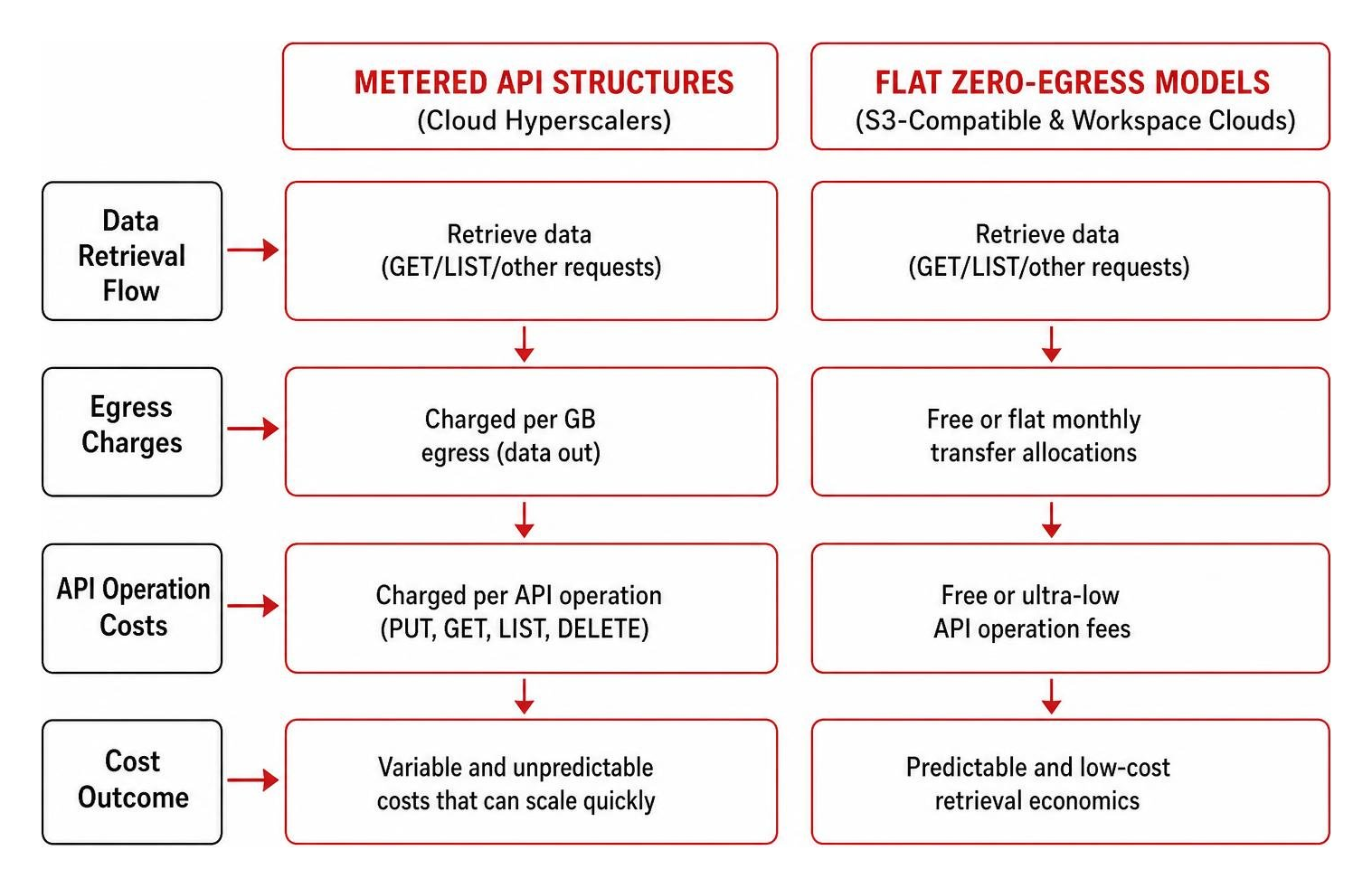
Hidden operational overhead can rapidly inflate monthly cloud invoices. While base storage costs might look low on paper, providers often charge extra for egress bandwidth (moving data out of the cloud) and API call operations (PUT, GET, LIST, and DELETE commands).
For high-throughput archiving, active media workflows, and backup infrastructure, evaluating S3-compatible alternatives can yield substantial cost savings. Some providers offer predictable egress structures, while others eliminate egress and API transaction fees entirely on hot object storage tiers.
Enterprise Workloads and Real-World Application Use Cases
Modern cloud architectures scale far beyond simple desktop folder backups, functioning as active operational backbones across diverse industries:
- SaaS Ecosystem Protection: Native SaaS platforms (such as Microsoft 365, Google Workspace, and Salesforce) operate on shared responsibility models. Cloud-to-cloud backup solutions provide point-in-time recovery for mailboxes, SharePoint libraries, and CRM accounts.
- Telephony and Call Center Archiving: Modern VoIP and unified communications systems stream customer interaction recordings directly into S3-compatible object storage. Organizing records by SIP Call-ID and indexing metadata allows instant compliance retrieval while maintaining low retention overhead.
- Mobile and Web Application Pipelines: Developers connect directly to cloud buckets using dedicated toolsets, providing resilient, resumable uploads for user-generated content, letting mobile apps store media assets without custom server middleware.
Big Data Analytics and AI Model Training
Unstructured information represents the vast majority of enterprise data growth. Without scalable storage architectures, this data risks becoming dark, unusable assets.
Modern high-performance object stores serve as data lake backbones for artificial intelligence and machine learning pipelines:
- Vector Storage Integration: High-dimensional vector stores accelerate generative AI, semantic search, and Retrieval-Augmented Generation (RAG) models.
- High-Throughput Caching: Specialized high-speed storage tiers deliver massive throughput, keeping compute-heavy GPU clusters saturated during deep learning model training.
- Storage Intelligence Automation: Machine learning algorithms continuously inspect metadata, automatically generating cost-optimization recommendations and moving stagnant data sets to lower-cost tiers without administrative friction.
Business Continuity, Archival, and Disaster Recovery
A complete business continuity plan relies on isolated, geographically redundant recovery data:
- Recovery Point Objective (RPO): Dictates the acceptable threshold of data loss measured in time. Continuous replication and automated snapshotting reduce RPOs from days to minutes.
- Recovery Time Objective (RTO): Measures how quickly systems return to operational status following an outage. Multi-region deployments with rapid failover mechanisms ensure business operations resume smoothly.
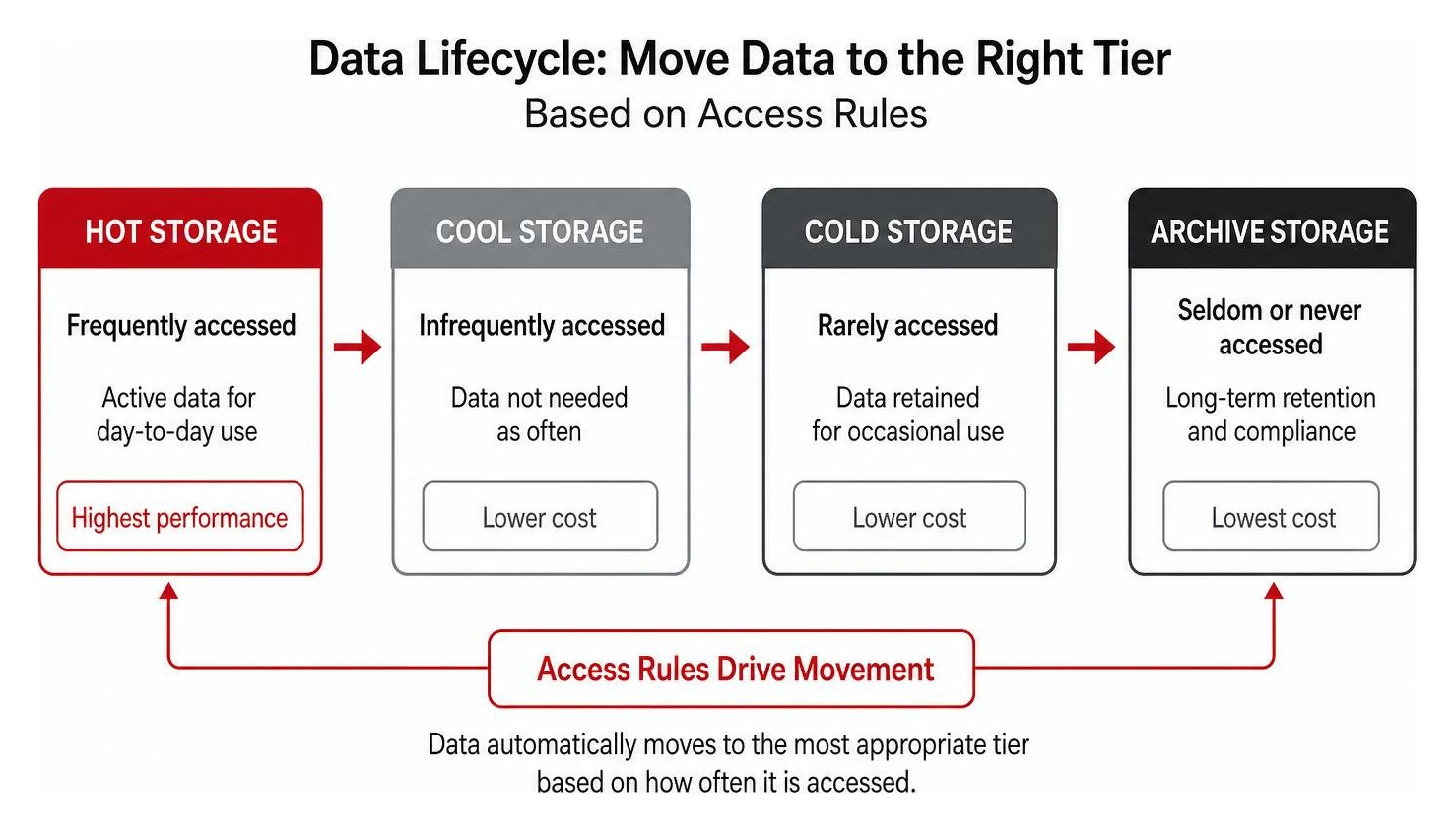
- Cold and Deep Archive Tiers: Infrequently accessed records transition automatically to low-cost archive tiers, providing immutable storage at fractions of standard hosting prices.
Frequently Asked Questions About Cloud Storage
How does object storage differ from traditional block and file storage?
Object storage houses files as self-contained units (objects) within flat, non-hierarchical buckets, pairing raw data with extensive, customizable metadata and global unique identifiers. File storage relies on hierarchical folder trees, making it ideal for shared team drives, while block storage splits data into raw addressable sectors for low-latency databases and virtual machine OS drives.
What hidden fees should organizations look out for in cloud storage contracts?
Beyond standard per-gigabyte monthly hosting rates, organizations must account for data egress bandwidth fees, API read/write operations (PUT/GET/LIST requests), minimum retention intervals (which charge full durations even if data is deleted early), and transition costs incurred when shifting files between hot and cold storage tiers.
How do immutable storage policies protect backups against ransomware attacks?
Immutable storage uses Write Once, Read Many (WORM) technology to lock down data for a predetermined retention period. Once written, the files cannot be altered, overwritten, encrypted, or deleted by any process, administrator, or malware payload, ensuring organizations always retain a clean snapshot to restore from during a security breach.
Conclusion
Developing an effective data strategy requires balancing access performance, regulatory compliance, ransomware defense, and total cost of ownership. Rather than treating storage as an isolated purchase, organizations achieve better operational resilience by integrating their data lifecycle management with comprehensive managed IT and unified communications.
At Centra IP Networks, we help businesses across Dallas, Fort Worth, Orlando, Tampa, St. Petersburg, Clearwater, and Sarasota eliminate technology fragmentation. By consolidating connectivity, voice systems, infrastructure management, and tailored cloud solutions onto a single platform with one bill and a single point of contact, we turn complex cloud choices into scalable, dependable business advantages.