

No More IT Headaches: What Fort Worth Businesses Need to Know About Managed IT Services
Managed IT services in Fort Worth give local businesses a single, proactive team to handle everything — monitoring, security, help desk, and strategy — for a flat monthly rate.
Here is a quick snapshot of what to expect:
| Topic | Quick Answer |
|---|---|
| What it costs | $35 – $250 per user per month depending on scope |
| Response time | Top local providers respond in 15 – 30 minutes |
| Onboarding time | 2 – 4 weeks for most businesses |
| Key compliance areas | HIPAA, HITRUST, SOC 2, PCI-DSS, Texas SB 2610 |
| Top service models | Fully managed, co-managed, or hybrid (monitoring only) |
| Main benefit | Predictable costs, less downtime, stronger security |
If your business is juggling multiple IT vendors, dealing with slow response times, or just tired of unexpected tech bills — you are not alone. Many Fort Worth businesses are in the same position. The right managed IT partner simplifies all of that into one relationship, one bill, and one team that keeps things running.
I’m Patrick Brangan, and with 20+ years of experience helping SMBs across the DFW area navigate managed IT services in Fort Worth — from unified communications to network infrastructure — I have seen what separates a smooth IT operation from a constant fire drill. Let’s break down everything you need to make the right call for your business.
What is Managed IT Services and How Does It Benefit Fort Worth Businesses?
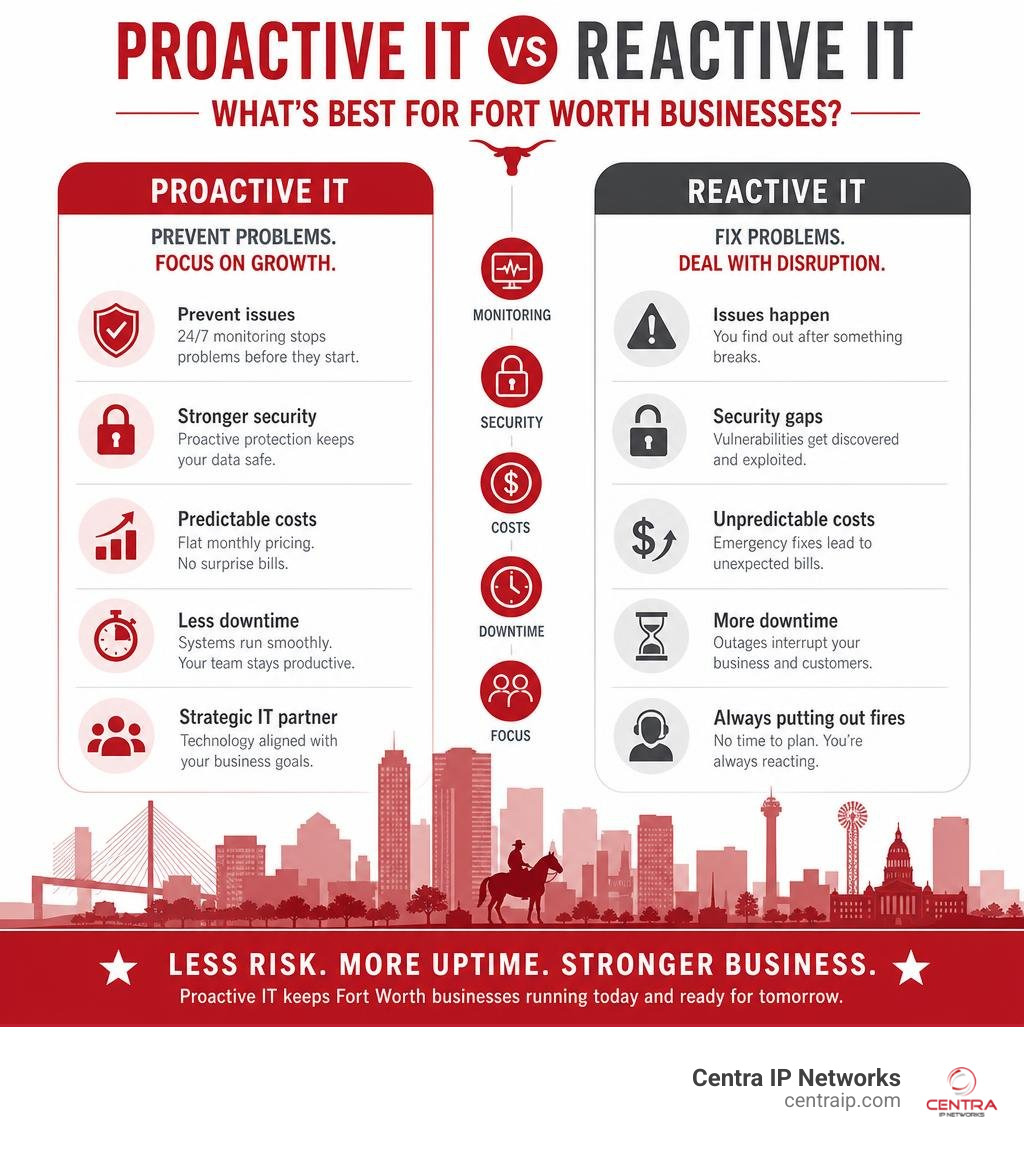
At its core, partnering with a Managed Service Provider means outsourcing the daily management, maintenance, and security of your technology infrastructure to a dedicated team of experts. Instead of waiting for a server to crash or a workstation to get infected with malware before calling for help, a high-quality provider continuously monitors your systems to prevent problems before they start.
The core of modern Managed IT Services lies in proactive maintenance. We keep a constant eye on your servers, endpoints, and cloud environments to ensure optimal network health. This continuous oversight allows us to apply critical security patches, optimize database performance, and identify hardware bottlenecks before they disrupt your operations.
When you transition to this model, your business unlocks several key Benefits of Managed IT Services:
- Minimized Downtime: Routine maintenance, automated updates, and round-the-clock threat detection ensure your systems remain stable, keeping your employees productive.
- Seamless Scalability: As your business grows in Cowtown or expands across Tarrant County, your IT infrastructure can scale effortlessly. You can easily add or remove users, cloud storage, and security licenses without buying expensive on-premise hardware.
- Access to Enterprise-Grade Tools: Small and mid-sized businesses gain access to advanced security tools, data analytics, and cloud architectures that are typically only affordable for major corporations.
- Predictable Budgeting: By bundling your IT support, cloud environments, and cybersecurity into a single flat-rate monthly fee, you can eliminate surprise repair bills.
By shifting the burden of technology management to an expert partner, you free up your internal teams to focus on core business objectives. If you want to dive deeper into how this works, check out our guide on How Managed IT Service Providers Boost Efficiency.
Fully Managed IT vs. Co-Managed IT vs. vCIO Services
Every business has different internal capabilities. Some companies have no technical staff at all, while others have a dedicated, albeit overworked, internal IT manager. To accommodate these differences, local providers offer three primary service tiers:
- Fully Managed IT: This is the ultimate “outsource the headache” model. We act as your complete, outsourced IT department. We handle everything from resetting forgotten passwords on the help desk to managing cloud backups and implementing multi-layered cybersecurity. This is highly popular for businesses that want to focus entirely on their core operations without managing tech staff. Learn more about how this compares by reading Managed IT vs. In-House IT: Which Is Best for Your Business?.
- Co-Managed IT: If you already have an internal IT director or a small tech team, co-managed IT is designed to support them, not replace them. We partner with your in-house staff to handle repetitive, time-consuming tasks like patch management, 24/7 network monitoring, and help desk support. This frees up your internal team to focus on high-value, strategic internal projects.
- Virtual CIO (vCIO) Services: Beyond daily troubleshooting, growing businesses need high-level strategic leadership. A vCIO provides executive guidance, helping you build 12-to-24-month technology roadmaps, plan IT budgets, and align your digital investments with your long-term business goals. To explore how strategic consulting can transform your operations, read our breakdown of Managed IT Consulting Services.
Why Proactive Support Beats Break-Fix IT Support
Many businesses in Fort Worth still rely on the traditional “break-fix” model. Under this reactive approach, you only call an IT technician when something goes wrong. While this might seem cost-effective on the surface, it actually creates a severe misalignment of incentives.
Think about it: a break-fix provider makes money only when your systems are broken. They have no financial incentive to make your network permanently stable or highly secure. If you suffer a ransomware attack or a catastrophic server failure, they bill you by the hour to clean up the mess.
Furthermore, break-fix support leads to unpredictable IT expenses and highly disruptive downtime. A single server failure can result in thousands of dollars in emergency repair bills and days of lost employee productivity.
In contrast, a proactive managed IT model aligns our goals directly with yours. Because we charge a flat monthly fee, we make the most profit when your systems run flawlessly. We are incentivized to invest in automated monitoring, robust security, and deep documentation to prevent issues from happening in the first place. If you are ready to move away from the chaos of reactive IT, you can read more in Outsource the Headache: A Guide to Managed IT Support and get Outsourced IT Support Services Explained Without the Tech Jargon.
How to Choose the Best Managed IT Services in Fort Worth
Choosing an IT partner is one of the most critical decisions a business owner can make. The right provider keeps your data secure and your systems running, while the wrong one can lock you into long contracts with slow response times and unexpected out-of-scope fees.

When evaluating potential providers in the Fort Worth and Tarrant County area, keep these three selection criteria in mind:
- True Local Presence: Ensure the provider has physical offices and field engineers located directly in the DFW metroplex. If a critical network switch fails or a server goes offline at 7:00 AM, you cannot afford to wait for a technician to drive in from another region—or worse, rely entirely on remote support from a national call center. A local partner can dispatch a field engineer to your office on Camp Bowie Boulevard or the Stockyards in minutes.
- Proven Client Retention: Ask prospective providers about their client retention rates. A high retention rate (95% or higher) is a strong indicator of reliable service, consistent communication, and transparent billing.
- Clear Contract Terms: Avoid providers that try to lock you into rigid, multi-year contracts with heavy penalties for cancellation. Look for partners that offer flexible agreements and are willing to earn your business month after month through exceptional service. For more tips on selecting a partner, see Choosing Your Tech Partner: The Premier Managed IT Services in Dallas.
Evaluating Service Level Agreements (SLAs) and Response Times
A Service Level Agreement (SLA) is a legally binding commitment that defines exactly how quickly your provider must respond to and resolve technical issues. When reviewing an SLA, pay close attention to how the provider categorizes priority levels:
- Critical Outages (Priority 1): This applies to issues that halt your entire business operations, such as a major server crash, a complete internet outage, or a suspected cyberattack. Top-tier Fort Worth providers commit to responding to critical issues in 15 minutes or less.
- High-Priority Issues (Priority 2): These are issues that significantly degrade productivity for a department or group of users but do not stop the entire business. A standard SLA response time for Priority 2 is typically under 1 hour.
- Normal/Low-Priority Tickets (Priority 3 & 4): These are daily inconveniences, such as a printer jam or a request to set up a new user account. Response times for these issues usually range from 2 to 4 hours.
Beyond response times, look for providers that boast a high first-call resolution rate (ideally 80% or higher). This means their help desk technicians are experienced enough to solve your issue on the first call, rather than constantly escalating your ticket to higher tiers and leaving you waiting.
Understanding the Onboarding Process for Managed IT Services in Fort Worth
A major reason businesses hesitate to switch IT providers is the fear of transition downtime. They worry that switching will lead to lost emails, broken software, and chaotic disruptions.
However, a professional provider uses a structured, parallel onboarding process to ensure a seamless transition with zero operational downtime. This transition typically takes 2 to 4 weeks and follows a clear, step-by-step framework:
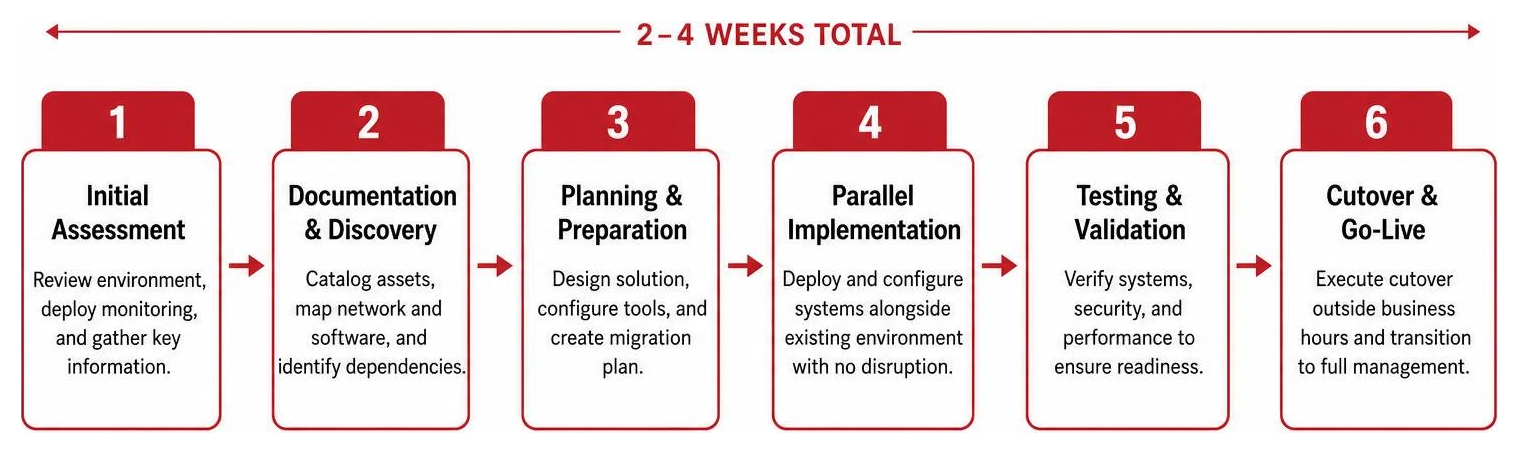
During the initial assessment, we deploy non-intrusive monitoring agents to scan your network, catalog your hardware assets, and map out your software dependencies. We then compile all of this information into a secure documentation portal, capturing passwords, network layouts, and vendor contacts.
Only after your entire environment is fully documented and our security tools are configured do we execute the formal cutover. This cutover is carefully coordinated outside of normal business hours to ensure your team arrives at work on Monday morning to find everything running smoothly.
Cost and Pricing Models for Managed IT Services in Fort Worth
Managed IT services are designed to turn unpredictable capital expenditures into predictable operating expenses. In the Fort Worth market, pricing is typically structured around one of three models:
- Per-User Pricing: This is the most common and transparent model. You pay a flat monthly fee for each employee who uses your network. This fee typically covers all of their devices (desktop, laptop, mobile phone) and unlimited help desk support.
- Per-Device Pricing: Under this model, you pay a separate flat fee for each individual device on your network, including workstations, servers, network switches, and firewalls.
- Hybrid Monitoring Plans: For budget-conscious small businesses, some providers offer a low-cost hybrid plan. This typically starts around $35 per user per month and covers basic background monitoring, patch management, and antivirus licensing, while active help desk support is billed separately at an hourly rate (typically around $100/hour).
To help you understand the value of a bundled, flat-rate plan, let’s compare the cost of purchasing individual IT services separately versus bundling them into an all-inclusive managed IT plan:
| Service Component | Individual Monthly Cost (Per User) | Included in Flat-Rate Managed IT? |
|---|---|---|
| 24/7 Help Desk & Remote Support | $30 – $100 | Yes |
| Endpoint Detection & Response (EDR) | $15 – $35 | Yes |
| Security Information & Event Management (SIEM) | $15 – $100 | Yes |
| Advanced Email Security & Phishing Defense | $6 – $18 | Yes |
| Secure Cloud Backups & Disaster Recovery | $15 – $35 | Yes |
| Proactive Network Monitoring & Patching | $30 – $50 | Yes |
| Virtual CIO (vCIO) Strategic Guidance | $150 – $300 (Hourly) | Yes (Quarterly Reviews) |
| Total Estimated Cost | $266 – $638+ per user/month | $95 – $250 per user/month |
Cybersecurity and Compliance Standards for Texas Businesses
In July 2026, cybersecurity is no longer an optional add-on for your business; it is a fundamental requirement. Texas businesses are high-value targets for ransomware, business email compromise (BEC), and sophisticated social engineering scams.
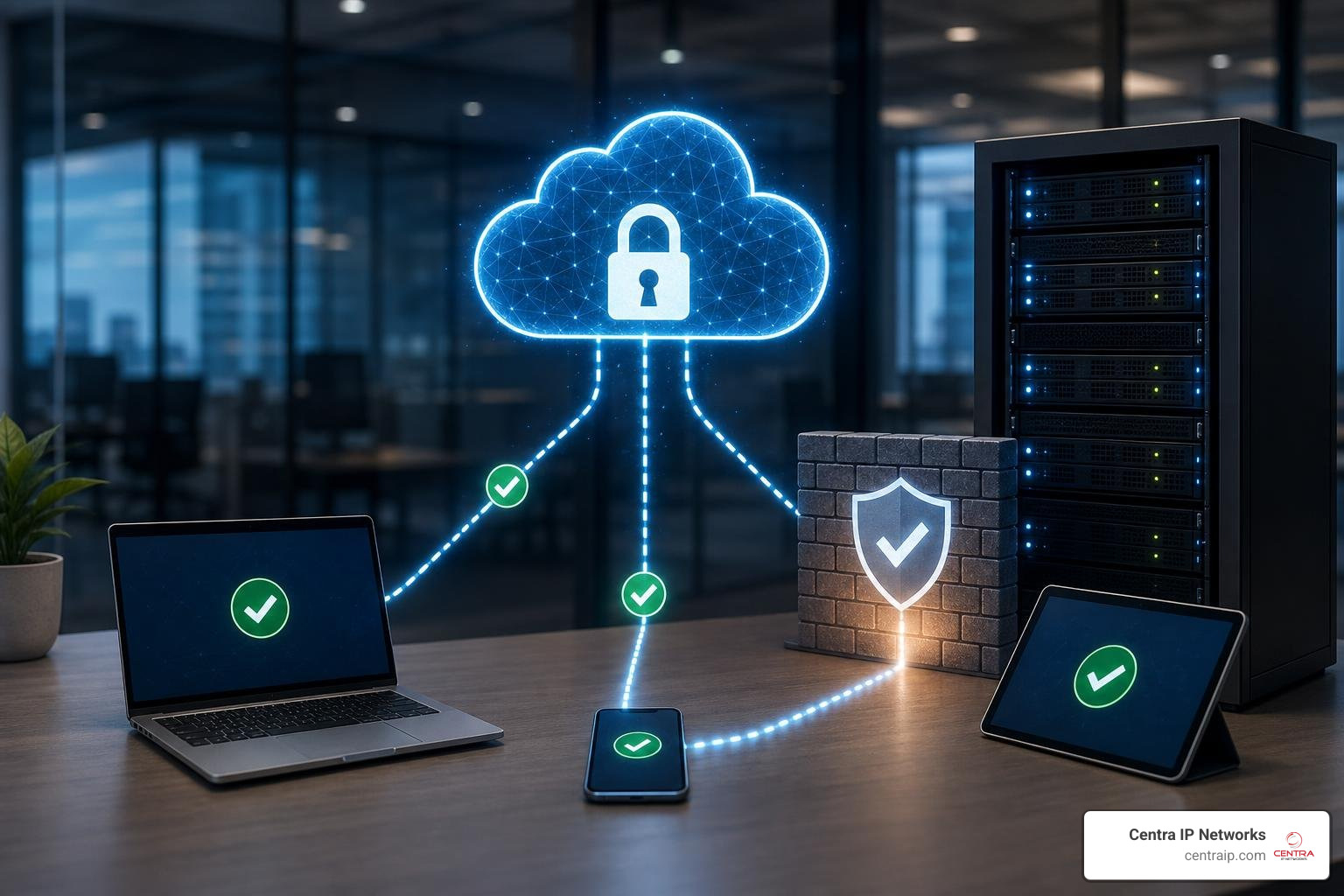
To protect your assets, a modern IT provider must implement a multi-layered cybersecurity framework directly into your core IT plan, rather than treating security as an expensive upgrade. This framework should include:
- Endpoint Detection and Response (EDR): Traditional antivirus software is no longer enough to stop modern threats. EDR uses artificial intelligence to monitor device behavior in real-time, instantly isolating any workstation that exhibits suspicious activity to prevent malware from spreading across your network.
- Security Information and Event Management (SIEM): This technology aggregates and analyzes security logs from all of your devices, cloud applications, and firewalls, allowing a 24/7 Security Operations Center (SOC) to detect and neutralize complex threats before they cause damage.
- Multi-Factor Authentication (MFA): Enforcing MFA across all business applications and email accounts is the single most effective way to prevent unauthorized access.
- Continuous Security Awareness Training: Because human error is the primary cause of security breaches, your provider should run regular, simulated phishing campaigns to train your employees on how to spot and report suspicious emails.
Navigating HIPAA, HITRUST, and SOC 2 Compliance
If your business operates in a regulated industry, compliance is a major operational concern. Fort Worth businesses must navigate complex federal and industry standards:
- HIPAA & HITRUST: Healthcare clinics, dental offices, and medical billing companies must strictly safeguard Protected Health Information (PHI). Beyond standard HIPAA requirements, some organizations require HITRUST certification—a highly rigorous framework that provides a gold standard for data protection. Your IT partner must sign a Business Associate Agreement (BAA) and implement encrypted communications, access controls, and detailed audit logs. To explore how we support medical practices, read our guide on Managed IT Services for Healthcare.
- SOC 2 Type II: This independent audit evaluates a service provider’s security controls over an extended period. If you outsource your IT, you should choose an MSP that has successfully completed its own SOC 2 Type II attestation, proving that they practice the high-level security they preach.
Meeting Texas Safe Harbor Law and SB 2610 Requirements
Texas has taken a proactive approach to cybersecurity legislation. The Texas Cybersecurity Safe Harbor Law offers critical legal protections for local businesses. Under this law, if your business suffers a data breach but you can prove that your cybersecurity program was actively aligned with a recognized framework—such as the NIST Cybersecurity Framework—you are legally protected from punitive damages in class-action lawsuits.
The requirements under the Texas Cybersecurity Safe Harbor Law scale strictly based on your employee count:
- Fewer than 20 Employees: Simplified, baseline security requirements.
- 20 to 99 Employees: Must implement CIS Controls Implementation Group 1 (IG1), which represents essential cyber hygiene.
- 100 to 249 Employees: Must adopt broader, comprehensive frameworks such as the full CIS Controls, NIST CSF, or ISO 27001 standards.
Additionally, public entities and certain private contractors in Texas must comply with Texas SB 2610, which dictates strict rules for cybersecurity training, incident reporting, and data handling. A qualified Fort Worth IT partner can help you implement the exact controls required to meet these state mandates.
Industry-Specific IT Support in Tarrant County
Fort Worth is home to a diverse and thriving business community. Different industries have unique operational workflows, software applications, and compliance requirements that demand specialized technical support:
- Healthcare & Medical Practices: Medical clinics need high-speed network connectivity, reliable Electronic Health Record (EHR) access, and strict HIPAA/HITRUST compliance to ensure patient care is never disrupted by technical glitches.
- Construction & Engineering: Local construction firms often operate across multiple temporary job sites. They require rugged mobile devices, secure cloud-based project management tools, and seamless remote connectivity to coordinate with architects and sub-contractors in real-time.
- Professional Services (Legal, Finance, Accounting): These firms handle highly sensitive client data and face strict confidentiality mandates. They need secure document management systems, encrypted email communications, and specialized software support. For a deeper look at financial technology, read Managed IT Services for Accounting Firms.
- Water Utility Districts & Public Infrastructure: Tarrant County water districts and municipal entities rely on specialized Industrial Control Systems (ICS) and SCADA networks. Securing these physical-to-digital systems against cyber threats requires specialized network segmentation, industrial firewalls, and strict access controls.
Backup, Disaster Recovery, and Business Continuity Planning
A reliable backup strategy is your business’s ultimate safety net. If your office is hit by a sudden severe weather event, a ransomware attack, or a major hardware failure, your survival depends on how quickly you can restore your operations.
A professional disaster recovery plan is built around two key metrics:
- Recovery Point Objective (RPO): This defines how much data you can afford to lose in a disaster. For example, if your systems back up to the cloud once every 24 hours, your RPO is 24 hours. For critical financial or healthcare databases, we set up continuous backups to reduce your RPO to minutes.
- Recovery Time Objective (RTO): This defines how quickly you need your systems to be fully operational after a failure. If your server crashes, can your business survive for two days while a technician rebuilds it, or do you need to failover to a cloud-based virtual server in 30 minutes?
To achieve true business continuity, we implement a hybrid backup strategy. Your data is backed up to a secure local device for rapid, on-site restoration, and simultaneously replicated to a secure, off-site cloud environment to protect against physical disasters. To learn more about building a resilient recovery strategy, see Managed Disaster Recovery Services: The Things You Should Consider.
Frequently Asked Questions About Managed IT Services in Fort Worth
How much do managed IT services cost in Fort Worth?
For small to mid-sized businesses in the Fort Worth and Dallas area, fully managed IT services typically range from $100 to $250 per user per month. The exact cost depends on your number of users, the complexity of your network infrastructure, your regulatory compliance requirements, and whether you need 24/7 support.
How long does it take to switch to a new managed IT provider?
A standard, professional transition takes 2 to 4 weeks. This structured timeline allows your new provider to thoroughly audit your existing network, deploy monitoring tools, document all credentials, and execute a seamless cutover outside of business hours to ensure zero operational downtime.
Do Fort Worth MSPs support remote and hybrid teams?
Yes. Modern providers utilize cloud-based identity management, secure Virtual Private Networks (VPNs), and Mobile Device Management (MDM) tools to secure and support employees working from home or on the road. We fully manage and secure cloud collaboration platforms like Microsoft 365 and Google Workspace to ensure seamless remote productivity.
Conclusion
At Centra IP Networks, we believe that technology should drive your business forward—not hold it back with constant disruptions, security worries, and unpredictable bills.
What makes us different is our unified approach. We deliver comprehensive Managed IT, cybersecurity, and advanced Cloud Communications directly on a single platform with a single bill and a single point of contact. By leveraging our 35+ strategic partnerships, we design tailored, cost-effective technology solutions that fit your business.
Whether you need to upgrade your business phone systems, secure your network infrastructure, or completely outsource your daily IT management, we are here to help. To explore how unified communications can streamline your operations, check out Streamline Your Business: The Benefits of Managed Communication Services.
Ready to eliminate your IT headaches for good? If you are located in the DFW metroplex, visit our Managed IT Services Dallas page or contact us today to schedule your free, no-pressure technology assessment.