
Still Faxing the Old Way? Here’s What You’re Missing
Virtual fax solutions let businesses send and receive faxes over the internet — no phone line, no machine, no paper required. Here’s a quick snapshot of what they are and why they matter:
| Question | Quick Answer |
|---|---|
| What is it? | A cloud-based service that replaces physical fax machines |
| How does it work? | Via email, web browser, or mobile app |
| What does it cost? | Roughly $5–$40/month for most plans |
| Is it secure? | Yes — AES-256 and TLS encryption are standard |
| Is it HIPAA compliant? | Yes, if the provider offers a signed BAA |
| Can I keep my number? | Yes, most providers support number porting |
If your office still has a fax machine humming in the corner, you’re not alone — but you’re probably paying more than you need to, in both time and money. Virtual fax solutions have quietly replaced that dusty hardware for millions of businesses, turning a process that once required dedicated phone lines, ink cartridges, and a prayer into something you can do from your phone in under a minute.
Healthcare clinics, law firms, financial institutions, and even small businesses with occasional faxing needs are all making the switch. And the reasons go beyond just convenience — security, compliance, and cost savings are pushing this transition faster than ever in 2026.
I’m Patrick Brangan, and with 20+ years helping SMBs in Dallas, Tampa, and Orlando streamline their technology — including unified communications and virtual fax solutions — I’ve seen what works and what doesn’t. Let’s break it all down so you can make a confident decision for your business.
What is a Virtual Fax Solution and How Does It Work?
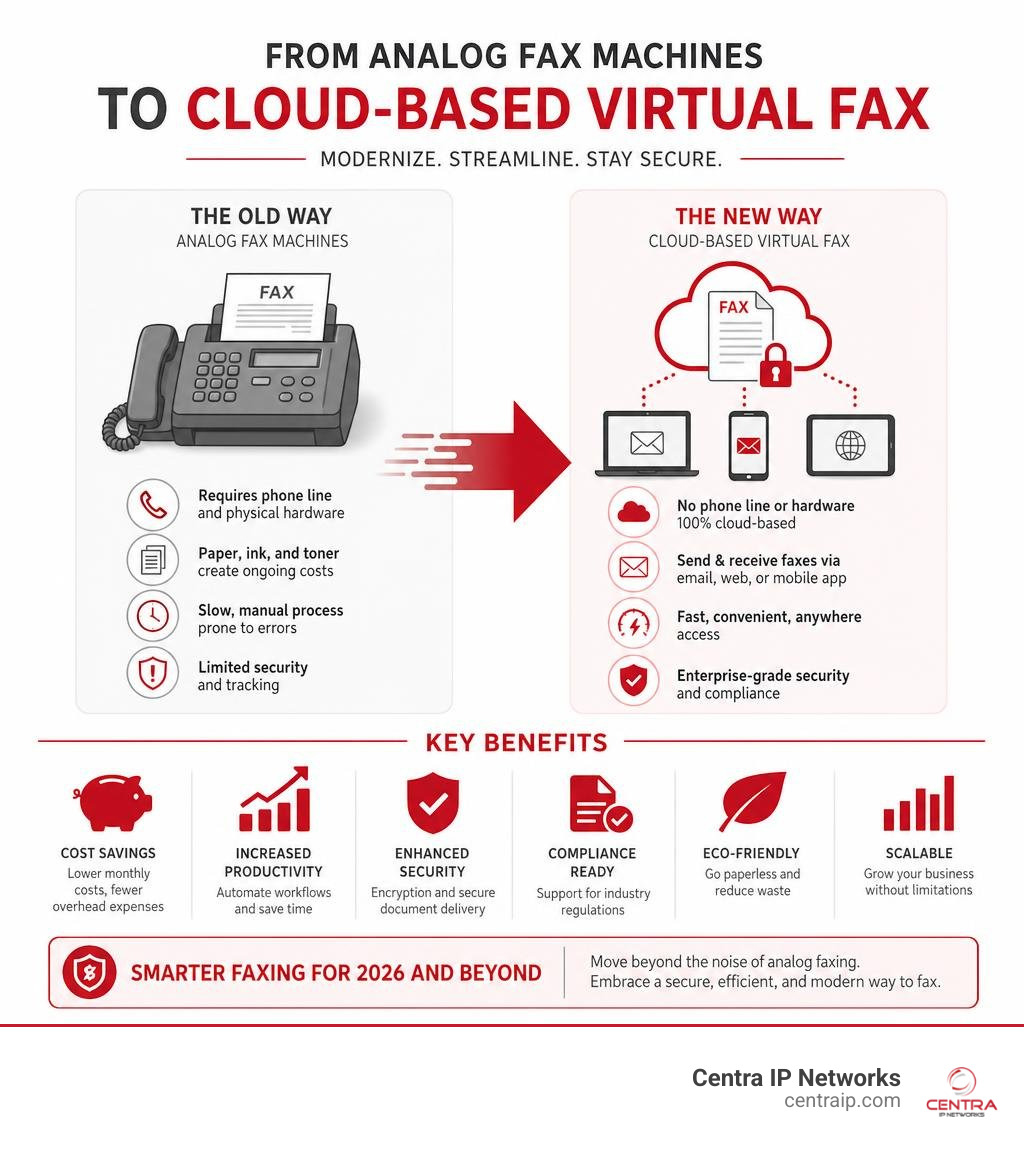
To understand a virtual fax solution, we first have to look at what it leaves behind. Traditional faxing relies on a physical machine connected to an analog copper landline (POTS – Plain Old Telephone Service). The machine scans a physical piece of paper, converts that image into audio tones (the infamous dial-up screech), and transmits it over the phone network to another physical machine, which decodes the audio and prints it out.
It is slow, prone to paper jams, and highly dependent on physical infrastructure that telecom companies are rapidly phasing out.
A virtual fax solution (often called cloud fax or e-fax) completely digitizes this process. Instead of physical lines, it transmits data over a secure cloud network using the internet. The core technology behind this is often What is Fax Over IP? Benefits and Best Practices for Businesses, which packages fax data into digital packets that travel seamlessly over the internet.
To the end-user, sending a virtual fax is as simple as sending an email. You do not need to stand over a machine or listen for a dial tone. You can manage your faxes through three primary pathways:
- Email-to-Fax: You compose a standard email, attach your document (such as a PDF or Word file), type the recipient’s fax number followed by a specific domain in the “To” field (e.g.,
1234567890@providerfax.com), and hit send. - Web Portals: You log into a secure online dashboard, upload your documents, enter the destination number, and send.
- Mobile Apps: You use your smartphone or tablet to snap a photo of a document, which the app automatically optimizes, straightens, and sends as a high-quality monochrome fax.
For incoming faxes, the cloud provider routes the transmission to your assigned virtual number, converts the incoming data into a clean PDF, and delivers it straight to your email inbox or secure web portal.
The Mechanics of Modern Virtual Fax Solutions
Behind the scenes of every virtual fax transmission is a highly sophisticated routing and conversion process. Let’s look at how a document travels from your computer to a recipient’s traditional fax machine:
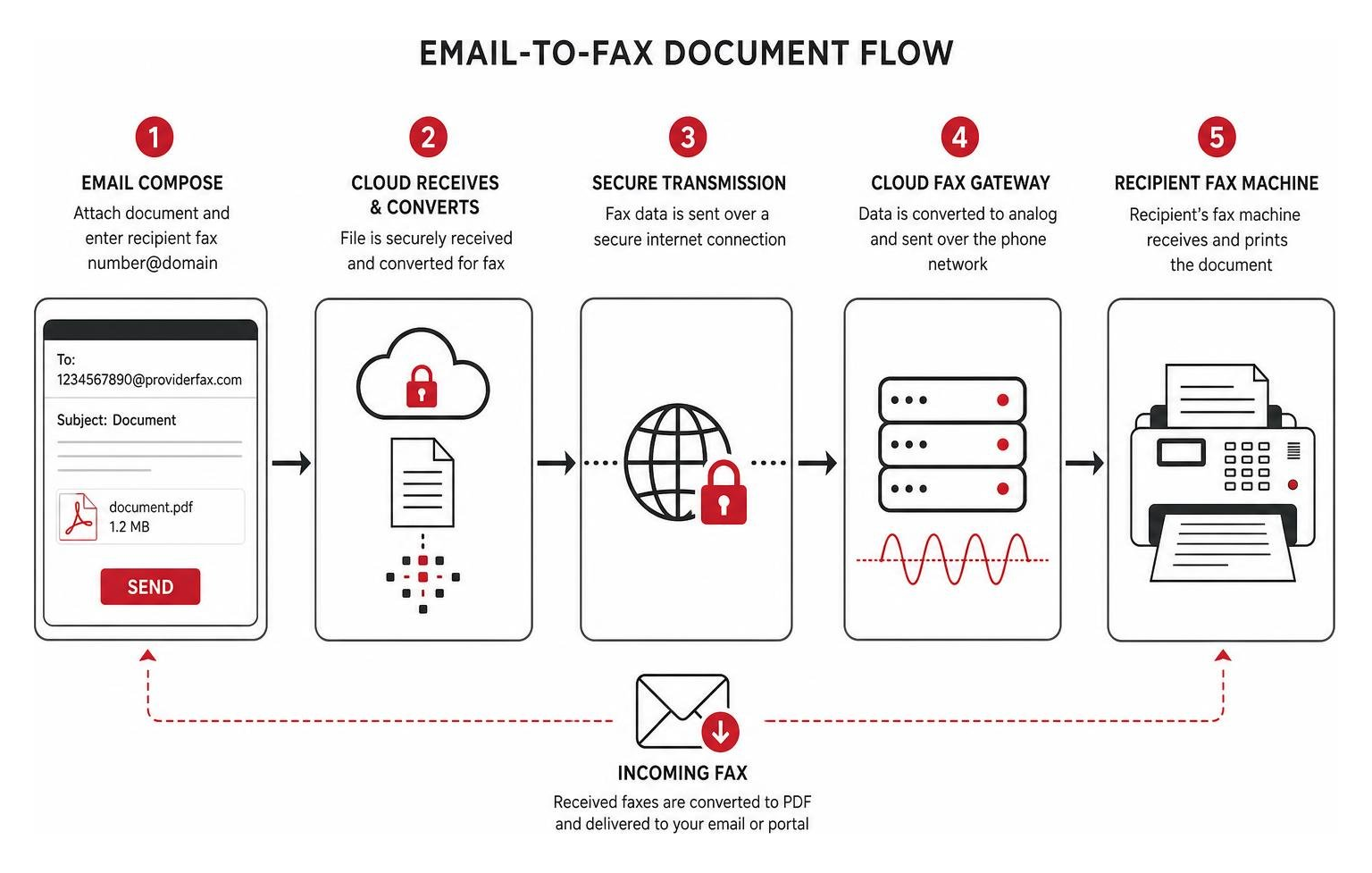
- Document Upload and Conversion: When you upload a PDF, DOCX, or JPEG, the virtual fax system converts the file into a standardized, high-resolution monochrome format optimized for fax machines.
- Outbound Transmission: The system initiates a secure connection over HTTPS or TLS to the cloud provider’s servers.
- Inbound Routing: If the recipient is using a traditional machine, the cloud provider’s gateway converts the digital packets back into analog audio tones to traverse the public switched telephone network (PSTN) and feed into the recipient’s physical machine.
- API Integration: For enterprise environments, modern solutions allow businesses to bypass user interfaces entirely. By using RESTful APIs, document workflows within EHR (Electronic Health Record) platforms or custom CRMs can trigger automatic outbound transmissions and receive inbound documents directly without manual human intervention.
If you are looking to get started with an easy-to-use, secure interface, you can explore modern online fax platforms to see these mechanics in action.
Key Benefits of Transitioning to Cloud-Based Faxing
Ditching the physical fax machine is one of those rare operational upgrades where you save money while significantly improving your daily workflow.

Here are the primary benefits businesses experience when they transition to cloud-based faxing:
- Substantial Cost Savings: Maintaining a dedicated analog phone line for a single fax machine can easily cost $50 to $100 per month in telecom fees. Add in the cost of paper, toner, physical machine maintenance, and energy consumption, and traditional faxing becomes a massive money sink. Virtual faxing eliminates the analog line entirely, replacing it with predictable, low-cost monthly plans.
- Mobility and Remote Work Support: If your team works in a hybrid model across Fort Worth or Sarasota, they cannot easily access a physical machine in the main office. Cloud faxing allows employees to send and receive critical documents securely from their laptops, tablets, or mobile phones, no matter where they are.
- Enhanced Document Organization and Searchability: Traditional faxes are easily lost in a physical pile on a tray. Virtual faxes are saved digitally, and many advanced providers use Optical Character Recognition (OCR) to read the text within the faxes. This allows you to tag, archive, and search through your entire fax history instantly.
- AI-Powered Automation: Modern virtual platforms can utilize Natural Language Processing (NLP) to extract key information from inbound faxes (such as patient names, dates of birth, or invoice numbers) and automatically route them to the correct department or database.
For a deeper dive into how these advantages can protect your bottom line, check out our guide on the Top Secure Online Fax Services to Save Your Small Business.
Security and Compliance Standards for Regulated Industries
For industries like healthcare, legal, finance, and government, faxing isn’t just a preference; it is a regulatory requirement. However, physical fax machines pose a significant security risk. Anyone walking past the office printer can look at a sensitive medical record or financial statement sitting in the tray.
Virtual fax solutions dramatically improve your security posture and help you maintain compliance with strict regulatory standards:
- HIPAA (Health Insurance Portability and Accountability Act): Healthcare providers in places like Tampa and Orlando must safeguard Protected Health Information (PHI). Compliant virtual fax services encrypt data in transit using TLS 1.2+ protocols and at rest using AES 256-bit encryption. Crucially, compliant providers will sign a Business Associate Agreement (BAA), legally binding them to protect your data. For baseline federal guidance on protecting electronic PHI, see the HHS HIPAA Security Rule guidance. You can read more about setting up these safeguards in The Complete Guide to HIPAA Compliant Cloud Fax.
- GLBA (Gramm-Leach-Bliley Act): Financial institutions must protect non-public personal information. Cloud faxing ensures that loan applications, tax forms, and credit reports are delivered directly to secure, password-protected digital inboxes rather than printed out on shared trays.
- PCI-DSS (Payment Card Industry Data Security Standard): For businesses handling credit card details, secure cloud fax networks prevent unauthorized access to cardholder data through secure transmission logs and multi-factor authentication (MFA).
- Audit Trails: In the event of an audit, physical fax logs are notoriously difficult to reconstruct. Cloud fax platforms maintain detailed, tamper-evident audit trails that log exactly who sent a document, when it was sent, the transmission status, and who accessed it.
Comparing the Top Virtual Fax Solutions of 2026
Choosing a virtual fax provider can feel overwhelming with so many options on the market. To help you evaluate your choices, we have compiled a comparison of the top platforms available in 2026:
| Provider | Starting Price | Page Limits (Entry Tier) | Compliance Standards | Key Strengths |
|---|---|---|---|---|
| eFax | ~$15 – $20/mo | 150 send / 150 receive | HIPAA, GLBA, PCI-DSS | Global reach, large file sharing (up to 3GB), robust mobile app |
| iFax | $12.49/mo | 200 pages/mo | HIPAA, SOC 2, ISO 27001 | Modern UI, pay-per-page options, Zapier integrations |
| MyFax | $5.00/mo | Varies by plan | Basic security | Highly cost-effective for low-volume users |
| Dropbox Fax | Free trial / Paid plans | 5 free pages, then paid tiers | SOC 2 (Requires enterprise for HIPAA) | Best-in-class cloud storage integration, digital signatures |
| Voxago | Custom / Per-user | Unlimited options | HIPAA (BAA on all plans), SOC 2 | 99.9% uptime SLA, parallel porting, unified billing |
| Nextiva vFax | $9.95/mo | 500 pages/mo | HIPAA-compliant options | Great page allowances, hybrid machine support via ATA |
For an even more exhaustive breakdown of features and plans, explore our resource on Digital Fax Service for Business: A Complete Comparison.
How to Choose the Best Virtual Fax Solutions for Your Business
While the table above highlights the major players, the “best” solution depends entirely on your specific business needs. When evaluating providers, keep these critical factors in mind:
- Page Limits and Overage Fees: Many providers split page limits into separate “send” and “receive” pools, while others offer a shared pool. Be sure to calculate your average monthly volume to avoid steep per-page overage charges (which can range from $0.03 to $0.10 per page).
- Security Tiers: Do not assume every plan is HIPAA-compliant. Some providers only offer HIPAA compliance and BAA signing on their expensive enterprise-tier plans. Ensure the plan you select matches your required industry compliance standards.
- Integrations: If your team relies heavily on Google Workspace, Microsoft Office, or specific EHR systems, look for a provider that integrates directly with those tools. This prevents employees from having to constantly download and re-upload files to send a fax.
- Consolidated Billing: Managing separate bills for your phone system, internet, and fax service is an administrative headache. Many businesses prefer to bundle their virtual faxing into a unified cloud communications suite.
To compare all your options in one place, take a look at The Ultimate List of Cloud-Based Fax Solutions.
Frequently Asked Questions About Virtual Faxing

Switching to a new technology always brings up practical questions. Here are the most common queries we hear from businesses in Dallas, Fort Worth, and Florida.
Can I keep my existing fax number when switching to a virtual fax service?
Yes, absolutely. You do not have to update the fax numbers printed on your business cards, website, or medical referral forms.
The process of moving your existing number to a cloud provider is called number porting. Most reputable virtual fax providers can port your local or toll-free numbers in the US and Canada.
Best of all, providers like Voxago utilize a “parallel porting” process. This means your physical fax line remains active right up until the digital switch occurs, ensuring zero downtime for your business communications.
If you want to make sure your transition is seamless, consult our list of Cloud Fax Providers That Actually Work.
Are there free or low-cost options for occasional faxing?
Yes, if you only need to send a fax once or twice a year, you don’t necessarily need a monthly subscription.
- Dropbox Fax (formerly HelloFax) offers a free tier that allows you to send up to 5 pages for free, with no credit card required. You can even earn up to 20 additional pages by completing simple tasks.
- iFax offers a pay-per-page option starting around $1.99 per page, letting you send one-off documents without signing up for a recurring plan.
- MyFax offers ultra-low-cost plans starting at just $5 per month, which is ideal for sole proprietors and micro-businesses.
That free accounts almost always have strict limitations. They rarely support inbound faxing (you can only send, not receive), do not offer HIPAA compliance or BAA signing, and lack advanced features like search or OCR.
For a complete breakdown of budget-friendly platforms, read our guide on the Best Digital Fax Service: Top Picks for a Paperless Office.
How do virtual fax solutions integrate with existing business tools?
Modern cloud faxing is designed to fit directly into the software your team already uses every day.
- Email Clients: You can send and receive faxes directly within Microsoft Outlook or Gmail without installing any extra software.
- Cloud Storage: Providers like eFax and Dropbox Fax integrate with Google Drive, OneDrive, and Box. You can configure your system to automatically save all incoming faxes as PDFs in a shared cloud folder.
- Collaboration Tools: Services like CocoFax can integrate with Slack, sending real-time delivery confirmations directly into a dedicated team channel.
- EHR and CRM Systems: Developers can use RESTful APIs to connect cloud faxing to medical platforms or enterprise databases, automating high-volume document workflows.
To explore enterprise-grade integrations and scalable cloud features, you can look for platforms that offer robust API support and seamless cloud storage connections.
Conclusion
Transitioning to a virtual fax solution is one of the easiest ways to modernize your office, secure your sensitive data, and cut unnecessary monthly expenses. Whether you are running a multi-location medical clinic in Fort Worth and Orlando, or a law firm in downtown Tampa, getting rid of legacy physical hardware is a major step toward a truly paperless, efficient office.
At Centra IP Networks, we believe business communications should be simple. That’s why we offer comprehensive Managed IT and Cloud Communications services that bring your phones, internet, and faxing together on a single platform.
Instead of juggling multiple vendors and confusing contracts, you get all your services from one trusted provider with a single, predictable monthly bill. Leveraging our 35+ industry partnerships, we design custom, cost-effective communication solutions tailored specifically to your business in Dallas, Fort Worth, Orlando, Tampa, St. Petersburg, Clearwater, or Sarasota.
Ready to silence the dial-up screech for good? Explore our tailored Voice Data Services / Faxing Solutions and let us help you build a smarter, more secure workflow today.