

Why Enterprise Cloud Data Backup Is Your Business’s Last Line of Defense
Enterprise cloud data backup is the process of automatically copying and storing your organization’s critical data — including files, databases, virtual machines, and infrastructure configurations — to secure cloud storage, so you can recover quickly from ransomware, hardware failure, or human error.
Here’s what you need to know at a glance:
| What It Does | Why It Matters |
|---|---|
| Copies data to offsite cloud storage automatically | Protects against local disasters and hardware failure |
| Creates immutable, air-gapped backup copies | Blocks ransomware from encrypting or deleting backups |
| Enables fast recovery with low RPO and RTO | Minimizes downtime and data loss after an incident |
| Supports compliance (SOC 2, HIPAA, GDPR, PCI DSS) | Keeps regulated industries audit-ready |
| Covers VMs, SaaS, databases, and infrastructure configs | Closes gaps that traditional backups leave behind |
Most businesses think about backup only after something goes wrong. By then, it’s too late. The reality is that 94% of businesses that experience severe data loss never fully recover — and yet only 57% of IT managers even have a backup solution in place.
What makes this harder in 2026 is complexity. Data doesn’t live in one place anymore. It’s spread across on-premises servers, public clouds, SaaS apps, and hybrid environments. That’s what Cohesity calls mass data fragmentation — and it’s one of the biggest reasons backup strategies fail.
And here’s the part most people miss: when a cloud incident hits, the data is often the easy part to restore. What takes weeks to rebuild is the infrastructure around it — the firewall rules, IAM policies, network configurations, and access controls. Without backing those up too, your team is doing archaeology at 2 AM.
I’m Patrick Brangan, and over 20+ years in business technology I’ve helped SMBs navigate exactly this kind of complexity — including building out enterprise cloud data backup strategies as part of a unified managed IT approach. In the sections ahead, I’ll break down what actually works, what to avoid, and how to pick the right solution for your environment.
Understanding Enterprise Cloud Data Backup in 2026
As we navigate the tech landscape of May 2026, the definition of “backup” has shifted. It is no longer just about copying files to a tape or an external drive. Today, enterprise cloud data backup is a sophisticated, AI-driven pillar of cyber resilience.
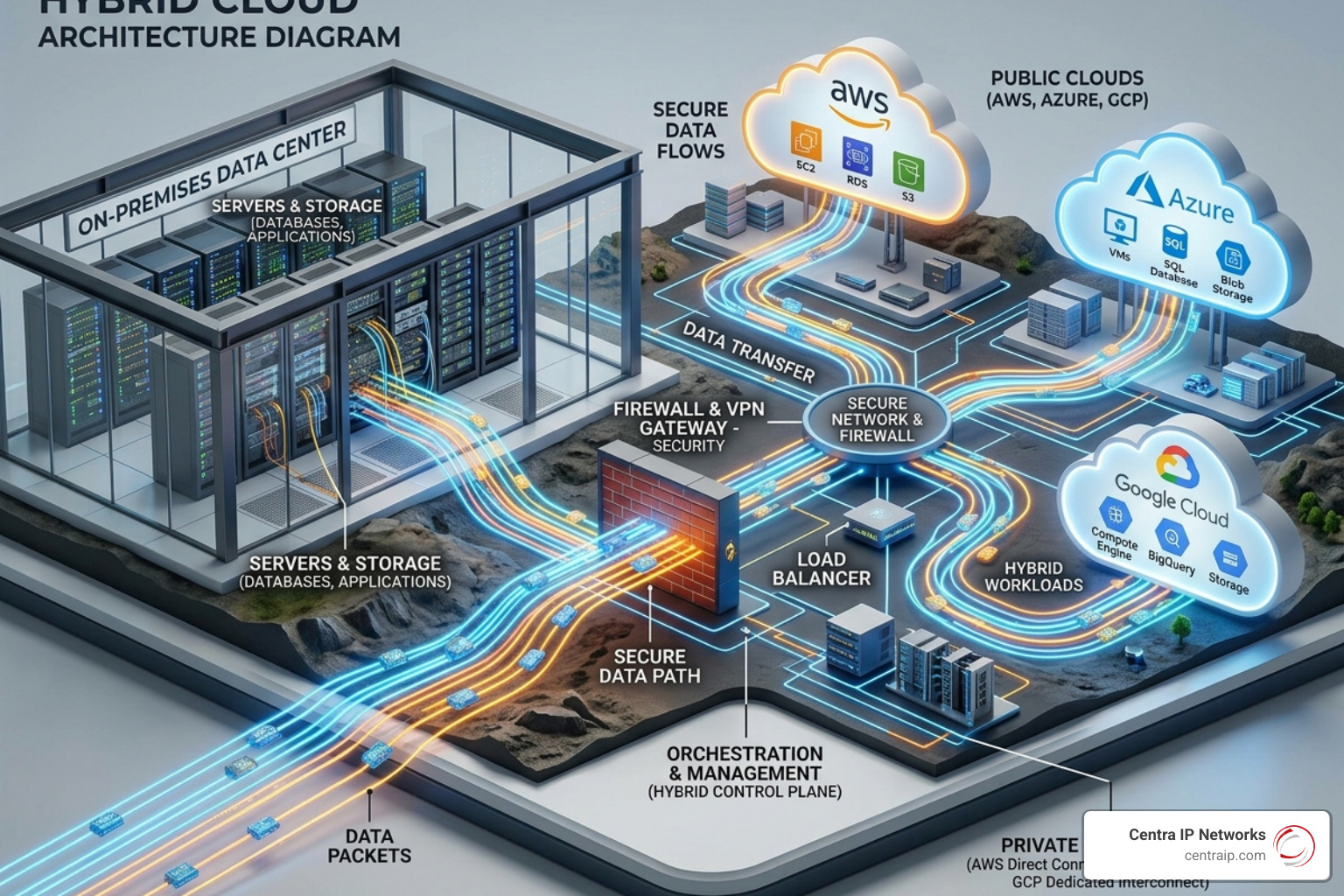
In our service areas—from the bustling tech hubs of Dallas and Fort Worth to the growing business corridors of Orlando, Tampa, and Sarasota—enterprises are grappling with multi-cloud complexity. Most modern organizations aren’t just “on the cloud”; they are using AWS for production, Google Cloud for analytics, and Microsoft Azure for identity management. This sprawl creates a massive surface area for potential failure.
The 2026 trend is moving toward “Radical Resilience.” This means your backup shouldn’t just exist; it should be intelligent. We are seeing a shift where data sovereignty (knowing exactly where your data sits to meet legal requirements) is just as important as the backup speed itself. If you’re looking for a deeper dive into the fundamentals, check out The Ultimate Guide to Enterprise Cloud Backup Services.
Achieving Low RPO and RTO with Enterprise Cloud Data Backup
In disaster recovery, two acronyms rule supreme: RPO and RTO.
- Recovery Point Objective (RPO): This is your “data loss” metric. If you back up once a day at midnight and your system crashes at 11 PM, your RPO is 23 hours. For a modern enterprise, that is unacceptable.
- Recovery Time Objective (RTO): This is your “downtime” metric. How long does it take to get the lights back on?
In 2026, leading solutions like Veeam Data Cloud are pushing the boundaries of what’s possible. We are now seeing “near-zero” RPOs through continuous data protection and “near-instant” RTOs. For example, some organizations have reported spinning up mission-critical system replicas in as little as eight minutes during quarterly tests, even when their official SLA was two hours.
Achieving these numbers requires moving away from legacy “point products” and toward unified platforms that can restore virtual machines (VMs) at scale in minutes, not days.
Specialized Enterprise Cloud Data Backup for SaaS and Infrastructure
One of the most dangerous myths in IT is that “the cloud doesn’t need to be backed up because Microsoft/Google/AWS handles it.” This is false. While they manage the infrastructure, the data is your responsibility.
This is where specialized tools come in:
- SaaS Protection: Platforms like Microsoft 365, Salesforce, and Entra ID (formerly Azure AD) are prime targets for ransomware. Solutions like the Afi Cloud Data Management Platform use AI to identify “orphaned” data and unused accounts that pose legal risks, while providing automated, high-frequency backups.
- Infrastructure Configuration Backup: This is the “new frontier.” Tools like ControlMonkey have pioneered the idea that you must back up your settings—your VPCs, IAM policies, and firewall rules—as code. If your cloud account were deleted today, could you rebuild the network? Without configuration backups, the answer is usually a painful “no.”
Essential Features for Cyber Resilience and Compliance
If your backup isn’t secure, it isn’t a backup—it’s just a secondary target for hackers. Modern enterprise cloud data backup must include these non-negotiable security features:
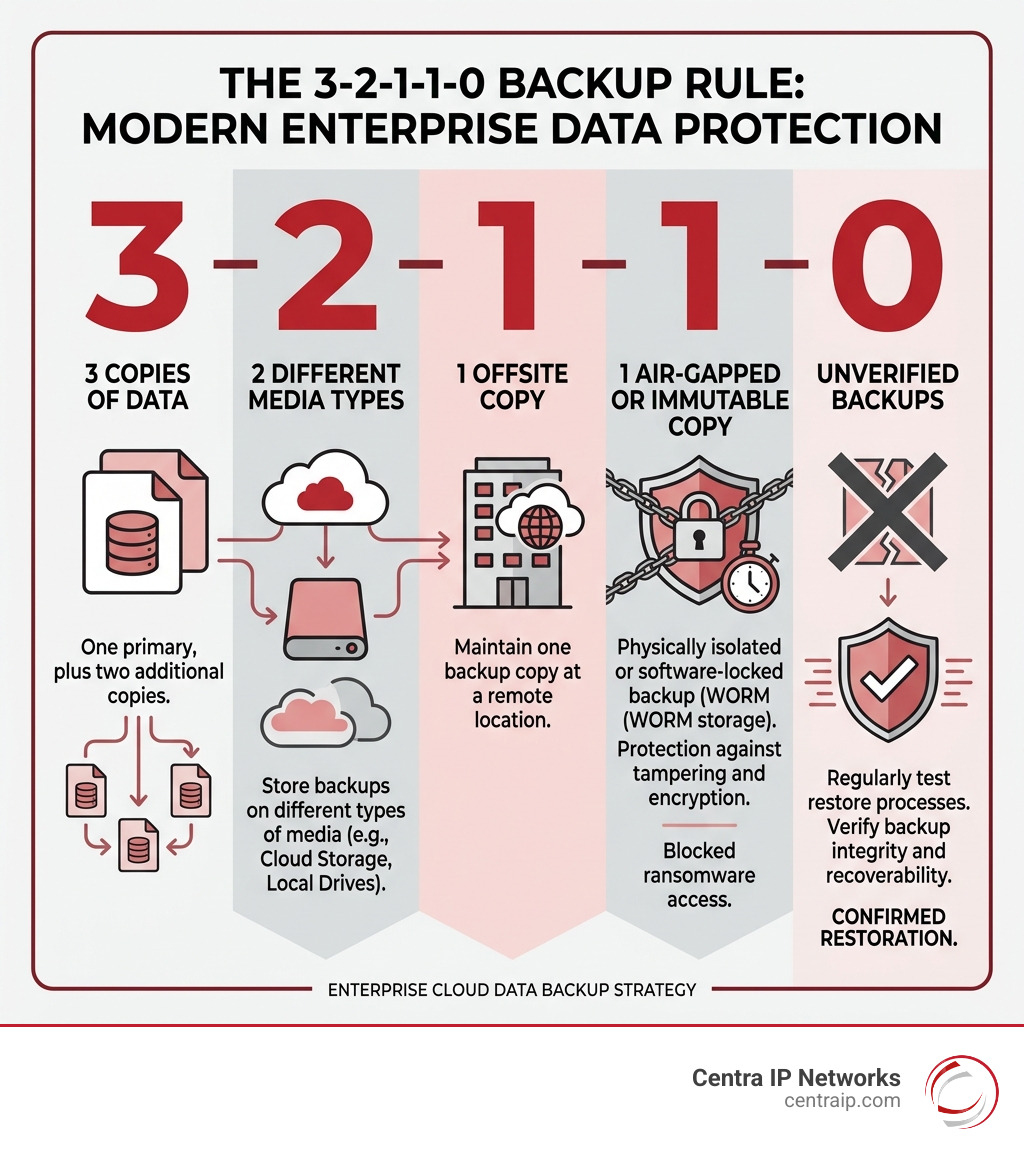
- Immutability: This is the “gold standard.” Immutable backups are written in a “Write Once, Read Many” (WORM) format. Once the data is saved, it cannot be changed, encrypted, or deleted by ransomware, even if the attacker gains administrative credentials.
- Air-Gapping: This creates a physical or logical gap between your production environment and your backup data. If a virus tears through your network, it can’t jump the gap to your “vaulted” data.
- AES-256 Encryption: Your data should be encrypted at the source, while in transit, and while sitting at rest in the cloud.
- AI-Powered Anomaly Detection: Modern systems now monitor your backups for “unusual behavior.” If a sudden wave of file deletions or encryptions occurs, the system flags it as a potential ransomware attack before it’s too late.
Companies like Druva have led the way here, offering SaaS backup and recovery for enterprise public cloud data with a focus on air-gapped security that removes the management complexity of traditional offsite storage.
Compliance Standards for Global Enterprises
For our clients in Florida and Texas, compliance isn’t just a “nice to have”—it’s a legal requirement. Whether you are a healthcare provider in Orlando or a financial firm in Dallas, your enterprise cloud data backup must meet strict standards:
- HIPAA: Requires specific encryption and audit trails for patient data.
- GDPR/CCPA: Mandates that you know where data is stored and have the ability to delete specific user data (the “right to be forgotten”).
- SOC 2: Proves you have established and followed strict information security policies.
- PCI DSS: Essential for anyone handling credit card information.
Leading backup providers now offer “Data Residency” options, allowing us to choose exactly which geographic region (e.g., US-East or US-West) your data stays in to ensure you never violate regional privacy laws.
Comparing Top Solutions: Veeam, Cohesity, and Beyond
Choosing a provider in 2026 can feel like ordering from a 50-page menu. To help you narrow it down, we’ve compared the heavy hitters based on current market performance and peer ratings.
| Provider | Best For… | Key Strength |
|---|---|---|
| Veeam | Hybrid Environments | 67% of the Global 2000 trust them; incredible recovery speed. |
| Cohesity | Mass Data Fragmentation | Unified platform that handles on-prem, cloud, and SaaS in one UI. |
| Druva | SaaS-First Orgs | 100% cloud-native; excellent for AWS and Azure VM protection. |
| Rubrik | Ransomware Defense | Strong focus on “Zero Trust” and immutable data vaults. |
| Commvault | Large Enterprises | Manages massive scale (exabytes) and complex legacy integrations. |
While these giants dominate the headlines, others like Veritas Alta™ Data Protection offer highly automated, cloud-native protection that can reduce cloud instance utilization by up to 40% through elastic autoscaling.
Cost Considerations and TCO Optimization
Total Cost of Ownership (TCO) is where many “cheap” backup plans become expensive. You have to look past the monthly subscription fee.
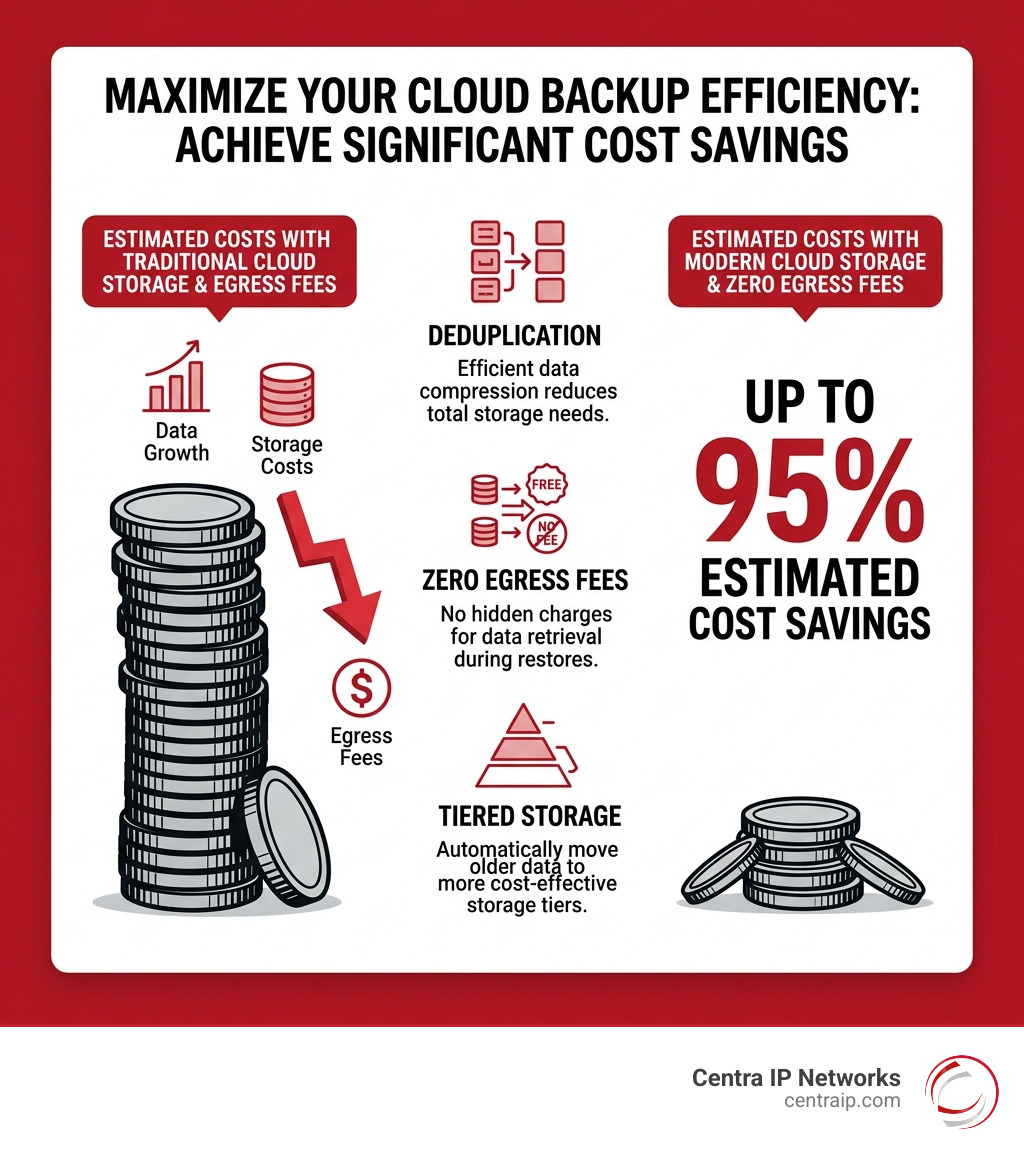
- Egress Fees: Many hyperscalers (like AWS or Azure) charge you to move your data out of their cloud. If you need to restore 100TB after a crash, the “egress fees” could be a nasty surprise.
- Deduplication: A good backup tool will only save unique data. If you have 100 employees with the same 5MB PDF, a smart system only saves it once. This can decrease storage costs by up to 95%.
- Tiered Storage: Not all data needs to be on “hot” (expensive/fast) storage. Older backups can move to “cold” storage (like Glacier) to save money.
For businesses looking for predictable pricing, Everpure (formerly Pure Storage) and Backblaze B2 have become popular. Backblaze, for instance, offers $0 egress fees and “Overdrive” high-throughput options for massive datasets, often resulting in 95% cost savings compared to traditional hyperscalers.
Step-by-Step: Implementing Your Enterprise Cloud Data Backup Strategy
Implementing a strategy isn’t a “weekend project.” It requires a methodical approach to ensure you don’t leave gaps in your defense.
- Audit Your Data: You can’t protect what you don’t know you have. Identify your “Crown Jewels” (mission-critical databases) versus your “Rot” (redundant, obsolete, or trivial data).
- Define Your RPO/RTO: Ask your department heads: “How many hours of work can we afford to lose?” and “How long can we stay offline before we start losing customers?”
- Vendor Selection & POC: Don’t just take a salesperson’s word for it. Run a Proof of Concept (POC). Try to restore a complex database and see if it actually works.
- Phased Deployment: Start with your most critical workloads. Don’t try to move 500 servers to the cloud in one night.
- Recovery Rehearsals: This is the most important step. A backup is only as good as your last successful restore. Conduct “Fire Drills” every quarter.

Evaluating Scalability and Performance
As your business grows in Clearwater or St. Petersburg, your backup needs to grow with you. Look for two types of scaling:
- Vertical Scaling: Increasing the power of your existing backup servers.
- Horizontal Scaling: Adding more “nodes” or servers to the cluster to handle more data.
Performance also matters during the “Initial Seed.” The first time you back up 50TB, it might take days. Modern solutions use “Forever-Forward Incremental” backups, meaning after that first big upload, the system only sends the tiny changes made each day, keeping your network traffic light.
Frequently Asked Questions about Enterprise Cloud Backup
What is the difference between data backup and infrastructure configuration backup?
Data backup is like saving the document you’re writing. Infrastructure configuration backup is like saving the settings of the computer you’re writing it on. If your cloud environment is deleted, data backup gives you the files back, but configuration backup (like ControlMonkey) gives you the network, the firewalls, and the user permissions back so those files actually have a place to live.
How does immutable storage protect against ransomware?
Ransomware works by finding your files and encrypting them so you can’t read them. If your backups are “immutable,” they are locked. Even if the ransomware finds them, it physically cannot change the data. It’s like trying to write on a piece of paper that’s been encased in a block of solid glass.
Why is recovery testing more important than the backup itself?
Because “Backup” is a verb, but “Recovery” is the result. We have seen many cases where businesses faithfully “backed up” for years, only to find out during a crisis that the data was corrupted or the encryption keys were lost. If you haven’t tested a restore, you don’t have a backup; you have a hope.
Conclusion
In 2026, enterprise cloud data backup is no longer an IT “chore”—it is a strategic necessity for survival. From the unpredictable weather patterns in Florida to the rapid corporate growth in North Texas, businesses face constant threats to their digital lifeblood.
At Centra IP Networks, we believe in radical simplicity. Why juggle five different vendors for your phone systems, internet, and cloud backups when you can have them all on one platform? We leverage over 35 partnerships to provide tailored, cost-effective solutions that fit your specific geography and industry.
Don’t wait for a “2 AM archaeology” session to realize your data is at risk. Let us help you build a resilient, multi-cloud strategy that keeps your business running, no matter what.