

How to Choose an Enterprise Cloud File Server
An enterprise cloud file server gives a business one managed place to store, access, and share files across offices and devices. To evaluate one, check whether it works with your existing file shares and sign-in system, lets people work securely from anywhere, and offers the backup and access controls your business needs. Compare its total cost with keeping your current servers, not just its monthly price.
The right setup depends on your files and your team. A fully hosted service may reduce hardware work, while a hybrid setup can keep frequently used files close to an office. Neither choice removes the need to plan permissions, migration, and recovery.
I’m Patrick Brangan, and I’ve spent more than 20 years helping businesses with 200 users or fewer choose practical IT solutions. I’ll bring that lens to this guide so you can assess an enterprise cloud file server without adding needless complexity.
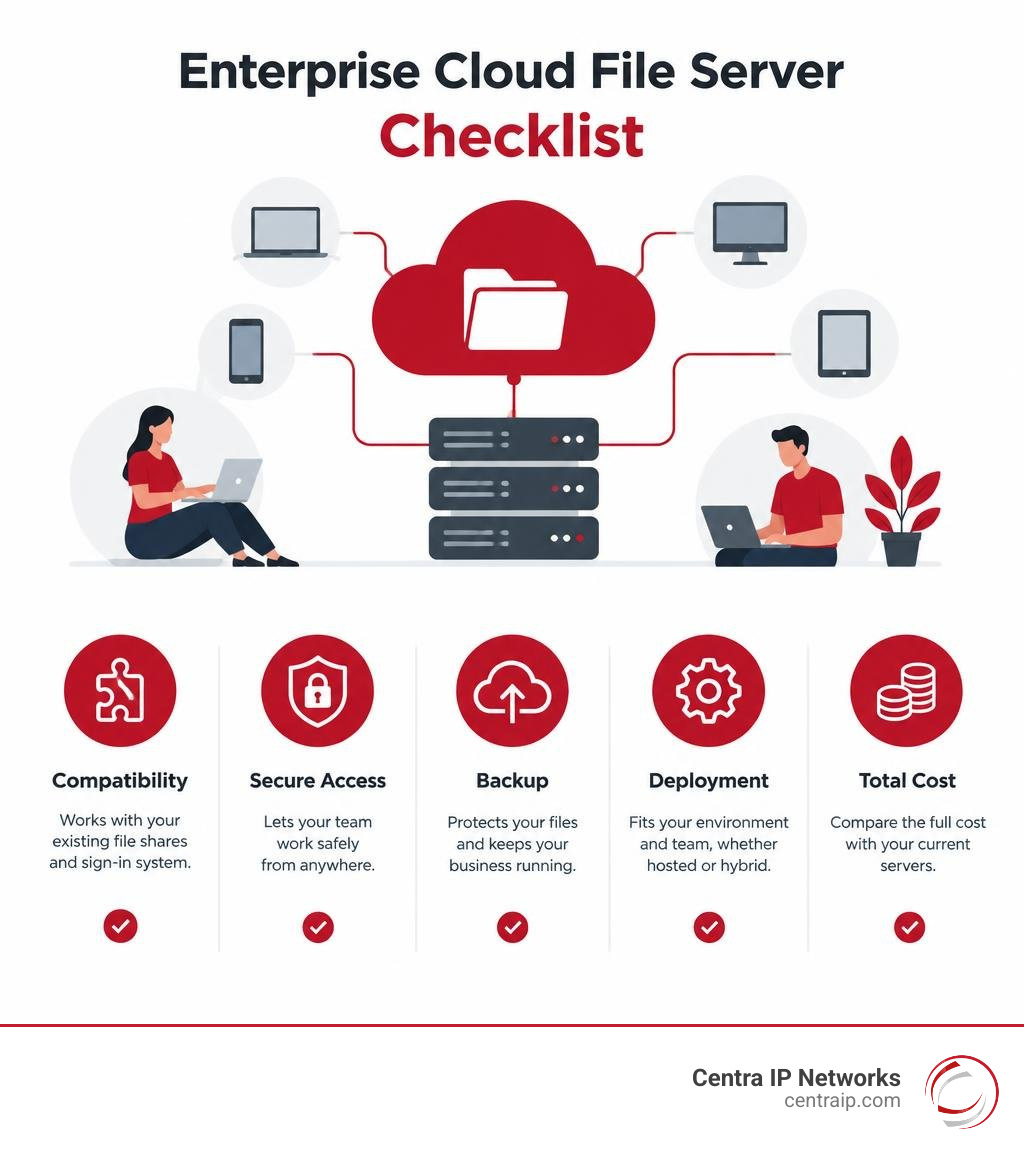
Enterprise cloud file server word guide:
What Is an Enterprise Cloud File Server and How Does It Work?
At its core, an enterprise cloud file server is a centralized, software-defined storage platform hosted in secure data centers or hybrid environments. It combines the structured folder hierarchies and familiar mapped drives of traditional Network Attached Storage (NAS) with the global accessibility, infinite scalability, and advanced collaboration features of the cloud.
Modern systems do not merely store unstructured data; they actively manage it. Through automated background file synchronization, version control, metadata indexing, and sub-folder level sync, these platforms eliminate file sprawl and resolve data conflicts before they disrupt productivity. When multiple team members work across distributed offices, automated file locking and checkout mechanisms prevent coworkers from overwriting each other’s changes.
Deploying secure enterprise cloud storage ensures that files remain accessible anywhere while maintaining rigorous data governance and security controls.
| Feature / Capability | Traditional On-Premises File Server | Consumer Cloud Storage (e.g., Personal Drive) | Enterprise Cloud File Server |
|---|---|---|---|
| Primary Architecture | Physical local hardware (SAN/NAS) | Multi-tenant public cloud bucket | Distributed cloud or hybrid with local cache |
| Access Method | Local LAN or sluggish VPN | Web browser or consumer desktop sync client | Native drive mapping (SMB/NFS/WebDAV), Web, Mobile |
| Identity & Access | Local Active Directory (NTFS) | Personal credentials or basic consumer accounts | Enterprise AD/LDAP, SAML SSO, Role-Based Access Control |
| Scalability | Rigid; requires physical disk expansion | Tiered consumer plans with hard limits | Elastic pay-as-you-grow; petabyte-scale |
| Compliance & Governance | Manual auditing and siloed data policies | Basic consumer privacy; minimal certifications | HIPAA, GDPR, ITAR, FINRA, automated retention |
| Data Protection | Local tape/NAS backups prone to outages | Basic version history and trash bin | Continuous snapshotting, WORM, geo-redundancy |
Traditional File Servers vs. Consumer Storage vs. Cloud Solutions
Relying on legacy on-premises servers ties your workforce to a physical office or forces them through clunky VPNs that slow file access to a crawl. When employees struggle to access documents remotely, they inevitably turn to consumer cloud storage. This breeds shadow IT—unregulated personal accounts containing sensitive company intellectual property with zero administrative oversight.
Consumer storage tools lack granular permission inheritance, regulatory compliance guarantees, and enterprise-grade Service Level Agreements (SLAs). An enterprise-grade cloud file platform bridges this gap by delivering the consumer-like simplicity your staff wants alongside the centralized administration, audit reporting, and data sovereignty that modern IT management requires.
Multi-Protocol Support: SMB, NFS, and WebDAV
Enterprise organizations run diverse environments. Marketing teams might use macOS, software developers build on Linux, while accounting depends on Windows and legacy line-of-business applications. Modern cloud file systems provide seamless multi-protocol access to bridge these systems:
- Server Message Block (SMB 3.x): Provides standard mapped network drive capabilities across Windows and macOS workstations with integrated encryption in transit.
- Network File System (NFS): Delivers high-throughput, POSIX-compliant file shares tailored for Linux servers, virtualization clusters, and containerized workloads.
- WebDAV & REST APIs: Enable remote drive mapping and automated programmatic integration without requiring complex network configuration.

Key Benefits and Strategic ROI of Cloud File Migration
Moving from physical storage arrays to a modern cloud architecture transforms file infrastructure from a reactive maintenance burden into a proactive business asset. Consolidating fragmented data silos into a unified global namespace simplifies data management while significantly lowering operating expenses.

Cost Optimization and Infrastructure Consolidation
Maintaining physical servers demands continuous capital expenditure: purchasing disk arrays, upgrading uninterruptible power supplies, paying for data center cooling, and funding labor-intensive hardware refreshes every three to five years.
Adopting a pay-as-you-grow model allows you to scale storage on demand without over-provisioning unused capacity. When evaluating your IT roadmap, moving beyond physical servers through automated data tiering and deduplication systematically reduces cold storage costs while maximizing performance for active projects.
Hybrid Work Enablement and Cross-Platform Remote Access
Today’s teams need instant file access whether they are in the corporate office, working from home, or traveling between client sites across Dallas, Fort Worth, Orlando, or Tampa. Cloud file servers support native clients across Windows, macOS, Linux, iOS, and Android.
By leveraging intelligent local caching (Smart Cache), users enjoy lightning-fast local read/write speeds for their active files, while the underlying platform syncs changes to the cloud in the background. This architecture completely eliminates the need for frustrating VPNs while ensuring seamless offline productivity.
Architecture, Security, and Enterprise Compliance Frameworks
Enterprise data protection requires a multi-layered security strategy. Leading cloud platforms integrate automated ransomware detection that monitors anomalous file activity—such as rapid mass renames or unexpected encryption patterns—and initiates policy-driven remediation to isolate infected endpoints and restore impacted files instantly.

To maintain absolute data integrity, organizations should pair their primary file system with dedicated enterprise cloud backup services configured according to standard Security Guidelines for Storage Infrastructure.
Key Security Features of an Enterprise Cloud File Server
- End-to-End Encryption: Protects data at rest using AES-256 encryption and data in transit using TLS 1.2 or higher, with support for Customer-Managed Keys (CMK).
- Identity & Access Management: Enforces Multi-Factor Authentication (MFA), SAML 2.0 Single Sign-On (SSO), and granular role-based permissions at the folder and sub-folder levels.
- Data Loss Prevention (DLP) & DRM: Blocks unauthorized downloads, restricts copy/paste actions, and applies dynamic digital watermarks to confidential documents.
- Automated Content Classification: Leverages machine learning to scan, identify, and tag Personally Identifiable Information (PII) and protected financial records.
Data Sovereignty, Zero Trust, and Regulatory Compliance
Regulatory standards dictate stringent controls over how sensitive data is stored, processed, and accessed. Enterprise platforms provide dedicated compliance centers that help businesses meet HIPAA, GDPR, ITAR, NIST 800-171, and CMMC frameworks.
For organizations operating under strict legal requirements, choosing dedicated sovereign file storage isolates files within specific geographical jurisdictions, safeguarding sensitive records against extraterritorial data requests and ensuring absolute data sovereignty.
Deployment Options and Advanced Enterprise Workloads
Every business has unique infrastructure requirements, latency thresholds, and regulatory constraints. Selecting the right deployment model ensures your storage environment aligns with operational demands while preventing data fragmentation.
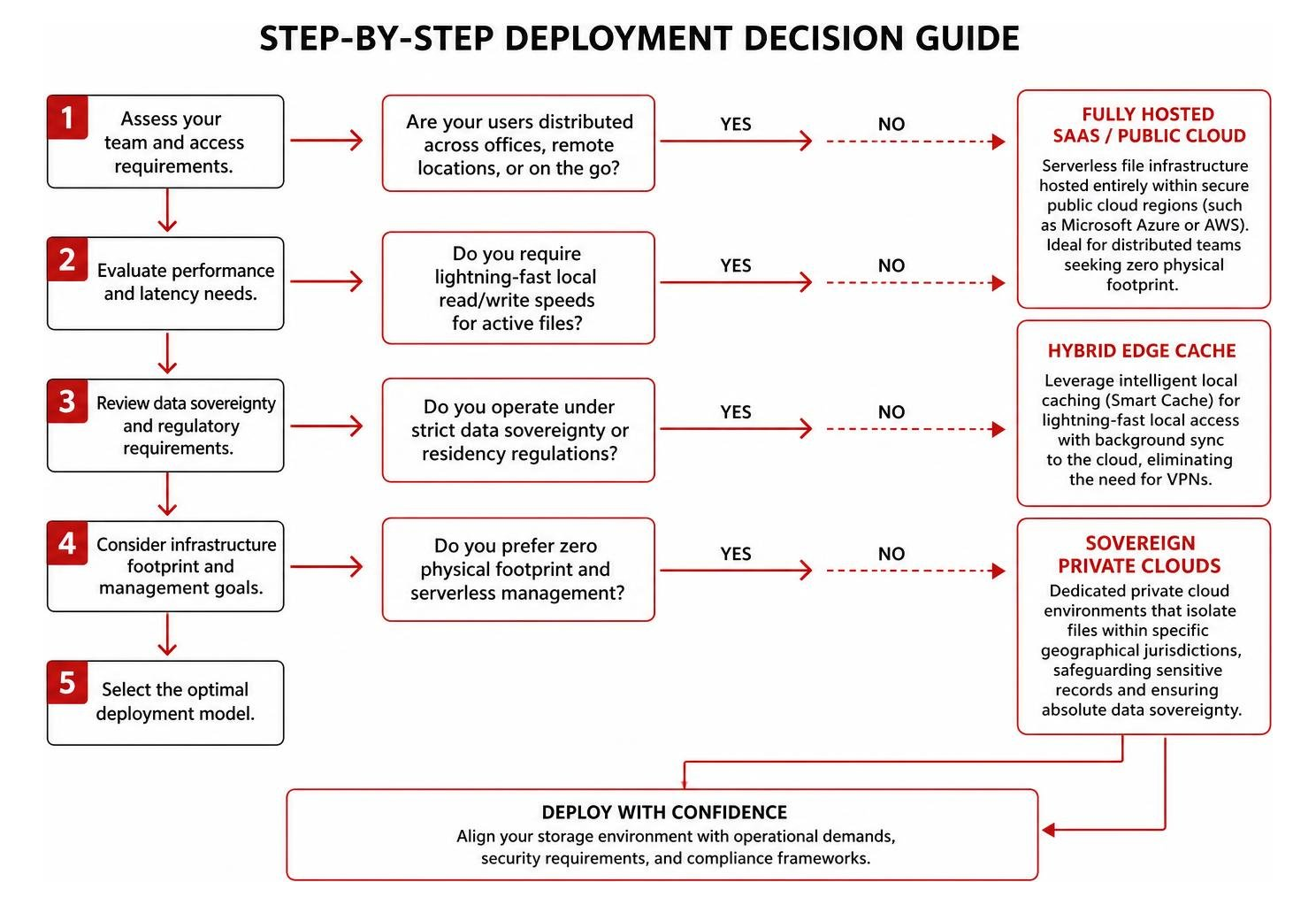
To prevent data silos across distributed office networks, companies leverage intelligent scale-out file management alongside tailored cloud solutions to ensure high availability and centralized management.
Deployment Models for Your Enterprise Cloud File Server
- Fully Hosted SaaS / Public Cloud: Serverless file infrastructure hosted entirely within secure public cloud regions (such as Microsoft Azure or AWS). Ideal for distributed teams seeking zero physical footprint.
- Hybrid Cloud File Architecture: Combines centralized cloud storage with lightweight on-premises caching appliances or virtual machines at branch offices. Delivers local-area-network speeds for large files while maintaining unified cloud governance.
- Private Sovereign Cloud: Dedicated virtual data center instances isolated from shared multi-tenant infrastructure, tailored for defense contractors, financial institutions, and healthcare providers.
Supporting AI/ML Workloads, VDI, and Large-Scale File Transfers
Modern enterprise file systems handle demanding enterprise computing workloads:
- Virtual Desktop Infrastructure (VDI): Delivers scalable shared storage for user profile containers (such as Microsoft FSLogix) with sub-millisecond profile mount times.
- AI and Machine Learning Pipelines: Provides high-throughput, shared NFS/SMB datasets that allow AI training models and analytical engines to access millions of files simultaneously.
- Large-Scale Media and Engineering: Supports high-capacity CAD modeling, 4K/8K video production, and medical imaging repositories with credit-based bursting for high-bandwidth tasks.
Frequently Asked Questions About Enterprise Cloud File Servers
How does an enterprise cloud file server integrate with Active Directory?
Modern cloud file platforms integrate directly with on-premises Active Directory Domain Services (AD DS) and cloud identity providers like Microsoft Entra ID via LDAP, Kerberos, or SAML 2.0. This allows IT administrators to synchronize existing user accounts, security groups, and complex Nested NTFS permissions without rebuilding access control lists from scratch.
Can an enterprise cloud file server maintain local drive letters and offline access?
Yes. Desktop client utilities map virtual drives (such as the standard S: or Z: drive) directly inside Windows File Explorer or macOS Finder. Users interact with cloud files as if they were stored locally. Files are downloaded on demand or pinned for offline use, and any edits made while offline automatically synchronize to the central repository once internet connectivity is restored.
What disaster recovery capabilities are built into cloud file servers?
Enterprise cloud file solutions include automated geo-redundant replication across geographically separated data centers, point-in-time snapshotting, and Write-Once-Read-Many (WORM) storage. If a local site suffers a disaster or ransomware attack, administrators can roll back entire directories to an uncorrupted state within minutes, ensuring continuous business operations.
Conclusion
Migrating to an enterprise cloud file server eliminates the hardware overhead, security vulnerabilities, and collaboration barriers of legacy storage. By uniting centralized data governance, Zero Trust security, and high-performance hybrid access, modern businesses can empower their distributed workforces while lowering long-term operating costs.
At Centra IP Networks, we deliver comprehensive Managed IT and Cloud Communications services—including enterprise phone systems, high-speed Internet connectivity, and tailored cloud infrastructure—all on a single, consolidated platform with one predictable bill. Leveraging more than 35 strategic technology partnerships, our engineers design and support custom file architectures for organizations throughout Dallas, Fort Worth, Orlando, Tampa, St. Petersburg, Clearwater, and Sarasota.
Ready to modernize your company’s file storage infrastructure? Discover our managed cloud services and schedule your architectural assessment today.